Logical backup vs. storage-assisted backup with Kasten v4 and SolidFire
To answer the question quickly: logical backups make sense.
WTF is a K10 logical backup?
Logical backups use application-aware backup commands to backup data (and restore, when restoring). K10 uses Kanister which uses Blueprints to define application-specific workflows. "Applications" currently means popular databases:
- PostgreSQL
- mySQL
- MongoDB
- Elasticsearch
There are no snapshots taken on the storage system. Even though K10 "understands" CSI, when logical backup is used K10 simply doesn't use snapshots. See more on logical backups in the K10 docs here.
To try it out, I installed a ready-made mySQL image using Helm, used commands from that page to prepare the pod for logical backup, and then created a policy for it (db-to-s3, on the right-hand side in the screenshot below).
I also created a namespace with a regular mySQL DB image/app and a policy (db-to-s3-trident, on the left) meant to backup this mySQL database. As this mySQL instance wasn't annotated for logical backup, it was created for the usual approach - storage snapshot-assisted, crash-consistent backups. (I wrote about Kasten and SolidFire early this year so you can skim through that article for a refresher on the standard approach with CSI snapshots).
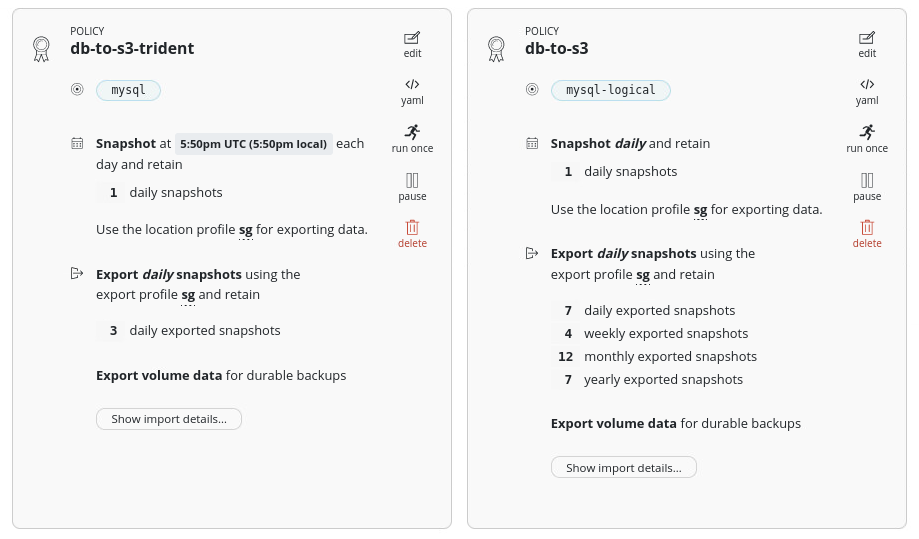
So what's special about the logical policy? Nothing! I just needed each policy to backup a different database so that I can compare different approaches. In real life you could have a single logical backup policy for all mySQL databases and it would use logical backup on all mySQL databases configured to use it.
I executed db-to-s3 to backup data in the namespace mysql-logical - that's the first Backup at the bottom (9:04am). Then I restored that backup from S3 - that's the first Restore at the center (9:06am).
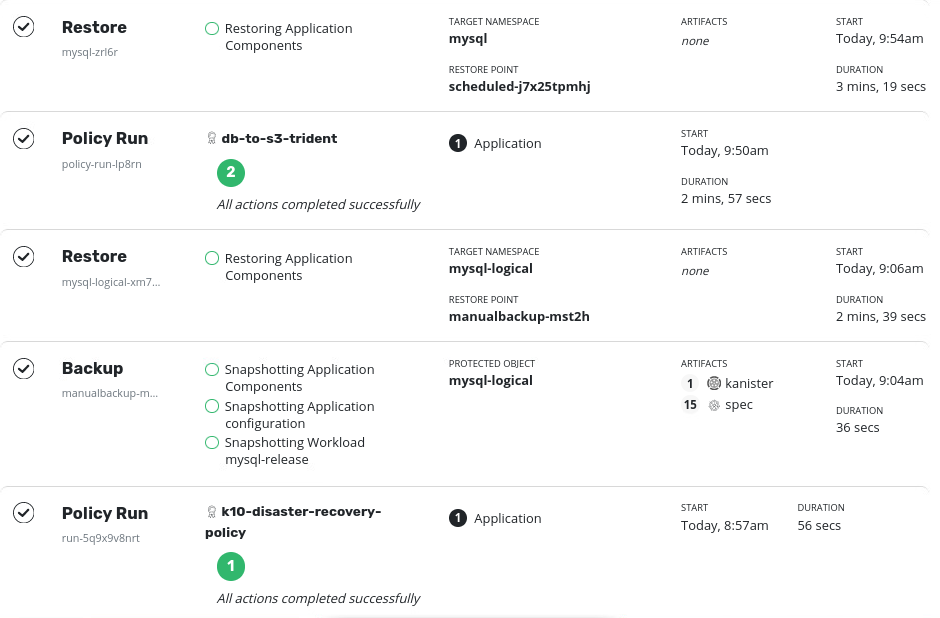
I repeated this for the regular DB using CSI snapshot-assisted backup of the second database (Policy Run at 9:50am), and then ran a restore (9:54am). All four jobs completed successfully.
What can be said about the differences between these approaches?
- Logical backup was faster because there was no volume snapshotting (and iSCSI target rescan, login, etc.) involved and the DB was small. If the DB was large, I suspect snapshot-assisted backup would be much faster
- Looking at the S3 bucket used by K10 (listing below), if we scroll to the bottom right hand side, we see a backup archive
dump.sql.gz. That 257 KiB compressed dump file is what logical mySQL backup generated. Whereas snapshot-assisted backup copied actual DB files (109 KiB in this particular case - see them near the top)
$ mc ls --recursive sgpub/kasten/k10
[2021-09-08 23:15:22 CST]     0B df9b411d-12ad-4e33-ba99-5aa2368448ae/migration/
[2021-09-09 17:49:04 CST]     0B df9b411d-12ad-4e33-ba99-5aa2368448ae/migration/db-to-s3-trident/perturbation/
[2021-09-09 17:53:32 CST]     0B df9b411d-12ad-4e33-ba99-5aa2368448ae/migration/db-to-s3-trident/perturbation/1631181211932824699/
[2021-09-09 17:53:33 CST] 109KiB df9b411d-12ad-4e33-ba99-5aa2368448ae/migration/db-to-s3-trident/perturbation/1631181211932824699/2021-09-09T09:53:33.011310168Z
[2021-09-09 17:53:33 CST]   226B df9b411d-12ad-4e33-ba99-5aa2368448ae/migration/db-to-s3-trident/perturbation/1631181211932824699/collections.db.enc
[2021-09-09 17:04:07 CST]     0B df9b411d-12ad-4e33-ba99-5aa2368448ae/migration/db-to-s3/perturbation/
[2021-09-09 16:57:46 CST]   406B df9b411d-12ad-4e33-ba99-5aa2368448ae/migration/df9b411d-12ad-4e33-ba99-5aa2368448ae/k10/repo/_log_20210909085744_5115_1631177865_1631177866_1_6fdca782be56c1f2ddebe2f038df5b4f
[2021-09-09 16:57:52 CST]   627B df9b411d-12ad-4e33-ba99-5aa2368448ae/migration/df9b411d-12ad-4e33-ba99-5aa2368448ae/k10/repo/_log_20210909085748_e7f1_1631177868_1631177872_1_d7bbc1a1de7513cc2f92d7cdde4f968b
[2021-09-09 16:57:57 CST]   637B df9b411d-12ad-4e33-ba99-5aa2368448ae/migration/df9b411d-12ad-4e33-ba99-5aa2368448ae/k10/repo/_log_20210909085754_bd7e_1631177874_1631177876_1_937bd9a0434fb153f70e5a8eeeabaaac
[2021-09-09 16:57:52 CST]   384B df9b411d-12ad-4e33-ba99-5aa2368448ae/migration/df9b411d-12ad-4e33-ba99-5aa2368448ae/k10/repo/kopia.maintenance
[2021-09-09 16:57:41 CST]   679B df9b411d-12ad-4e33-ba99-5aa2368448ae/migration/df9b411d-12ad-4e33-ba99-5aa2368448ae/k10/repo/kopia.repository
[2021-09-09 16:57:49 CST]   159B df9b411d-12ad-4e33-ba99-5aa2368448ae/migration/df9b411d-12ad-4e33-ba99-5aa2368448ae/k10/repo/n458d4a915b4a89c51aca5563bd956896-scbbe4a44f868650a108
[2021-09-09 17:57:43 CST]   435B df9b411d-12ad-4e33-ba99-5aa2368448ae/migration/d...
[2021-09-09 17:05:00 CST] 257KiB df9b411d-12ad-4e33-ba99-5aa2368448ae/migration/mysql-backups/mysql-logical/mysql-release/2021-09-09T09-04-48/dump.sql.gz
Job details of mysql-logical backup show Kanister path to mySQL dump archive on S3 (see Kanister > S3PATH to the right).
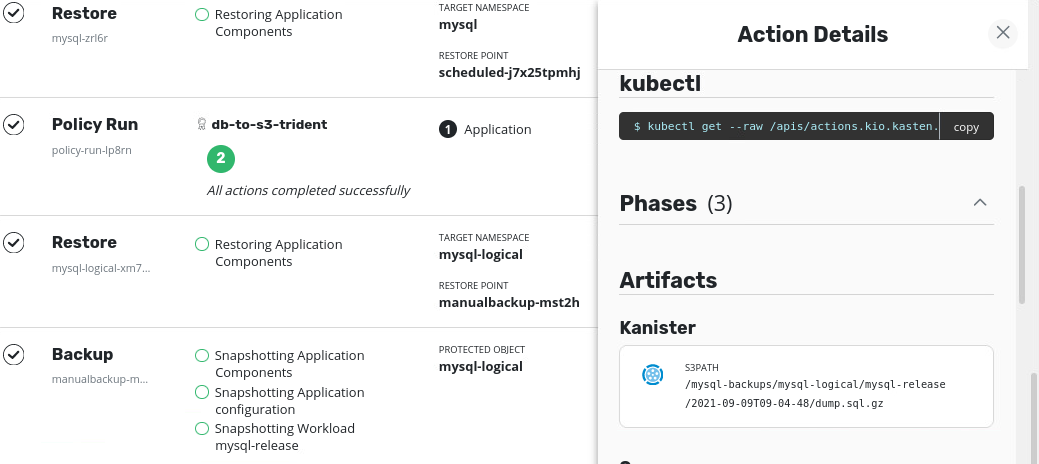
Considering that the main difference between two approaches is logical backup don't involve a volume snapshot, it's confusing that backup job log for mysql-logical refers to "snapshotting", but it seems these days snapshotting is used to describe the act of making a point-in-time copy of anything.
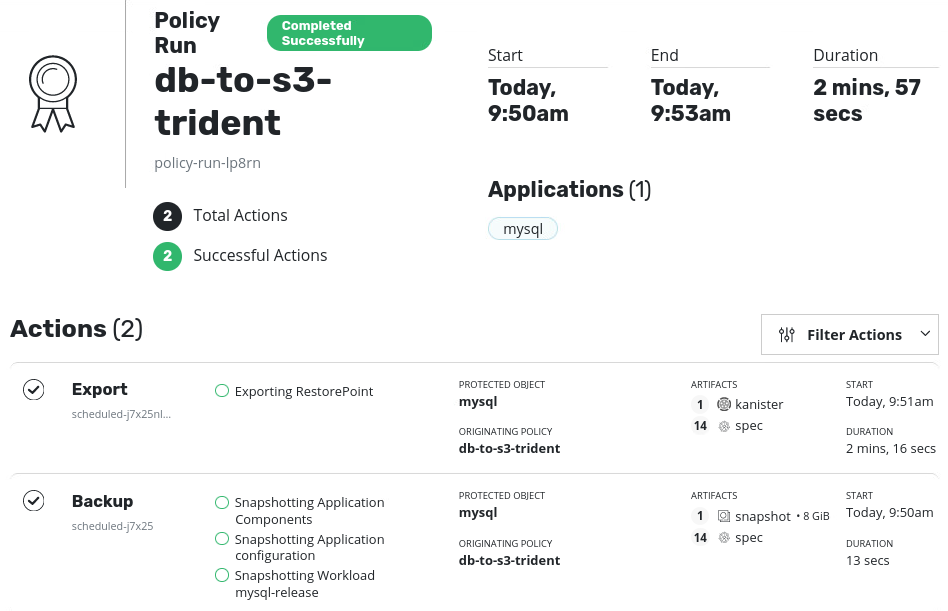
Regular backup job log also refers to snapshotting, but unlike in the job with logical snapshot here we can notice Backup job Artifacts has "1 snapshot" (which is in fact a real volume snapshot taken by K10 using Trident's Volume Snapshot Class):
More on similarities and differences:
- Logical backup dumps data on disk and as stated earlier, for databases that are 10GB or more that may require sufficiently high Max/Burst QoS, and seems to involve more disk I/O than snapshot-assisted backups. Depending on your circumstances, it may be better to use logical backup for smaller databases that need application consistency, and snapshot-assisted on larger (50G+?) that can also benefit from simple (albeit slightly more involved) SolidFire snapshot restore which doesn't require any data copying and takes seconds (then just start your workload, if data loss was the only problem you tried to solve)
- On "data-only" restore both types of backups result in a new SolidFire volume provisioned for the application (mySQL). As I did not have the old (original) volume really destroyed, they were left in place. This is to say: it doesn't matter if you lose just some data (files) and the volume survives: a restore results in the creation of a new volume, period. You may want to delete unneeded volumes once you confirm data has been restored successfully
To-do items
- I wonder how much disk space, if any, is required on PVs to store logical backup data before upload to S3. The documentation isn't very clear on that (maybe that's common knowledge?) and I wasn't equipped to create large databases and wait for Garbage Collection to figure out how much disk capacity is used in each stage of logical backup. (Update: it appears backups are streamed directly to S3)
- The same question applies to restores - are backup archives restored on the fly or first downloaded to an ad-hoc PV or streamed? Those short on free space would probably like to know (Update: it appears they are restored on the fly)
- Logical backup users would benefit from having detailed workflows for various restore scenarios in order to eliminate guessing. For example, recommended Reclaim Policy settings for SCs, how and when to delete volumes obsoleted by restores, etc. But we know how complex Kubernetes is and how things change in every release, so this probably can't be improved a lot - making educated guesses and searching the Web when we can't are unavoidable activities for Kubernetes administrators these days.
- I hit this Kubernetes issue (with Kubernetes.io v1.19.4, Ubuntu 20.04) when Trident couldn't delete a SQL PV removed by K10 prior to deploying another one while performing a restore. I know this can be fixed by patching (and another, very crude fix would be to reinstall Trident), but that sounds like a recipe for eventual disaster. K10 could probably check if a volume it deleted is stuck in
deletingand suggest a fix or KB article. - Related to this, you may wonder "why Kubernetes v1.19?" The answer is because the K10 v4.11 docs say that's the most recent version it supports. That seems like a documentation bug, to be honest, but it's not too old so I used it anyway.
- I hit this Kubernetes issue (with Kubernetes.io v1.19.4, Ubuntu 20.04) when Trident couldn't delete a SQL PV removed by K10 prior to deploying another one while performing a restore. I know this can be fixed by patching (and another, very crude fix would be to reinstall Trident), but that sounds like a recipe for eventual disaster. K10 could probably check if a volume it deleted is stuck in
I'd want to have these answers for production use of K10 v4 logical backups with SolidFire 12 and Trident v21.07, but it's only a matter of doing more testing using the environment, application and data set size that correspond to some real-life environment.
Conclusion
Logical backups are useful and especially so for SolidFire users because it's possible to get application-consistent database backups in a simple way and without consuming (and retaining) SolidFire snapshots (which can be up to 32 per volume). (Classic crash-consistent volume snapshots can still be scheduled and created on SolidFire - these approaches are not mutually exclusive).
At the same time, because logical backups likely create more write I/O during both backup and restore and may need some additional space on PVs, it's probably better to first get these answers experimentally or from Kasten and only then start protecting large databases this way.