Alluxio and ONTAP NFS
Intro
In the first Alluxio-related post I have a more detailed, generic introduction related to both S3 and NFS, so here I'll just say that in use cases where we can benefit from Alluxio's NFS (and S3, although I haven't tested that with ONTAP S3 yet), you can use it to speed up access to slower ONTAP on-premises, or any (fast or slow) remote ONTAP.
There I also briefly mentioned NetApp FlexCache which can be used for NFS and SMB read caching, so that is the only part I want to mention again.
Why not use FlexCache? This is not an exhaustive list, but more contextual:
- FlexCache is usually meant for different workloads than Alluxio (there's a very small overlap)
- FlexCache speaks very POSIX-y NFS (SMB is off topic here) and Alluxio speaks slightly POSIX-y Alluxio to its clients
- Alluxio can work with various back-ends, and runs locally on clients while FlexCache runs on ONTAP read-caching one or more remote ONTAP shares
Alluxio can help us create a multi-tiered system with FlexCache NFS as its back end, and have that FlexCache back end work with a remote ONTAP hidden from Alluxio's view, or you could use both Alluxio and FlexCache with the remote ONTAP (if you have different workloads that can benefit from FlexCache and Alluxio).
You can review examples of use FlexCache use cases in the official FlexCache documentation as well as various NetApp Technical Reports (TRs), such as TR-4743: FlexCache in ONTAP for example. To view Alluxio use cases, click here.
Configuration for NFS
My setup:
- Ubuntu 20.04 VM (2 vCPU, 4G vRAM) on VMware vSphere 7
- Alluxio 2.7.0 on Ubuntu 20.04
- NetApp ONTAP Select 9 (9.9.1) with a NFS share, also running on VMware vSphere 7
As an example, let's consider this situation (I'm just trying to come up with something that corresponds to my setup - I didn't set up my environment for this made up use case):
- I have a fairly static data set that's 100 GB in size, and I need to analyze it over NFS or block storage for several hours after upload, after which I move the data set to an S3 archive (doesn't matter where, maybe on-prem, maybe in the cloud)
- My environment is limited in sequential throughput because I have NetApp HCI which is optimized for random access common in regular applications (not media or HPC, for example)
- Because this NetApp HCI came with ONTAP Select, I set it up, and create a TB-sized share where I can upload these files and analyze them
- Alluxio is deployed on a large VM-based worker that with 150 GB RAM to be able to load the file into memory and allow some space for write-back cache (results are much smaller in size)
Also as an example: in this situation deploying another ONTAP Select with FlexCache would probably not make sense because it would just create another hop from one ONTAP to another, and still mandate NFS access while providing NFS caching. That's why I would consider Alluxio, to get my workload close to the CPUs and be able touse Spark on data cached in RAM, while getting some benefit from better write-back cache management compared to NFS client.
I don't mean to say NFS client cache doesn't work well, but that in the case of this particular workload, I can more easily tune Alluxio to cache my results exactly the way I want it and I cache writes. It would be difficult to do that for more generic workloads, but this is one particular challenging workload so I can afford to solve it this way.
Now, I could mount both ONTAP Select NFS and ONTAP (or StorageGRID) S3 in the same Alluxio instance (in Alluxio, use /mnt/nfs for ONTAP and /mnt/s3 for StorageGRID, for example), but to keep things simple I will use only NFS with Alluxio and in order to do that I only need to change one line in the default Alluxio configuration file:
alluxio.master.mount.table.root.ufs=/mnt/nfs
Before I start Alluxio, I must mount that ONTAP NFS share (I named it alluxio) in the VM:
sudo mount -t nfs -o actimeo=0 10.128.59.22:/alluxio /mnt/ontap
The above command could be "tuned" for ONTAP NFS, of course.
Then I mount and format (the Alluxio overlay, not the share) and start Alluxio services (there's a handful of them - master, worker, etc.):
./bin/alluxio-mount.sh SudoMount
./bin/alluxio format
./bin/alluxio-start.sh local
Now Alluxio overlay sits on top of that NFS share.

Run test workload with NFS back end
With that I'm ready to check if that worked. You can do manual tests, but you can also run automated tests (and quickly).
Because NFS is accessible from Alluxio root, I don't need to specify any directories when I use this command:
./bin/alluxio runTests
This will simply run various compatibility tests that will take less than 10 seconds.
If they all pass, you can even shutdown Alluxio and check your NFS mount point to see if the files are there. Or watch ONTAP NFS share performance statistics to see the activity caused by these tests.
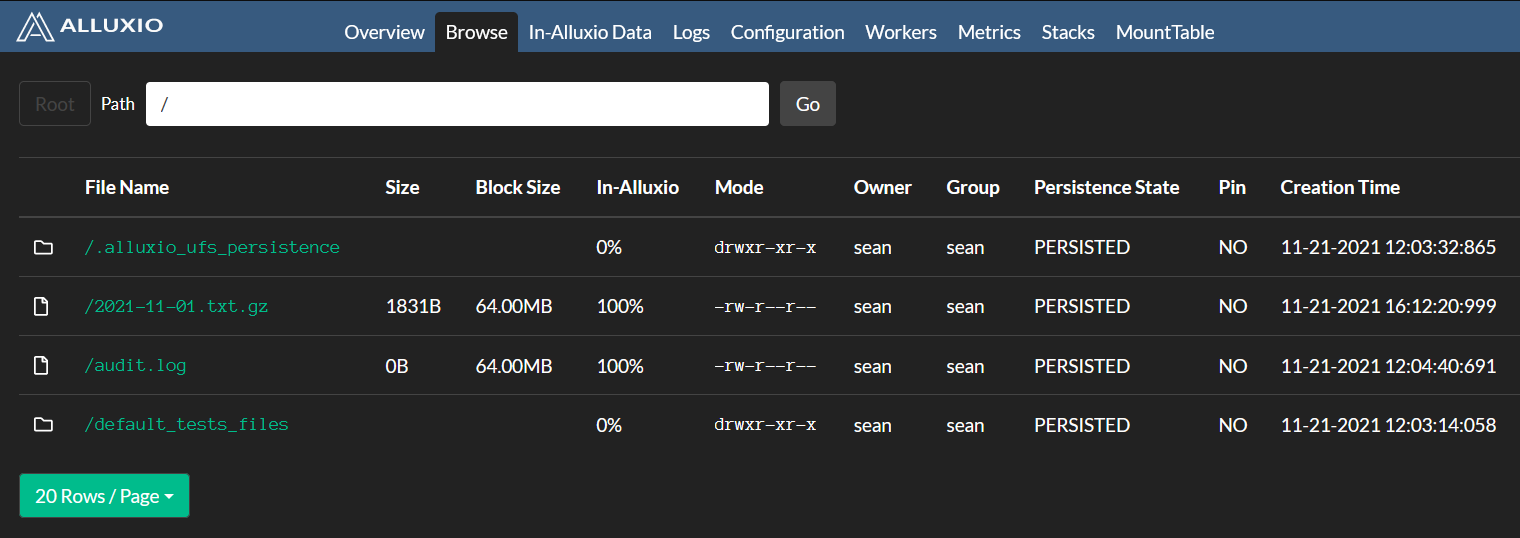
I also tried to read and write other files, e.g. copy some compressed log files from another NFS share (which happens to be the audit NFS share from a StorageGRID admin node) to Alluxio, and it was cached and then persisted to back-end NFS (ONTAP). I was able to list the persisted file directly (not as a way of using the file, but as a way of checking its status outside of Alluxio).

As you perform these tests, you can view Alluxio cache statistics in its Web UI on master node (my master is also the sole worker so I accessed the Web UI on the same node):
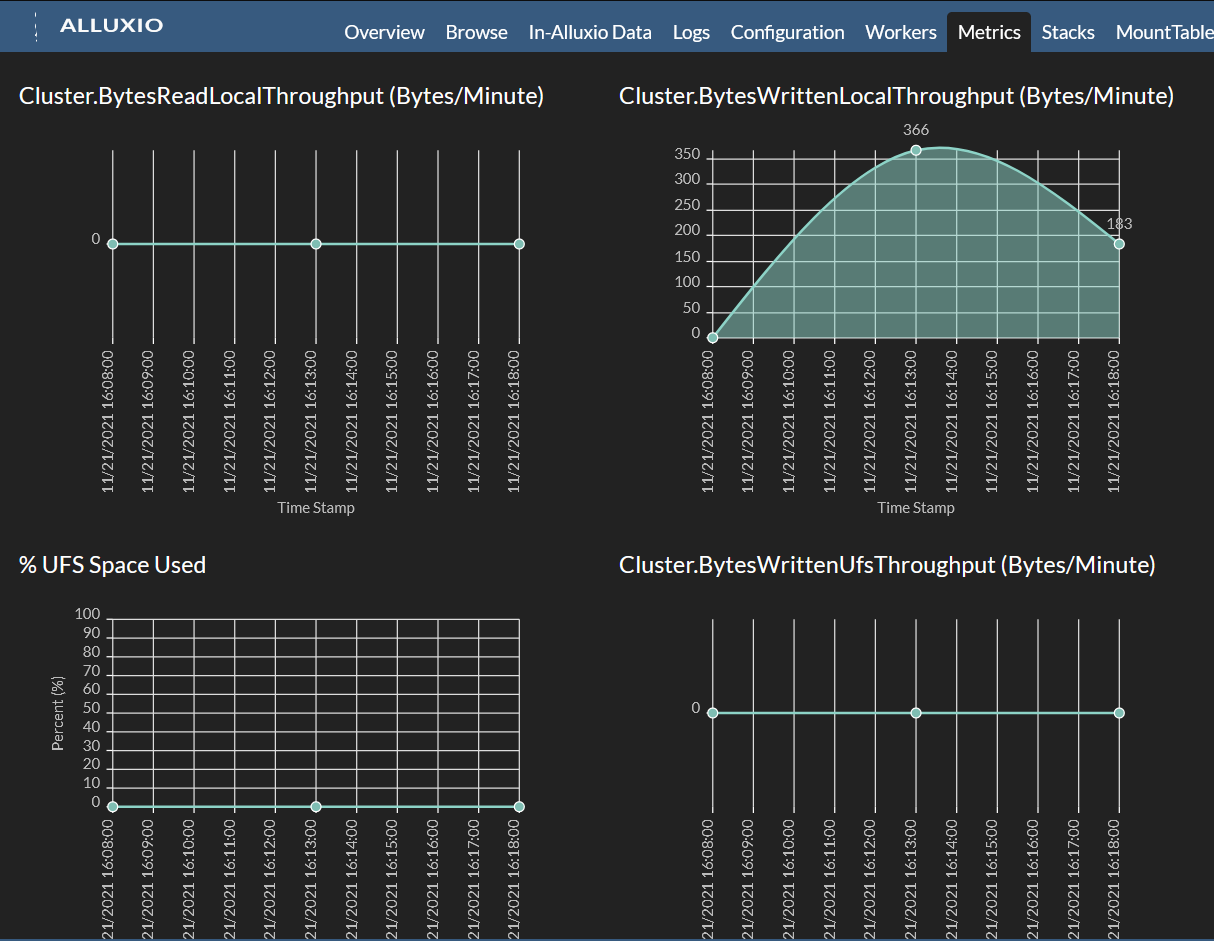
As objects get accessed or written they become "In-Alluxio" (cached). (I copied a 0b-sized audit.log at first, not noticing it had no contents, followed by a small compressed log file).
Alluxio with ONTAP S3
While not many users will use ONTAP S3 for analytics, some will so here's how to do that:
- Create a usable S3 bucket on ONTAP
- Prepare Alluxio config file the same way you would for StorageGRID or other Amazon S3-like back end
That's all.
Note that you can also simply start Alluxio using the default configuration file from v2.7.0. Then mount ONTAP S3 from the CLI (see the Alluxio docs).
That's what I did with ONTAP S3 (while in the Alluxio-StorageGRID post I used the approach similar to ONTAP NFS above).
In this screenshot s3://quay from ONTAP S3 is mapped to /containers in Alluxio:
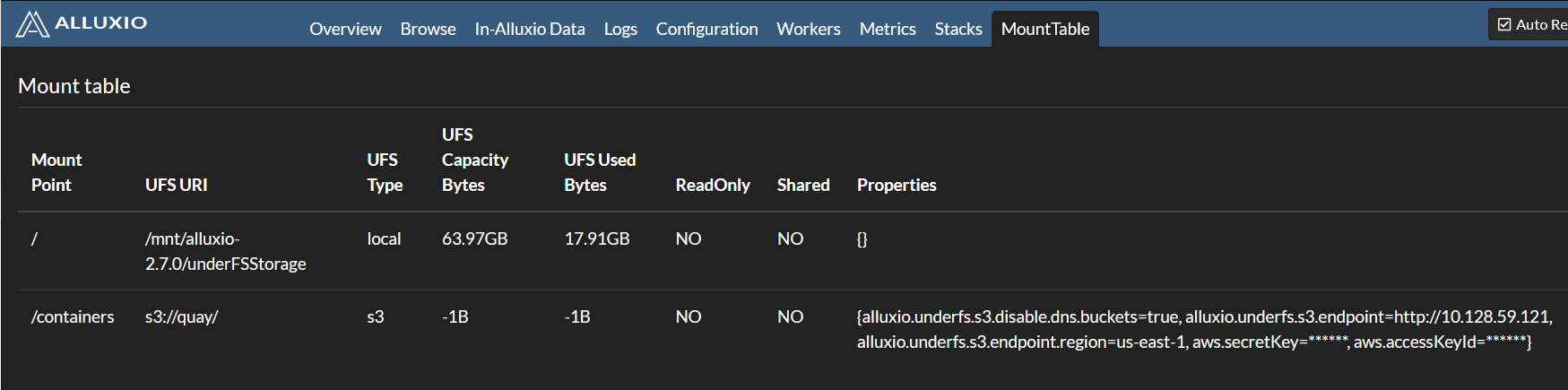
After we read an object once, it becomes cached and the second time (or on a subsequent read by another worker in this Alluxio cluster) it is served from RAM (or a local disk, with more advanced, multi-tiered Alluxio configuration).

If you watch the second half of the demo video below you will see that cached read performance is much better even though ONTAP S3 runs on the same VMware cluster where Alluxio worker is located, and is backed by SSD storage.
But this speed up would be much better - probably 20-30x for 10 workers accessing the same (set of) object(s) on the same ONTAP Select VM as you might have in a Spark or similar environment, making high performance analytics possible even in a VM-based ONTAP environment.
I haven't done much testing with ONTAP S3 (I didn't try to write, for example, and I even forgot to run runTests), so there could be types of access and caching patterns that have problems, but the ability to mount and cache reads are key to most Alluxio use cases.
Demo
- Alluxio 2.7.0 with ONTAP 9.9 (3m43s)
- For ONTAP S3 only, skip to approximately the middle of the video
- For StorageGRID S3, see Alluxio with StorageGRID (2m22s).