ObjectiveFS with NetApp StorageGRID and E-Series
Introduction
As I continue exploratory work with NetApp StorageGRID and E-Series while I have that VM-based StorageGRID cluster running, one of the existing solutions that few know about is ObjectiveFS.
Years ago, my colleague Phil created a nice blog post about getting started with ObjectiveFS. The post was on netapp.io, but the site was taken down and none of the content preserved, and bringing a version of that back is one of the things I've wanted to do.
So, what is ObjectiveFS? Let's hear it from the vendor:
The shared file system that scales automatically, with unlimited storage and high performance.
I recommend visiting their Web site and RTFM, but my summary would be:
- ObjectiveFS is a shared S3-backed filesystem
- One or more (or many) ObjectiveFS clients can read-write to shared ObjectiveFS filesystem which is check-pointed to a bucket
What does that mean for StorageGRID users?
ObjectiveFS with StorageGRID and E-Series
That means that, when you have heavy workloads that can't or shouldn't use S3, ObjectiveFS may be able to help.
The Web site has several use cases, but I'll highlight some that I'm interested in from a StorageGRID perspective.
Let's see some scenarios:
- You want to move everything to StorageGRID, but have some legacy Linux clients or applications that must work with data in local mount points. ObjectiveFS gives you a POSIX-compliant mount point for data backed by StorageGRID. ObjectiveFS is accessed locally like a network share would be, but ObjectiveFS data is checkpointed to StorageGRID. Mission accomplished!
- You not only need access from one client, but you have several. The more, the merrier!
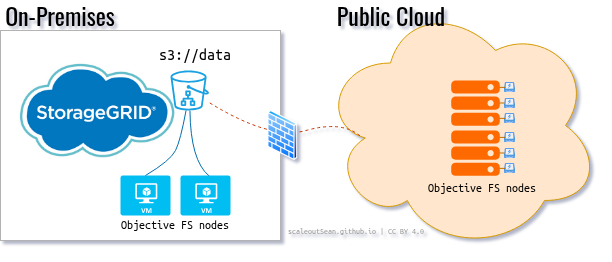
- You not only need several clients to share this S3-backed filesystem, but some are remote (maybe even in public cloud). Or maybe you write to ObjectiveFS on-premises, and read data from GPU instances in public cloud.
As you can imagine, there's synchronization among different clients, and there's write-back as well as read from a StorageGRID bucket. So you can't go completely crazy and run Oracle RAC that way. Basic rules of sanity apply.
But, as far as eliminating persistent non-S3 storage is concerned, ObjectiveFS will get you there for suitable workloads, which means a lot of AI and analytics workloads dominated by large data read.
What does this have to do with E-Series?
It's the same diagram that appears in all posts. Replace CACHE with ObjectiveFS and you get the idea.

If you want to protect cached data - which are already encrypted by ObjectiveFS - you can specify DISKCACHE_SIZE and DISKCACHE_PATH on every ObjectiveFS host, so that disk is used in addition to RAM. This will work with in-host disks, but you need to manage local disks, deal with unplanned downtime, etc.
- Disk cache on E-Series lets you park more data at
DISKCACHE_PATHthanCACHESIZE(which is RAM-based cache) can accommodate, which increases ObjectiveFS performance and decreases load on SG - Disk may be cheaper than RAM and large bandwidth. If your ObjectiveFS clients are remote, even NL-SAS on E4000 can work well for this, and you won't need to maintain internal storage and recover from failures in individual hosts
- If you need SSD-level performance for your 20TB large batch jobs, NL-SAS-based StorageGRID doesn't make it easy to add such a small capacity, but E-Series does. Add EF50 with 14 x 1.92TB disks and get many GB/s in fast ObjectiveFS cache. It's simple.
So, while E-Series isn't required, it can be helpful.
SANtricity LUNs would normally be provisioned one LUN per ObjectiveFS host, and you could use Terraform or Ansible or even do it manually when your ObjectiveFS cluster has just a handful of nodes.
If you need to burst to public cloud and your StorageGRID is on premises, that's also easy - the same thing you'd do from a branch office. If your working set fits in RAM, you don't even need disk cache.
Deploy and use
It takes 5 minutes to deploy and get started. There's one Linux (or OS X) package to install and 2-3 CLI commands to configure and mount.
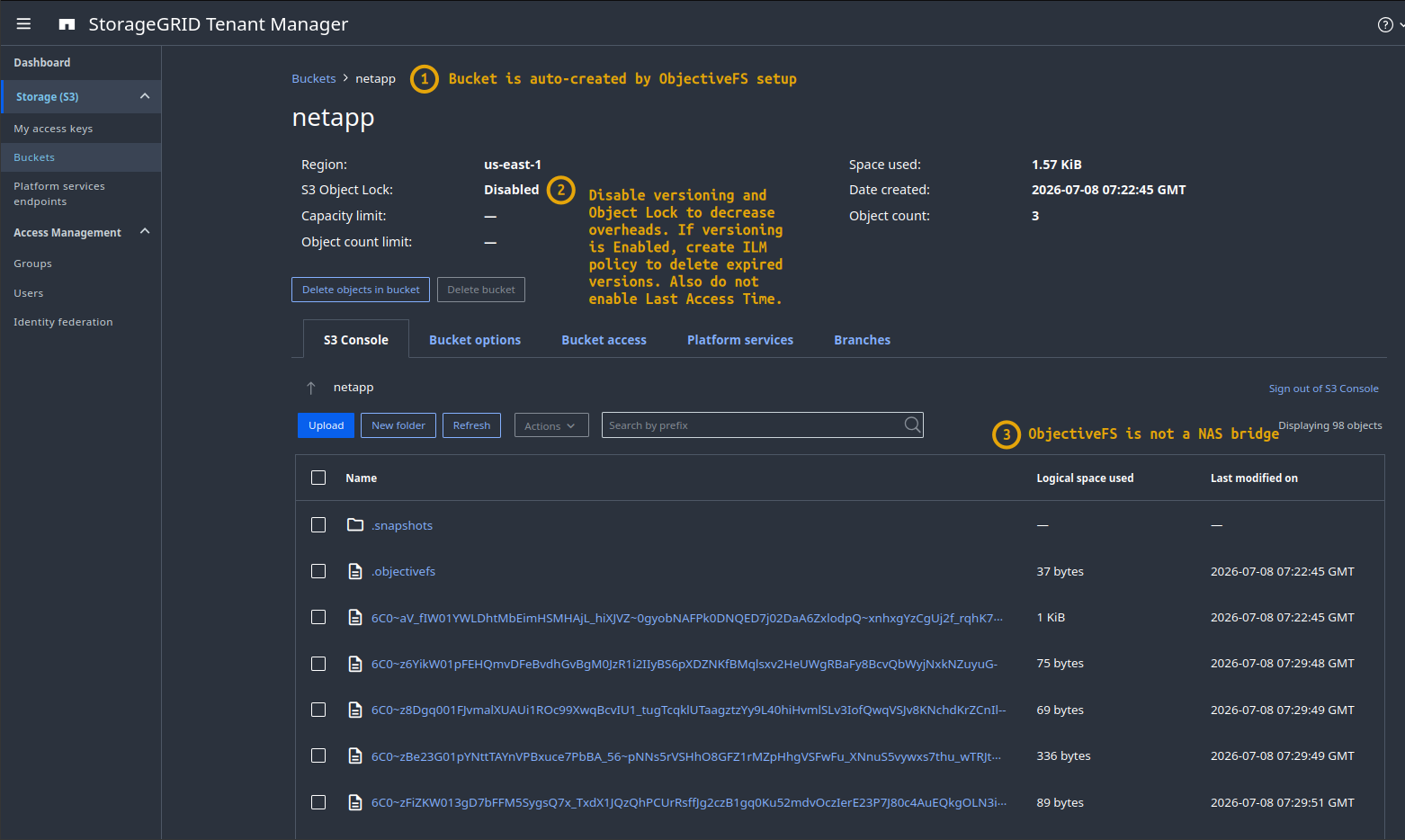
Some points related to this step:
- (1) ObjectiveFS can auto-create the bucket for you
- (2) There's no particularly good reason to enable object versioning on these buckets, but if you do, also create an ILM policy to expire those versions to avoid keeping many
- (3) ObjectiveFS isn't a NAS "bridge". The stuff you see in the bucket is chunked, and it was already encrypted on the client(s), so there's no way to read it without ObjectiveFS client and encryption password
Next, we can use ObjectiveFS.
My ObjectiveFS is mounted to /ofs. As we've mentioned, the best use cases involve sequential reads that you may find in media, analytics, AI, healthcare and similar.
I ran a fio test on that mount point.
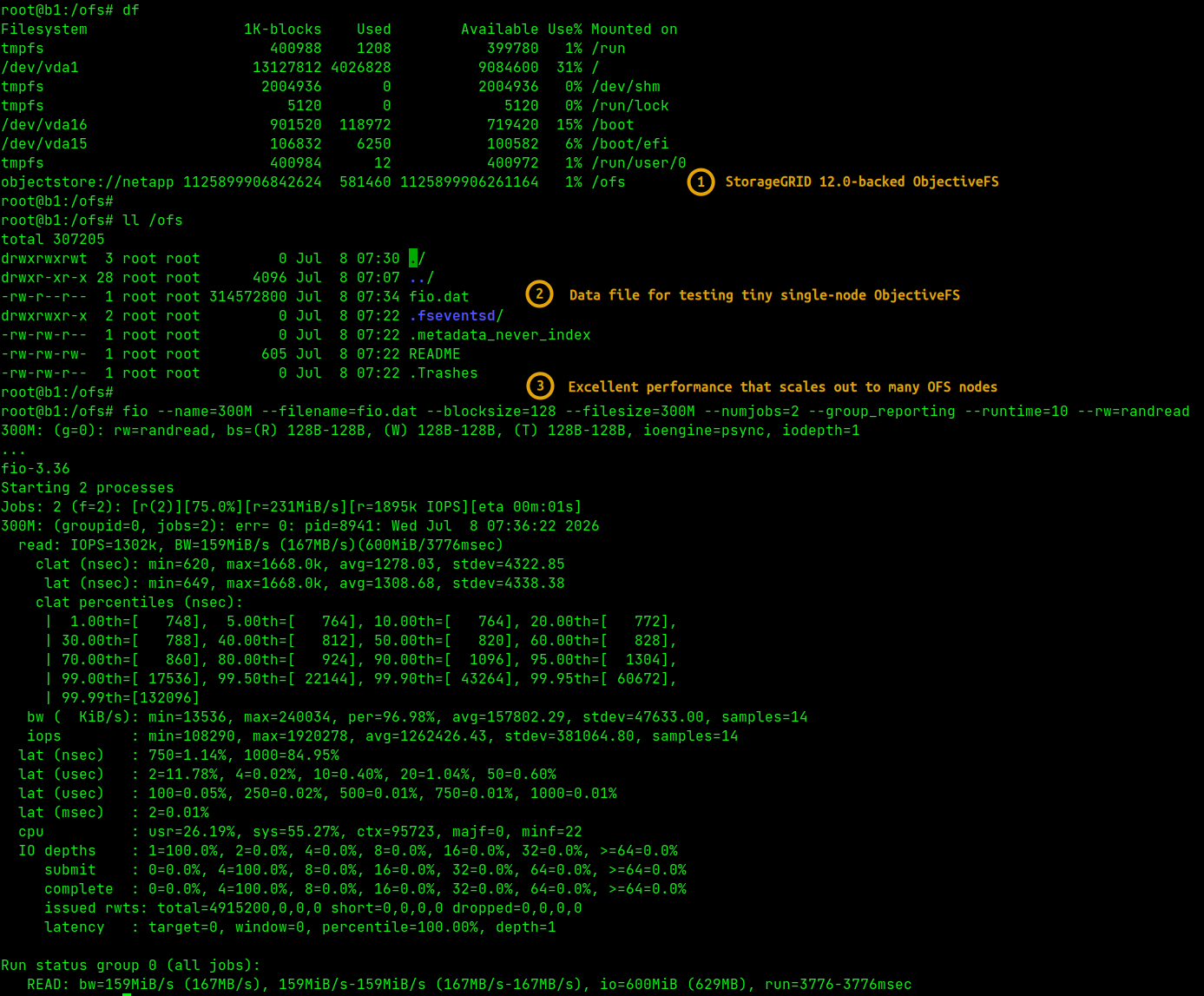
Now, it says "excellent performance", but it also says 167MB/s. Which is it?
Well, that is excellent. This was executed in an extremely basic environment where StorageGRID runs in extremely undersized VMs and can't do a fraction of that. So getting > 100MB/s is very nice. If I instruct fio to use 95% read (so that we simulate reads with some output of results), I get 403 MB/s from that single ObjectiveFS VM.
root@b1:/ofs# fio --name=128M --filename=fio.dat --blocksize=128K --filesize=128M --numjobs=2 --group_reporting --runtime=20 --rw=randrw --rwmixread 95 --runtime=30 --time_based=1
128M: (g=0): rw=randrw, bs=(R) 128KiB-128KiB, (W) 128KiB-128KiB, (T) 128KiB-128KiB, ioengine=psync, iodepth=1
...
fio-3.36
Starting 2 processes
Jobs: 2 (f=2): [m(2)][100.0%][eta 00m:00s]
...
Run status group 0 (all jobs):
   READ: bw=384MiB/s (403MB/s), 384MiB/s-384MiB/s (403MB/s-403MB/s), io=11.6GiB (12.5GB), run=30994-30994msec
  WRITE: bw=20.7MiB/s (21.7MB/s), 20.7MiB/s-20.7MiB/s (21.7MB/s-21.7MB/s), io=642MiB (673MB), run=30994-30994msec
Incidentally, my S3 cache in Kompromise also gets that much from the same VM. So I'd say we're on the right track here.
Then I spend 5 minutes to install the package and mount the same netapp bucket on two more VMs (all tiny, with ObjectiveFS cache on local disks). And I run a read workload from three ObjectiveFS clients:
Run status group 0 (all jobs):
   READ: bw=1294MiB/s (1357MB/s), 1294MiB/s-1294MiB/s (1357MB/s-1357MB/s), io=37.9GiB (40.7GB), run=30001-30001msec
All clients: (groupid=0, jobs=3): err= 0: pid=0: Wed Jul  8 08:25:05 2026
  read: IOPS=30.5k, BW=3808Mi (3993M)(112GiB/30001msec)
    slat (usec): min=5, max=9689, avg=167.27, stdev=194.05
    clat (nsec): min=640, max=2028.3k, avg=1168.96, stdev=4623.74
     lat (usec): min=6, max=9691, avg=168.44, stdev=194.26
   bw (  MiB/s): min= 3098, max= 4413, per=100.00%, avg=3810.50, stdev=47.06, samples=354
   iops        : min=24786, max=35309, avg=30483.69, stdev=376.51, samples=354
  lat (nsec)   : 750=0.40%, 1000=43.71%
  lat (usec)   : 2=53.51%, 4=2.08%, 10=0.17%, 20=0.11%, 50=0.01%
  lat (usec)   : 100=0.01%, 250=0.01%, 500=0.01%, 750=0.01%
  lat (msec)   : 2=0.01%, 4=0.01%
  cpu          : usr=0.74%, sys=38.45%, ctx=751567, majf=0, minf=256
  IO depths    : 1=100.0%, 2=0.0%, 4=0.0%, 8=0.0%, 16=0.0%, 32=0.0%, >=64=0.0%
     submit    : 0=0.0%, 4=100.0%, 8=0.0%, 16=0.0%, 32=0.0%, 64=0.0%, >=64=0.0%
     complete  : 0=0.0%, 4=100.0%, 8=0.0%, 16=0.0%, 32=0.0%, 64=0.0%, >=64=0.0%
     issued rwts: total=913936,0,0,0 short=0,0,0,0 dropped=0,0,0,0
Oh, look, 1.3 GB/s. Not bad! Imagine a cluster of StorageGRID appliances with ObjectiveFS disk cache on EF50.
Some additional observations:
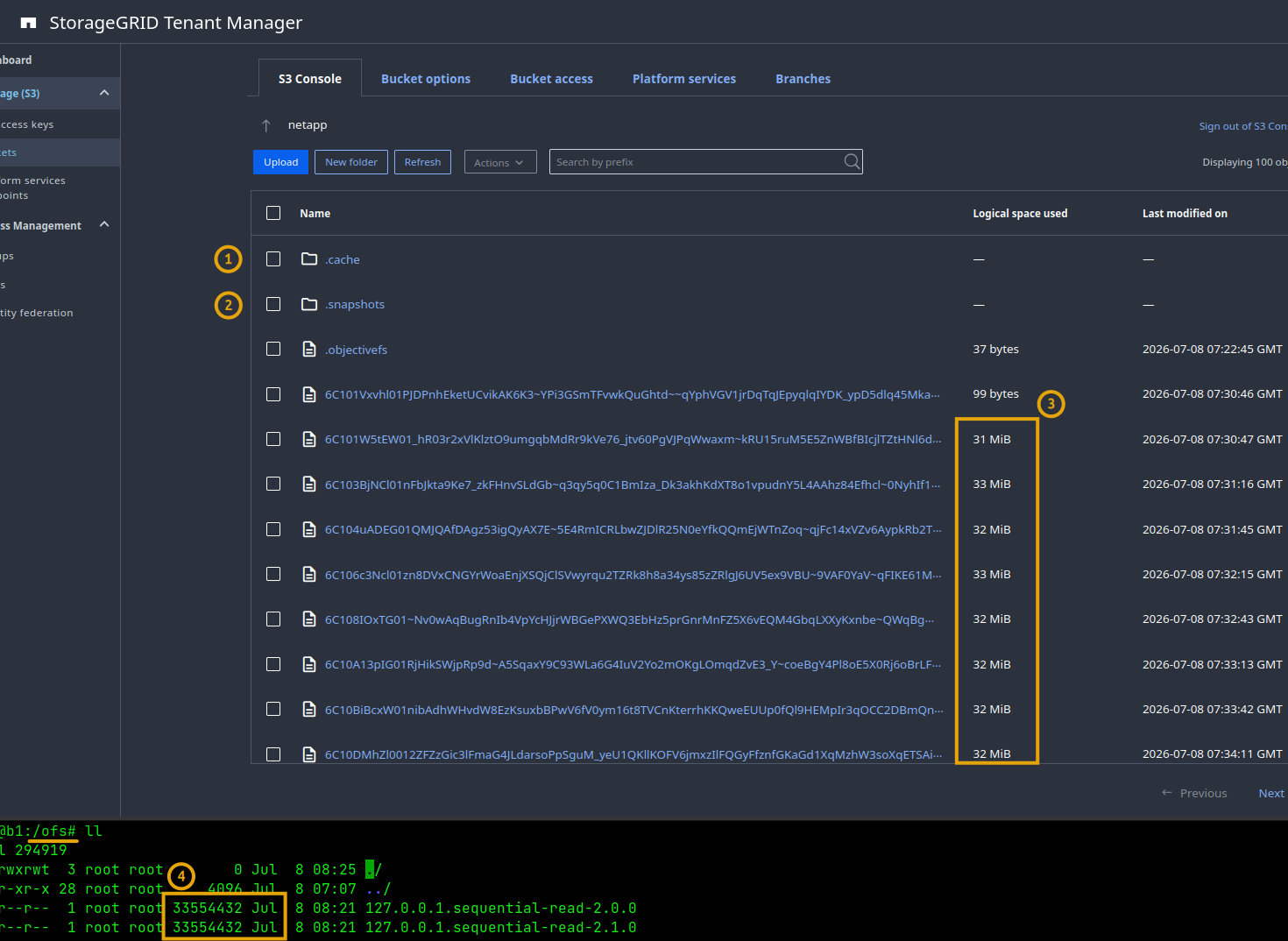
- (1) ObjectiveFS manages cache
- (2) Yes, it has snapshots, too. That doesn't mean you should migrate your DevOps and CI/CD to ObjectiveFS, but rather that, once a snapshot is taken, you could for all practical purposes lose all data on that EF50, and recover in seconds by simply mounting ObjectiveFS from anywhere else. That is why I say E-Series can help you avoid these situations, but at the same time it doesn't create a new point of backup/restore/management. Everything you need - except that ObjectiveFS encryption password - is on S3, just like you wanted
- (3) and (4) I know I've already said this, but mind your workloads. ObjectiveFS is optimized for certain use cases explored in this post (and on their Web site) and doesn't require special tuning or maintenance on StorageGRID, but one can't pick an unsuitable workload and expect miracles. ObjectiveFS has a hassle-free evaluation license - try before you buy.
ObjectiveFS has examples of testing performance with small and large files:
How to install with StorageGRID
The ObjectiveFS documentation is good, which frees me from trying to document the installation steps Phil's post had.
There's even a StorageGRID-specific how-to, but I recommend reading the entire documentation.
Here, I'll just mention some of the more interesting environment variables. If you don't put these in a file, export them before working with ObjectiveFS CLI.
LISTOBJECTS="v2"- don't let it slip to a lower version.PATHSTYLE=1- if you use path style (most people do).SIGNATURE="v4"- don't let it slip to a lower version.TLS,TLS_NOVERIFY_CERT,TLS_NOVERIFY_NAME- you won't need to use these if your don't use snake oil certificates. If TLS is used,ENDPOINTcan't use an IP addresses (or maybe it could if the TLS cert had IP SANs, or ifTLS_NOVERIFY_NAMEwas applied; I haven't checked. I added the StorageGRID endpoint to/etc/hostssince I didn't have it in DNS and that did it). Alternatively,SSL_CERT_DIRandSSL_CERT_FILEcan be used as well.TLS_NORESUME- you may set this to1but StorageGRID gateway in 12.0 does not support TLS session resumption, so ObjectiveFS shouldn't attempt to use it anyway.OBJECTIVEFS_LICENSEandOBJECTIVEFS_PASSPHRASE- both are necessary. There's no way to recover data if you lose the pass phrase. Store a copy of it in a secure location!DISKCACHE_SIZEandDISKCACHE_PATHfor E-Series on-disk cache. Default location is/var/cache/objectivefs, but I'd suggest to use something more visible such as/obj_cache
Snapshot schedule: it is enabled by default, so if you're planning write-heavy testing, consider changing or disabling (mount.objectivefs snapshot -s "" <filesystem>) snapshot schedule on test filesystem to save bucket space.
Mount options: -o noatime,nodiratime,mkdir should be used by most, but there's also -o hpc ("HPC mode") with chunkier writes and -o cputhreads=N,iothreads=M (and several similar options) if your StorageGRID can take more workload than "defaults" can generate.
Compaction ("defrag"): just like with ONTAP's Fabric Pool and other solutions, both due to the nature of how S3 clients and object stores work, capacity utilization on S3 is can be considerably higher than the "logical" amount of data stored. ObjectiveFS has advanced settings to tune that behavior, but regardless - when you start using ObjectiveFS, you need to understand what 1 logical TB translates into on S3 for particular workload. Workloads with more churn will use more S3 capacity.
Check the ObjectiveFS User Guide for more. The documentation is good.
Conclusion
I hope this will help StorageGRID users who need ObjectiveFS, but aren't yet aware of it.
S3-centric customers can use ObjectiveFS to decrease dependency on other storage protocols. It's not for general home directories, so mind your use case. No CI/CD on S3 buckets, please.
For those who want to spill-over their S3 cache to local disk, E-Series can do a great job whether it's on NL-SAS, NVMe or a mix of both, without adding burden to server administrators. With Ansible or Terraform, we can provision a cache volume to each of many ObjectiveFS nodes in seconds and, from time to time, replace any failed physical without cache loss, downtime or needing any recovery procedures on ObjectiveFS clients.
Because ObjectiveFS must be encrypted and consistency is maintained on S3 back-end, there's no reason or need to back up, restore or replicate disk cache on protected volumes on E-Series. Although ObjectiveFS cache can be backed up and there's value in having a copy in case you lose cache and have to rehydrate TBs of it, having it on protected external storage like E-Series makes the risk of cache loss tiny and with multiple hosts, copying a good cache volume and presenting it to the host that lost its volume due to corruption or operator error should be the fastest way to do it.
Update (2026/08): ObjectiveFS may be an on-premises alternative to S3 Files, depending on your needs. See that post for more.
Appendix A: Selected test runs
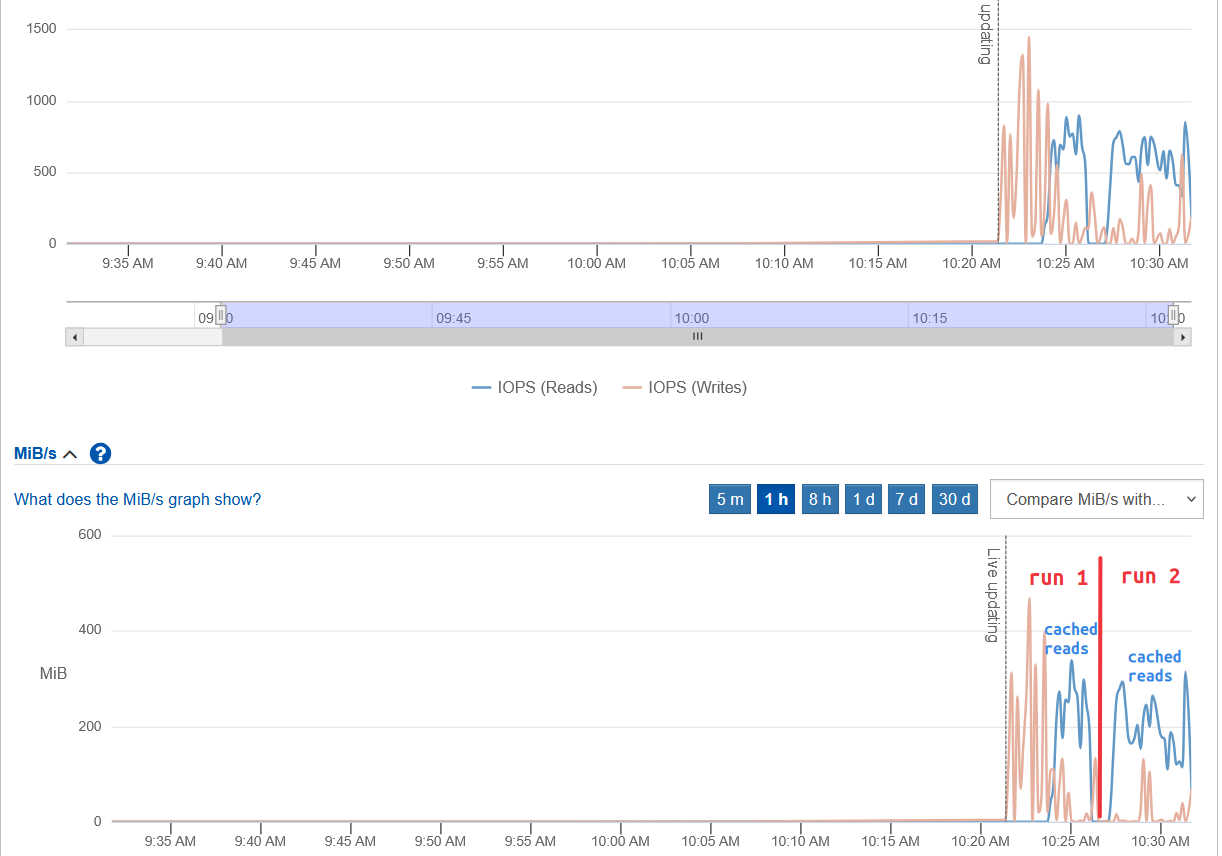
Whether you use RAM and/or disk to cache S3 data, if reads repeat the effect of caching will be visible.
This shows read/write activity on E-Series volume assigned to ObjectiveFS disk cache. As workload starts, all activity on disk cache volumes is writes because cache is empty. Later, however, reads (blue) emerge and if your workload runs again while reading the same data (as it eventually would, in workloads such as video streaming or ML runs with different parameters), cache hit rate may become significant.
Each client has own disk cache. In this chart we can see that, although workload runs on both clients, only one is highly active on storage.
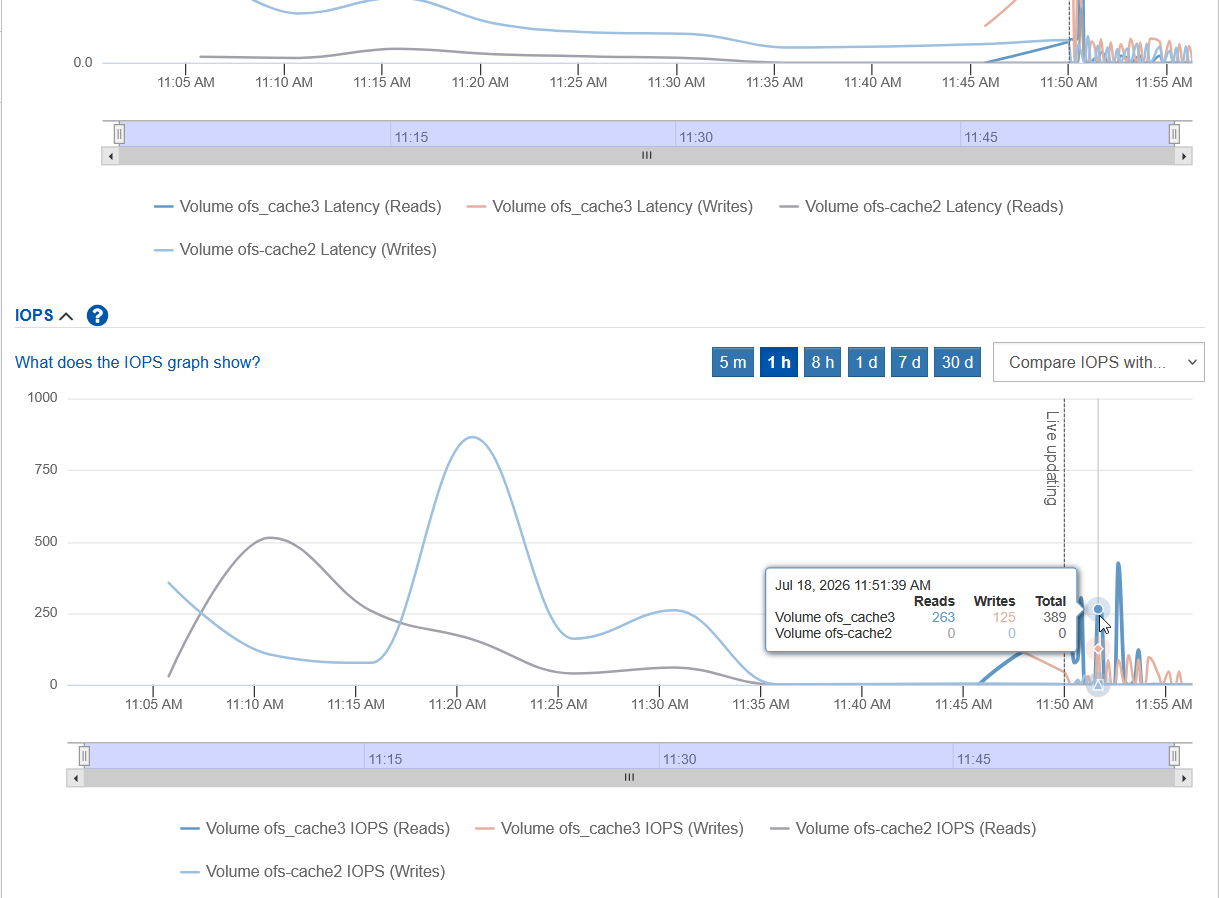
The client using ofs_cache2 was active.
Related to that: as the ObjectiveFS documentation states (and I've mentioned that above), if you want to pre-cache a ton of data at a high-latency location, it may (depending on data set size and so on) make sense to read the data from one OFS client, then clone the cache volume and make copies of cache for other OFS clients that share the same workload.
How much throughput should each cache disk support? It's hard to tell based on my limited testing, but 300-400 MB/s seems reasonable. I've seen individual clients use 400 MB/s. I assume 16 clients could consume up to 5 GiB/s in reads from disk cache volumes.
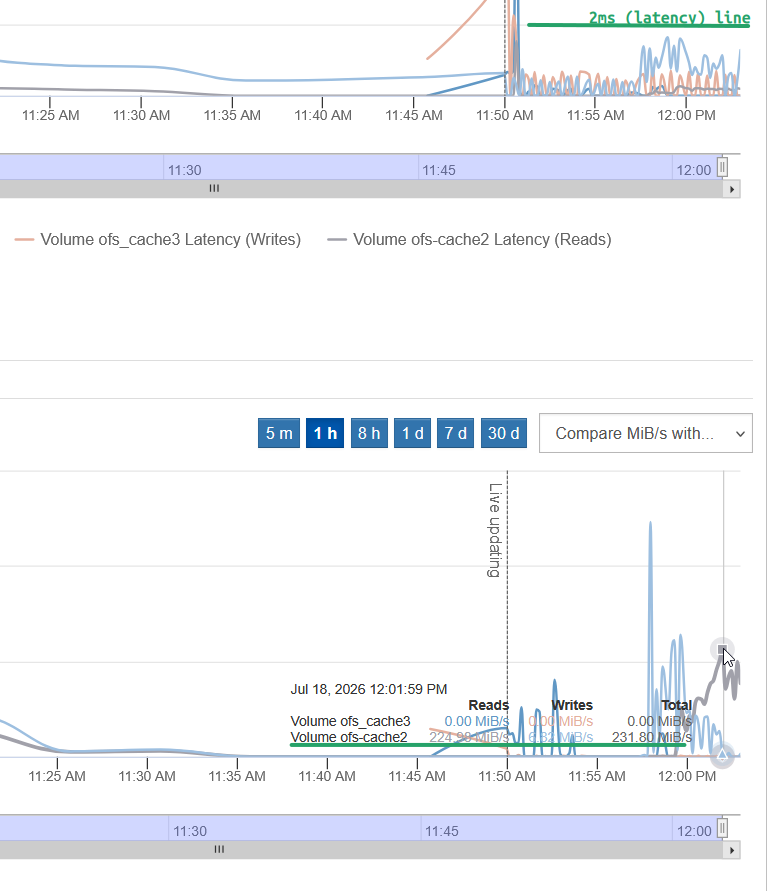
If your object store is fast enough, cache population can use a lot of write bandwidth. For truly ephemeral cache, this is where internal unproteted storage may work well. If you need to keep cache and can't afford to copy it around or rebuild, using external protected storage makes sense.
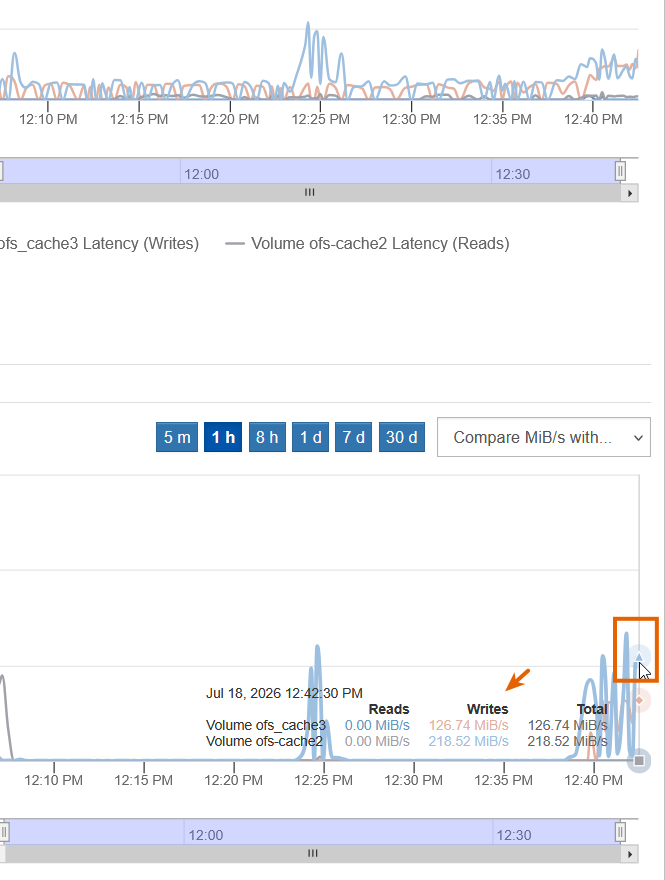
I used the Versity S3 Gateway v1.7.0 available over 1GigE connection in this testing, so non-cached reads weren't fast, but once disk cache warmed up as per above charts, cache hits resulted in lower bandwidth utilization from S3.
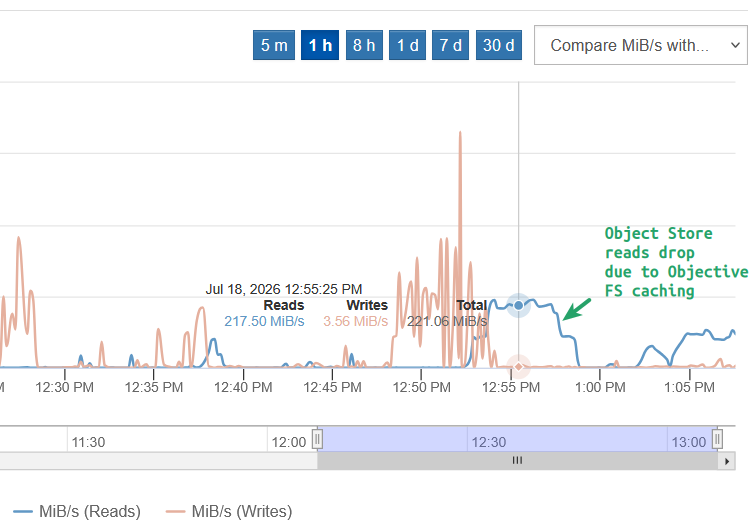
Due to limited hardware resources I had at my disposal and the many variables involved - from S3 performance to the nature of OFS workload - it's hard to say how one would go about sizing. If warming up cache before running workloads helps, that can make a huge difference even if S3 object store is slow. Until cache warms up and you start hitting it, you'll be limited by object store performance and that is logical. The ObjectiveFS folks are responsive and ready to help with trials, so I wouldn't worry about that too early if my use case is right. Also, be sure to check the two examples above (Large & Small Files tests).
Performance isn't the only reason why ObjectiveFS makes sense. It also helps you avoid unnecessary data copying. You may have POSIX clients that upload data to S3 on premises, and other, remote POSIX clients that can view and use that data right away, at whatever speed is available. That convenience alone can be worth the effort of deploying ObjectiveFS.