AWS S3 Files, checkpointing with nvCOMP
nvCOMP
Cut Checkpoint Costs with About 30 Lines of Python and NVIDIA nvCOMP shows savings that can be obtained by compressing synchronous checkpoints with CUDA.
I blogged about checkpointing some time ago and even then asynchronous was possible (early, but possible). Now NVIDIA says async checkpointing is still not easy to use (in the post above). I have no first-hand experience, and if NVIDIA says so… However, AWS says this:
Amazon S3 Connector for PyTorch provides robust support for PyTorch distributed checkpoints.
Well, maybe AWS S3 Connector is robust, but PyTorch checkpoints aren't…
Some funny parts in TFA:
Write time per checkpoint: 782 GB / 5 GB/s = 156.4 seconds (~2.6 minutes) Scale that to a 64-GPU cluster, and the monthly cost jumps to over $17,500.
But you're not writing to parallel file system at 5 GB/s. If you have 64 GPUs, that will likely be 8 servers with 8 GPUs each, so you'd have 3 GB/s per each of 8 servers. Even BeeGFS with EF600 could write over 20 GB/s per building block. Today EF80 is much faster.
So rather than 156.4 seconds, that would be close to 20 seconds per GPU.
Your checkpoints are the largest files in your training pipeline. Compress them.
In aggregate, yes they are. I tested with a small model, and the savings were negative. For "modern" and large models tested on modern GPUs, there are savings to be had. But don't assume they will automatically apply to even the smaller models.
As I suggested here, I can dump checkpoints to BeeGFS at 20 or 40 GB/s and tier older checkpoints to StorageGRID. Then when I need to load last several checkpoints, I can from BeeGFS. If I need older versions, I can get them directly from StorageGRID or recall the file from S3 (but why, if I can read it directly?).
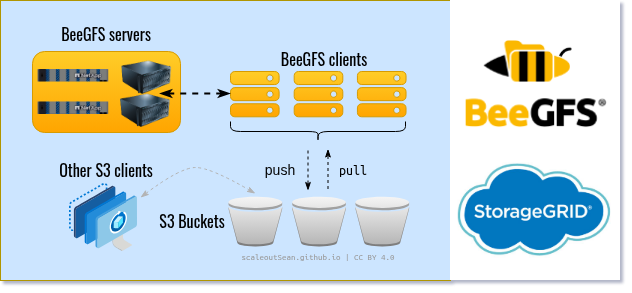
Another enhancement is I don't even need to checkpoint to BeeGFS. I can checkpoint to BeeOND (local on GPU nodes' internal disks) at tens of GB/s, and set up automated async replication to BeeGFS with NL-SAS storage. That way I can get even faster checkpointing with BeeOND and buy a slower BeeGFS than I otherwise would.
If you get this going very fast, the savings won't matter very much, but it's still nice to have them if you can.
AWS S3 Files
This S3 feature and add-on service came out in April 2026.
What is it, and how can we use it with StorageGRID?
First, it's a service in AWS EC2 that uses AWS EBS and AWS S3. You can't run it without these AWS services. You may read their features to understand more, but one of the nice use cases is agentic AI (as long as AI agents are too dumb to use S3 directly; at some point they'll get smart about it and then only S3 caching may become enough.)
Second, although I did not know about S3 Files some weeks ago, I saw the need, and blogged about ObjectiveFS two months ago.
- Unlike S3 Files, which lets you see and use S3 objects as directories and files, ObjectiveFS chunks and encrypts bucket data, so you can't see the same content in the bucket without ObjectiveFS. But that's not necessarily a bad thing. Of course, sometimes you want native S3 on one client and S3 Files for your AI agents. Well, in the case of ObjectiveFS you'd need to install and use ObjectiveFS in both places.
- Also unlike S3 Files, ObjectiveFS works on-premises. I used E-Series for backing block devices (see the post) and AWS S3 Files uses EFS
Third, if you can't use ObjectiveFS or other approaches then, in order to use S3 Files with StorageGRID, you can use rclone or CloudMirror to create a copy of your data in AWS S3 and use S3 Files there. You may not necessarily need to use S3 Files in the first place, so the firs step is to figure out what the requirements are.
- You can download data sets from on-premises S3 to EC2 node's RAM, compute, and discard. No data at rest!
- You can run ObjectiveFS in EC2. Similar benefits as with S3 Files, but all clients must be ObjectiveFS. No unencrypted data at rest.
- You can use rclone to download StorageGRID data and process it. Results can be written directly to StorageGRID on premises.
- You may be able to perform zero-copy compute with OpenSharing (read-only)
- You can cache Spark and other data on StorageGRID in EC2 with Alluxio, both reads and writes
- You can mirror data from StorageGRID to AWS S3 using Cloud Mirror and use S3 Files with AWS S3
- You can consider some poor man's choices such as AWS MountPoint S3
As we all know, there's no shortage of solutions for accessing on-premises S3 data in hybrid cloud environments. Pick S3 first and figure out how to do it later.
One nice detail that I spotted only later is that, although writes to S3 Files land on backing EFS, sequential reads GET data directly from AWS S3 endpoints - these reads are not proxied by S3 Files service endpoint. Of course, that makes sense for AWS where the same entity runs both services.
S3 Files does provide extra convenience if you copy your StorageGRID data to AWS S3 for final processing.