S2S3 Feeder for distributed NAS to S3 copying
Introduction
WTF is S2S3? See here.
It's a share-and-bucket inventory-related utility for NAS to S3 migrations.
In other words, S2S3 can't copy on its own - it provides canned recipes, but leaves that choice to the user. See that post for more.
After the initial release, a Windows-native S2S3 client came out, so now inventory generation is easy for both SMB and NFS shares. Even copying is easy, since canned S2S3's recipes for Rclone work on both Windows and Linux.
It's not that simple, of course. As I said in the first S2S3 post, if it was easy there would be no commercial tools for this. I also said S2S3 doesn't aim to replace those. There are many scenarios where free tools aren't acceptable.
When and where I'd recommend S2S3 depends on circumstances, but certainly for simpler environments and one-shot migrations with sub-100TB NAS shares.
We already established (in the first post) it's not hard to scale out copy operations, perform comparison and even verify share-to-bucket replication for each individual file.
The part that's still not trivial is watching manually parallelized tasks. Consider this:
- 100TB share
- 1MiB file size
- That's 100 million files
- In batches of 1,000, that's 100,000 batches
It's not hard or slow to scan a share with 100 million files, and it's not hard to split copy tasks into batches either. But you need something to keep things going, tell you when they are (and aren't) going and maybe re-try. To make that - and some other things - a little easier, we can use S2S3 Feeder.
S2S3 Feeder
S2S3 Feeder takes S2S3's share inventory in the Parquet format and gets to work:
- Celery and RabbitMQ create and dispatch tasks to workers.
- Each worker gets a job, which can be a tiny chunk of 1,000 files from that inventory with 100 million files.
- Each worker contributes to processing. The job of a S2S3 Feeder worker is to read the file from NAS and copy it to the S3 destination bucket. If a worker fails, the batch gets assigned to another. If a worker completes a batch, it comes back to the broker for more.
- We create any number of workers we want, but we should stop adding new workers if that overloads the object store and NAS.
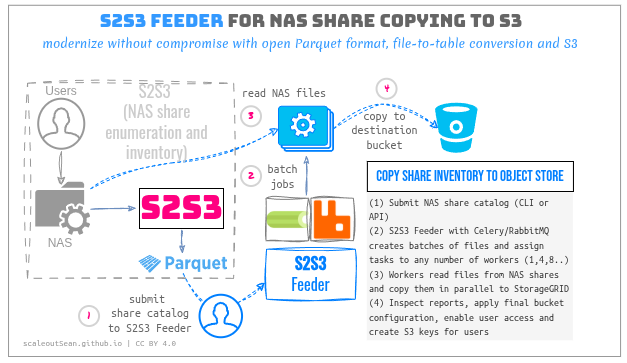
Even here, I default to using Rclone, which is built into Feeder worker's container image. But like with the manual S2S3 workflows, it's easy to use another copy tool.
This approach has no practical scaling limits. Of course, you may not be able to dispatch and complete 10,000 jobs per second. If each job contains a batch of 1,000 files, you'd need dozens of workers to process just a handful of jobs per second, and either the NAS or object store would slow down long before you got even close.
What is not shown (because the diagrams are already too busy) is S2S3 Feeder stores job details in a restricted-access bucket located on S3. That means there's no database service as such, and yet there are no new requirements because this is a "to S3" project, so S3 is always available or else you have no S3 to copy to. It also means you can delete or reinstall S2S3 Feeder and pick where you left off.
Other use cases for S2S3 Feeder
In the first S2S3 post I mentioned simple copying isn't the only thing one can do with Feeder:
- We can inject extra steps in worker job description
- We don't even have to migrate data from NAS
Why not migrate
Maybe your data-generating client is a legacy application limited to NFS.
Maybe you want to keep data on NAS, but develop new on-premises and cloud applications for S3.
There could be other reasons.
Non-migration use cases
S2S3 and S2S3 Feeder can help with an approach where legacy NAS clients and even multiple NAS vendors remain, and AI and analytics applications are developed for the modern S3 storage access.
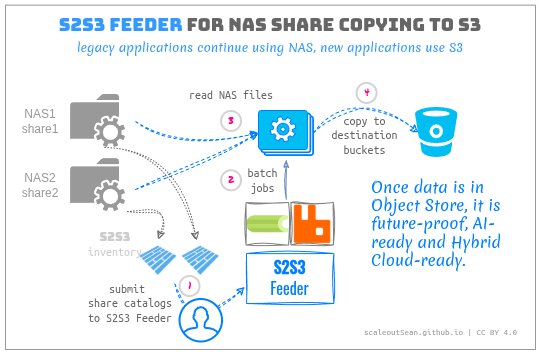
That's how you get here:
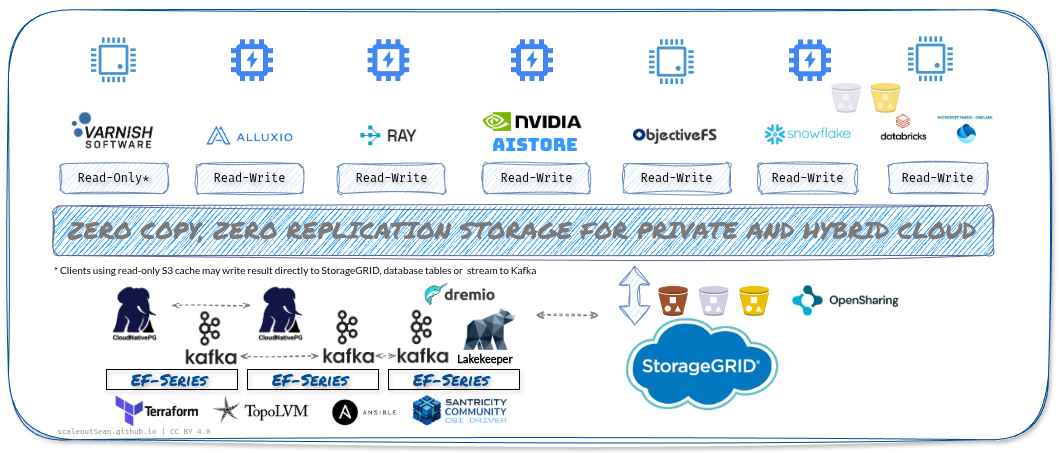
Modern, fast and secure access from anywhere: branches, factories, public cloud…
Other patterns
We can use any public or private API to do more with data than just copy or migrate it.
This may involve NAS-to-S3 migration, but it doesn't have to.
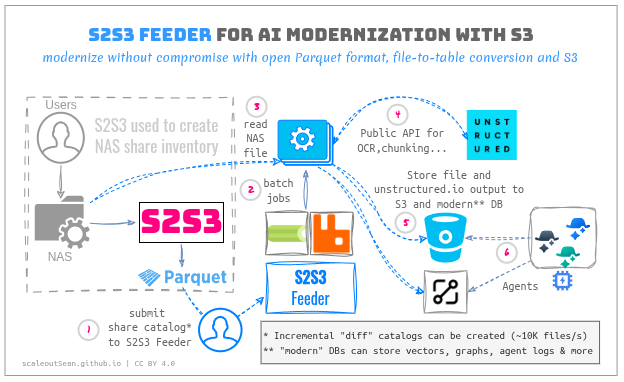
We do a bit of extra work to get additional benefits, so a new step is injected as step (4), making the old step (4) step (5):
- New step (4): we use a public or local API to do something with those files, such as convert them to structured data. That step with "unstructured" square is really called Unstructured, and you can use their service or self-host.
- Step (5): original files get copied to StorageGRID as before, but we may also take advantage of modern databases to store embeddings, graphs and/or indexes in them without extra steps.
Now, you have AI-native services to work with:
- S3 for original source data (and possibly more, depending where you want to keep embeddings and other stuff returned by Unstructured API)
- Modern database or index of your choice
I did something similar with Kompromise (described here), but it was based on off-the-shelf models and Unstructured may be able to do better.
One of the arguments in favor of doing everything on-premises is your data doesn't leave your control.
But that doesn't mean it shouldn't be migrated or copied to S3, because being able to access it from anywhere after that also means you won't need to copy it to the public cloud or a branch office either. It's also cheaper to park it on S3 than keep it on NAS.
It also doesn't mean all workflows has to be crated on premises from scratch. I intend to try Unstructured in this workflow because I want to evaluate a commercial service which is expected to work better. I tried doing OCR at home, but it sucks. I also hear that from users: "It's great, my data never leaves my premises! But my data is also stuck in poorly OCR'd output which makes it useless for AI". (Edit: as I tried to create an Unstructured account, I found they don't allow registration from non-business emails - even for pay-as-you-go accounts! So that idea is dead.)
Downsides of batch updates
In non-migration use cases, rescan-and-batch updates aren't always practical and may have downsides depending on use case.
The first is that re-running S2S3 inventory operations is expensive - both initial and incremental inventory performs run a full directory re-scan; only re-sync can be incremental. With a NAS source, that not suitable for large NAS shares.
S2S3 Feeder isn't meant to be used for such use cases. Object stores offer easy-to-consume event notifications and if you need something near-real-time, migrate to S3 and use event notifications (which I do in Kompromise) or use SGII, which allows you to incrementally refresh object lists by scanning (not copying!) just the changed objects (this uses StorageGRID bucket snapshots).
You can't use this trick with NAS systems because snapshots let you see all share data. SGII takes "in between" snapshots, so if I take one at 6am and want to scope my incremental inventory build to only today's changes, I snapshot the bucket for the period between 0 and 6am UTC, and see only what changed during that period.
The second is that, if NAS sources are updated, S2S3 Feeder should add the ability to use incremental inventory datasets to avoid copying the full share every time, which v1 currently doesn't do. This isn't hard to do, but it's not implemented. Using manual Rclone submission is a viable workaround for most situations until then: inventory scan remains full, but dataset is incremental which means that if a 10TB NAS share adds 10GB of new files, your Rclone copy job will run one job which runs for 1-2 minutes.
Conclusion
S2S3 Feeder enables easy copying of files from S2S3 inventory datasets, but also additional use cases.
- It can be used for workflows other than migration
- I have a utility for incremental bucket inventory with StorageGRID (called SGII), so this same job scheduling stack can be used with when data is already on S3 and inventory datasets are generated by SGII rather than S2S3
S2S3 Feeder doesn't have any fancy features and at this scale (up to 100TB shares) it aims for one-shot migrations because those take just a day or two per share. Manual Rclone runs can fail seconds after you leave office, but S2S3 Feeder is more robust so that problem is solved. Also the problem of gathering, consolidating and analyzing logs from thousands of smaller Rclone jobs.
For NFSv3 sources, we can run S2S3 Feeder natively or containerized (Docker or Kubernetes). For SMB 3, I run S2S3 Feeder on Windows OS (bare metal or VM workers).
Performance is yet again a non-issue. According to RabbitMQ benchmarks, tens of thousands of jobs can be dispatched per second. S2S3 Feeder jobs are not small (each individual job contains thousands of files), so processing just 8 or 16 per second would require a lot of very big workers.
Appendix A: Walk-through
- There's a Windows client for SMB 3, too, but we'll focus on the more popular NFSv3.

- Linux NFSv3 share
192.168.1.194:/mnt/nfs-testmounted on S2S3 Feeder client(s) using the same path:
$ dir -l /mnt/nfs-test
total 1049208
-rw-rw-r-- 1 777 sean 1074386693 Oct 31 21:38 big.file
drwxrwxr-x 3 777 sean         60 Nov  1 00:34 dirtree
- 1,000 small files, one large file:
$ dir -l /mnt/nfs-test
total 1049208
-rw-rw-r-- 1 777 sean 1074386693 Oct 31 21:38 big.file
drwxrwxr-x 3 777 sean         60 Nov  1 00:34 dirtree
-
S2S3 Feeder v1 supports "one shot" migrations. There's nothing different about multi-shot migrations for S2S3 Feeder, it's just that more job templates need to be created (i.e. both create and delete), as explained in the first S2S3 post.
-
Destination bucket
s3://s2s3-deston StorageGRID is empty at this time -
At this point, NFS share is made read-only as our one-shot migration kicks off
-
We use S2S3 to create an inventory:
$ sudo s2s3_linux inventory nfs://192.168.1.194/mnt/nfs-test \
    --db ./reference/datasets/nfs-feeder-sgws \
    --threads 2 \
    --reserved-port --uid "$(id -u)" --gid "$(id -g)"

$ sudo chown sean:sean -R ./reference/datasets/nfs-feeder-sgws/

$ dir -lat reference/datasets/nfs-feeder-sgws/
total 674
drwx------ 2 sean sean      6 Nov  1 12:37 .
-rw------- 1 sean sean    449 Nov  1 12:37 manifest.json
-rw------- 1 sean sean   6883 Nov  1 12:37 part-000000.parquet
-rw------- 1 sean sean 576739 Nov  1 12:37 journal.jsonl
drwxrwxr-x 7 sean sean      9 Nov  1 12:37 ..
-rw------- 1 sean sean      0 Nov  1 12:37 failed-jobs.jsonl
-
There have been no failed inventory-generating jobs, so we may continue
-
S2S3 Feeder is next. RabbitMQ and a worker are running.
CELERY_WORKER_CONCURRENCYis set to 1 by default so that one worker runs one Rclone (which in turn is also configured to run 1 concurrent job). 10 workers would run 10 Rclone jobs.
$ docker compose ps -a
NAME                     IMAGE                   COMMAND                  SERVICE    CREATED        STATUS                  PORTS
s2s3-feeder-rabbitmq-1   rabbitmq:4-management   "docker-entrypoint.s…"   rabbitmq   13 hours ago   Up 13 hours (healthy)   4369/tcp, 5671/tcp, 127.0.0.1:5672->5672/tcp, 15671/tcp, 15691-15692/tcp, 25672/tcp, 127.0.0.1:15672->15672/tcp
s2s3-feeder-worker-1     s2s3-feeder-worker      "s2s3-feeder worker"     worker     13 hours ago   Up 13 hours
- We start RabbitMQ and a worker and create a task:
$ docker compose --profile worker run --rm worker submit \
    --inventory /inventory/nfs-feeder-sgws \
    --source-path-base /source \
    --destination sgws:s2s3-dest
[+] Creating 1/0
 ✔ Container s2s3-feeder-rabbitmq-1  Running 0.0s
- Details:
- NFS inventory, Parquet dataset created earlier with S2S3, is mounted at the
inventorypath - NFS share is mounted at
source-path-base - S3 destination is
sgws:s2s3-dest, in the usual Rclone format - It is possible to use path filters, e.g. if I wanted to replicate just
/mnt/nfs-test/dirtree, I would have used--inventory-path-prefix dirtree/ - S2S3 Feeder loads all credentials and Rclone configuration we want to use
- NFS inventory, Parquet dataset created earlier with S2S3, is mounted at the
- Job and run ID are returned for our reference:
{
   "job_id": "3def2b054f1a40928f30ae43d40257a8",
   "run_id": "20261101T043933Z-f39a64f9",
   "batch_count": 1
}
- We can inspect this job and run combination:
$ docker compose --profile worker run --rm worker inspect \
    3def2b054f1a40928f30ae43d40257a8 20261101T043933Z-f39a64f9
- Details:
{
  "job_id": "3def2b054f1a40928f30ae43d40257a8",
  "run_id": "20261101T043933Z-f39a64f9",
  "run_status": "submitted",
  "batch_count": 1,
  "counts": {
    "success": 0,
    "failed": 0,
    "pending": 1
  },
  "batches": [
    {
      "batch_id": "00000000-87a3fb4ad01ba1d1",
      "status": "pending",
      "attempts": 0,
      "latest_attempt": null
    }
  ]
}
- Details:
batch_countis 1 because for batching gathers 10GiB or data or 10,000 files or (if neither can be reached) all files, I create just one batch because there are 1,001 files with 1 GiB of data on the share (aside from the big file, the rest are 0 bytes)- Batch
statusis pending because it's about to start
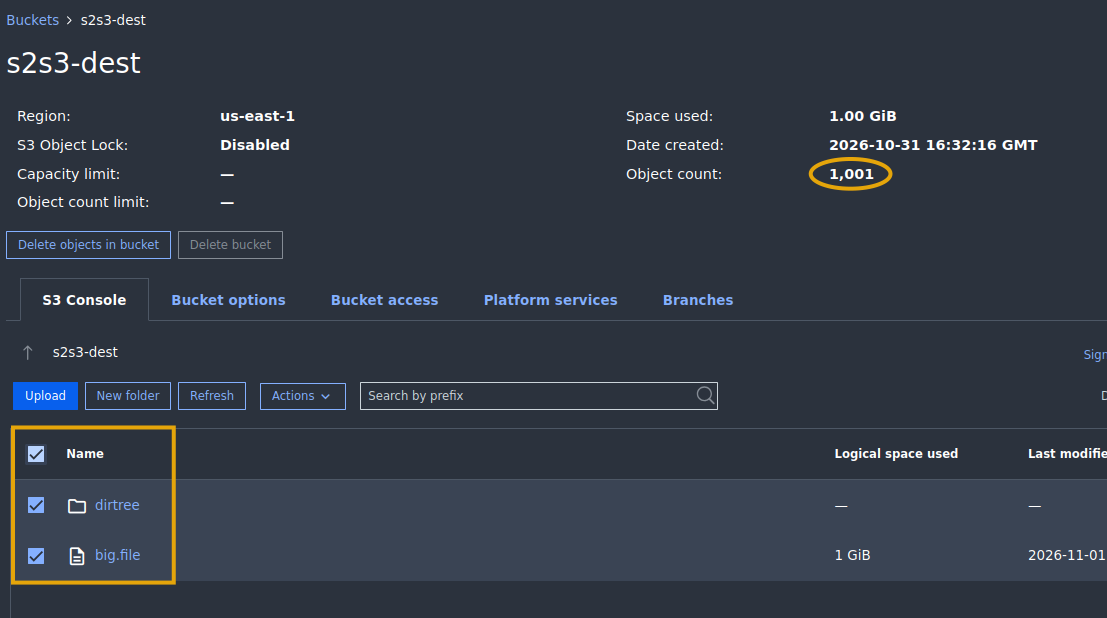
- Our next check shows 1,001 objects (total size 1,074,386,693 bytes) have been copied to StorageGRID.
{
  "job_id": "3def2b054f1a40928f30ae43d40257a8",
  "run_id": "20261101T043933Z-f39a64f9",
  "run_status": "submitted",
  "batch_count": 1,
  "counts": {
    "success": 1,
    "failed": 0,
    "pending": 0
  },
  "batches": [
    {
      "batch_id": "00000000-87a3fb4ad01ba1d1",
      "status": "success",
      "attempts": 1,
      "latest_attempt": {
        "attempt_id": "3cace5bc965d43f99bc8d16d793a82d5",
        "attempt_number": 1,
        "batch_file_count": 1001,
        "batch_id": "00000000-87a3fb4ad01ba1d1",
        "batch_total_bytes": 1074386693,
        "completed_at": "2026-11-01T04:40:30Z",
        "duration_s": 55.54549,
        "error": null,
        "estimated_bytes_per_second": 19342464.94,
        "estimated_files_per_second": 18.02,
        "final_failure": false,
        "job_id": "3def2b054f1a40928f30ae43d40257a8",
        "rclone_error_output": "",
        "rclone_exit_code": 0,
        "rclone_stats": [
          "2026/11/01 04:40:26 NOTICE:     1.001 GiB / 1.001 GiB, 100%, 18.162 MiB/s, ETA 0s",
          "2026/11/01 04:40:27 NOTICE:     1.001 GiB / 1.001 GiB, 100%, 17.027 MiB/s, ETA 0s",
          "2026/11/01 04:40:28 NOTICE:     1.001 GiB / 1.001 GiB, 100%, 15.963 MiB/s, ETA 0s",
          "2026/11/01 04:40:29 NOTICE:     1.001 GiB / 1.001 GiB, 100%, 14.965 MiB/s, ETA 0s",
          "2026/11/01 04:40:30 NOTICE:     1.001 GiB / 1.001 GiB, 100%, 14.030 MiB/s, ETA 0s"
        ],
        "run_id": "20261101T043933Z-f39a64f9",
        "schema_version": 1,
        "status": "success",
        "worker_id": "48083ae1e939"
      }
    }
  ]
}
- A potentially interesting detail here is the amount of data in MiB is 1024.615. The reason is S2S3 Feeder stores data on S3 (separately designated bucket), so the 615 KiB is related to job 3def2b054f1a40928f30ae43d40257a8. In a separate bucket:
$ mc ls s131/s2s3-manager/dc1/jobs
[2026-11-01 13:13:53 CST]     0B 3def2b054f1a40928f30ae43d40257a8/
[2026-11-01 13:13:53 CST]     0B 52dfb27cb5eb4f4281262d38d35b514a/
[2026-11-01 13:13:53 CST]     0B a2038dc96696497d907a4d0eb2dd2a98/
[2026-11-01 13:13:53 CST]     0B bdecb588a73c4fbcb5e7b8db6e6d7a28/
[2026-11-01 13:13:53 CST]     0B f87ef86b77d54baea6b6ff3b30a1f4e9/

$ mc ls s131/s2s3-manager/dc1/jobs/3def2b054f1a40928f30ae43d40257a8/
[2026-11-01 12:39:33 CST]   373B STANDARD manifest.json
[2026-11-01 13:14:07 CST]     0B batches/
[2026-11-01 13:14:07 CST]     0B runs/
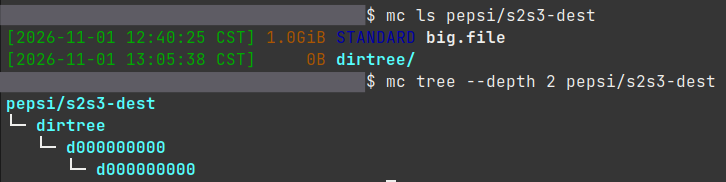
- Destination bucket is now populated:
$ mc ls pepsi/s2s3-dest
[2026-11-01 12:40:25 CST] 1.0GiB STANDARD big.file
[2026-11-01 12:41:07 CST]     0B dirtree/
- The file count is correct. Visual inspection:
- We can now go back to S2S3 and run the verify command for one final report before the destination bucket on StorageGRID is enabled for users
- Technically, we could run multiple iterations with this approach as well, but copying would not be incremental as it is in the S2S3 incremental approach and there would be overlapping jobs for the same source-destination pair (not a problem for copying, but not convenient for inspecting and tracking later)