PyTorch checkpointing workload with NetApp E-Series
- Introduction
- Torch checkpoints
- Filesystem format, path and files
- Example
- Storage considerations
- File system considerations
- S3 vs cluster file system
- Hybrid cloud options
- Conclusion
- Appendix A - Orbax
Introduction
Checkpoints save the state of the system and that state can be used to resume work without losing work already done.
One could, for example, use Spot.io to take advantage of low-cost compute instances, and save checkpoints to be able to resume work later in the case one or more go down before training is over.
They're not a new concept or technology. In fact, they are very common in HPC.
If you're looking for information on AI checkpointing in general, there's plenty of it on the Internet.
My objective was to find how they work and see what would be some general approaches to optimize checkpointing on NetApp E-Series.
This post focuses on PyTorch-related checkpointing.
Torch checkpoints
There are two kinds:
- traditional: torch.save
- distributed: dcp
As the name suggests, the latter is useful because in distributed DL parameters and gradients are partitioned, and the number of worker nodes and GPUs can be different when checkpoint needs to be loaded. dcp may be used with non-distributed as well, but it may have some limitations.
dcp works on single-GPU systems, but as long as it's not asynchronous, I'm not sure it's beneficial to use it instead of the usual. For what it's worth, here's dcp on a single-GPU system:

For asynchronous checkpointing, at this time PyTorch Lighting offers it as "experimental" feature (see here).
Filesystem format, path and files
Since the 1.6 release PyTorch uses a new zipfile-based file format. This is great for E-Series which doesn't support deduplication in any case and modern clients can compress data at a high speed.
Paths In some cases you can provide preferred path, in others it may be hard-coded (example: /opt/ml/checkpoints).
Example
To take a closer look I used one of Hugging Face transformer examples (text summarization) on a system with a single GPU.
The workload occupied 4.6 GiB VRAM.
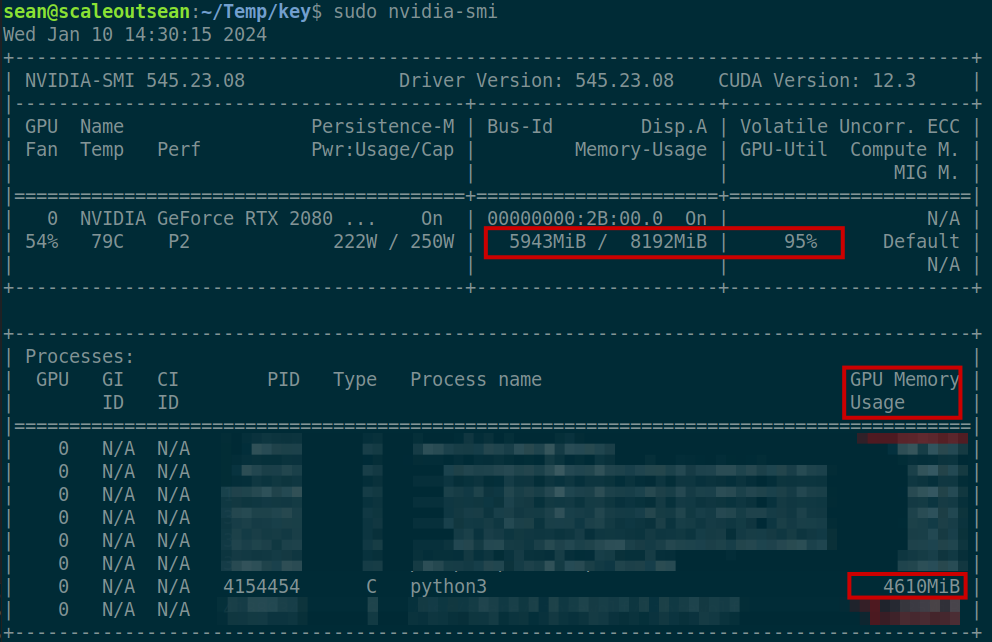
With this framework I could decide the output directory (--output_dir /tmp/tst-summarization). Checkpoints were periodically saved to subdirectories in that path.

The exact interval depends on several factors and although here we can see it happen every one-two minutes, in production it could happen much less frequently.

As you can see here, each checkpoint is roughly the same and the first one was same large, so these appear to be full checkpoints. I didn't find a way to create incremental checkpoints with PyTorch.
Multiple (N) independent nodes using "classic" checkpoints would increase the frequency of saving N times.
Using dcp on multiple nodes, on the other hand, would create a larger "aggregate" checkpoint composed of multiple files (one per GPU on which checkpointed job runs) as all jobs would save their memory at once.
Checkpoint files (from regular PyTorch checkpoint) look like this. Sizes of largest files are likely model size-dependent.
$ ls -l /tmp/tst-summarization/checkpoint-5500/
total 711424
-rw-rw-r-- 1 sean sean      1507 Jan 10 14:23 config.json
-rw-rw-r-- 1 sean sean       147 Jan 10 14:23 generation_config.json
-rw-rw-r-- 1 sean sean 242041896 Jan 10 14:23 model.safetensors
-rw-rw-r-- 1 sean sean 484163514 Jan 10 14:23 optimizer.pt
-rw-rw-r-- 1 sean sean     14244 Jan 10 14:23 rng_state.pth
-rw-rw-r-- 1 sean sean      1064 Jan 10 14:23 scheduler.pt
-rw-rw-r-- 1 sean sean      2543 Jan 10 14:23 special_tokens_map.json
-rw-rw-r-- 1 sean sean    791656 Jan 10 14:23 spiece.model
-rw-rw-r-- 1 sean sean     20746 Jan 10 14:23 tokenizer_config.json
-rw-rw-r-- 1 sean sean   2422289 Jan 10 14:23 tokenizer.json
-rw-rw-r-- 1 sean sean      1821 Jan 10 14:23 trainer_state.json
-rw-rw-r-- 1 sean sean      4856 Jan 10 14:23 training_args.bin
Some files may or may not be there depending on options. For example, rng_state.pth may be optional if you don't need it.
Each checkpoint had the same size, which wasn't unexpected. Considering that VRAM size was 4.6 GiB, 695 MB (compressed) checkpoint size seems reasonable.
This is an oversimplification, but let us assume that a checkpoint is somewhere around 1/8th of GPU memory used.
Storage considerations
E-Series is used in HPC and many users store TB-sized checkpoints on cluster file systems that reside on E-Series.
It is my guess that Deep Learning checkpoints are relatively smaller, and in environments sized to provide many GB/s in read performance it is not difficult to find room for a few GB/s in write performance.
In DL environments with E-Series we usually see a parallel file system such as BeeGFS, GPFS or Lustre, and save checkpoints to it. In the case of S3 we know MinIO on E-Series can also deliver GB/s in write performance and Versity S3 Gateway also looks promising.
A GB-sized checkpoint would take just second to write. A 20-node cluster with 8 GPUs per node and 40 GB VRAM per GPU would have 6.4 TB GPU RAM / 8 or some 800 GB on-disk checkpoint data. ("/ 8" comes from the $CAPACITY_GB / 8 assumption made 5-6 paragraphs ago.)
At 10 GB/s write speed (doable with a single EF600), it would take a minute to checkpoint 800 GB.
Smaller workloads with checkpoints taken at different times would of course take less time and space.
If we keep many checkpoints for a while, we may want to use NL-SAS instead of flash disks. This being a sequential write (and later read) workload, there normally isn't much advantage to keeping many checkpoints on flash storage. If you can keep the recent few on flash, that may be okay.
RAID-wise, RAID 6 would be suitable here. Optionally we could use RAID 10, but that would be more expensive capacity-wise.
Assuming that RAID 10 could be 30% faster than RAID 6, flash may make sense if time savings (which prevent GPUs from idling) can justify RAID 10. We also have to consider load time here - if workloads are frequently preempted or interrupted and checkpoints equally frequently loaded back, then using RAID 10 becomes even more attractive.
DDP (disk pools) could also be used (both with RAID 6 and 10-style volumes), but in HPC/DL disks are rarely pooled in DDP groups because RAID 6 and RAID 10 perform slightly better.
Reads are usually easier on storage than writes, so loading (restoring) checkpoints is less taxing on filesystem and storage controllers, and with E-Series can be much faster. If a checkpoint takes 30 seconds to save, it may take 15-20 seconds to load it. Of course, "it (always) depends", but loading a checkpoint is expected to be faster than saving it.
File system considerations
Some parallel file systems support tiers and ILM (GPFS, for example) and it is possible to write new checkpoints to RAID 10 and move older checkpoints to a lower-cost RAID 6-backed filesystem. But that's likely to be effective only in very large environments.
Since parallel file systems are also used in HPC, I would just recommend to apply general considerations for HPC storage and - if available - checkpoint-specific or scratch space-specific tuning information for dedicated checkpoint filesystems.
Some general considerations for BeeGFS and E-Series design can be found here and on the NetApp Web site.
About storage and filesystem efficiencies: because large checkpoint files are compressed, compressing these checkpoints again (before replication, for example) with generic compression approaches doesn't work well. For example, compressing compressed checkpoints saved me only single digit percentage points.
Saving uncompressed checkpoints would make storage efficiencies possible, but E-Series doesn't have any so that approach wouldn't be helpful unless one created uncompressed checkpoints and had a compressing and deduplicating filesystem that could potentially not only compress data, but also deduplicate any similarities between various checkpoints. I have no idea if there is much similarity between checkpoints, though, and haven't explored these options.
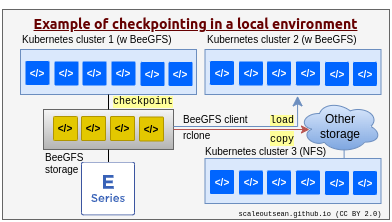
If you want to make a checkpoint available elsewhere, simply copy it, which can be part of your regular deep learning jobs, or another on-demand job.
S3 vs cluster file system
If, for some reason, checkpoints need to be copied to S3, sometimes it may be better to save them to disk and upload to S3 after that.
Although - with MinIO sharing the same E-Series (array or arrays) as parallel file system - that means writing the same thing twice, the first save would go to the disk at full speed (e.g. 10, 20 GB/s) and allow GPUs to resume work ASAP, while the second (filesystem to S3) could run slowly at a steady pace (e.g. 1 GB/s). For example:
- 30 minute checkpoints to filesystem at 10 GB/s,
- followed by bandwidth rate-limited upload from filesystem to S3 at 1-2 GB/s, after which the filesystem copy may be deleted (with or without a sleep/delay)
Upload to S3 can be done as separate step (say, in Jupyter) using your favorite S3 client. To save bandwidth and disk space you may want to run this "sync to S3" step only if certain conditions have been met (e.g. the latest checkpoint, or every 4th checkpoint, or every checkpoint when epoch result meets certain criteria).
If you use NetApp DataOps Toolkit, you can see this example. That could allow you to resume from a checkpoint in public cloud, for example using containers managed by Spot.io (see this workflow example).
Hybrid cloud options
As mentioned above (and in the linked articles), S3 is a good option for hybrid cloud situations because checkpoints can be dumped on to S3, which eliminates the need to first dump to filesystem and then upload to AWS or other S3 service.
Without S3, one can use rsync or similar approach to securely copy your data to/from another location.
Checkpointing to S3 - even on-prem S3 - avoids copying and allows secure access to S3 from any cloud, so I would tend to prefer this approach. If you're willing to experiment with it, you could try creating checkpoints on S3 mount points mapped to an object store accessible from another location.
If you create more checkpoints than you want to upload to S3, then checkpoint to shared filesystem and selectively upload checkpoints to S3. You may take advantage of enriching those with user tags, Object Lock protection, and so on.
Checkpoints for jobs that may need to be continued elsewhere can be written to an S3 mount point and loaded in the cloud.

The same can work in the opposite direction (cloud-to-on-prem), too.
There are commercial options, too, such as scheduled replication jobs that NetApp Cloud Sync does, or asynchronous directory-level replication by Komprise.
Conclusion
AI checkpointing is not very different from HPC checkpointing.
Because GPUs have less RAM than compute nodes, it may even be less of a challenge.
It appears no special considerations exist for PyTorch and E-Series. If E-Series is properly sized for read performance required, it is very likely it can also handle frequent checkpoints with ease.
Appendix A - Orbax
A colleague pointed out there's Orbax for JAX users.
Example:
>>> my_tree = {
...     'a': np.arange(8),
...     'b': {
...         'c': 42,
...         'd': np.arange(16),
...     },
...     'c': {
...             'x': 3333333,
...             'z': 4444444,
...     }
... }
>>> checkpointer.save(path / 'checkpoint_05', my_tree)
>>> my_tree
{'a': array([0, 1, 2, 3, 4, 5, 6, 7]), 'b': {'c': 42, 'd': array([ 0,  1,  2,  3,  4,  5,  6,  7,  8,  9, 10, 11, 12, 13, 14, 15])}, 'c': {'x': 3333333, 'z': 4444444}}
>>> checkpointer.restore(path / 'checkpoint_04/')
{'a': array([0, 1, 2, 3, 4, 5, 6, 7]), 'b': {'c': 42, 'd': array([ 0,  1,  2,  3,  4,  5,  6,  7,  8,  9, 10, 11, 12, 13, 14, 15])}, 'c': {'x': 11111111, 'z': 2222222}}
Similarly to PyTorch, checkpoint data is saved to a directory of your choice:
$ ls -lat ~/Temp/orbax-checkpoint/
total 64
drwxrwxr-x 8 sean sean  8 Feb  1 13:49 .
drwxrwxr-x 4 sean sean  8 Feb  1 13:49 checkpoint_05
drwxrwxr-x 4 sean sean  8 Feb  1 13:49 checkpoint_04
drwxrwxr-x 4 sean sean  8 Feb  1 13:43 checkpoint_03
drwxrwxr-x 4 sean sean  8 Feb  1 13:41 checkpoint_02
drwxrwxr-x 4 sean sean  8 Feb  1 13:40 checkpoint_01
drwxrwxr-x 9 sean sean 55 Feb  1 13:39 ..

$ ls -lat ~/Temp/orbax-checkpoint/checkpoint_04/
total 55
drwxrwxr-x 8 sean sean   8 Feb  1 13:49 ..
drwxrwxr-x 4 sean sean   8 Feb  1 13:49 .
-rw-rw-r-- 1 sean sean 144 Feb  1 13:49 manifest.ocdbt
drwxrwxr-x 2 sean sean   3 Feb  1 13:49 d
drwxrwxr-x 3 sean sean   5 Feb  1 13:49 ocdbt.process_0
-rw-rw-r-- 1 sean sean 105 Feb  1 13:49 checkpoint
-rw-rw-r-- 1 sean sean 829 Feb  1 13:49 _METADATA

$ ls -lat ~/Temp/orbax-checkpoint/checkpoint_05/
total 55
drwxrwxr-x 4 sean sean   8 Feb  1 13:49 .
drwxrwxr-x 8 sean sean   8 Feb  1 13:49 ..
drwxrwxr-x 2 sean sean   3 Feb  1 13:49 d
-rw-rw-r-- 1 sean sean 144 Feb  1 13:49 manifest.ocdbt
drwxrwxr-x 3 sean sean   5 Feb  1 13:49 ocdbt.process_0
-rw-rw-r-- 1 sean sean 105 Feb  1 13:49 checkpoint
-rw-rw-r-- 1 sean sean 829 Feb  1 13:49 _METADATA
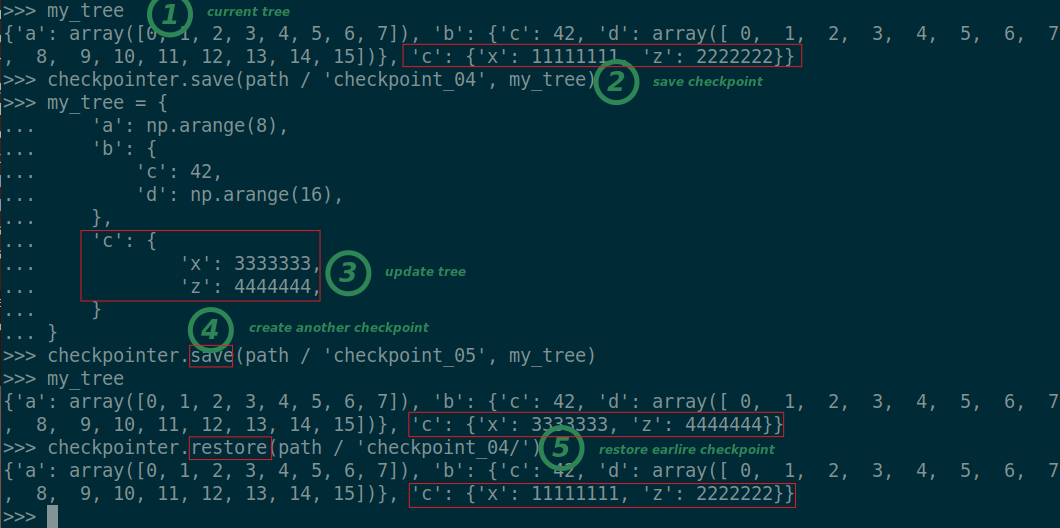
- 1 - initial tree data
- 2 - checkpoint number 04
- 3 - update tree data
- 4 - save updated checkpoint (number 05)
- 5 - restore previous checkpoint number 04
One thing I haven't tried is large tree structures to see if compression of checkpoints yields any savings. With tiny trees it's hard to say.