Ray checkpointing with BeeGFS and StorageGRID
- Part 1: Ray framework with NetApp E-Series and StorageGRID
- Part 2: Ray checkpointing to BeeGFS/E-Series and StorageGRID (this post)
Introduction
The first post on Ray framework with NetApp E-Series already covers checkpointing to BeeGFS.
Since that post got very long, this one will focus on the missing (and optional) second step of moving checkpoints from BeeGFS/BeeOND to StorageGRID.
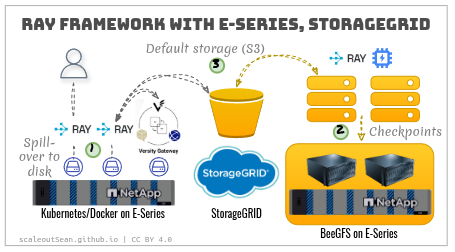
Moving snapshots to S3 is only theoretically optional. In most cases, it doesn't make sense to avoid it.
Consider this:
- You decide to keep checkpoints on BeeGFS
- Since you need those around, you can't use BeeOND and especially can't use RAID 0 with it (although you may want to use RAID 0 for ephemeral (BeeOND) filesystems)
- Now, because you're hoarding these on BeeGFS, you realize you also have a backup and restore problem
- Yes, there's always another solution. In this case, we can use BeeGFS RST
- Now you have to manage RST. It works, but I wouldn't use it for checkpoints
If we make the right choice and move checkpoints to S3, there are no new problems. You can then pull those from AWS or any other place, or push them elsewhere with Cloud Mirror or other, easy approaches.
One could also checkpoint directly to S3. That's fine, if your object store is fast enough.
In practice, that means:
- You probably need more hardware resources (such as, for example, several all-flash nodes, or more NL-SAS nodes that you'd otherwise have, as opposed to one 2U disk array)
- It may end up costing more and taking more rack units of space
Checkpointing directly to S3 is viable, but checkpointing to disk is probably more effective and the same shared space can be used for "swapping" (a less important, but useful feature mentioned in Part 1).
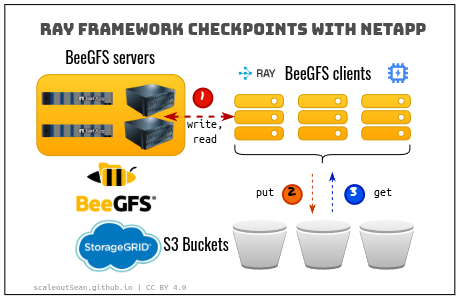
BeeGFS or BeeOND
Main decisions:
- We can use a full-featured BeeGFS cluster
- We can use BeeOND, which is a BeeGFS Lite. I'm sure ThinkParQ marketing has a fancier description, but let's say BeeOND is "one shot", "bare bones", unmanaged, ephemeral BeeGFS. A "cattle" storage cluster, compared to BeeGFS, a "pet" storage cluster.
Both modes work with any block devices. It is assumed that BeeOND would use internal storage (which is less reliable and less resilient than protected), but I've been saying for years - it's silly to not:
- Run BeeOND with E-Series when appropriate. You can run both BeeGFS and BeeOND at the same time and both with the same E-Series array
- Use RAID 0 on E-Series when appropriate. You don't have to make everything RAID 0
Whatever is chosen, it makes no difference to Ray. Checkpoints are staged to a temporary path on BeeGFS/BeeOND and that is all.
There is a catch, which is that RAID 0 (or any bare metal node) could fail midway, which could interrupt checkpointing, which could in turn interrupt training. There's always risk of interruption for various reasons (not just disk failures) and it has to be weighted against the savings in capacity and shorter checkpoint times with RAID 0.
Among niche solutions for BeeGFS-only access, I'll highlight the one I usually blog about:
- Use mixed storage clusters (NVMe/NL-SAS, e.g. hybrid EF80 disk arrays)
- Checkpoint to BeeGFS (NVMe)
- Use in-filesystem tiering to move older checkpoints from NVMe to NL-SAS
- Use Versity S3 Gateway(s) with BeeGFS for S3 access
StorageGRID
We create a bucket for checkpointing.
Generally, you may want to enable versioning and S3 ObjectLock on these as you don't want them wiped before their time or replaced with malware.
Since we stage to BeeGFS first and then put objects to StorageGRID, there's probably no need to use all-flash StorageGRID nodes. While it is faster to resume from flash-based StorageGRID nodes, it is also costlier, so make your own decision.
Smaller clusters have fewer failures and the cost of waiting is slower. If reloading a checkpoint from NL-SAS nodes takes 5 minutes of training time, and from NVMe 2 minutes, that is awesome.
But, if that saves just 3 minutes in a 100 minute training epoch, maybe you wouldn't mind NL-SAS. Especially if you can dedicate a fraction of that EF-Series array to S3 caching with Alluxio or similar solution that costs a fraction of three NVMe storage nodes.
Ray framework
There's literally half a dozen ways one can take checkpoints in Ray.
Check their documentation for the details, but from a storage integration perspective, they are very similar:
- Checkpoint data lands on shared filesystem such as BeeGFS or local filesystem(s) in "per node" chunks (distributed checkpointing). You could use a single host filesystem on E-Series in Direct Attach mode, if you didn't need or want a shared filesystem. One reason for not using internal disks and using BeeGFS with protected storage is a better availability.
- From BeeGFS, snapshots are uploaded to S3 (sync or async)
- Ray then removes staged data from BeeGFS
Data is uploaded to S3 synchronously or asynchronously. The latter has a lower impact on training workload, but it makes no difference to BeeGFS or StorageGRID. I tried both variants.
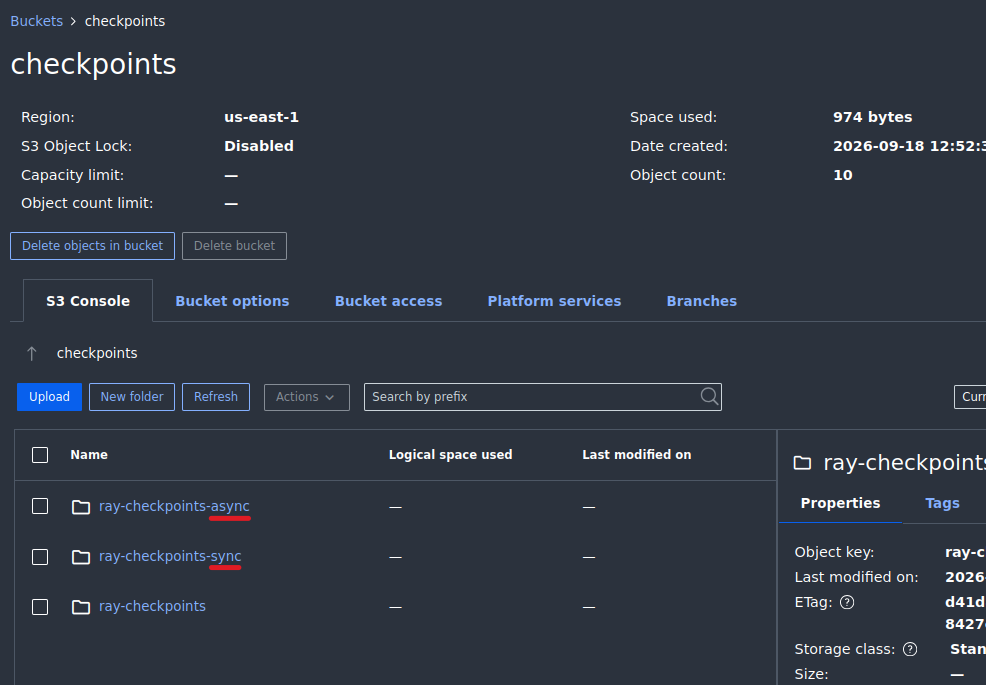
The performance was within margin of error. How is that possible? My checkpoint files were not large (64 MiB, ~1-2 seconds to copy) and training epoch lasted less than 20 seconds, so time savings from asynchronous upload were barely noticeable.
In both cases, the end result was the same - checkpoints on StorageGRID.
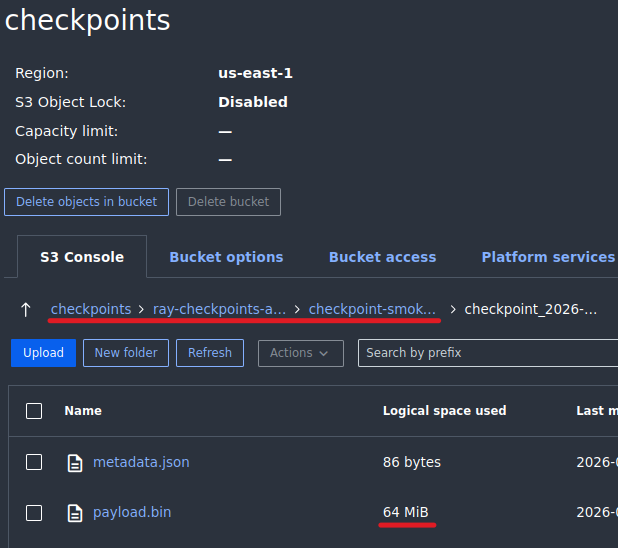
Walk-through
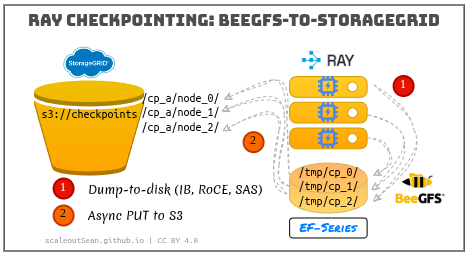
Both sync and async were used. These demos don't include validation, which is the easier workload (S3 GET).
Disk-to-S3
Ray stages checkpoints to a staging directory.
From there, Ray Checkpoint picks staged files, renames them as necessary and uploads them to designated S3 checkpoint bucket/prefix:
(RayTrainWorker pid=2566873) Checkpoint successfully created at:
  Checkpoint(filesystem=s3, path=checkpoints/ray-checkpoints-async/checkpoint-smoke-s3/checkpoint_2026-09-18_21-13-35.108871)
Ray is also in charge of deleting data from the staging directory.
What happens if compute job fails and we have to resume? We start the same job. Ray looks at the checkpoints on S3 and picks the most recent checkpoint.
(TrainController pid=2580489) A run snapshot was found in storage folder at:
  'checkpoints/ray-checkpoints-async/checkpoint-smoke-s3'

(TrainController pid=2580489) This snapshot contains a list of checkpoints reported via
 `ray.train.report` and will be loaded. This allows the latest checkpoint found in the snapshot
  to be accessible within your training function via `ray.train.get_checkpoint`.
This is the same approach we'd use to pick a checkpoint from a StorageGRID bucket exposed to the public cloud to continue training at a different location.
After upload, each result is reported for evaluation.
(RayTrainWorker pid=675703) Reporting training result 49:
  TrainingReport(checkpoint=Checkpoint(
    filesystem=s3, path=checkpoints/ray-checkpoints-async/checkpoint-smoke-s3/checkpoint_2026-09-19_01-18-18.837927),
    metrics={'step': 8, 'score': 8.0, 'rank': 0, 'is_best': True}, validation=False) from rank 0
We can specify how many checkpoints to keep in S3 and whether to keep last N or just "best".
A result from a simple training run with asynchronous checkpoints to S3.
{
  "elapsed_s": 52.731348189059645,
  "storage_path": "s3://checkpoints/ray-checkpoints-async",
  "resolved_storage_path": "checkpoints/ray-checkpoints-async",
  "s3_endpoint": "http://192.168.1.211:10080",
  "async_upload": true,
  "best_only": true,
  "num_workers": 1,
  "num_steps": 10,
  "checkpoint_mb": 64,
  "num_to_keep": 3,
  "result_path": "checkpoints/ray-checkpoints-async/checkpoint-smoke-s3",
  "best_checkpoint_path": "checkpoints/ray-checkpoints-async/checkpoint-smoke-s3/checkpoint_2026-09-18_21-14-46.040634",
  "best_checkpoint_filesystem": "s3",
  "metrics": {
    "step": 9,
    "score": 9.0,
    "rank": 0,
    "is_best": true
  }
}
Synchronous checkpoints don't have async_upload=true.
{
  "elapsed_s": 53.03262649709359,
  "storage_path": "s3://checkpoints/ray-checkpoints-sync",
  "resolved_storage_path": "checkpoints/ray-checkpoints-sync",
  "s3_endpoint": "http://192.168.1.211:10080",
  "async_upload": false,
  "best_only": true,
  "num_workers": 1,
  "num_steps": 10,
  "checkpoint_mb": 64,
  "num_to_keep": 3,
  "result_path": "checkpoints/ray-checkpoints-sync/checkpoint-smoke-s3",
  "best_checkpoint_path": "checkpoints/ray-checkpoints-sync/checkpoint-smoke-s3/checkpoint_2026-09-18_21-12-01.150357",
  "best_checkpoint_filesystem": "s3",
  "metrics": {
    "step": 9,
    "score": 9.0,
    "rank": 0,
    "is_best": true
  }
}
As mentioned above, the bucket has versioning enabled and that is visible in this audit log screenshot.
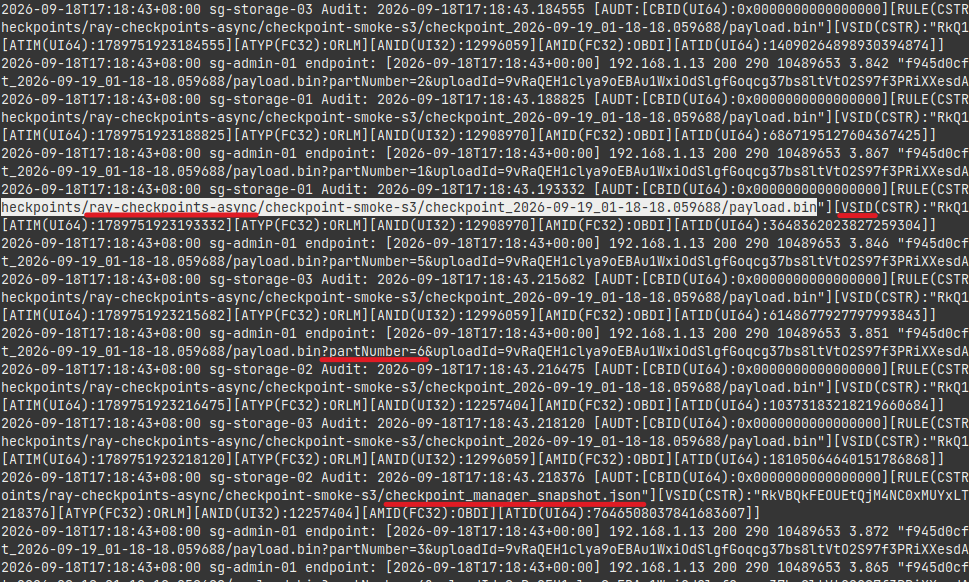
These runs used a generic single-host filesystem on a disk shared by other services - a noisy environment which wasn't conductive to making performance-related observations.
BeeGFS-to-S3
For this test, we use BeeOND with disks on E-Series EF600 (NVMe/ROCE). You can use internal disks (no E-Series) or BeeGFS with E-Series for a "persistent" take on shared storage.
In this test, our primary concerns are:
- Staging to a shared filesystem should efficiently stripe I/O across devices, demonstrating scalability and the ability to handle large bursts without over-provisioning NVMe disks to each host where workers run
- Fast staging to BeeGFS, should let us observe a delay between staging vs. moving data to S3 and maybe expose difference in performance (synchronous vs. asynchronous checkpoint shipping to S3) which couldn't be observed in the noisy environment
Because the logs would take a lot of screen space, I captured relevant screenshots and put them in Appendix A below.
I'll show one screenshot not in Appendix A, it shows how nicely BeeGFS chunks I/O requests across all data disks.
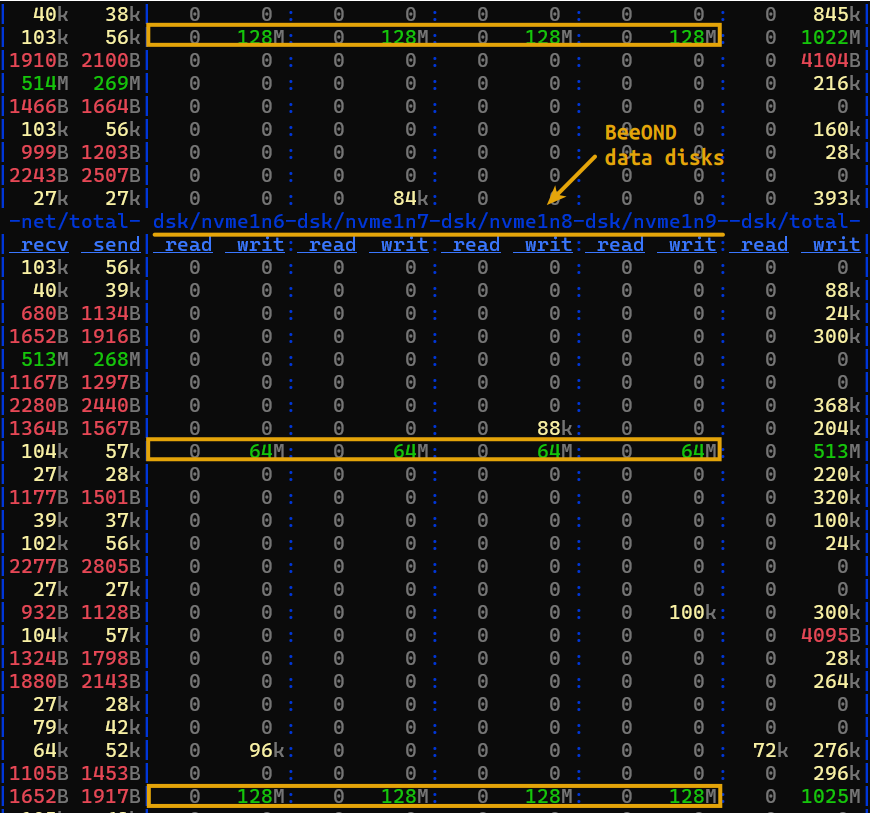
Add to that RDMA between peers (in BeeOND), NVMe/RoCE to storage and even GDS (I didn't use GPUs, though), and tens of GB/s of protected storage bandwidth on EF-Series, it's not easy to do better and cheaper with S3 storage which usually requires multiple network hops to complete writes.
I was encouraged by what I've seen using Ray with BeeOND/BeeGFS on E-Series.
Conclusion
Keeping checkpoints on a shared filesystem is simply not a good idea. I know there are decent approaches for that (including the hybrid BeeGFS approach described at the top), but I do not like it for checkpoints. Eventually, checkpoints should end up in cost-effective S3 object stores. The sooner the better, because there checkpoints get better protection, security and become universally accessible from anywhere, so why delay if the delay isn't adding much value?
Whether one should upload directly or indirectly (by staging to an intermediate local or shared file system) to S3 is not a settled matter. I believe the indirect, staging approach still makes sense if done right. S3/RDMA won't change that any time soon.
An advantage for E-Series is that the same E-Series system can also be used for S3 read caching and other block storage-based services that are needed in these environments, so some form of fast, reliable block storage is usually required in any case. Eight additional NVMe disks for BeeOND and S3 read cache may still be preferred over adding three all-flash object storage nodes.
BeeGFS with E-Series (staging) and StorageGRID (for checkpoints, but also data/artifacts and model registry) seem to be the right NetApp solution for medium and large users of Ray framework.
Appendix A: BeeGFS for staging, S3 for checkpoints
- 2 Ray workers, 128 MiB checkpoints, 10 steps
- BeeOND 8.4.0 on EF600 (1 metadata, 4 data disks)
- Versity S3 Gateway 1.8.0 on EF600 (separate disk and host)
- Sync and async checkpoint to S3
Sync checkpoint to S3 with two workers using shared BeeGFS staging area:
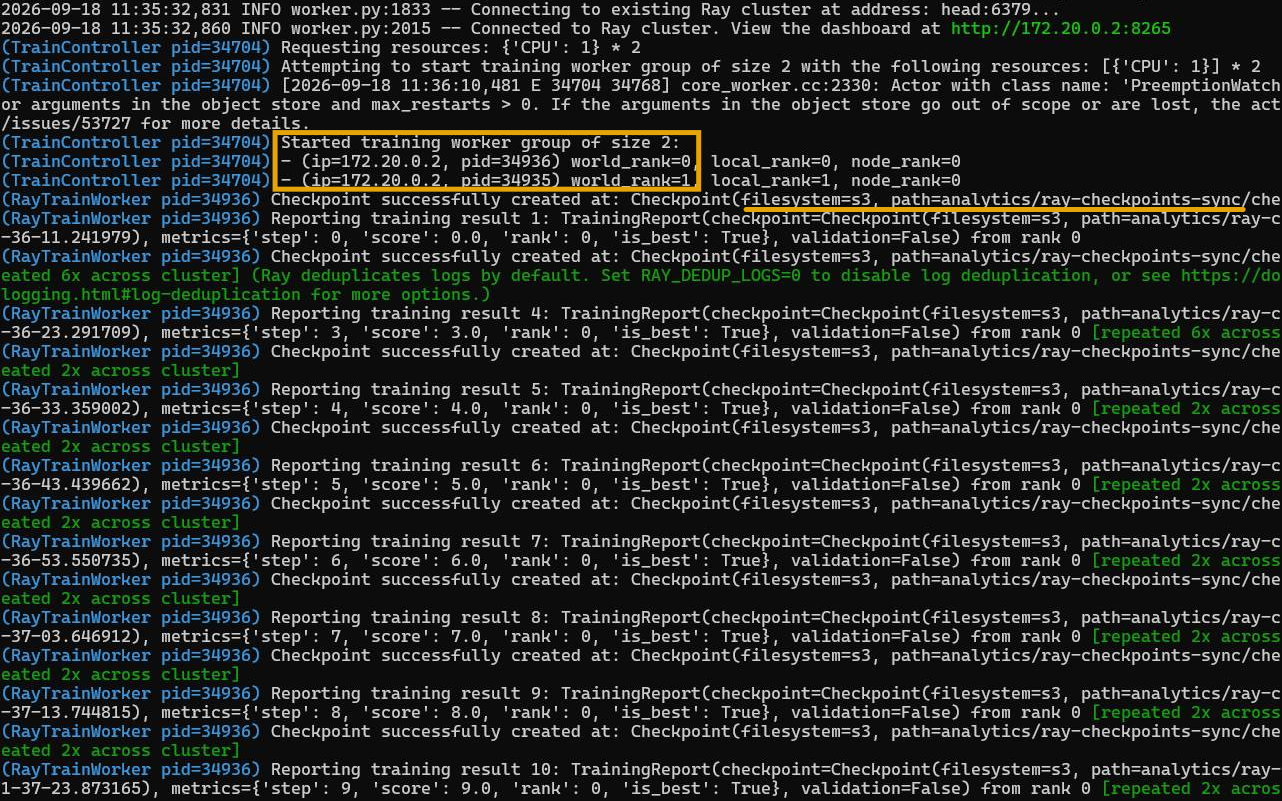
One very interesting detail is BeeGFS disk I/O (2) was lagging behind S3 traffic. Notice that dstat interval was 5s (1), so the gap was significant.
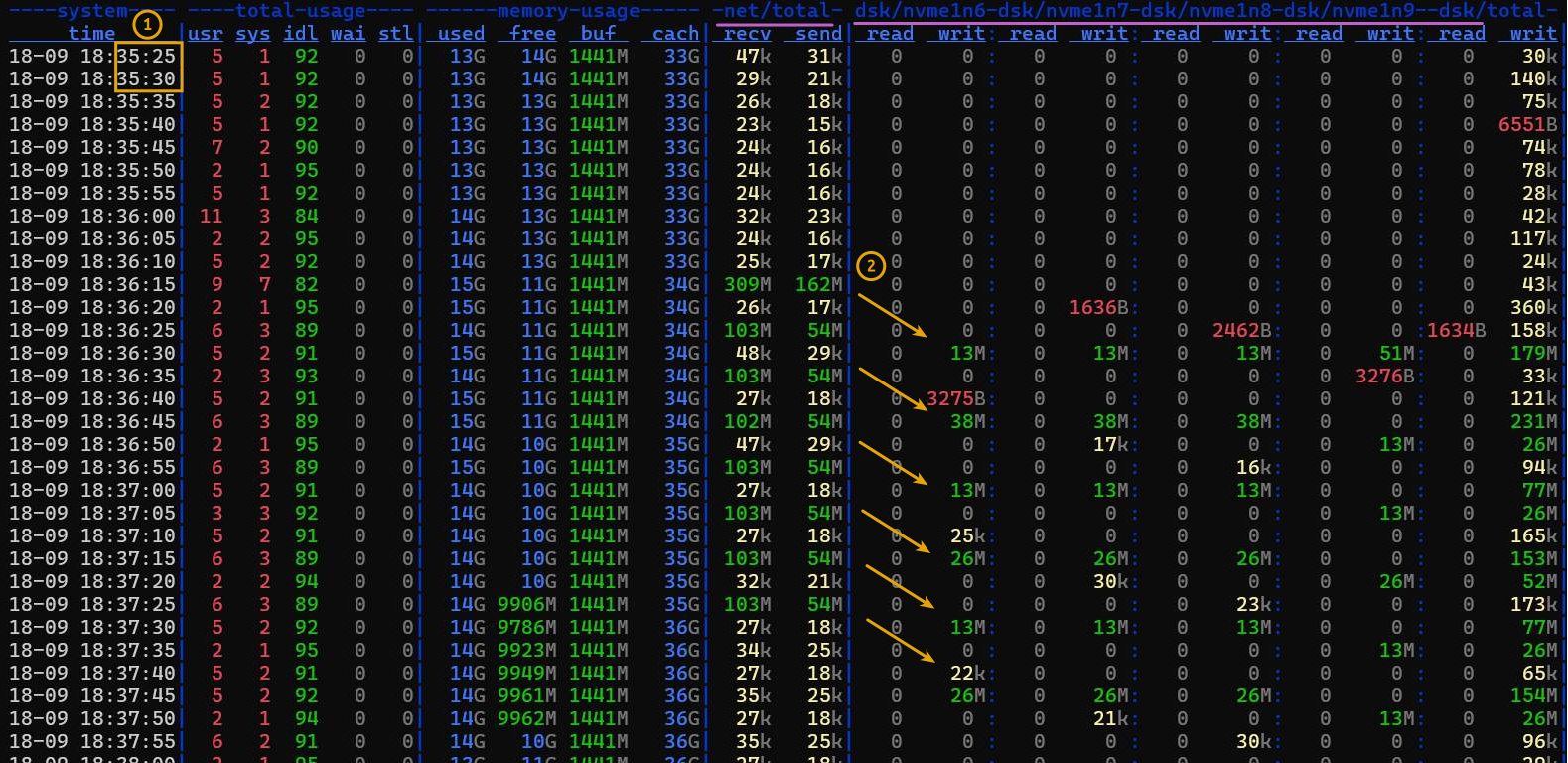
Result from a sync run:
{
  "elapsed_s": 149.3415741873905,
  "storage_path": "s3://analytics/ray-checkpoints-sync/",
  "resolved_storage_path": "analytics/ray-checkpoints-sync/",
  "s3_endpoint": "http://192.168.1.11:7070",
  "async_upload": false,
  "best_only": true,
  "num_workers": 2,
  "num_steps": 10,
  "checkpoint_mb": 128,
  "num_to_keep": 3,
  "result_path": "analytics/ray-checkpoints-sync/checkpoint-smoke-s3",
  "best_checkpoint_path": "analytics/ray-checkpoints-sync/checkpoint-smoke-s3/checkpoint_2026-09-18_11-37-23.873165",
  "best_checkpoint_filesystem": "s3",
  "metrics": {
    "step": 9,
    "score": 9.0,
    "rank": 0,
    "is_best": true
  }
}
Another somewhat unexpected result was that async wasn't any faster. Out of 12 runs (6 each), sync scored four 149s and two 145s, while async scored the opposite (four 145s, and two 149s).
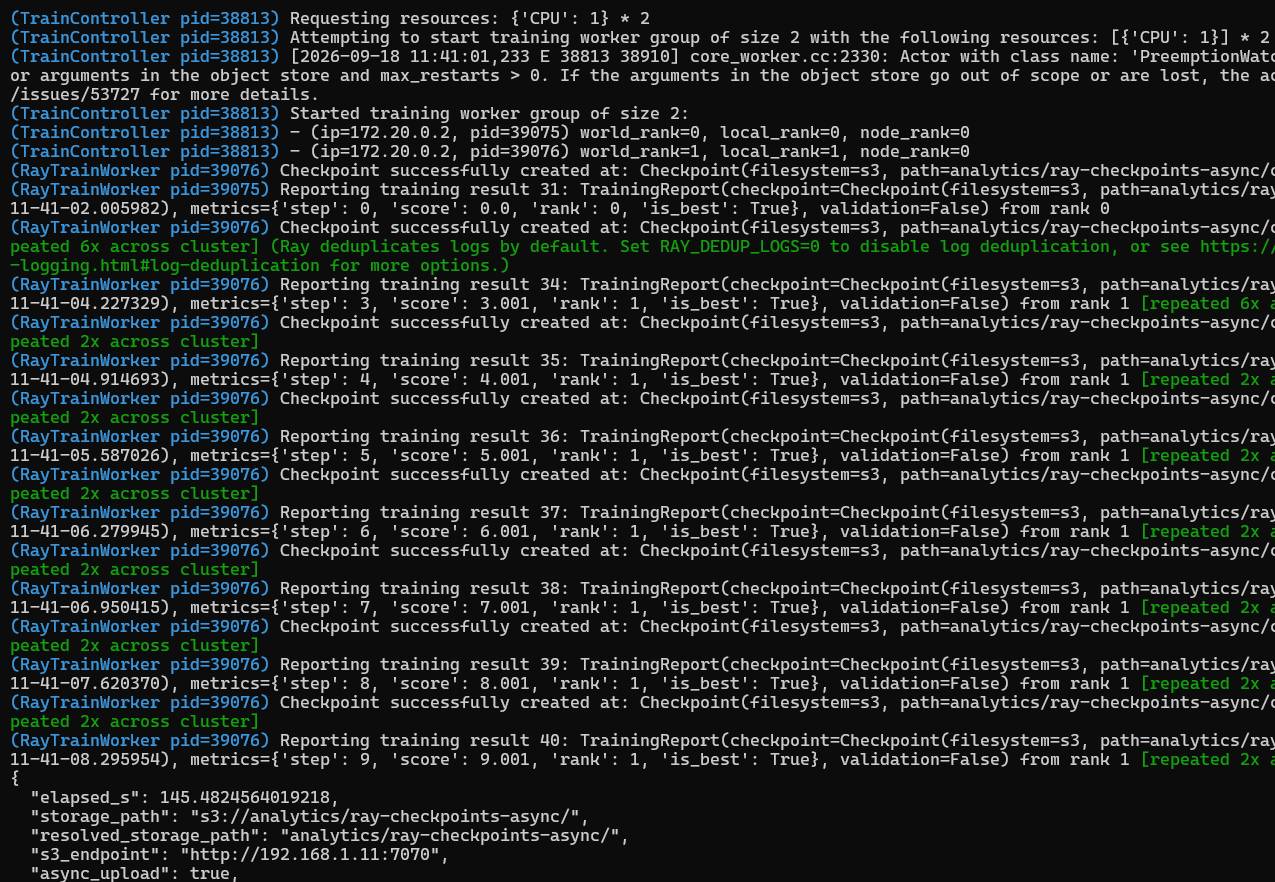
One of the async results:
{
  "elapsed_s": 145.4824564019218,
  "storage_path": "s3://analytics/ray-checkpoints-async/",
  "resolved_storage_path": "analytics/ray-checkpoints-async/",
  "s3_endpoint": "http://192.168.1.11:7070",
  "async_upload": true,
  "best_only": true,
  "num_workers": 2,
  "num_steps": 10,
  "checkpoint_mb": 128,
  "num_to_keep": 3,
  "result_path": "analytics/ray-checkpoints-async/checkpoint-smoke-s3",
  "best_checkpoint_path": "analytics/ray-checkpoints-async/checkpoint-smoke-s3/checkpoint_2026-09-18_11-41-08.295954",
  "best_checkpoint_filesystem": "s3",
  "metrics": {
    "step": 9,
    "score": 9.0,
    "rank": 0,
    "is_best": true
  }
}
Switching to 1s dstat interval provided insight into bursts.
- (1) At least some of the traffic must have been from Docker, so "out" (egress) direction was the one I watched more
- (2) BeeGFS very nicely striped I/O across the four storage targets (configured to chunk in 1MiB segment per target)
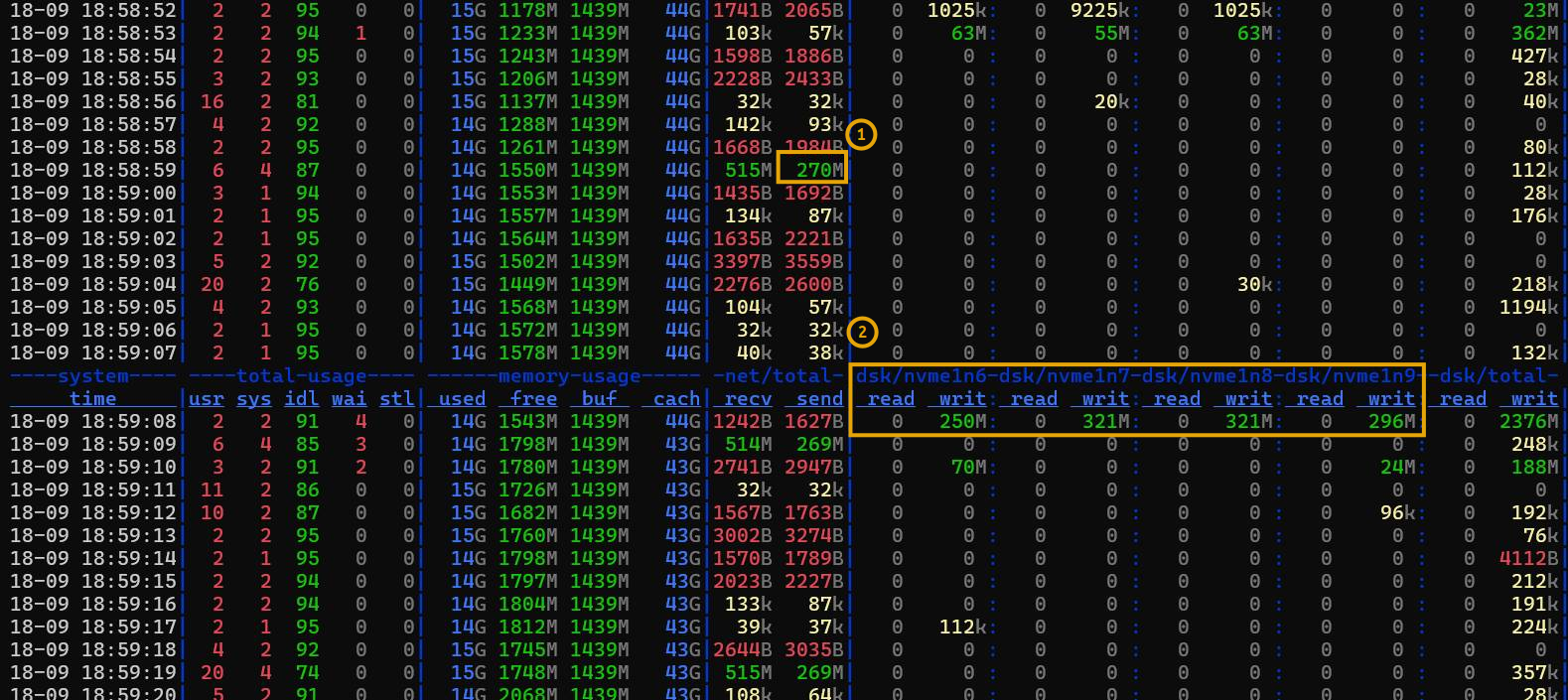
This is another, beautiful example of BeeGFS chunking/striping across multiple E-Series LUNs.
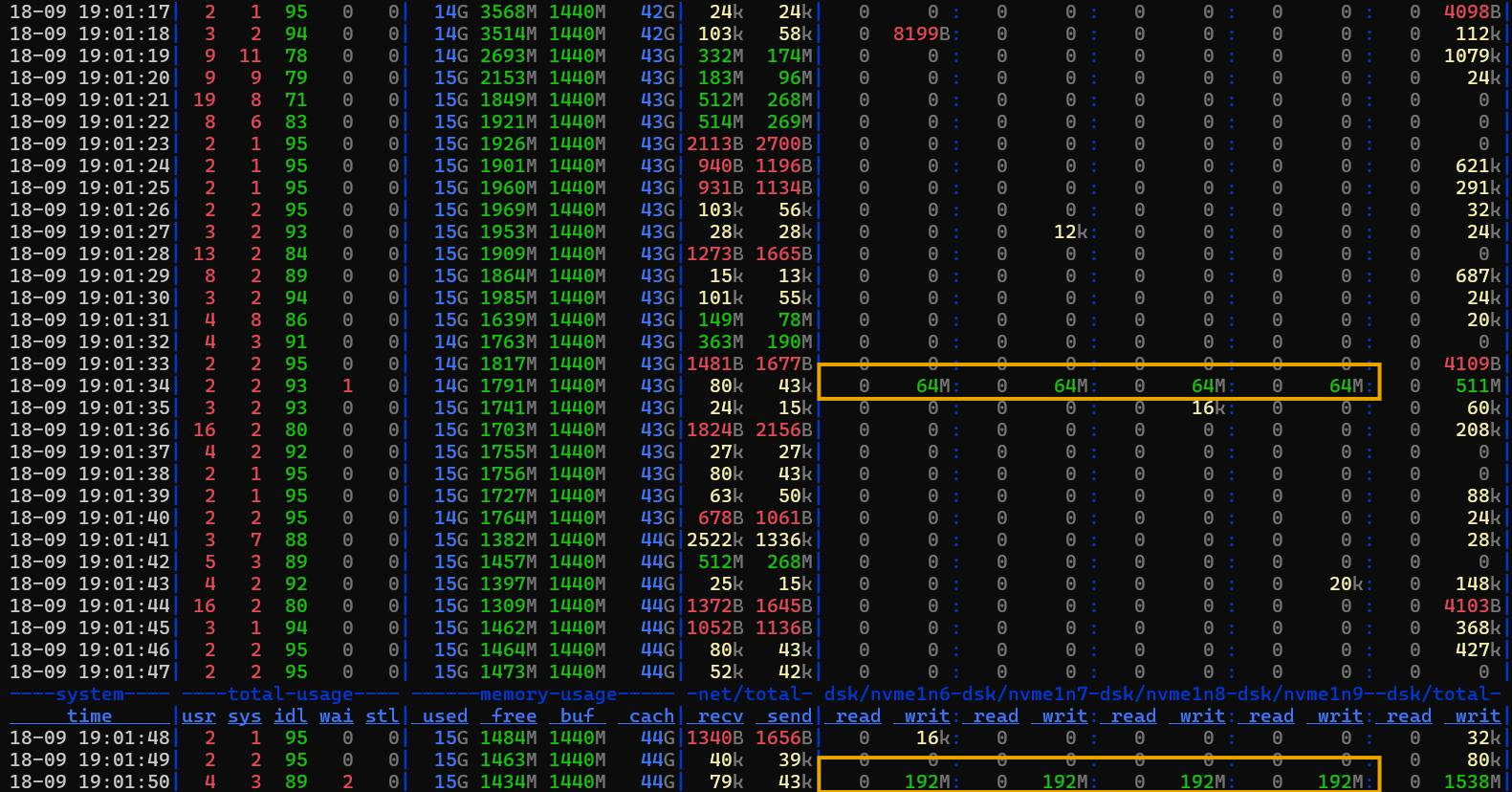
VGW handled 128MiB checkpoints within several seconds, delivering hundreds of MB/s. (My tested maximum on a single E-series LN is several GB/s - so I know it can do 10x more.)
In the SANtricity UI, the effect of 1MiB chunks was obvious (aggregate view). Some of that I/O was from VGW on another LUN. These charts are "averaged", so not as interesting as dstat - the interesting part is average request size.
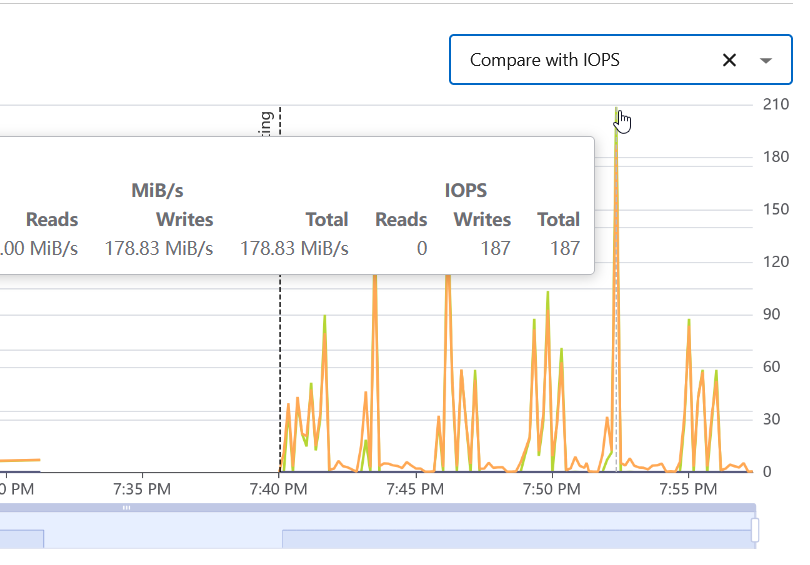
It is obvious that the exact behavior and interplay between staging and S3 depends on several highly variable factors.
In these particular runs, the checkpoints weren't large, and so S3 was not slow enough. Were the checkpoints larger, we would have created an artificial bottleneck and maybe async would have looked better.
The "lag" of disk I/O behind S3 - synchronous or not - comes from write cache buffering on BeeGFS. Of course, we could disable write cache on BeeGFS, but no one does that in real life. Because of that buffering, S3 PUTs aren't negatively affected by synchronous. Both async and sync checkpoints read from RAM and were limited by S3 PUT performance - buffered writes weren't causing any delays to sync.
With a different workload or carefully selected parameters, maybe we could create a scenario in which async looks better, but that would be meaningless for real life use. We already know that, under heavy workload, BeeGFS would write to disk before S3 is done uploading and async would save time. But, not all training would be like that.