S3/RDMA with Versity S3 Gateway and NetApp E-Series
Introduction
I've written a number of posts about the Versity S3 Gateway with NetApp E-Series. I think it's a great combination.
Earlier this week Versity committed S3/RDMA code to the Versity S3 Gateway repository.
Is that useful? Can we use it with E-Series? How?
Let's take a crack at these questions.
Use cases
RDMA is useful with S3 as it is with NVMe (which, let's not forget, has a poor man's version in NVMe/TCP).
So that is the first and obvious use case - accessing large objects without burdening the gateway. In this case, "the gateway" would be:
- a Versity S3 gateway running in a Kubernetes container, VM or bare metal server, sharing data from an E-Series-backed LUN (very generic and universal)
- half a dozen Versity S3 gateways sharing data from BeeGFS in parallel
Common use cases (copied from the Versity repository):
| Use case | Why |
|---|---|
| Large-object streaming on a RoCE/IB fabric | Near line-rate throughput with no CPU loading |
| AI/ML training | Data loading from object storage eliminates host-memory copy |
Since there's no extra "cost" to it - S3 over RDMA compared to S3 over TCP - if you have RDMA-capable hardware and it's faster with RDMA than without it, there's no reason to not use it.
Making use of VGW S3/RDMA with E-Series
This will be updated as I make progress actually doing it, but the concept is simple:
- Deploy VGW with S3/RDMA on a RoCE-capable network
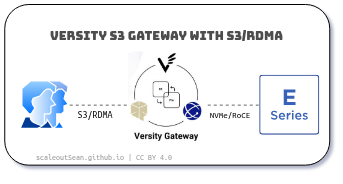
Optionally (the second leg of I/O path):
- Serve data on E-Series with NVMe/RoCE interfaces and NVMe disks. RDMA/IB will also work, of course. EF-Series EF80 is currently the best model for both RoCE and IB and it's the same network card configuration that can serve on or the other. While VGW S3/RDMA will work even with E-Series E4012 with iSCSI interfaces, I/O will get bottle-necked on disk array interfaces and disks.
That could give us end-to-end RDMA with regular filesystems (XFS, for example). You can try it today by following the instructions.
BeeGFS clients use RDMA, so one could in theory run VGW S3/RDMA on BeeGFS clients and still get end-to-end RDMA, but this is more complex so we'll have to see if this is as simple as single host filesystems.
Where does NetApp StorageGRID fit
StorageGRID 12.1 does not support S3/RDMA, so currently it's like having two NAS boxes, one with NFS v3 and another with NFS v3 and v4 support. We can access both at the same time, if we want. Or, we can copy/move data from one to another and compute using that protocol.
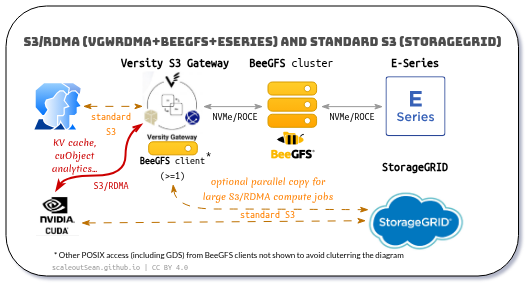
It's the same logic as in using just BeeGFS for batch processing data copied from (BeeGFS without Versity S3 Gateway): sometimes it can be less costly to copy to another tier and compute faster after that, than to compute in place.
Ideally, copying should be avoided. But consider that StorageGRID provides data security, durability and protection that's significantly different to BeeGFS on NVMe/RoCE. Mixing both in the same cluster often results in a higher cost of capacity and performance across the board. You end up with a platform that does everything and does it fast, but it's usually an all-flash system that costs multiple times more even after advanced data reduction. It's not a bad option, but it has tradeoffs and this isn't just unnecessary copying between "islands" of storage systems with very similar properties.
But even in this diagram, it's not mandatory to copy anything. You may have existing inferencing or other workflows in place and simply add S3/RDMA as a KV cache destination, if you plan on using S3 for KV cache. Zero copying and no change to your workflows.
Conclusion
For NetApp users, Versity S3 Gateway with S3/RDMA is currently the only way to get S3/RDMA at HPC-like cost of performance. S3/RDMA will likely become available - and even be built-in - on other NetApp storage platforms, but not at this cost of performance for protected storage. For KV Cache use case, you could even run this thing on RAID 0 volumes to get an even lower cost of performance.
Versity S3 Gateway with S3/RDMA on BeeGFS not only enables E-Series to provide crazy-fast access to data without traditional file sharing services (you can run it even on Kubernetes), but also makes it possible to supplement StorageGRID with S3 on E-Series to let applications do the heavy lifting on E-Series and output the results to StorageGRID.
In some cases we'll need the fastest GET over S3/RDMA possible in order to fetch or analyze large files or file sets (backup-to-disk, or perhaps analytics queries) and in other cases there may be several instances of VGW S3/RDMA deployed on a BeeGFS cluster used for rapid processing of terabytes of data.
It is simple and cost effective because Versity (and ThinkParQ) did the work for us and made the software available for free. I'm interested in a variety of use cases related to S3/RDMA and E-Series, so look forward to blogging more on this topic.
Appendix A: VGW S3/RDMA backed by E-Series (NVMe/RoCE)
Although Versity S3 Gateway notes currently recommend just one particular Rocky Linux 9 and kernel version, it can be made to work on Ubuntu 26.04. Just follow the steps from the Versity User Guide for S3/RDMA and install the dependencies before building. I used CUDA Toolkit (installing just CUDA Runtime wasn't enough). All three binaries could be built, but I couldn't use the CUDA client as I didn't have GPU hardware.
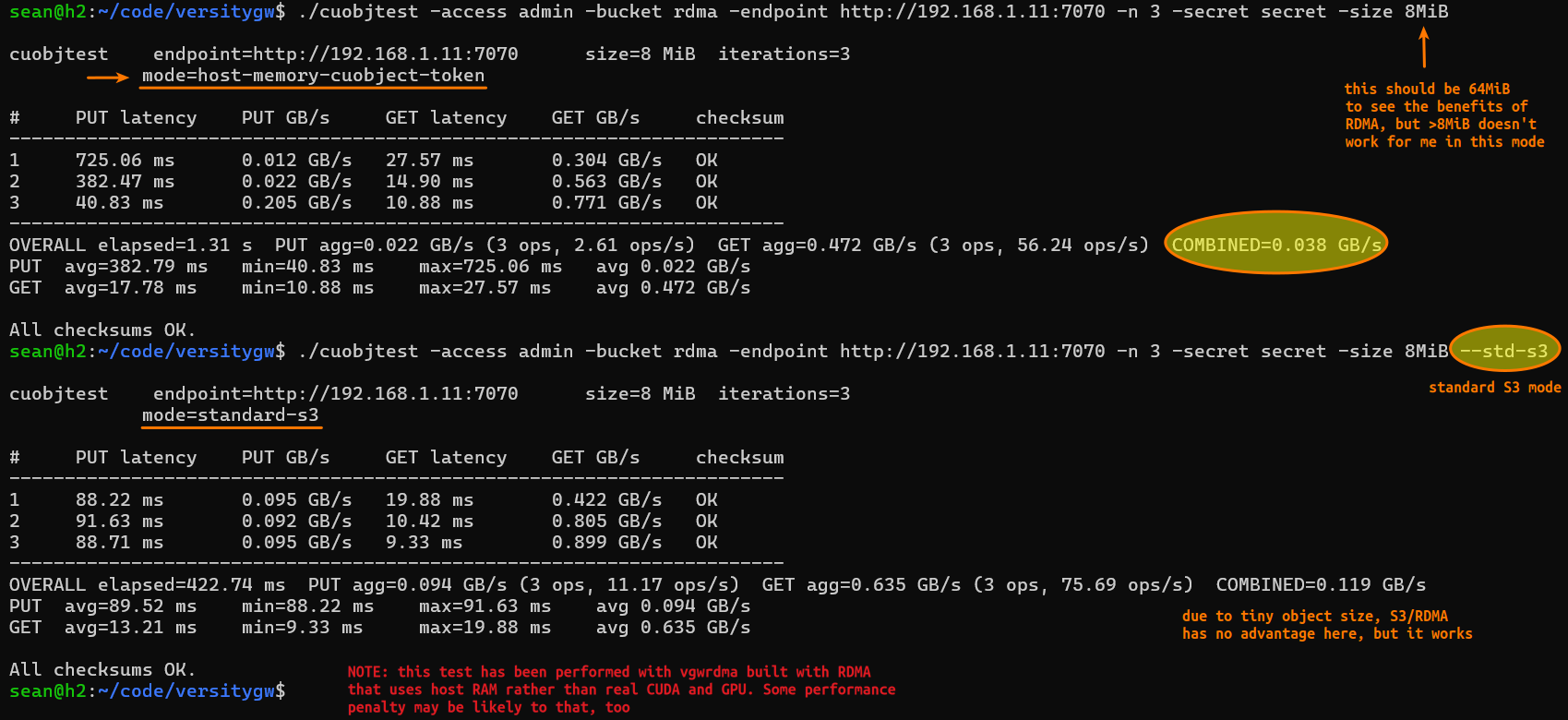
In this test below:
- I did not have CUDA hardware, i.e. slow host memory was used instead of CUDA and GPU
- I could not use objects larger than 8 MiB, which is too small to see benefits from RDMA hand-off even if I had GPU hardware
As a result, it doesn't work faster than regular Versity S3 Gateway, but this is a huge step forward.
A screenshot from two client tests, S3/RDMA and standard S3:
If anyone tries to build on Ubuntu 26.04 and 24.04:
- the client was Ubuntu 24.04 LTS with latest CUDA 13.3, both types of clients were built successfully
- the server was Ubuntu 26.04 LTS with latest CUDA 13.3, both server and two clients were built successfully
Server details were as follows:
- Ubuntu 26.04 LTS
- Kernel modules:
$ lsmod
Module                  Size  Used by
ib_iser                57344  0
libiscsi               81920  1 ib_iser
rpcrdma               450560  0
scsi_transport_iscsi   176128  2 ib_iser,libiscsi
ib_ipoib              143360  0
ib_umad                45056  0
rdma_ucm               40960  0
nf_conntrack_netlink    61440  0
xt_nat                 12288  0
xt_tcpudp              16384  0
veth                   45056  0
xt_conntrack           12288  6
xt_MASQUERADE          16384  6
xfrm_user              69632  1
xfrm_algo              16384  1 xfrm_user
xt_set                 20480  0
ip_set                 61440  1 xt_set
nft_chain_nat          12288  6
nf_nat                 65536  3 xt_nat,nft_chain_nat,xt_MASQUERADE
xt_addrtype            12288  4
nft_compat             20480  16
nf_tables             409600  172 nft_compat,nft_chain_nat
beegfs                782336  0
xfs                  2981888  2
cpuid                  12288  0
algif_hash             20480  0
af_alg                 32768  1 algif_hash
dm_round_robin         12288  36
dm_vdo                618496  1
dm_bufio               57344  1 dm_vdo
lz4_compress           24576  1 dm_vdo
qrtr                   53248  2
cfg80211             1536000  0
intel_rapl_msr         20480  0
intel_rapl_common      57344  1 intel_rapl_msr
intel_uncore_frequency    12288  0
intel_uncore_frequency_common    20480  1 intel_uncore_frequency
binfmt_misc            24576  1
skx_edac               20480  0
skx_edac_common        28672  1 skx_edac
nfit                   81920  1 skx_edac_common
x86_pkg_temp_thermal    20480  0
intel_powerclamp       28672  0
nls_iso8859_1          12288  1
coretemp               24576  0
kvm_intel             552960  0
kvm                  1527808  1 kvm_intel
cmdlinepart            16384  0
irqbypass              16384  1 kvm
spi_nor               180224  1
irdma                 516096  0
rapl                   20480  0
mtd                   106496  5 spi_nor,cmdlinepart
intel_cstate           20480  0
ice                  1511424  1 irdma
ipmi_ssif              45056  0
ses                    20480  0
idpf                  229376  1 irdma
mlx5_ib               548864  0
enclosure              24576  1 ses
libeth_xdp             32768  2 idpf,ice
macsec                 77824  1 mlx5_ib
ib_uverbs             204800  3 irdma,rdma_ucm,mlx5_ib
gnss                   20480  1 ice
mgag200                77824  0
cdc_ether              28672  0
libeth                 20480  3 libeth_xdp,idpf,ice
usbnet                 65536  1 cdc_ether
i2c_algo_bit           16384  1 mgag200
libie_fwlog            28672  1 ice
mii                    20480  1 usbnet
ipmi_si                94208  1
acpi_power_meter       24576  0
acpi_ipmi              24576  1 acpi_power_meter
ipmi_devintf           20480  0
mei_me                 61440  0
i2c_i801               36864  0
ipmi_msghandler        98304  4 ipmi_devintf,ipmi_si,acpi_ipmi,ipmi_ssif
acpi_pad              184320  0
i2c_smbus              20480  1 i2c_i801
spi_intel_pci          12288  1
mei                   184320  1 mei_me
i2c_mux                20480  1 i2c_i801
lpc_ich                32768  0
spi_intel              36864  1 spi_intel_pci
intel_pch_thermal      20480  0
ioatdma                90112  0
dca                    20480  1 ioatdma
mac_hid                12288  0
nfsd                 1069056  1
auth_rpcgss           188416  1 nfsd
nfs_acl                12288  1 nfsd
lockd                 151552  1 nfsd
grace                  16384  2 nfsd,lockd
sch_fq_codel           28672  2
sunrpc                851968  6 nfsd,rpcrdma,auth_rpcgss,lockd,nfs_acl
efi_pstore             12288  0
dm_multipath           45056  19 dm_round_robin
nfnetlink              20480  6 nft_compat,nf_conntrack_netlink,nf_tables,ip_set
mlx5_core            3088384  1 mlx5_ib
i40e                  663552  1 irdma
mlxfw                  36864  1 mlx5_core
psample                24576  1 mlx5_core
mpt3sas               430080  0
tls                   163840  1 mlx5_core
uas                    32768  0
libie                   8192  2 i40e,ice
raid_class             12288  1 mpt3sas
ghash_clmulni_intel    12288  0
megaraid_sas          233472  3
usb_storage            86016  1 uas
pci_hyperv_intf        12288  1 mlx5_core
libie_adminq           12288  2 i40e,ice
scsi_transport_sas     57344  2 ses,mpt3sas
wmi                    36864  0
ahci                   53248  0
libahci                57344  1 ahci
dm_mirror              28672  0
dm_region_hash         24576  1 dm_mirror
dm_log                 20480  2 dm_region_hash,dm_mirror
nvme_rdma              49152  75
nvme_fabrics           36864  1 nvme_rdma
rdma_cm               155648  5 beegfs,rpcrdma,nvme_rdma,ib_iser,rdma_ucm
iw_cm                  61440  1 rdma_cm
ib_cm                 151552  2 rdma_cm,ib_ipoib
ip_vs_wrr              12288  0
ip_vs_sh               12288  0
ip_vs_rr               12288  0
ib_core               552960  14 beegfs,rdma_cm,ib_ipoib,rpcrdma,nvme_rdma,iw_cm,ib_iser,ib_umad,irdma,rdma_ucm,ib_uverbs,mlx5_ib,ib_cm
ip_vs                 229376  6 ip_vs_rr,ip_vs_sh,ip_vs_wrr
br_netfilter           32768  0
nf_conntrack          196608  6 xt_conntrack,nf_nat,xt_nat,nf_conntrack_netlink,xt_MASQUERADE,ip_vs
nvme_core             241664  77 nvme_rdma,nvme_fabrics
bridge                425984  1 br_netfilter
ip6table_filter        12288  0
iptable_filter         12288  0
nvme_keyring           20480  2 nvme_core,nvme_fabrics
ip_tables              36864  1 iptable_filter
nf_defrag_ipv6         24576  2 nf_conntrack,ip_vs
overlay               233472  0
ip6_tables             36864  1 ip6table_filter
stp                    12288  1 bridge
arp_tables             32768  0
nvme_auth              28672  1 nvme_core
nf_defrag_ipv4         12288  1 nf_conntrack
llc                    16384  2 bridge,stp
hkdf                   12288  1 nvme_auth
x_tables               65536  12 ip6table_filter,xt_conntrack,iptable_filter,nft_compat,xt_tcpudp,xt_addrtype,xt_nat,xt_set,ip6_tables,ip_tables,xt_MASQUERADE,arp_tables
msr                    12288  0
dmi_sysfs              28672  0
autofs4                61440  2
aesni_intel            98304  0
- RDMA NICs:
Mellanox Technologies MT28908 Family [ConnectX-6]Mellanox Technologies MT28908 Family [ConnectX-6]
The first HCA was used in S3/RDMA tests (both were used for NVMe/ROCE I/O):
sean@h1:~$ ibv_devinfo -v -l
4 HCAs found:
        mlx5_0
        mlx5_1
        irdma0
        irdma1

sean@h1:~$ ibv_devinfo -v -d mlx5_0
hca_id: mlx5_0
        transport:                      InfiniBand (0)
        fw_ver:                         20.24.4702
        node_guid:                      b859:9f03:0037:8268
        sys_image_guid:                 b859:9f03:0037:8268
        vendor_id:                      0x02c9
        vendor_part_id:                 4123
        hw_ver:                         0x0
        board_id:                       MT_0000000225
        phys_port_cnt:                  1
        max_mr_size:                    0xffffffffffffffff
        page_size_cap:                  0xfffffffffffff000
        max_qp:                         262144
        max_qp_wr:                      8192
        device_cap_flags:               0x25321c36
                                        BAD_PKEY_CNTR
                                        BAD_QKEY_CNTR
                                        AUTO_PATH_MIG
                                        CHANGE_PHY_PORT
                                        PORT_ACTIVE_EVENT
                                        SYS_IMAGE_GUID
                                        RC_RNR_NAK_GEN
                                        MEM_WINDOW
                                        XRC
                                        MEM_MGT_EXTENSIONS
                                        MEM_WINDOW_TYPE_2B
                                        RAW_IP_CSUM
                                        MANAGED_FLOW_STEERING
        max_sge:                        30
        max_sge_rd:                     30
        max_cq:                         16777216
        max_cqe:                        4194303
        max_mr:                         16777216
        max_pd:                         16777216
        max_qp_rd_atom:                 16
        max_ee_rd_atom:                 0
        max_res_rd_atom:                4194304
        max_qp_init_rd_atom:            16
        max_ee_init_rd_atom:            0
        atomic_cap:                     ATOMIC_HCA (1)
        max_ee:                         0
        max_rdd:                        0
        max_mw:                         16777216
        max_raw_ipv6_qp:                0
        max_raw_ethy_qp:                0
        max_mcast_grp:                  2097152
        max_mcast_qp_attach:            240
        max_total_mcast_qp_attach:      503316480
        max_ah:                         2147483647
        max_fmr:                        0
        max_srq:                        8388608
        max_srq_wr:                     32767
        max_srq_sge:                    31
        max_pkeys:                      128
        local_ca_ack_delay:             16
        general_odp_caps:
                                        ODP_SUPPORT
                                        ODP_SUPPORT_IMPLICIT
        rc_odp_caps:
                                        SUPPORT_SEND
                                        SUPPORT_RECV
                                        SUPPORT_WRITE
                                        SUPPORT_READ
        uc_odp_caps:
                                        NO SUPPORT
        ud_odp_caps:
                                        SUPPORT_SEND
        xrc_odp_caps:
                                        NO SUPPORT
        completion timestamp_mask:                      0x7fffffffffffffff
        hca_core_clock:                 156250kHZ
        raw packet caps:
                                        C-VLAN stripping offload
                                        Scatter FCS offload
                                        IP csum offload
                                        Delay drop
        device_cap_flags_ex:            0x1425321C36
                                        RAW_SCATTER_FCS
                                        PCI_WRITE_END_PADDING
        tso_caps:
                max_tso:                        262144
                supported_qp:
                                        SUPPORT_RAW_PACKET
        rss_caps:
                max_rwq_indirection_tables:                     65536
                max_rwq_indirection_table_size:                 2048
                rx_hash_function:                               0x1
                rx_hash_fields_mask:                            0x800000FF
                supported_qp:
                                        SUPPORT_RAW_PACKET
        max_wq_type_rq:                 8388608
        packet_pacing_caps:
                qp_rate_limit_min:      0kbps
                qp_rate_limit_max:      0kbps
        tag matching not supported

        cq moderation caps:
                max_cq_count:   65535
                max_cq_period:  4095 us

        maximum available device memory:        131072Bytes

        num_comp_vectors:               32
                port:   1
                        state:                  PORT_ACTIVE (4)
                        max_mtu:                4096 (5)
                        active_mtu:             4096 (5)
                        sm_lid:                 0
                        port_lid:               0
                        port_lmc:               0x00
                        link_layer:             Ethernet
                        max_msg_sz:             0x40000000
                        port_cap_flags:         0x04010000
                        port_cap_flags2:        0x0000
                        max_vl_num:             invalid value (0)
                        bad_pkey_cntr:          0x0
                        qkey_viol_cntr:         0x0
                        sm_sl:                  0
                        pkey_tbl_len:           1
                        gid_tbl_len:            256
                        subnet_timeout:         0
                        init_type_reply:        0
                        active_width:           4X (2)
                        active_speed:           25.0 Gbps (32)
                        phys_state:             LINK_UP (5)
                        GID[  0]:               fe80:0000:0000:0000:ba59:9fff:fe37:8268, RoCE v1
                        GID[  1]:               fe80::ba59:9fff:fe37:8268, RoCE v2
                        GID[  2]:               0000:0000:0000:0000:0000:ffff:c0a8:010b, RoCE v1
                        GID[  3]:               ::ffff:192.168.1.11, RoCE v2
- GDS/CUDA check (no GPU hardware on client):
$ /usr/local/cuda-13.3/gds/tools/gdscheck -p
 No GPU found in the system, use this library only for sysmem
 GDS release version: 1.18.1.6
 nvidia_fs minimum version: 2.12
 Platform: x86_64
 ============
 ENVIRONMENT:
 ============
 =====================
 DRIVER CONFIGURATION:
 =====================
 NVMe               : compat
 NVMeOF             : compat
 SCSI               : compat
 ScaleFlux CSD      : compat
 NVMesh             : compat
 DDN EXAScaler      : compat
 IBM Spectrum Scale : compat
 NFS                : compat
 BeeGFS             : compat
 ScaTeFS            : compat
 VIRTIOFS           : compat
 WekaFS             : compat
 Userspace RDMA     : Unsupported
 --Mellanox PeerDirect       : Disabled
 --rdma library              : Not Loaded (libcufile_rdma.so)
 --rdma devices              : Not configured
 --rdma_multipath            : Disabled
 --rdma_health_monitor       : Not initialized
 --rdma_dev_addr_list_status : Up: 0 Down: 0
 =====================
Later today I also tried the same hardware with BeeOND 8.4.0, which also worked for both S3/RDMA and standard S3.
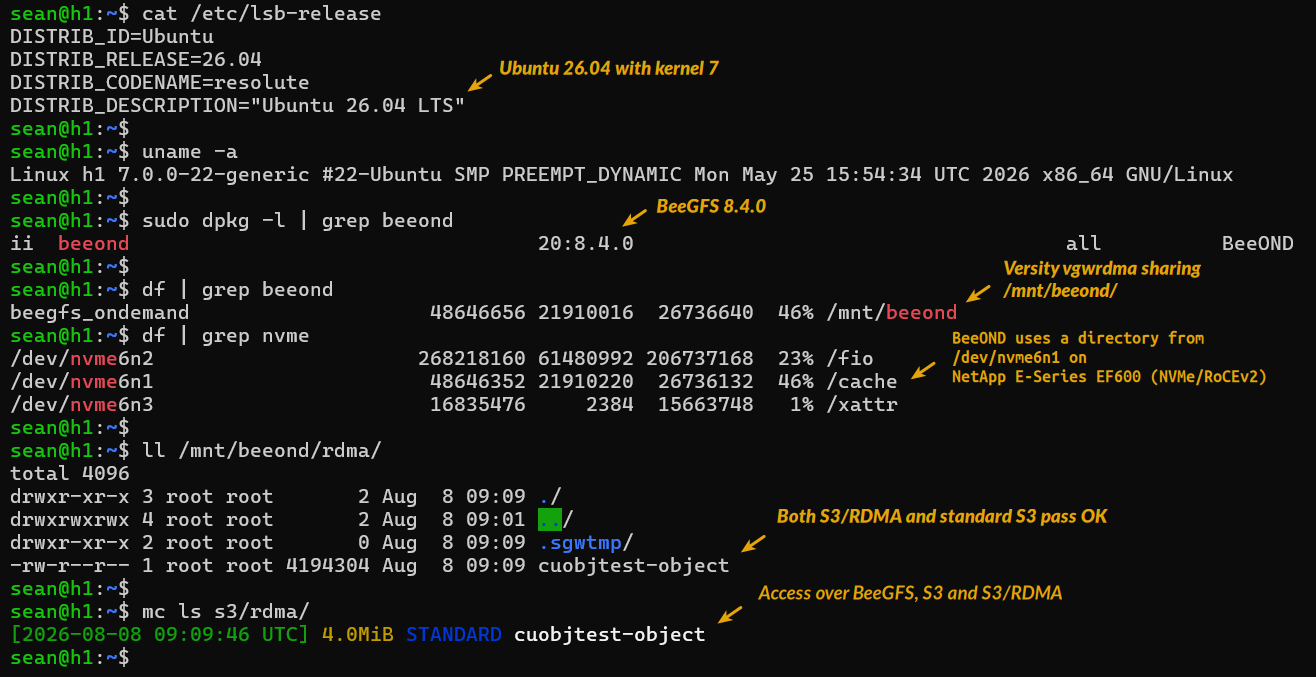
Appendix B: Demo with BeeOND
BeeOND 8.4.0 was used because it's much easier to setup (it takes 30 seconds and can share existing volumes).
Appendix C: Additional fiddling
This is still with host-based memory (no CUDA).
Because I can't reliably get objects larger than 5 MiB to work consistently, I tried several other things. One of them was to add concurrency to cuobjtest.
That helped a lot, even though I'm using the crippled non-GPU RDMA client. Some findings:
| Object size (MiB) | Concurrency | S3/RDMA | Throughput (MiB/s) | CPU % (Host) |
|---|---|---|---|---|
| 5 | 1 | No | 80 | >1% |
| 5 | 1 | Yes | 112 | 1% |
| 5 | 4 | No | 314 | 10% |
| 5 | 4 | Yes | 337 | <7% |
It's still not great (and I haven't tried higher concurrency counts), but it's much better. The real solution is proper CUDA hardware and larger object sizes, but I can't do that now.
With increased concurrency, I was able to get CPU utilization on the server to almost 10% combined when standard S3 is used (HTTP, so no TLS):
-system- ----total-usage---- -dsk/total- -net/total- ---paging-- ---system--
 times  |usr sys idl wai stl| read  writ| recv  send|  in   out | int   csw
07:31:20|  6   3  90   0   0|   0   307M| 150M  162M|   0     0 |  47k   31k
07:31:21|  6   2  91   0   0|   0   152k| 152M  142M|   0     0 |  41k   27k
07:31:22|  6   3  90   0   0|   0    68k| 153M  160M|   0     0 |  47k   30k
That's dstat output, so it shows everything. Just FYI.
The same test with S3/RDMA shows S3/RDMA saves me close to 50% - 4 percent compared to 6 percent without S3/RDMA.
-system- ----total-usage---- -dsk/total- -net/total- ---paging-- ---system--
 times  |usr sys idl wai stl| read  writ| recv  send|  in   out | int   csw
07:31:45|                   |           |           |           |
07:31:46|  4   2  92   0   0|   0   545k| 103k   78k|   0     0 |  42k   26k
07:31:47|  4   2  93   0   0|   0  1741k|  96k   68k|   0     0 |  40k   25k
And then of course going from 112 to 337 MiB/s with higher concurrency in cuobjtest is phenomenal. Let's hope Versity adds the concurrency argument to cuobjtest.
$ time ./cuobjtest -access admin -bucket rdma -endpoint http://192.168.1.11:7070 -n 1000 -secret secret -size 5MiB -c 4 -get-only

----------------------------------------------------------------------
OVERALL elapsed=11.73 s  GET agg=0.447 GB/s (1000 ops, 85.22 ops/s)
GET  avg=22.41 ms    min=15.07 ms    max=58.77 ms    avg 0.234 GB/s

GET-only run complete.

real    0m11.781s
user    0m13.255s
sys     0m15.726s
With -get-only on a 2-CPU (Intel(R) Xeon(R) Silver 4110 CPU @ 2.10GHz) client:
| Object size (MiB) | Concurrency | Access | S3/RDMA | Throughput (MiB/s) |
|---|---|---|---|---|
| 5 | 4 | GET | Yes | 447 |
| 5 | 8 | GET | Yes | 840 |
| 5 | 32 | GET | Yes | 1,367 |
| 5 | 64 | GET | Yes | 1,826 |
At 64 concurrency, CPU utilization on client is 26% and GET latency goes over 100ms, but both client and server have identical old CPUs. Server-side view:
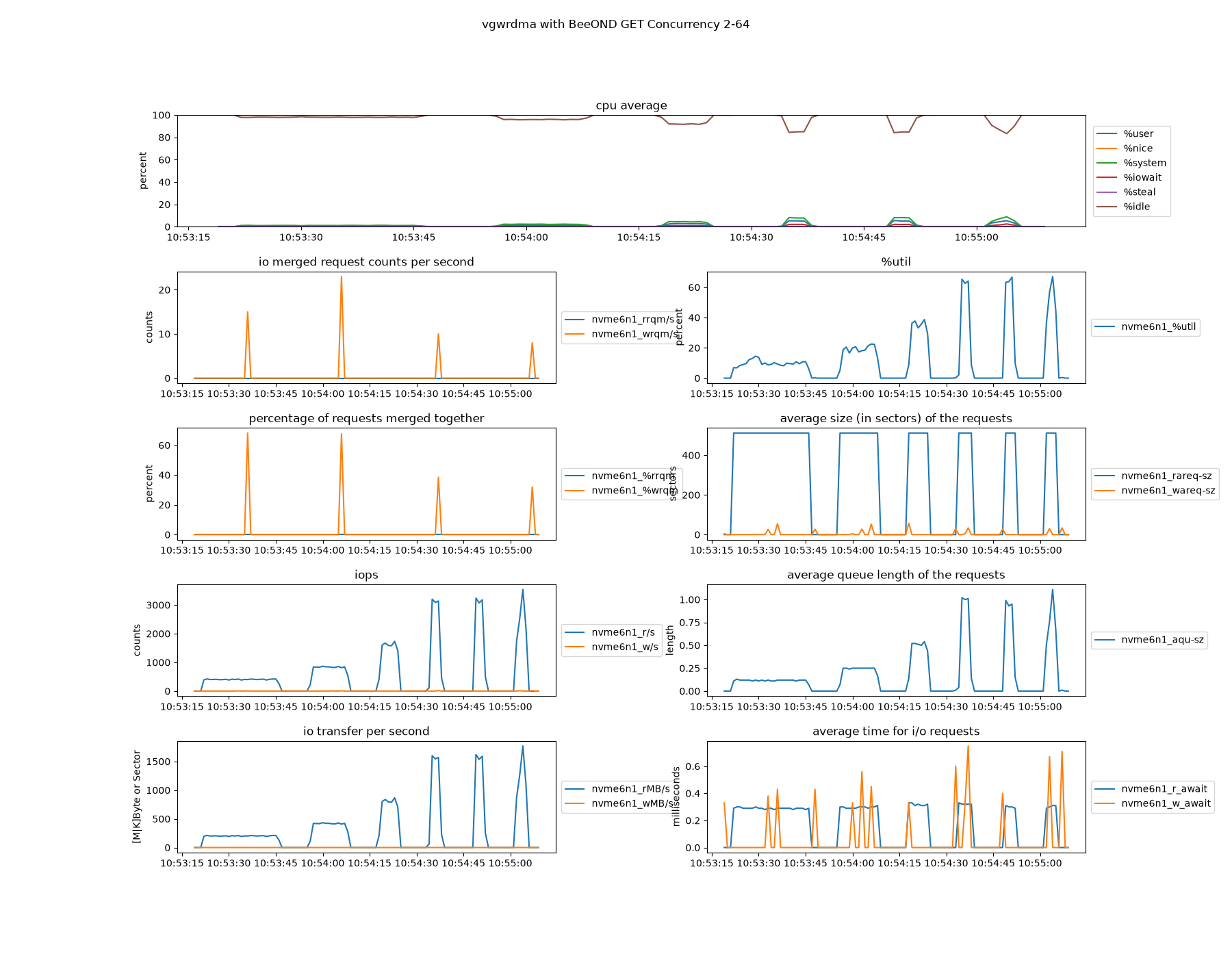
I don't know why IO queue can't visibly cross 1. I had more luck with with XFS, but this approach can't work for scale-out, so it's limited to single host scalability.
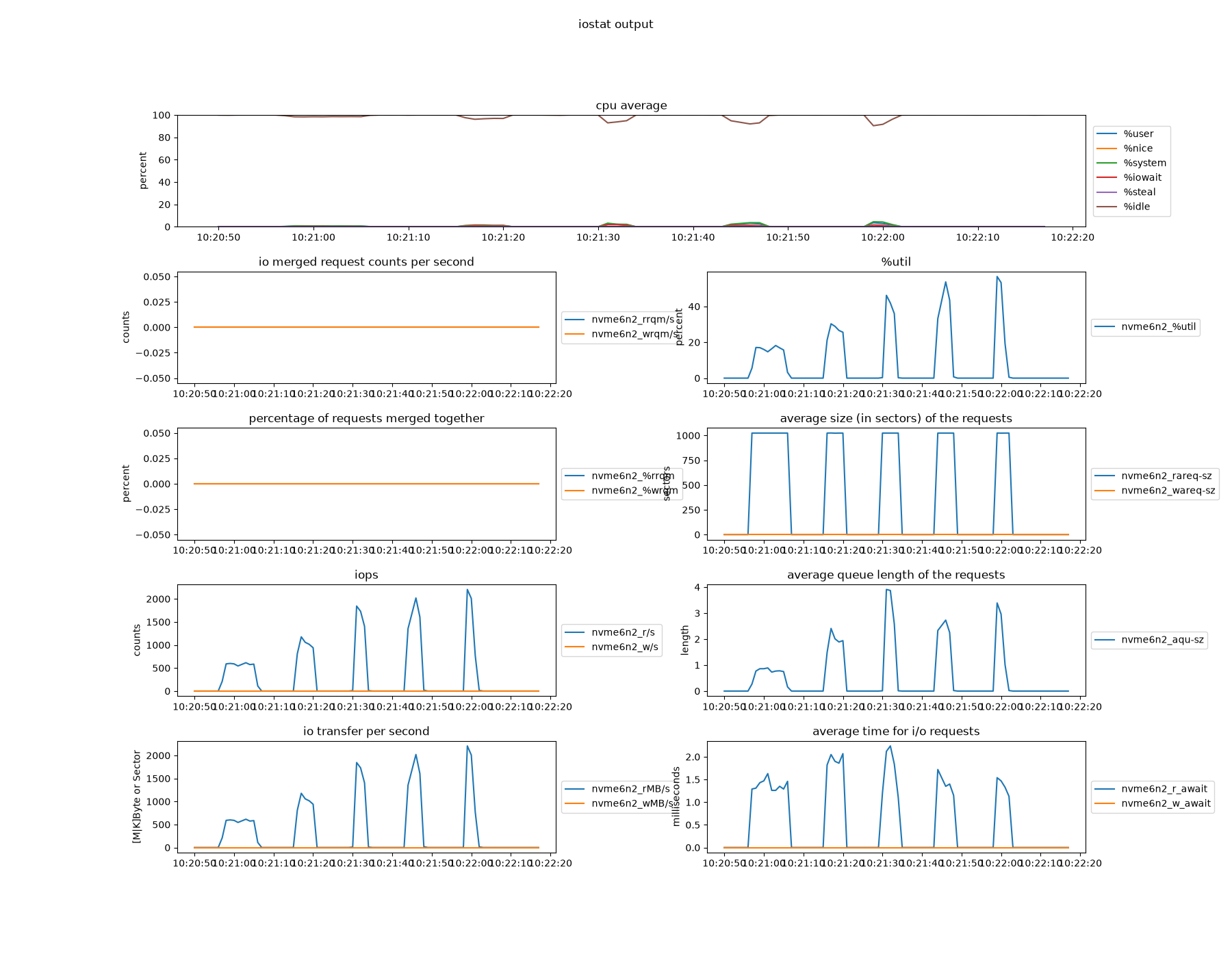
I couldn't get -get-only to work with -std-s3 to compare standard S3 with S3/RDMA in GET-only tests.
The potential is there, even without CUDA - improved performance with less CPU resources!