Ray framework with NetApp E-Series and StorageGRID
- Part 1: Ray framework with NetApp E-Series and StorageGRID (this post)
- Part 2: Ray checkpointing with BeeGFS and StorageGRID
What is Ray
Ray is an open source unified framework for scaling AI and Python applications. It provides a simple, universal API for building distributed applications that can scale from a laptop to a cluster.
Why should NetApp users care
Well, they don't have to care, but if you're modernizing for next-gen apps/hybrid cloud or simply trying to cut costs, it's worth taking a look.
This is how it looks like:
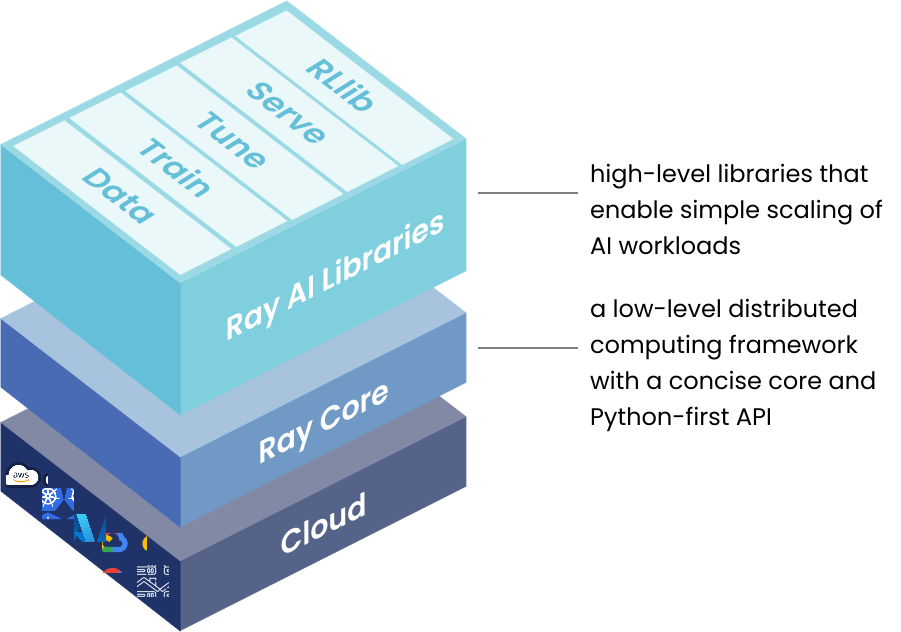
A scalable framework that runs anywhere. By "anywhere" - as far as persistent data storage is concerned - I mean on your laptop's boot disk, E-Series block device, BeeGFS filesystem, NFS, or S3 (StorageGRID or Versity S3 Gateway on E-Series).
Now, the "modernize" part: as I've said countless times, consider main groups of services that appear in AI and analytics:
- Database (usually on fast block, RF2/RF3 or set up for continuous replication)
- Event streaming (usually RF3 on fast block)
- S3 (usually RF2, RF3 or Erasure Coding)
Some people will tell you that means you should have one big storage cluster stretched across racks. Perhaps. In my opinion that's fine for loosely coupled object stores. Doing that for databases and event streaming looks nice, but it's extra cost and lower availability.
I'd stretch StorageGRID across racks, and use independent E-Series systems per rack. Once you automate storage provisioning (which can be done in Kubernetes, too), the rest is all done in Kubernetes and Ray.
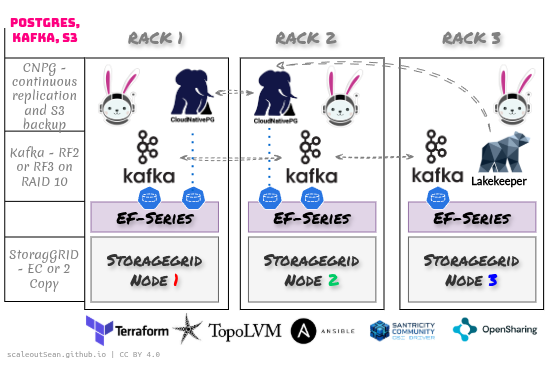
This is a highly available, high-performance pattern that works the way applications expect.
It does not fight applications and it doesn't fight architects and Operations. What you see is what you get: in rack 2, you're supposed to see and use the EF-Series block devices from that array in rack 2. For S3, you hit a load balancing gateway and multiple units of those can be provided across racks.
When it comes to Ray, here we can (currently) find about Ray framework's best practices for storage and storage dependencies. There are 2 major kinds by use and persistence:
- Artifact storage
- Package dependencies
Artifact storage
This is "data".
For clusters or anything that scales out beyond one, you may need a (shared) filesystem or S3.
Shared file system: this is commonly NFS. You can use BeeGFS or other shared file system. This "sharing" does not extend beyond LAN, though. Once you have some compute workloads (or artifacts) in a remote office, you need to employ new tricks (and it's not fun).
S3: local S3 is a no-brainer. It works locally, from branch offices, and from public cloud. You don't need any tricks: all S3 remote access tricks are already built-in to modern applications and frameworks (such as Ray)!
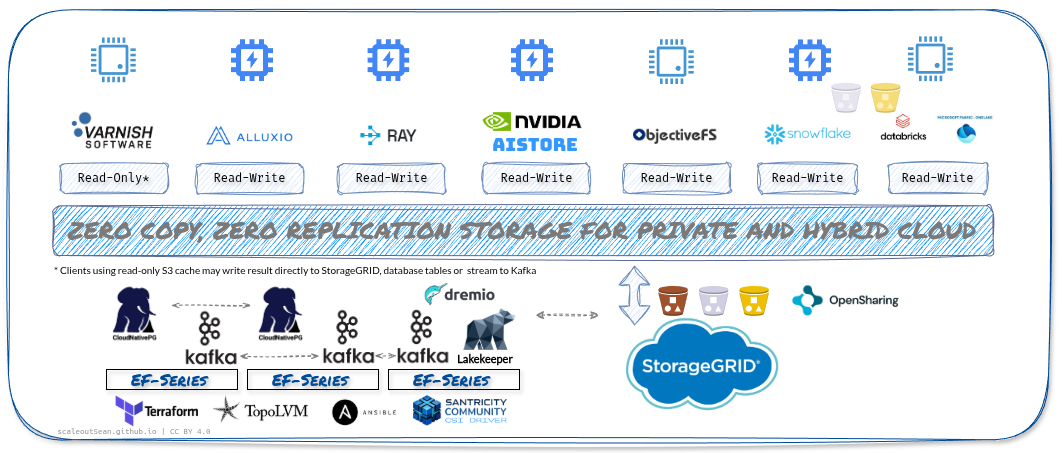
Package dependencies
These are ephemeral - aka cache trash.
You can keep those on a shared filesystem or bake into container images. Container images are ephemeral and use worker's internal storage, so you probably shouldn't care about this.
An "advantage" of keeping package dependencies on a shared file system is as you can imagine on your own: containers start faster, you save space, updates are faster as well. Woo-hoo!
A big disadvantage - in my opinion - is that your package dependencies are on a shared file system.
For production setups, Ray is neutral on what to choose.
Put the code and install the packages onto your NFS. The benefit is that you can quickly interact with the rest of the codebase and dependencies without shipping it across a cluster every time.
How do you validate and control those dependencies? Unless your NFS connections are encrypted, can you trust your data?
I'd just keep my containers in a container registry on StorageGRID, and cached on my workers, thank you very much.
Ray also recommends container registry for Kubernetes, so container registry wins.
Can we use E-Series for "local scratch" space
Yes (see below), although S3 or Alluxio should be preferred (more on Ray with Alluxio).
You're not supposed to use single-host filesystems because Ray expects uniform view by multiple worker nodes.
But you can have a shared file system:
- You can run HDFS on E-Series
- You can run Ceph on E-Series
- You can run BeeOND or BeeGFS
- If you schedule multiple Ray workers on the same Kubernetes worker, they can share a PVC (for example, for model checkpointing)
The first thing to consider is: do we realy need to do that?
If I already have S3, I wouldn't deploy HDFS or use Ceph for HPC-like workloads. I like the BeeOND a little bit better, but I'd generally try to stick with S3, especially if read-write S3 cache is available.
Finally, note that Ray has its own mechanisms for cluster-wide "object" (not S3 object) caching, with spill-over to disk. See an example further below.
Ray with S3
The StorageGRID sub-section is slim, but it works and the main message is really: you may need several GB/s per second per each worker node.
StorageGRID
I don't have much to say on this one - Ray isn't picky and I'd say most users would use NL-SAS-based StorageGRID appliances here.
In cases where you know you need all-flash S3 (or a tier, in a hybrid S3 cluster), you could mix and match.
StorageGRID has its own caching solution - currently for read cache.
Personally, I'm a fan of caching approaches built into various analytics- or AI-focused frameworks and projects (mentioned at the top) and would use hybrid grids only if my applications couldn't be smart about S3. You get application smarts and, with some of them, read-write cache.
I ran Ray with StorageGRID and it was uneventful, because it was a very small StorageGRID good only for compatibility testing.
I then repeated the same test at a larger scale with Versity.
Versity S3 Gateway
This scenario is what you may have in smaller environments - ROBO, remote sites, and such.
- Versity S3 gateway (VM or container)
- Ray (VM or container)
- Directly-attached (SAS, FC, iSCSI, NVMe, IB) E-Series
I created several GB of Parquet files and ran various routine queries including write-back to S3.
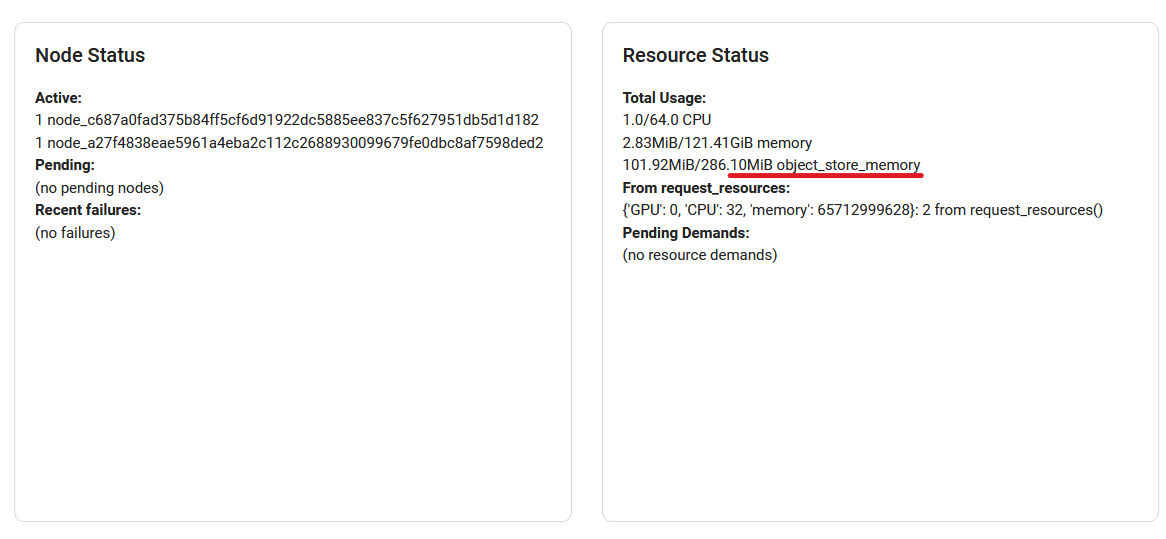
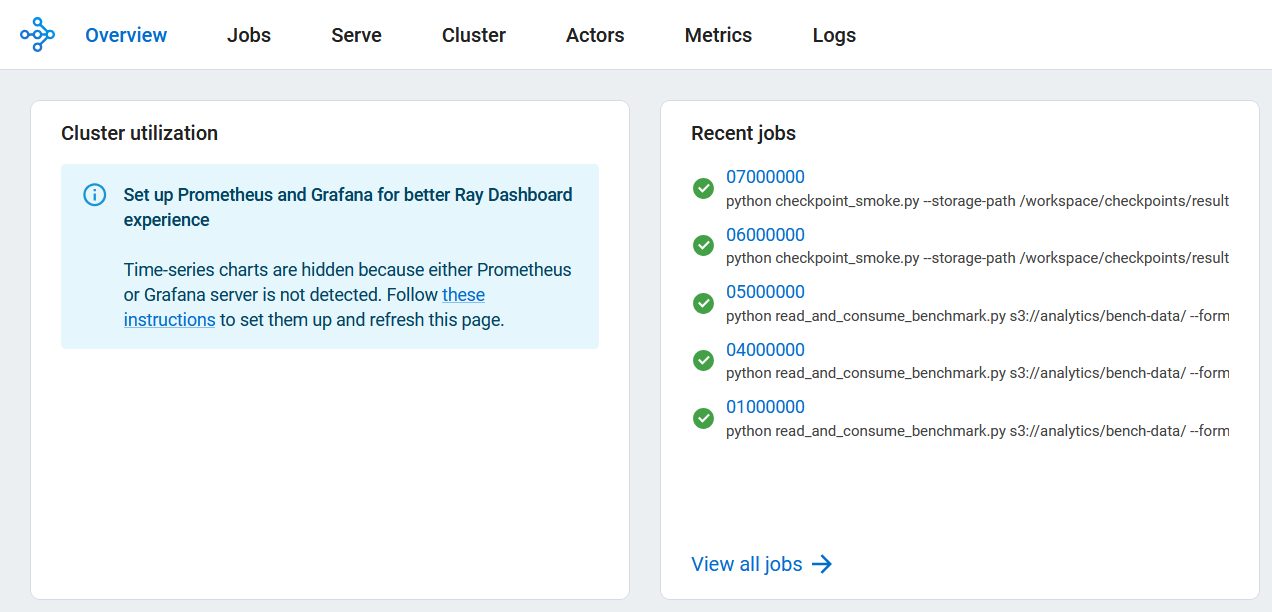
Ray dashboard (without Grafana, which I incidentally have on the same host, but it's "secure" on port 3443 and hence didn't work out of box):
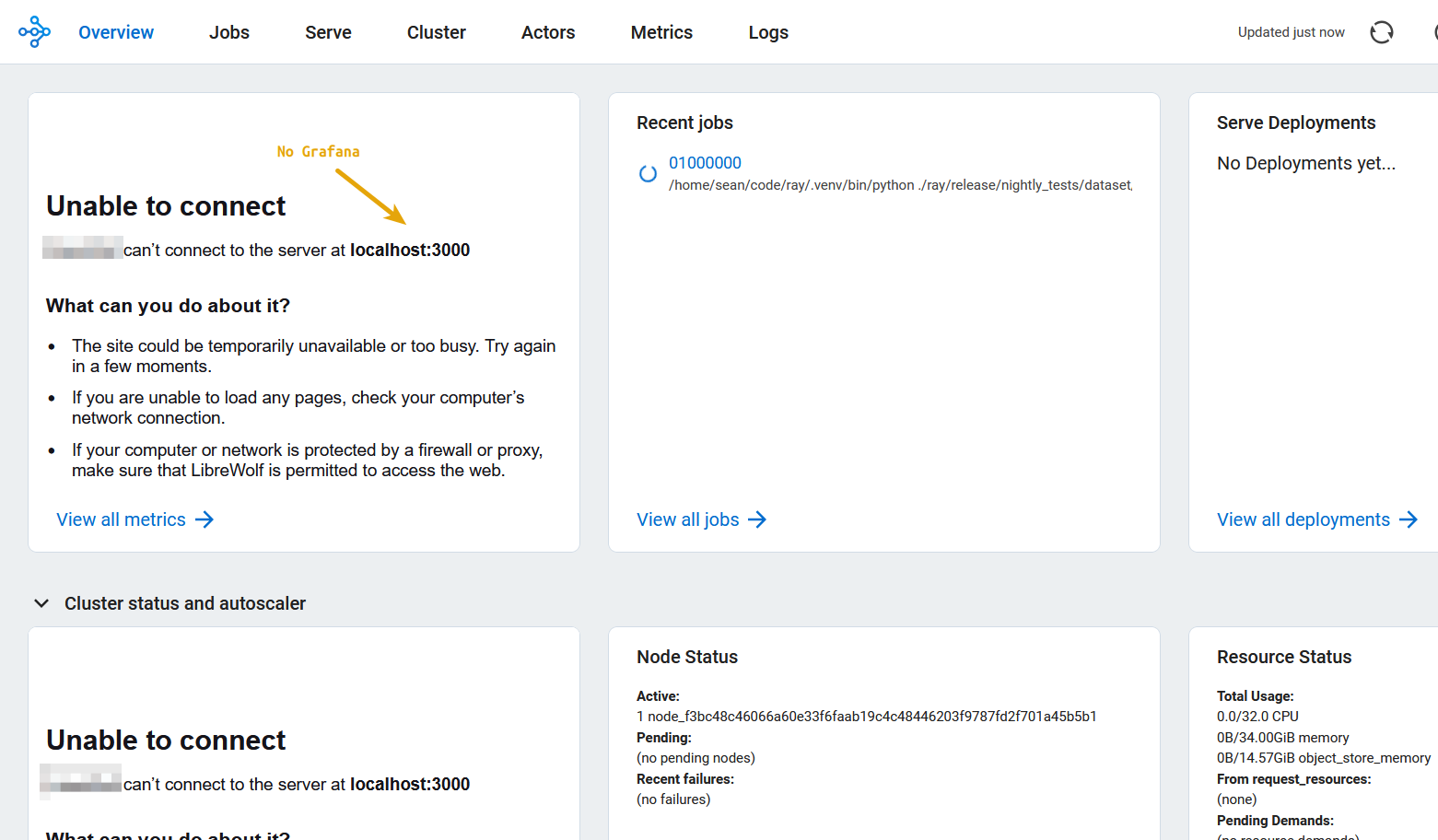
This shows nodes. I had just one here.
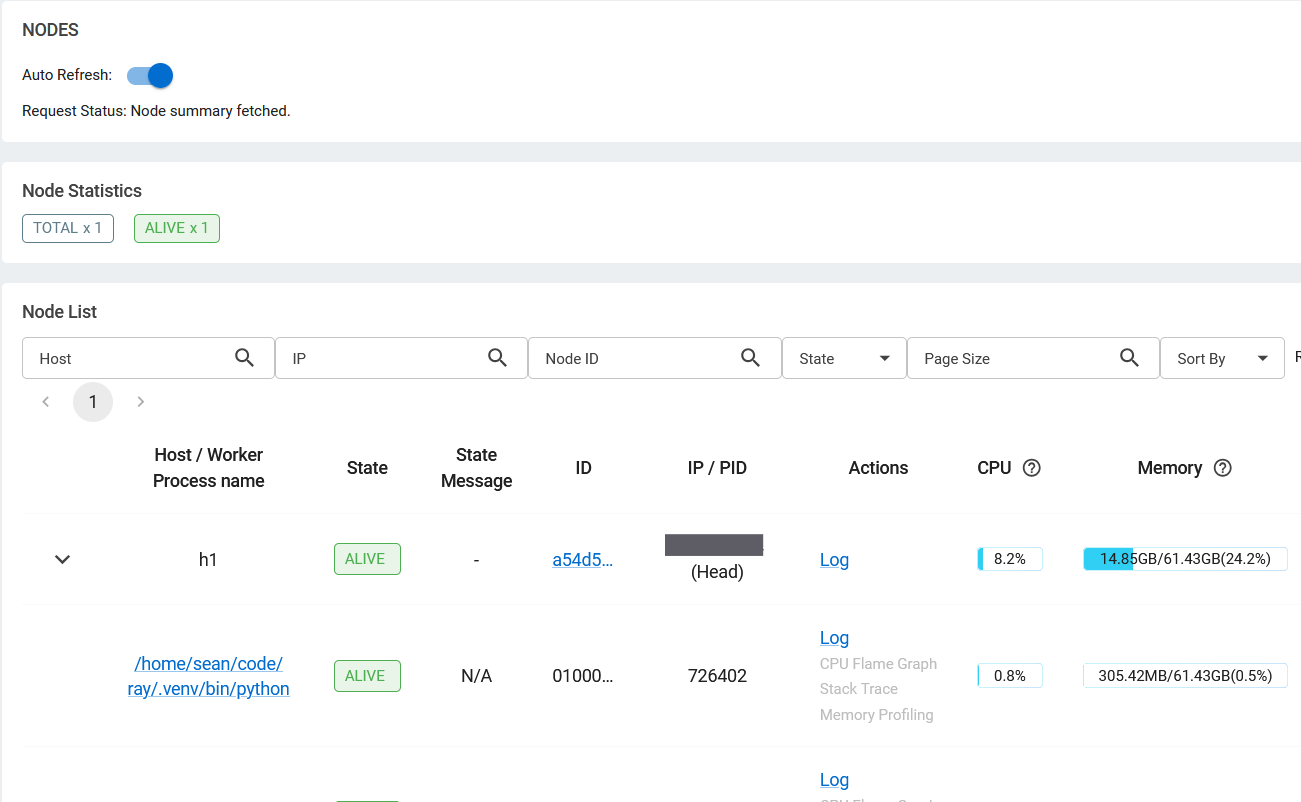
Versity S3 gateway was running on the same host as Ray.
This sample workload reads Parquet files. You may not need to run massive workloads in a branch office, but this thing goes through CPUs like hot knife through butter…
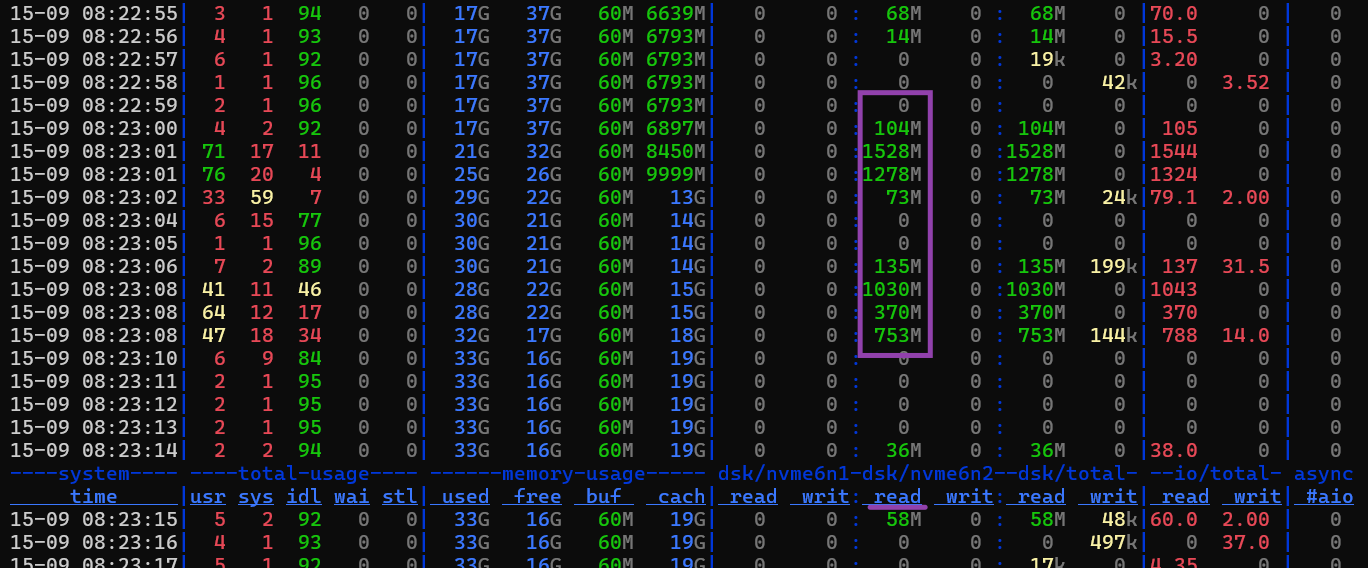
It managed to do over 3 GB/s of storage I/O at peak, although we shouldn't assume this was all to/from Versity S3 (maybe Ray that was object-to-disk spill-over and both Ray and Versity were on the same filesystem). (See here for a "maximum" GET I could get from Versity on a single host filesystem.)
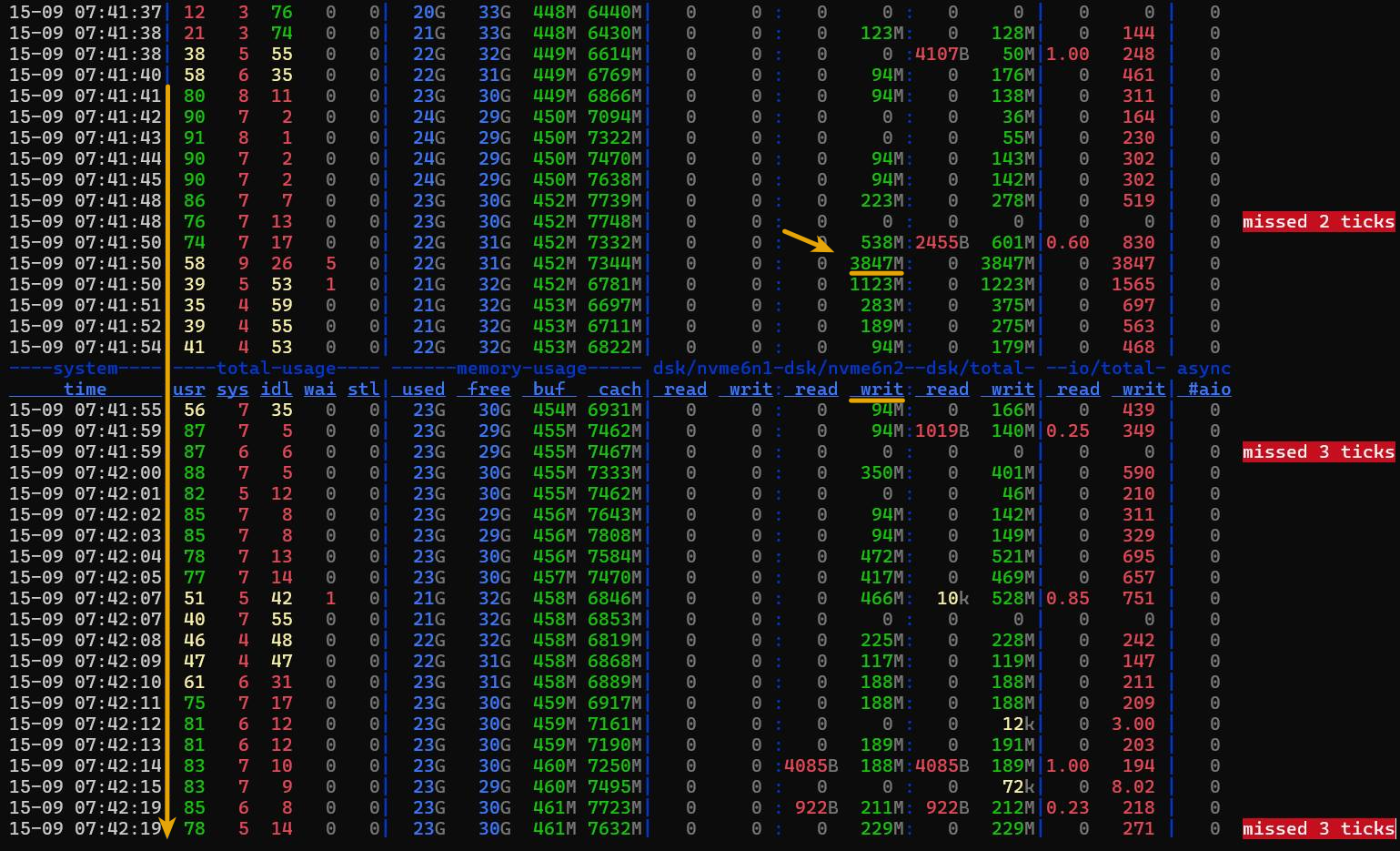
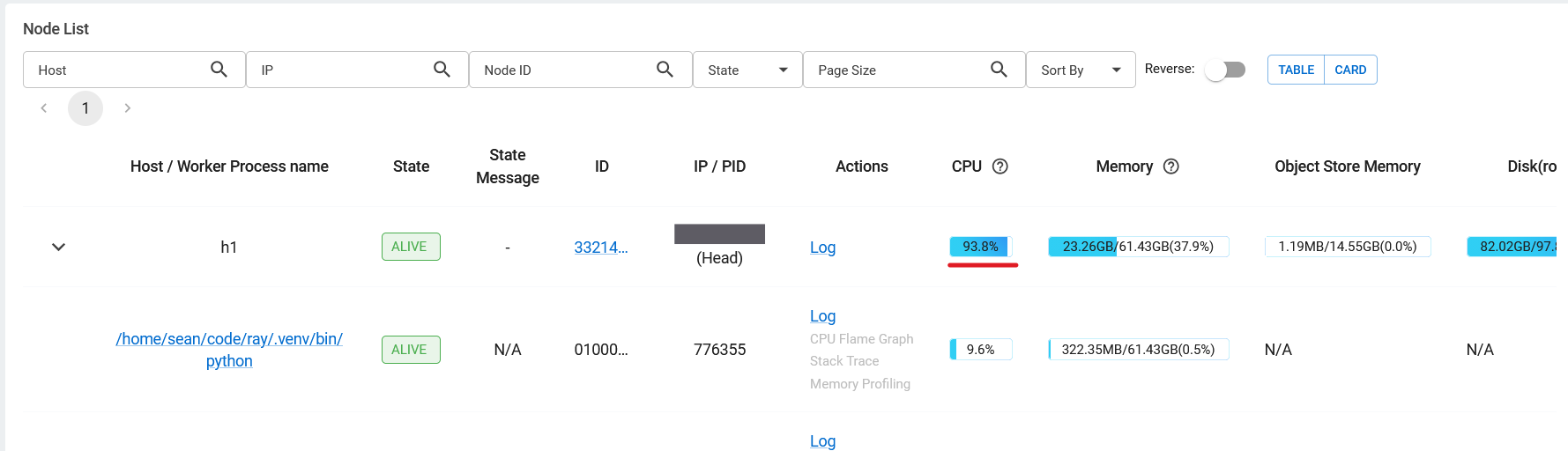
The point is, Ray can push your hardware to limits. Just one Ray worker on this system used up all CPU resources.
In the E-Series UI, performance figures are "averaged", so the 3 GB/s peak isn't visible, but even so - it's still hundreds of MB/s in reads, which almost certainly means Ray was downloading from Versity S3 at over 1 GB/s.
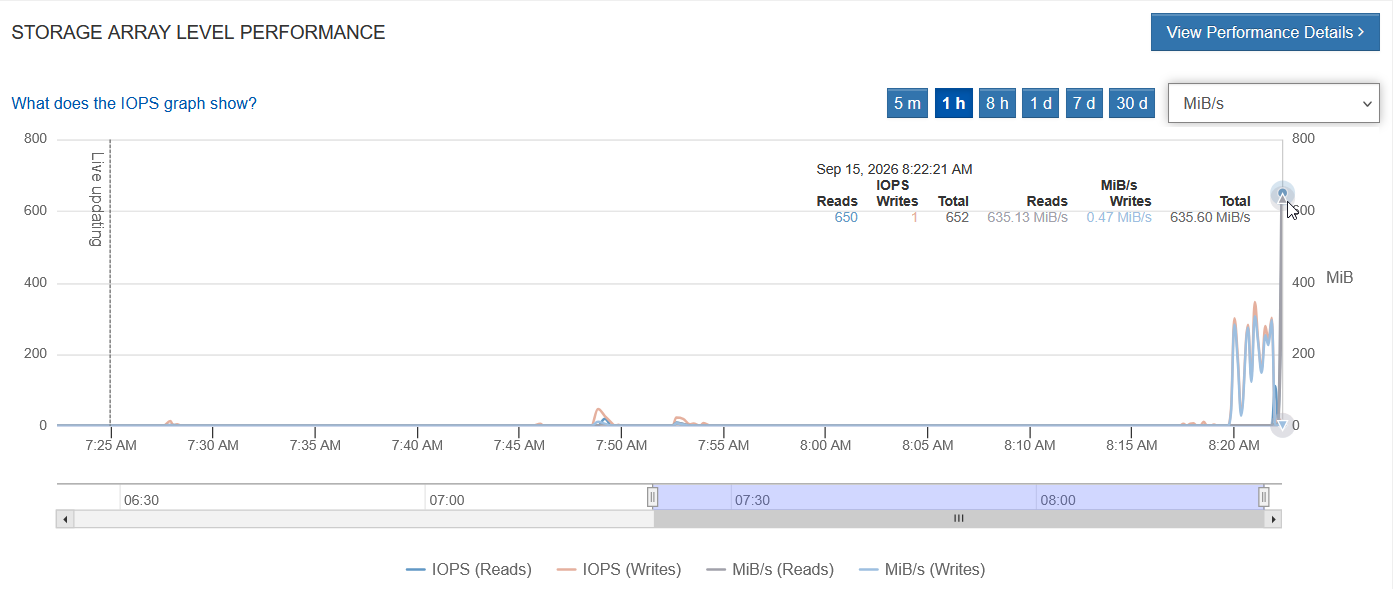
Example:
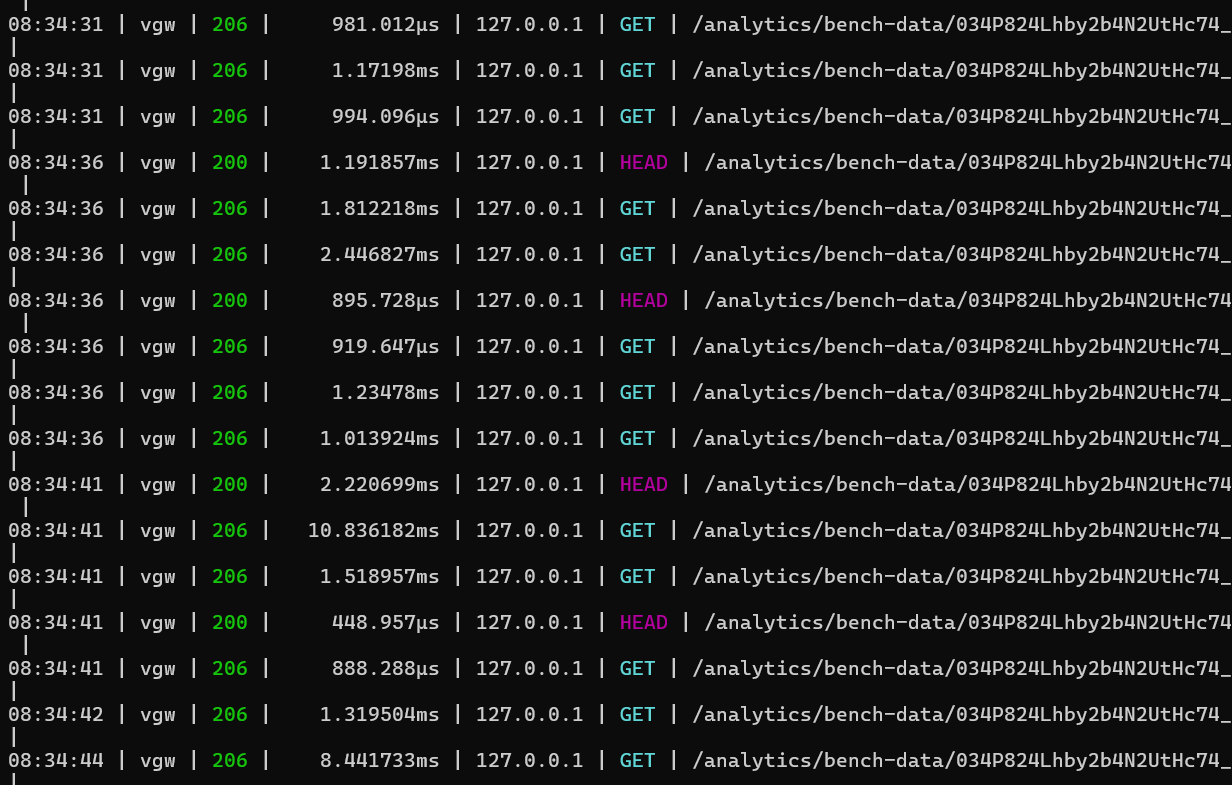
For analytics workloads, S3 may not be doing a lot of requests. It could be just a handful per second, but they could be Parquet files that are 256 MB each.
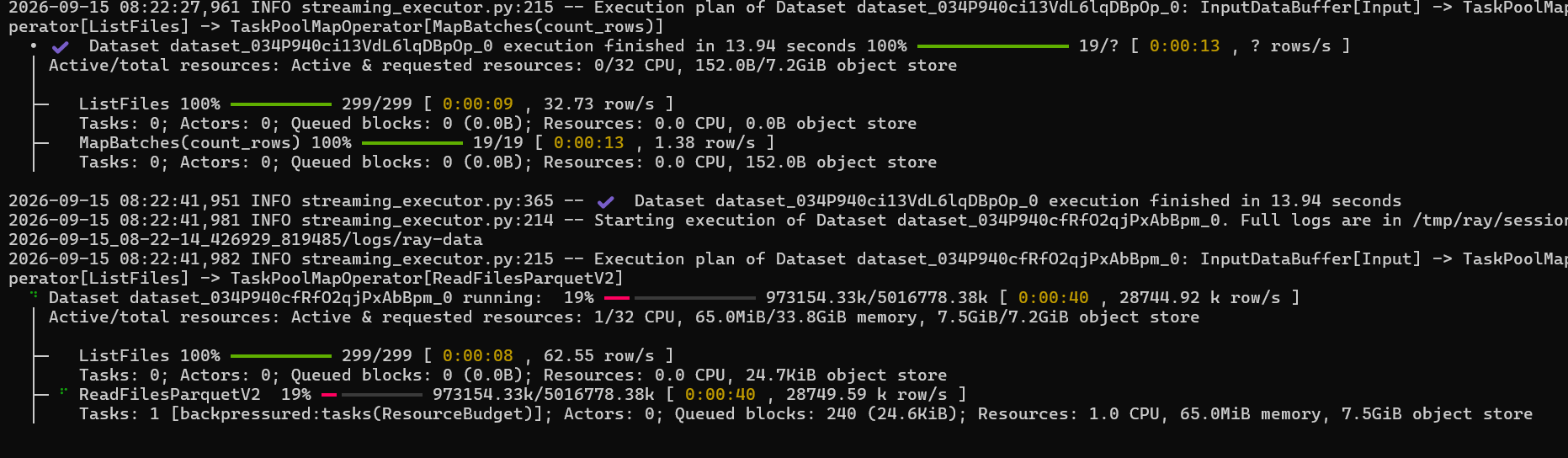
This below is Ray console output. That /tmp/ is what would need to be shared among multiple workers working on the same job.
If we extrapolate from these anecdotal examples, it's easy to see how just several nodes can max out a shared file system on E-Series E4000 or several StorageGRID all-flash nodes when S3 is used.
S3 and local or shared block devices
About the ability to make use of fast local disk for shared Ray data cache: it's clearly a workaround for the mistake called "incorrectly sized cluster", than a "feature" one should celebrate.
Here's a demo: we have a worker node with very limited RAM resources.
Since I have no clue what I'm doing, the worker is mis-sized for the job.
When I run my workload which can't fit its working set into worker's RAM, it's "swapping".
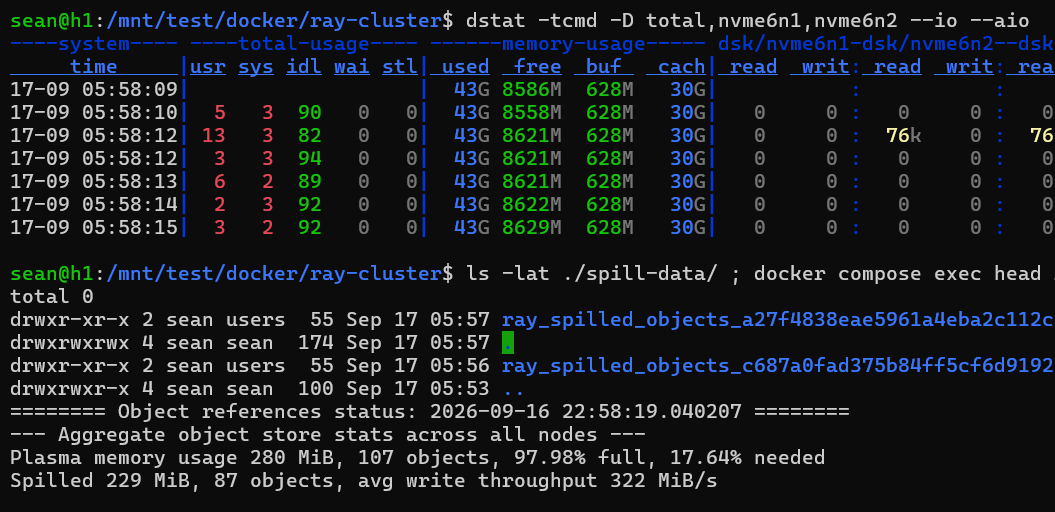
While it may seem great that we're using storage bandwidth, this is not a good thing. The worse it gets, the happier we are. Almost 600 MB/s - nice!
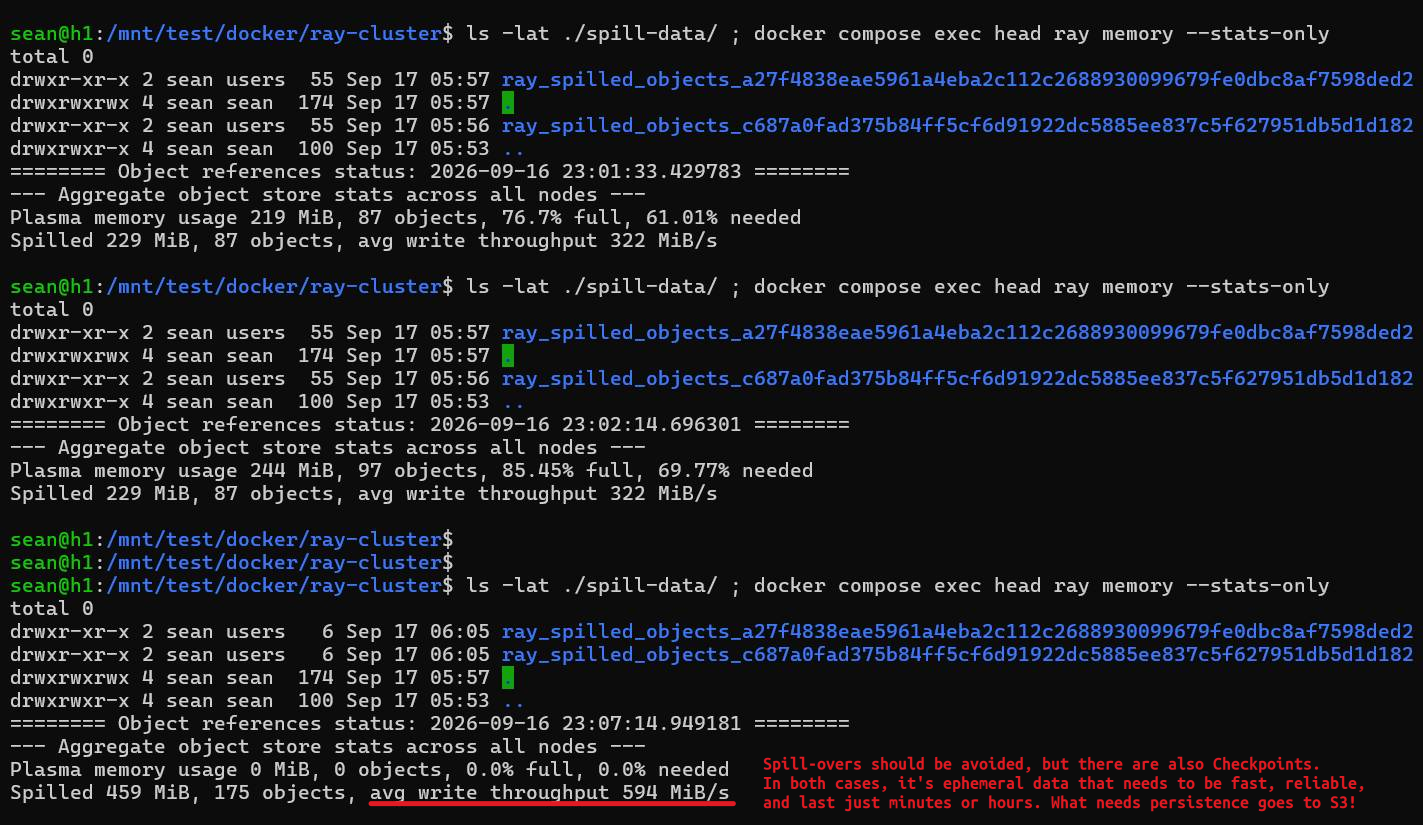
So, this is usually something to avoid. Maybe you've downloaded 1 TB of data from AWS or remote branch office and want to keep it on protected storage rather than lose it and wait (or pay dearly) until you get another copy.
As far as the other "write" workload - checkpointing - is concerned, consuming storage bandwidth this way is not bad.
I've written about using BeeGFS (dumping checkpoints to a shared filesystem) or local disks (distributed dump to single-host file system on each worker, followed by upload to S3 and deletion from local or shared file system). No, there is nothing you need to hoard on local disks or BeeGFS - these are just ephemeral stops on a checkpoint's journey to S3.
We could even dump to BeeGFS and use tiering on BeeGFS, but Ray checkpoints make that seamless and we should take advantage of it.
Ray can also checkpoint directly to S3, but that is likely to be slower than dumping to NVMe devices on EF-Series. Depending on situation, it may or may not be preferred. Sometimes it's faster and cheaper to wait, other times we may want to trade the cost of writing checkpoints twice to save GPU cycles.
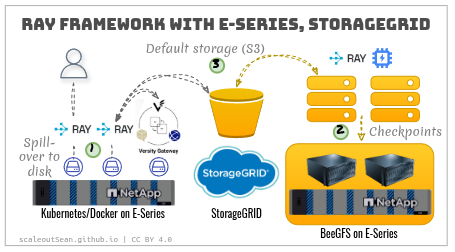
- (1) "Paging" is a somewhat niche use case, but fully workable
- (2) Checkpointing - on BeeGFS (I haven't tested yet) or single-host filesystems - is nice
- (3) S3 - StorageGRID in DC and Versity S3 Gateway on Edge is ideal
Conclusion
Ray framework isn't new and we know it works with standard on-premises S3 implementations including StorageGRID.
What may be new to some NetApp users is that people use Ray with StorageGRID because all AI and analytics stacks have discovered it's a best practice.
Both StorageGRID (data) and Ray (compute) easily scale across many sites using just HTTPS connections. Opening an HTTPS port to your Ray compute instances in public cloud is all it takes to make your zero-copy, hybrid cloud AI and analytics start working in minutes (do use at least S3 read cache).
For ROBO, Versity Gateway turns the low-cost E-Series into a hybrid cloud-capable storage sharing appliance for free, whether you consume "raw" S3 or OpenSharing (Delta and Iceberg tables, or volumes).
Finally, these casual tests show that each physical node running Ray can consume multiple GB/s for what is essentially temporary or semi-ephemeral data (checkpoints, for example). For this, I advocate the use of S3 cache - there's a bunch of "batteries included"-style approaches - or low-cost, high-performance ephemeral shared filesystems (BeeOND, for example) that can use EF-Series arrays for tens of GB/s.
Appendix A: Ray, BeeGFS, VGW E-Series demo
NetApp doesn't feature this use case for BeeGFS.
As expected (in previous posts I wrote about this), BeeGFS seems to work really well for Ray's checkpoints.
If you prefer a video demo, click here (3m55s).
Here, BeeGFS 8.4.0 was running as BeeOND on a host (h2) different from VGW (h1):
- One metadata LUN on RAID 0 (just because I can. And this is ephemeral storage, remember?)
- Four data LUNs (DDP, I had several unused LUNs available there)
- I used BeeGFS (BeeOND) filesystem defaults (the workload was simple)
sean@h2:/mnt/beeond$ df -h | grep bee
/dev/nvme1n3                       7.1G  271M  6.3G   5% /mnt/beeond_internal_meta_nvme1n3
/dev/nvme1n6                        10G  510M  9.5G   6% /mnt/beeond_internal_data_nvme1n6
/dev/nvme1n7                        10G  519M  9.5G   6% /mnt/beeond_internal_data_nvme1n7
/dev/nvme1n8                        10G  513M  9.5G   6% /mnt/beeond_internal_data_nvme1n8
/dev/nvme1n9                        10G  511M  9.5G   6% /mnt/beeond_internal_data_nvme1n9
beegfs_ondemand                     40G  2.1G   38G   6% /mnt/beeond

sean@h2:/mnt/beeond/docker/ray-cluster$ beegfs entry info /mnt/beeond/docker/ray-cluster/checkpoints

PATH                             ENTRY_ID      TYPE       META_NODE  META_MIRROR   STORAGE_POOL              STRIPE_PATTERN  STORAGE_TARGETS  STORAGE_MIRRORS  REMOTE_TARGETS  COOL_DOWN  ACCESS  STATE
/docker/ray-cluster/checkpoints  4-6AACBDF6-1  directory  m:1        (unmirrored)  storage_pool_default (1)  RAID0 (4x512K)  (directory)      (directory)      (none)          (n/a)      (n/a)   (n/a)
As I said here and elsewhere, RAID 0 should be considered, at least for some BeeOND instances. I don't believe the overhead of protection is always necessary for ephemeral storage.
Note that Ray was running in Docker Compose and BeeOND on "bare metal" server (you can't/shouldn't run it in Kubernetes).
Ray uses remote VGW S3 service (from h1, used in earlier tests above), which is evident from network traffic under (small) test workload.
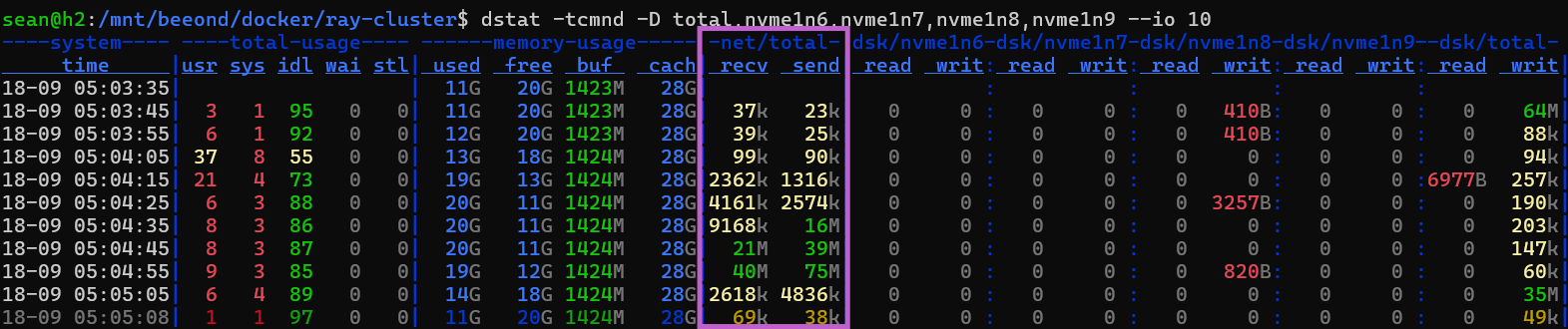
Since "paging" is a feature of last resort, checkpointing is more interesting.
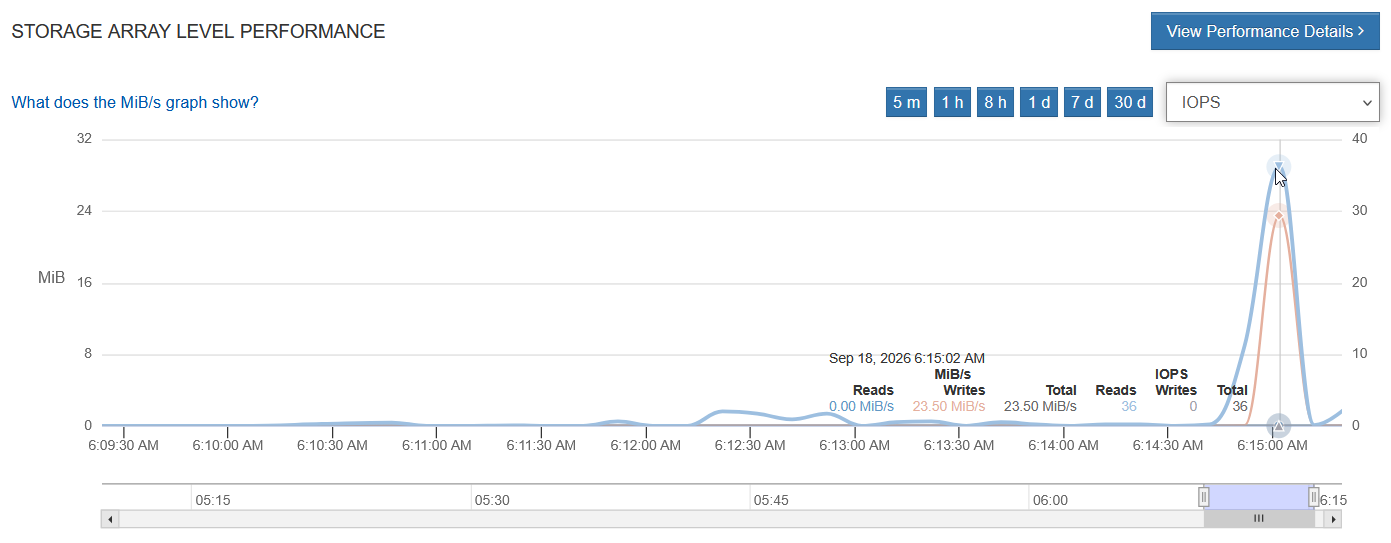
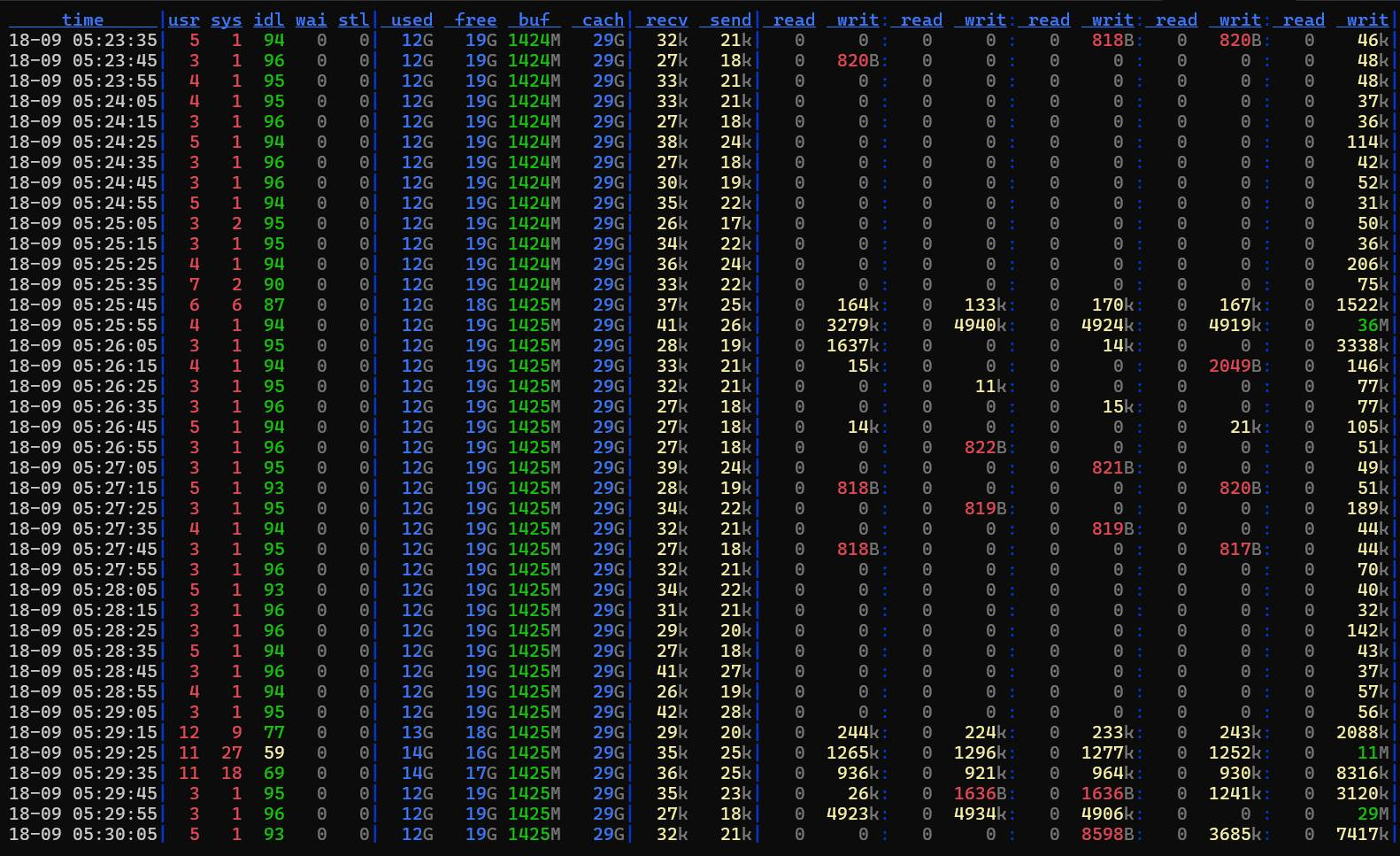
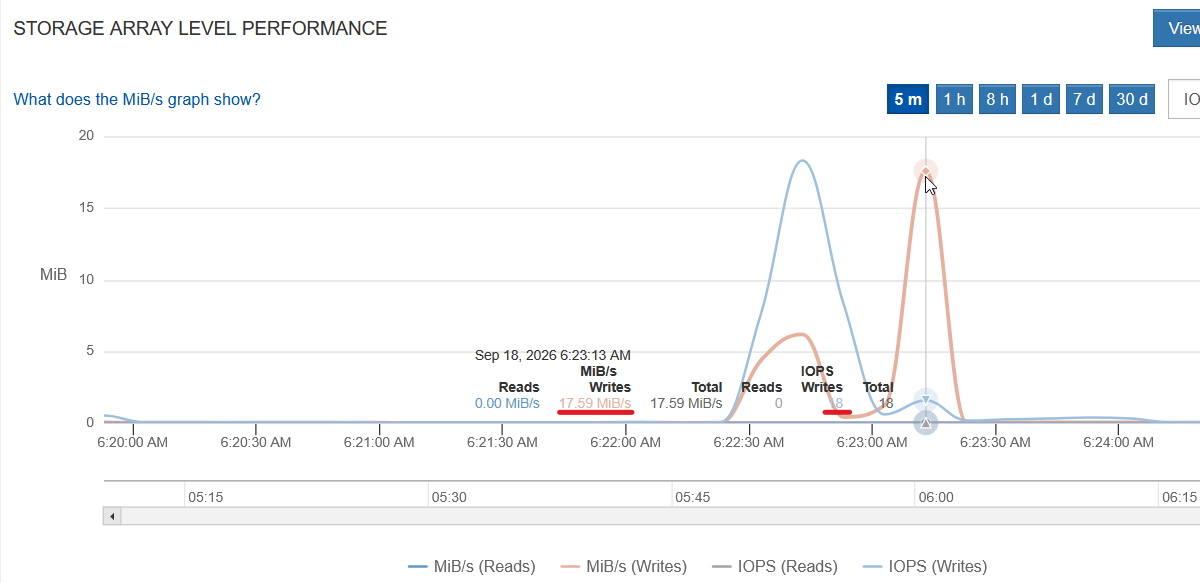
We have a small 1 vCPU ML model checkpointing to BeeOND (these stats are supposedly "real time" so, as you can see, 0 MiB read and 36 read Ops can both be true at the same time).
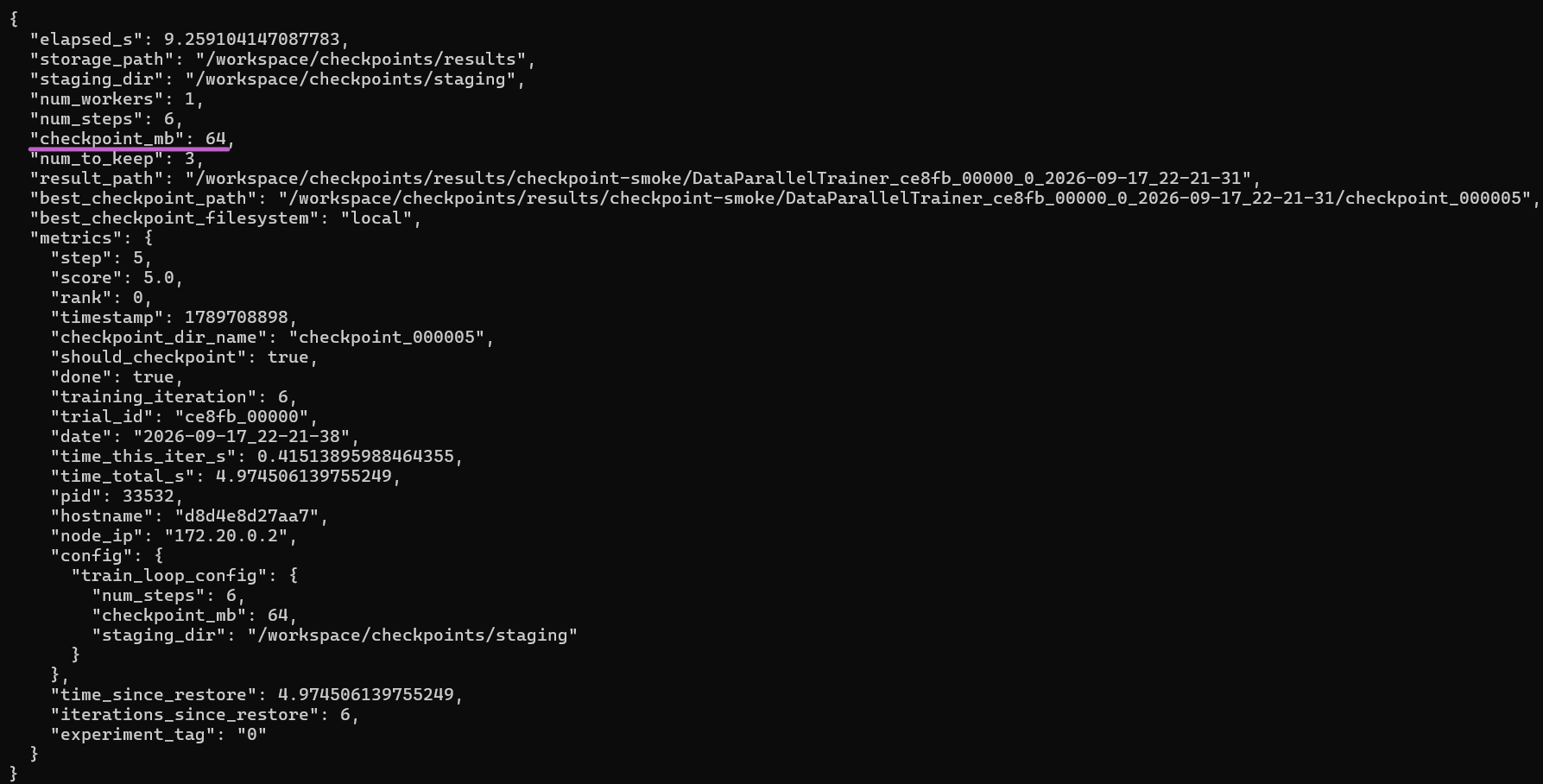
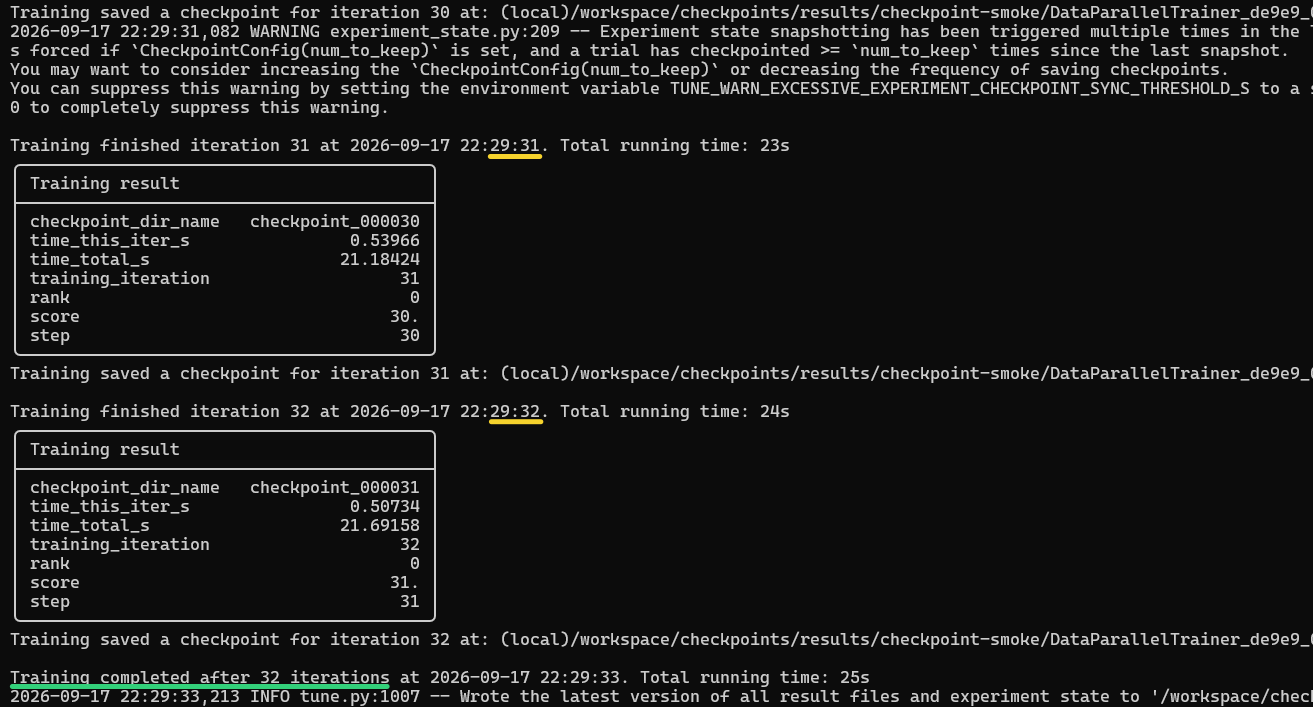
This is what drove the test workload.
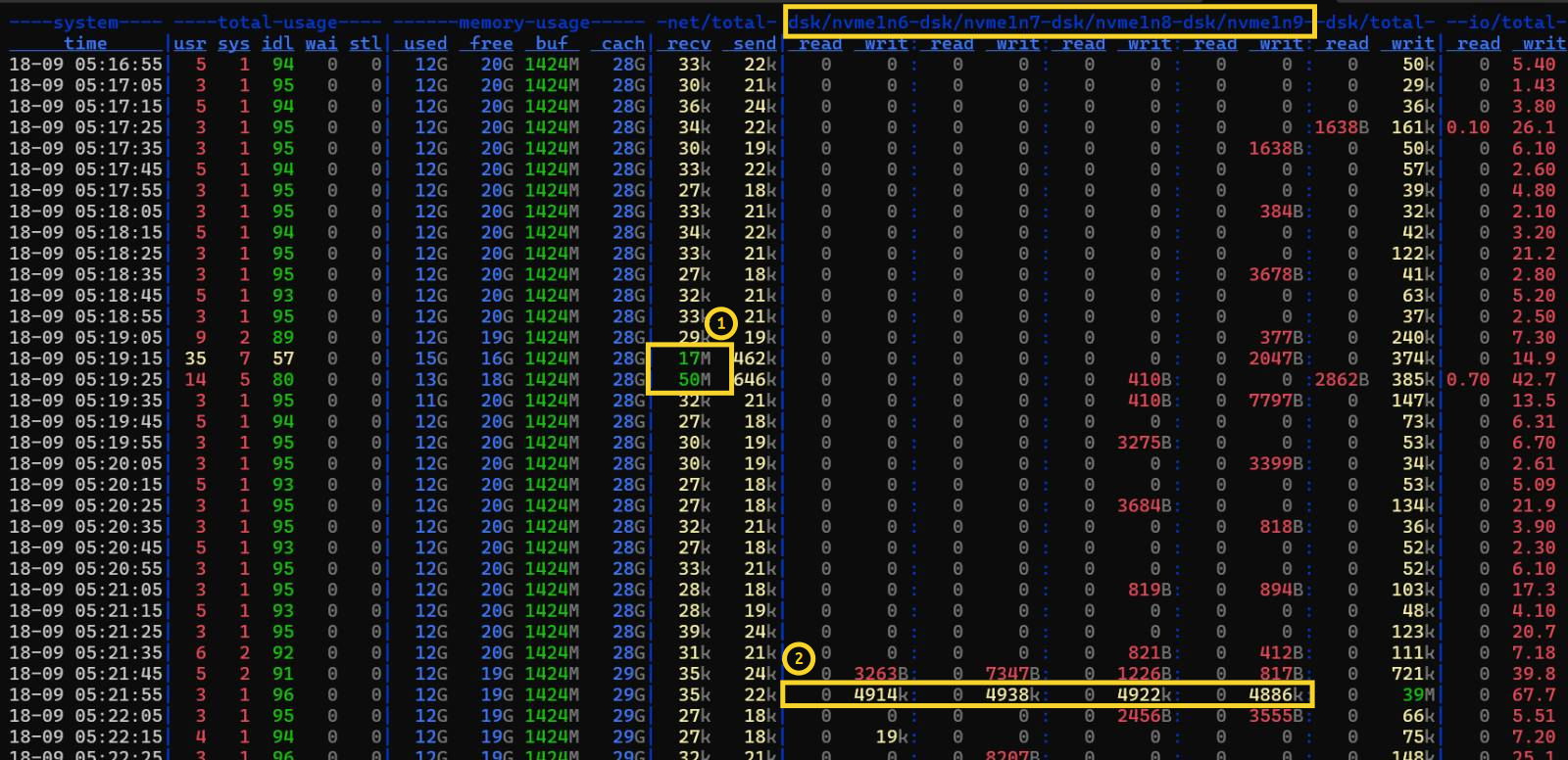
dstat gives a better view than SANtricity's monitor. We can see that checkpointing nicely striped across all 4 data LUNs (2). In (1), Ray loads training inputs (artifacts) from Versity S3 Gateway on h1.
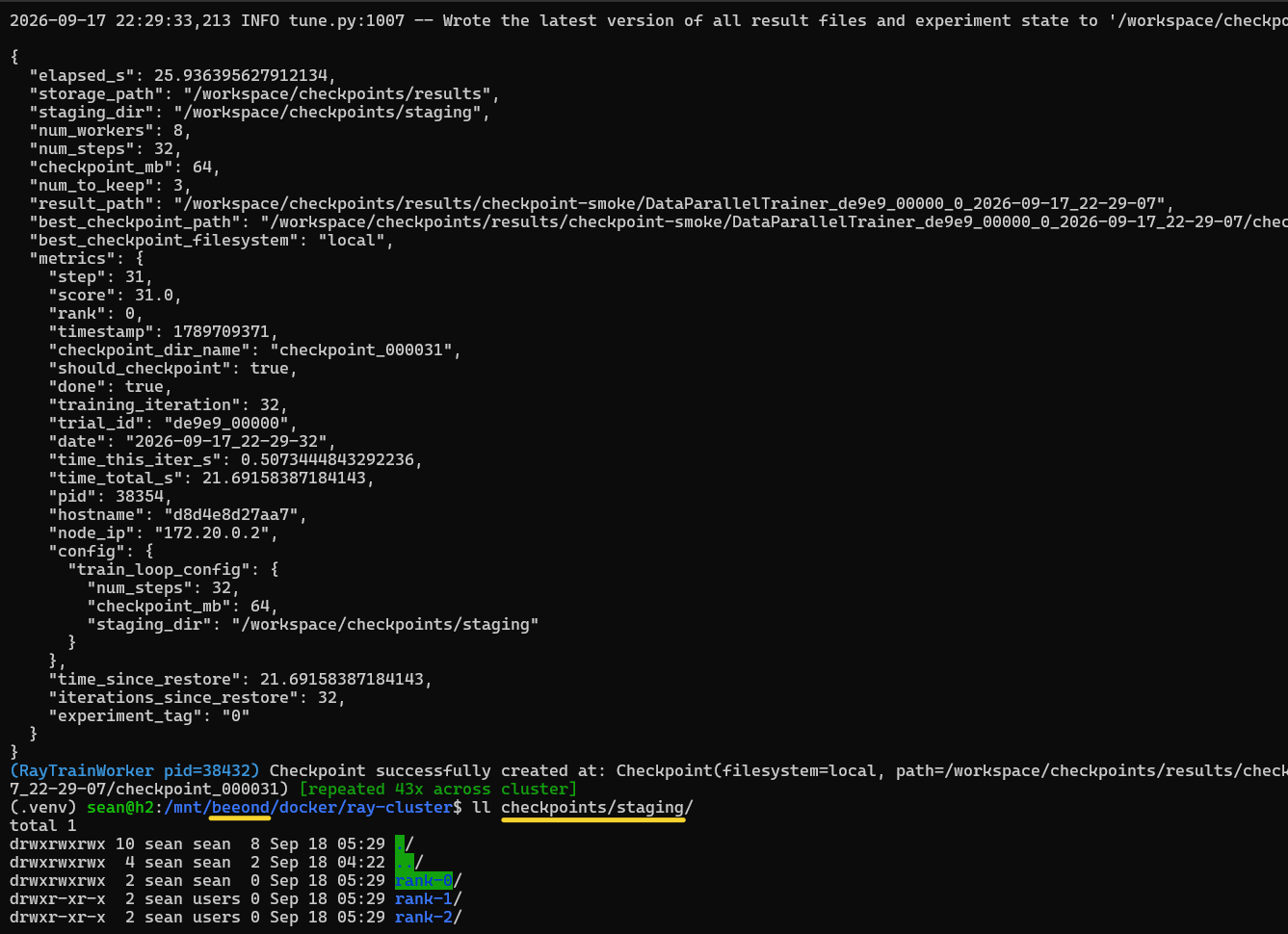
Result:
{
  "elapsed_s": 25.936395627912134,
  "storage_path": "/workspace/checkpoints/results",
  "staging_dir": "/workspace/checkpoints/staging",
  "num_workers": 8,
  "num_steps": 32,
  "checkpoint_mb": 64,
  "num_to_keep": 3,
  "result_path": "/workspace/checkpoints/results/checkpoint-smoke/DataParallelTrainer_de9e9_00000_0_2026-09-17_22-29-07",
  "best_checkpoint_path": "/workspace/checkpoints/results/checkpoint-smoke/DataParallelTrainer_de9e9_00000_0_2026-09-17_22-29-07/checkpoint_000031",
  "best_checkpoint_filesystem": "local",
  "metrics": {
    "step": 31,
    "score": 31.0,
    "rank": 0,
    "timestamp": 1789709371,
    "checkpoint_dir_name": "checkpoint_000031",
    "should_checkpoint": true,
    "done": true,
    "training_iteration": 32,
    "trial_id": "de9e9_00000",
    "date": "2026-09-17_22-29-32",
    "time_this_iter_s": 0.5073444843292236,
    "time_total_s": 21.69158387184143,
    "pid": 38354,
    "hostname": "d8d4e8d27aa7",
    "node_ip": "172.20.0.2",
    "config": {
      "train_loop_config": {
        "num_steps": 32,
        "checkpoint_mb": 64,
        "staging_dir": "/workspace/checkpoints/staging"
      }
    },
    "time_since_restore": 21.69158387184143,
    "iterations_since_restore": 32,
    "experiment_tag": "0"
  }
}
The checkpoints:
$ ll /mnt/beeond/docker/ray-cluster/checkpoints/staging/
total 1
drwxrwxrwx 10 sean sean  8 Sep 18 05:29 ./
drwxrwxrwx  4 sean sean  2 Sep 18 04:22 ../
drwxrwxrwx  2 sean sean  0 Sep 18 05:29 rank-0/
drwxr-xr-x  2 sean users 0 Sep 18 05:29 rank-1/
drwxr-xr-x  2 sean users 0 Sep 18 05:29 rank-2/
...
I ran several jobs with varying settings, they all completed nicely.
I ran some with more CPUs and more frequent checkpointing, which resulted in more frequent writes, always balanced nicely.
Taking checkpoints every second is stupid, but I had to try.
As we've mentioned before, these are stored on BeeOND (or single-host file system, when you don't have a cluster file system) and can be shipped off to S3 from there. There's no need to hoard them here, take "snapshots" of BeeGFS disks, copy/replicate to backup storage, and whatnot.
Keep as many as you need for as long as you need, but not more/longer. Copy the ones you want to keep to VGW or StorageGRID (you can always get them directly from there using S3 client - you don't need to "rehydrate") and delete the ageing rest from BeeGFS/local disk.
This is like the one before, but with less ridiculous figures; the point here is IO requests are chunky, which is exactly what we want and maximizes useful throughput for BeeGFS and E-Series.
The small job with a ridiculous 1 checkpoint per second also worked.
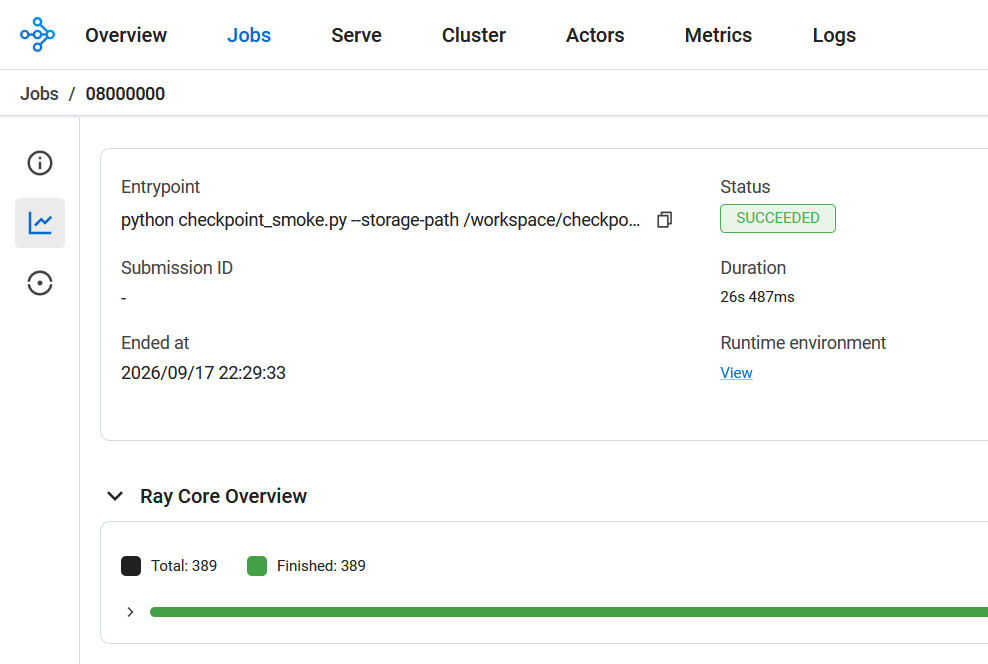
All runs:
sean@h2:/mnt/beeond/docker/ray-cluster$ ll checkpoints/staging/
total 1
drwxrwxrwx 10 sean sean  8 Sep 18 05:29 ./
drwxrwxrwx  4 sean sean  2 Sep 18 04:22 ../
drwxrwxrwx  2 sean sean  0 Sep 18 06:30 rank-0/
drwxr-xr-x  2 sean users 0 Sep 18 05:29 rank-1/
drwxr-xr-x  2 sean users 0 Sep 18 05:29 rank-2/
drwxr-xr-x  2 sean users 0 Sep 18 05:29 rank-3/
drwxr-xr-x  2 sean users 0 Sep 18 05:29 rank-4/
drwxr-xr-x  2 sean users 0 Sep 18 05:29 rank-5/
drwxr-xr-x  2 sean users 0 Sep 18 05:29 rank-6/
drwxr-xr-x  2 sean users 0 Sep 18 05:29 rank-7/

sean@h2:/mnt/beeond/docker/ray-cluster$ ll checkpoints/results/
total 2
drwxrwxrwx 3 sean sean  1 Sep 18 04:22 ./
drwxrwxrwx 4 sean sean  2 Sep 18 04:22 ../
drwxrwxrwx 8 sean sean 21 Sep 18 06:29 checkpoint-smoke/


sean@h2:/mnt/beeond/docker/ray-cluster$ ll checkpoints/results/checkpoint-smoke/
total 161
drwxrwxrwx 8 sean sean     21 Sep 18 06:29 ./
drwxrwxrwx 3 sean sean      1 Sep 18 04:22 ../
-rw-r--r-- 1 sean users  6914 Sep 18 05:21 basic-variant-state-2026-09-17_22-21-31.json
-rw-r--r-- 1 sean users  6914 Sep 18 05:25 basic-variant-state-2026-09-17_22-25-31.json
-rw-r--r-- 1 sean users  6914 Sep 18 05:29 basic-variant-state-2026-09-17_22-29-07.json
-rw-r--r-- 1 sean users  6914 Sep 18 06:26 basic-variant-state-2026-09-17_23-26-23.json
-rw-r--r-- 1 sean users  6914 Sep 18 06:28 basic-variant-state-2026-09-17_23-28-20.json
-rw-r--r-- 1 sean users  6915 Sep 18 06:30 basic-variant-state-2026-09-17_23-29-18.json
drwxr-xr-x 5 sean users     8 Sep 18 06:28 DataParallelTrainer_2455f_00000_0_2026-09-17_23-28-20/
drwxr-xr-x 5 sean users     8 Sep 18 06:30 DataParallelTrainer_46fd6_00000_0_2026-09-17_23-29-18/
drwxr-xr-x 5 sean users     8 Sep 18 05:25 DataParallelTrainer_5d96b_00000_0_2026-09-17_22-25-31/
drwxr-xr-x 5 sean users     8 Sep 18 05:21 DataParallelTrainer_ce8fb_00000_0_2026-09-17_22-21-31/
drwxr-xr-x 5 sean users     8 Sep 18 06:26 DataParallelTrainer_de330_00000_0_2026-09-17_23-26-23/
drwxr-xr-x 5 sean users     8 Sep 18 05:29 DataParallelTrainer_de9e9_00000_0_2026-09-17_22-29-07/
-rw-r--r-- 1 sean users 18100 Sep 18 05:21 experiment_state-2026-09-17_22-21-31.json
-rw-r--r-- 1 sean users 18191 Sep 18 05:25 experiment_state-2026-09-17_22-25-31.json
-rw-r--r-- 1 sean users 18699 Sep 18 05:29 experiment_state-2026-09-17_22-29-07.json
-rw-r--r-- 1 sean users 18505 Sep 18 06:26 experiment_state-2026-09-17_23-26-23.json
-rw-r--r-- 1 sean users 18510 Sep 18 06:28 experiment_state-2026-09-17_23-28-20.json
-rw-r--r-- 1 sean users 18513 Sep 18 06:30 experiment_state-2026-09-17_23-29-18.json
-rw-r--r-- 1 sean users  3183 Sep 18 06:29 trainer.pkl
-rw-r--r-- 1 sean users  1314 Sep 18 06:29 tuner.pkl
-rw-r--r-- 1 sean users     0 Sep 18 05:21 .validate_storage_marker