Alluxio and StorageGRID
Intro
Some IT people (I wish I could say many, but sadly that'd be untrue) are aware that the state of technology related to global and distributed access has been improving and can have huge benefits in time-to-results, manageability, security and costs.
Some examples of NetApp-related products and solutions:
- NetApp FlexCache - NFS and SMB read caching (ONTAP edge, ONTAP core)
- NetApp Global File Cache - SMB (Windows edge, ONTAP core)
- NetApp StorageGRID - S3 read caching (AWS S3-compliant edge, StorageGRID core)
This posts is about the last category, although it applies to ONTAP core (with NFS, but probably also S3 - I just haven't tried it yet).
And - although not directly related - this "AWS S3-compliant edge" that I mentioned above can be NetApp HCI compute nodes. I mention this for several reasons:
- In the past I've encountered HCI prospects who objected to NetApp HCI compute nodes having "too much RAM", although their workload could meaningfully benefit most from plenty of RAM. I'm not talking about Alluxio-related use cases (where RAM is a primary consideration, which makes the point obvious), but other caching solutions. Yes, one could save 1% of the HCI compute budget by having a minimum amount of RAM, but the performance would be (say) 30% slower vs. what it could be, and one still couldn't buy anything that helps more for the $2,000 saved that way.
- As we shall see later, such high-RAM nodes are especially beneficial with Alluxio, so anyone with "too much RAM" on their NetApp HCI nodes and a suitable use case can consider if using Alluxio can help.
Problem description
I gather various audit logs and store them on StorageGRID. This includes StorageGRID 11.5's own audit.log. I want to keep them for a long time, prevent tampering, and the price must be affordable.
To analyze such logs, I use a tool. You may have your own, and you may analyze genomics data or something else. It doesn't matter.
In the past I'd download such logs to my VM and analyze them there, creating unnecessary read-write workload on my VMware storage (with NetApp HCI that storage is SolidFire).
Such logs go up to few GB in size, but because I have "too much RAM" they can fit in RAM-based cache and for that I'll use Alluxio.
Proof of Concept
Let's see what do we have here…
- Ubuntu 20.04 VM (2 vCPU, 4G vRAM) on vSphere
- Alluxio 2.6.2
- NetApp StorageGRID 11.5
My audit.log is 257 MiB in size, so I chose to test Alluxio with a small VM (4GB) and allocate 1GB RAM to Alluxio. That way my data set can still fit.
The StorageGRID is located some 10,000 km away, so it's slow enough - just what I need for this PoC. On it, I create a new bucket (logs):

Then I use an S3 client to upload a folder with StorageGRID audit-related files (some 300-400 MiB in total).
Then I download and deploy Alluxio 2.6.2 and configure it to use the StorageGRID bucket. If everything works out, I should be able to start Alluxio.
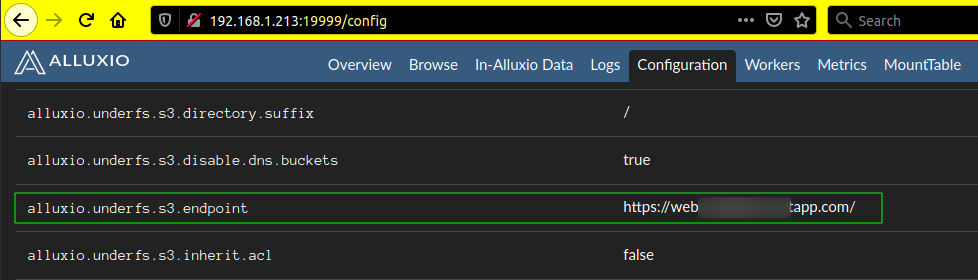
Now I can access audit.log through Alluxio, which will cache the file in RAM. If I pinned it (I didn't), I wouldn't have to access it to get it cached.
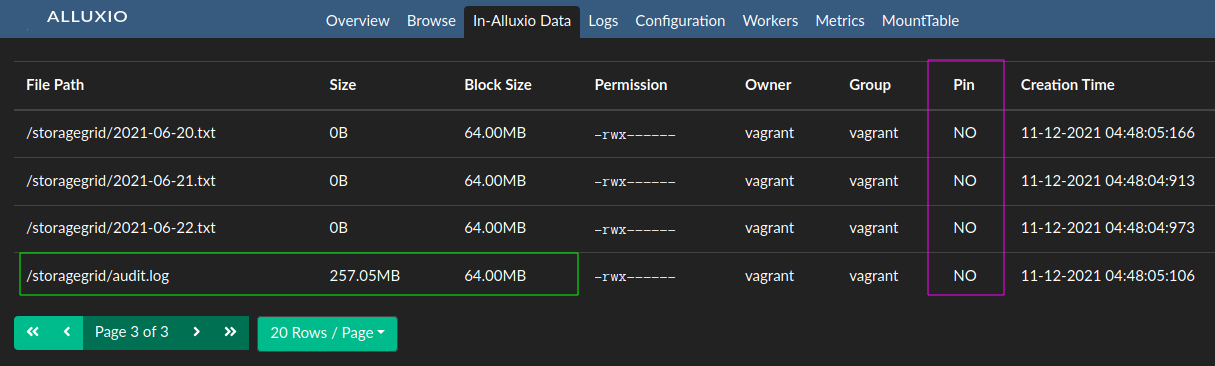
With this, I can run my analytics. Or rather: with or without this step, I can begin to analyze S3 data; if I did a cat before analysis, that'd cache files (within the limit of Alluxio cache), but if I didn't it'd still work fine just slower the first time around.
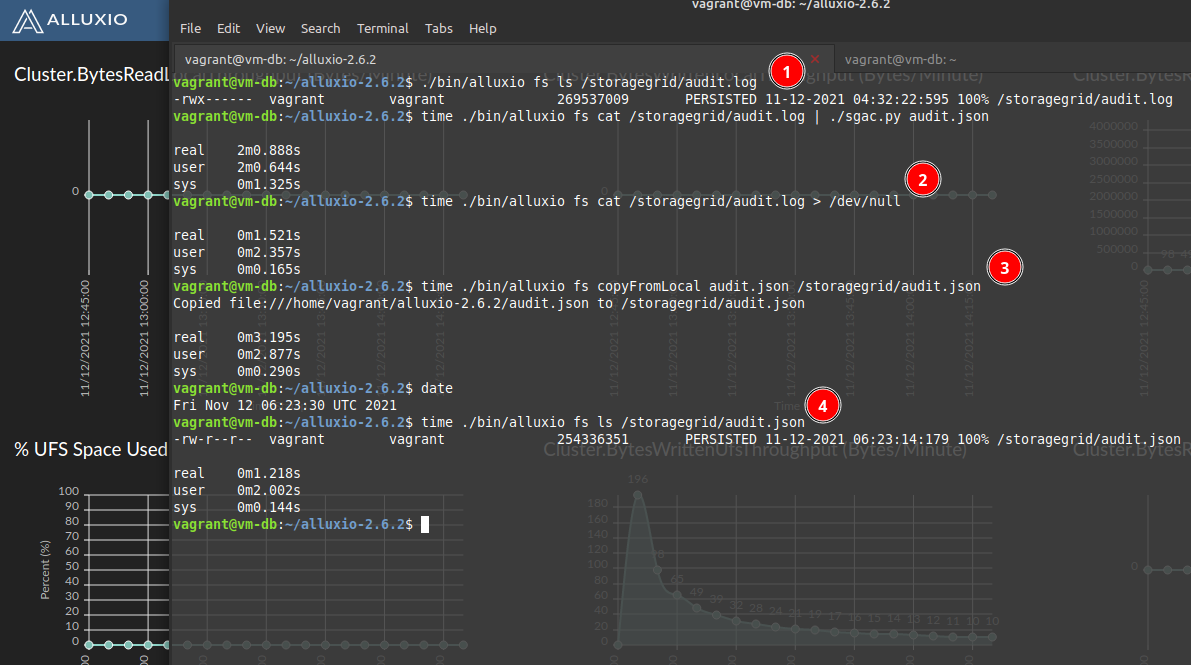
Because Alluxio is an overlay, shell I/O operations can't be direct. Instead, you do it like at the top of this screenshot below:
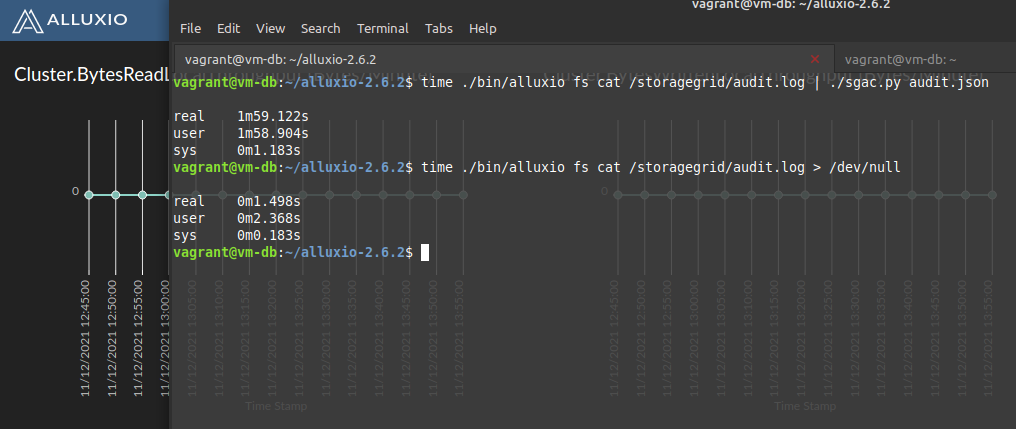
Remember, we're dealing with a 257 MiB file. At the bottom of the screenshot above, when we avoid any other (system) bottlenecks, it's clear we can read cached S3 data at around 200 MB/s. This can surely go faster with larger VMs and faster RAM & CPUs. For comparison, when I uploaded these files to StorageGRID I got only 6 MB/s.
After this exercise and some other fiddling, we haven't exhausted RAM available to Alluxio. In fact I'm using just 25% of it - the 257 MiB for audit log plus some S3 metadata, while Alluxio has 1 GiB at its disposal.

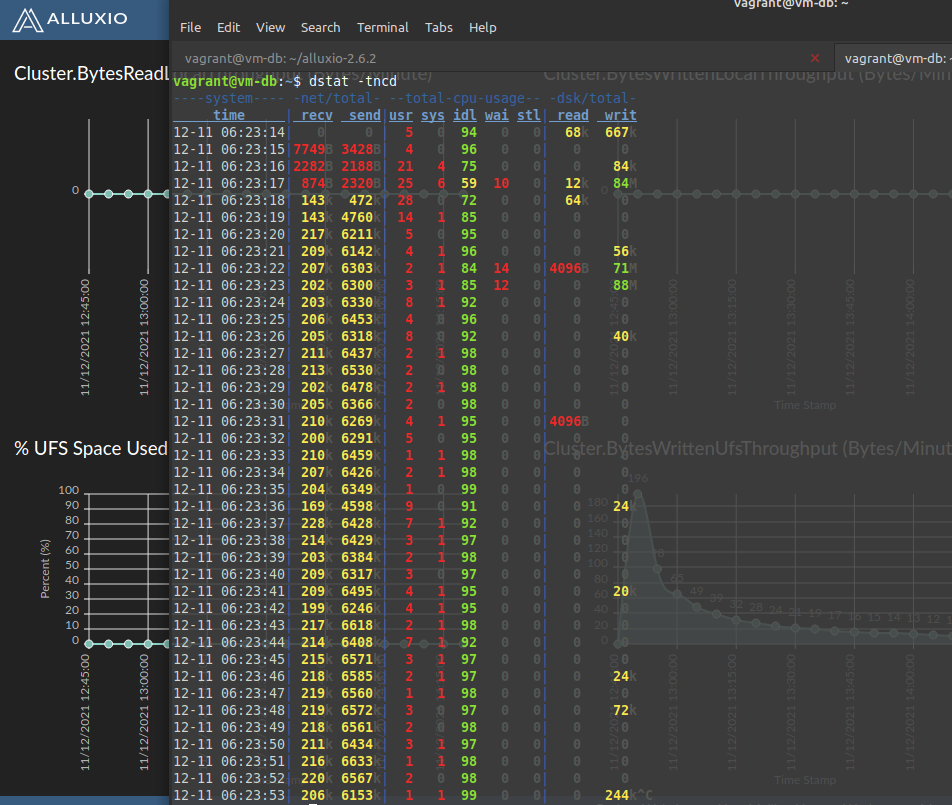
What about writing to StorageGRID? I write the result (JSON file, 242 MiB) to S3 and it takes around 3 seconds (75 MiB/s), while reading the file from StorageGRID itook minutes. How is that even possible?
As you've no doubt guessed it, it's the same answer as to why we can read S3 data at 75 MiB/s: because we have Alluxio and "too much RAM". Alluxio drains write caches behind the scene.
Configuration
-
RTFM about Alluxio Unified Namespace (v2.6.2)
-
StorageGRID (S3) data in the bucket logs, under storagegrid path (
s3://logs/storagegrid/). This StorageGRID uses path-style buckets:
$ mc ls sgpub/logs/storagegrid/audit.log
[2021-11-12 12:32:22 CST] 257MiB audit.log
- Alluxio S3 configuration (for path-style buckets):
alluxio.master.mount.table.root.ufs=s3://logs/
alluxio.underfs.s3.endpoint=https://s3.brandon.org/
alluxio.underfs.s3.disable.dns.buckets=true
alluxio.underfs.s3.inherit.acl=false
aws.accessKeyId=AAAAAAAAAAAAAAAAAAAA
aws.secretKey=BBBBBBBBBBBBBBBBBBBBBBBBBBBBBBBBBBBBB
- Alluxio data:
$ ./bin/alluxio fs ls /
drwx------  vagrant        vagrant                     98       PERSISTED 11-12-2021 06:23:13:576  DIR /storagegrid
Note: the above is what I used in this demo; but if you wanted S3 mounted elsewhere you could use s3://logs/storagegrid (bucket/directory) to have StorageGRID log data available at /storagegrid in Alluxio, and still mount other buckets or backend storage in other paths at top level. s3://bucket to /bucket is also possible.
If you're unsure you can also start Alluxio without any external backing (just RAM-backed Alluxio /) and mount back-ends later, using the Alluxio CLI.
Actions
List the audit.log file:
$ ./bin/alluxio fs ls /storagegrid/audit.log
-rwx------  vagrant        vagrant              269537009       PERSISTED 11-12-2021 04:32:22:595 100% /storagegrid/audit.log
Analyze S3 data while saving the result to local disk.
NOTE: because of the way Alluxio works, I had to modify SGAC to accept STDIN input. This is the proverbial "to take full advantage of X, applications may benefit from small modifications". And indeed, it took me about 10-15 minutes to figure this out and change SGAC to work this way. Without the ability to accept STDIN, I'd have to first download the inputs to local drive and then run my apps, but most analytics apps can accepted STDIN input or are open source software so they can be easily modified to allow for more efficient workflows.
$ time ./bin/alluxio fs cat /storagegrid/audit.log | ./sgac.py audit.json

real	2m0.888s
user	2m0.644s
sys	0m1.325s
Note that - if you need to first download your input files or can analyze data so quickly and need to write the result out at 200-300 MB/s write performance per job - you may benefit from having an E-Series array (say, iSCSI) or ONTAP (NFS, iSCSI, S3) attached to your Alluxio workers.
Here you can see how a VM can write to E-Series at more than 1GB/s per second and further below how several VM-based BeeGFS clients from single ESXi host write to EF280 at 5 GB/s.
In hindsight, after I wrapped up this testing, it occured to me that I could have modified my script output to write to Alluxio.
As I mentioned in various SGAC-related posts and readme, SGAC makes use of single CPU core and it can process StorageGRID logs at about 2 MB/s. Above we got around 2 MB/s, so seemingly there's no slowdown due to Alluxio. Let's check without Alluxio in data path:
$ time cat /tmp/audit.log | ./sgac.py /tmp/audit.json

real	1m57.002s
user	1m55.656s
sys	0m1.094s
So there's almost no overhead! Let's check Alluxio's cached read performance without application constraints:
$ time ./bin/alluxio fs cat /storagegrid/audit.log > /dev/null

real	0m1.521s
user	0m2.357s
sys	0m0.165s
We could upload the result to Alluxio this way:
$ time ./bin/alluxio fs copyFromLocal audit.json /storagegrid/audit.json
Copied file:///home/vagrant/alluxio-2.6.2/audit.json to /storagegrid/audit.json

real	0m3.195s
user	0m2.877s
sys	0m0.290s

$ date
Fri Nov 12 06:23:30 UTC 2021
This command returned in 3 seconds, and you already know why. Let's switch to a tab where we have dstat running.
$ dstat

----system---- -net/total- --total-cpu-usage-- -dsk/total-
     time     | recv  send|usr sys idl wai stl| read  writ
12-11 06:23:14|   0     0 |  5   0  94   0   0|  68k  667k
12-11 06:23:15|7749B 3428B|  4   0  96   0   0|   0     0
12-11 06:23:16|2282B 2188B| 21   4  75   0   0|   0    84k
12-11 06:23:17| 874B 2320B| 25   6  59  10   0|  12k   84M
12-11 06:23:18| 143k  472k| 28   0  72   0   0|  64k    0
12-11 06:23:19| 143k 4760k| 14   1  85   0   0|   0     0
12-11 06:23:20| 217k 6211k|  5   0  95   0   0|   0     0
12-11 06:23:21| 209k 6142k|  4   1  96   0   0|   0    56k
12-11 06:23:22| 207k 6303k|  2   1  84  14   0|4096B   71M
12-11 06:23:23| 202k 6300k|  3   1  85  12   0|   0    88M
12-11 06:23:24| 203k 6330k|  8   1  92   0   0|   0     0
12-11 06:23:25| 206k 6453k|  4   0  96   0   0|   0     0
12-11 06:23:26| 205k 6318k|  8   0  92   0   0|   0    40k
12-11 06:23:27| 211k 6437k|  2   1  98   0   0|   0     0
At 6 MB/s, audit.json should be persisted to StorageGRID in less than a minute. The timestamp below marks the time when fs copyFromLocal executed.
$ ./bin/alluxio fs ls /storagegrid/audit.json
-rw-r--r--  vagrant        vagrant              254336351       PERSISTED 11-12-2021 06:23:14:179 100% /storagegrid/audit.json

real	0m1.218s
user	0m2.002s
sys	0m0.144s
This isn't the only way, there are different methods (sync, etc.) that can be used to write to Alluxio. See alluxio.proxy.s3.writetype in their documentation.
Had I modified my Python script to write to Alluxio, it would benefit from write-back caching (if we configured Alluxio that way) but also avoid copyFromLocal as a separate step in this process.
Summary
1) S3 data is cached in Alluxio
2) Cached data can be accessed at few hundred MB/s or - with distributed workers - at many GB/s per second
3) Results were written to a local FS (for very fast write we could use E-Series with BeeGFS) and - if necessary - uploaded to S3 with fs copyFromLocal. That could also be done directly to another non-mounted bucket, by bypassing Alluxio if you don't need it in Alluxio cache.
4) If RAM allocated to Alluxio is sufficient, we can pre-cache (pin) remote files and otherwise fine-tune Alluxio cache behavior
5) In addition to StorageGRID S3 (or other S3-compliant object stores), you can run Alluxio from NetApp HCI compute nodes and for faster local I/O take advantage of NetApp ONTAP and E-Series arrays
Demo video
Alluxio with StorageGRID (2m22s)