Red Hat Quay with NetApp ONTAP S3
NOTICE: all credentials and tokens on this page are samples, not leaked.
Today I realized I'd forgotten to write this post last year…
So, how to configure Red Hat Quay with ONTAP S3?
- Use NetApp OTNAP 9.10.1 or newer
- Configure ONTAP S3 and create a bucket, account, etc. for Quay.
- Create a TLS certificate - real or fake - for ONTAP S3 vServer that Quay system will accept. Upload the cert to ONTAP. This is under: Storage VMs > (find your S3 server VM) > Edit S3 Server.
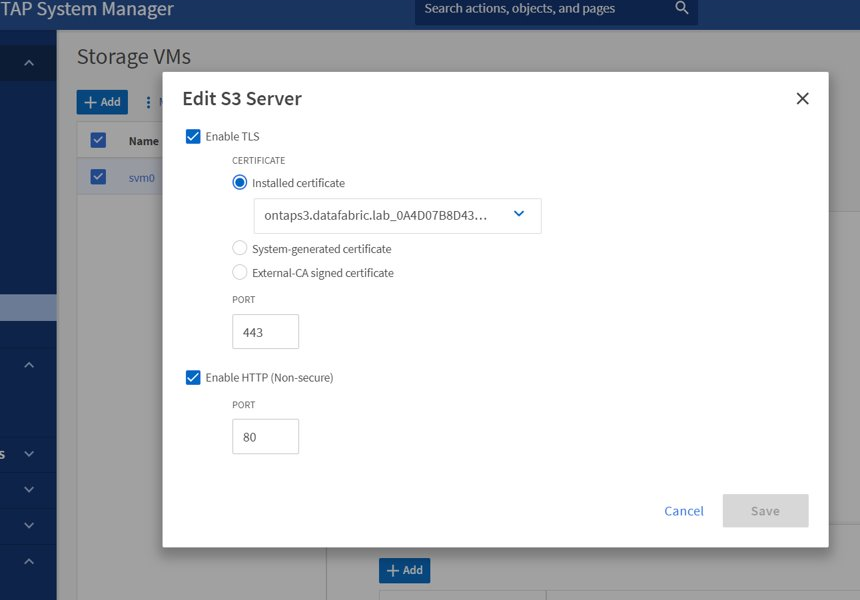
- At this point you can test the S3 HTTPS from your Quay container with curl. If curl doesn't work without
-k, don't bother continuing before you fix that. - Configure Red Hat Quay back-end using Amazon S3 storage engine, but provide ONTAP S3 IP/port, credentials, bucket name, etc. Path within bucket is optional.
- Like curl, Quay has to be provided with this certificate if it's fake (self-signed) and can't be validated with one of the valid CAs
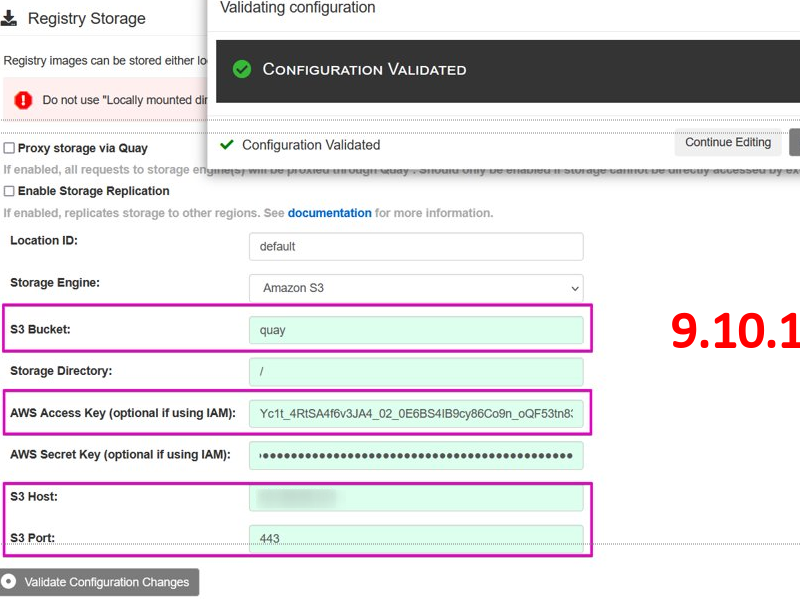
In my experience recent Quay releases won't accept an S3 endpoint if its TLS certificate cannot be validated.