Kubernetes with Cinder CSI on Openstack and SolidFire - Part 1
NOTICE: all credentials and tokens on this page are samples, not leaked.
Posts in "Kubernetes with Cinder CSI Plugin on Openstack Yoga/Xena with SolidFire 12.3" series
- (this post) Kubernetes with Cinder CSI Plugin on Openstack Yoga/Xena with SolidFire 12.3 - Part 1
- Kubernetes with Cinder CSI Plugin on Openstack Yoga/Xena with SolidFire 12.3 - Part 2
Table of Content for Part 1
- Introduction
- Deploy Openstack with SolidFire
- Configure Cinder with SolidFire back end
- Appendix A
- Video walk-through
Introduction
What's so special about Kubernetes on Openstack with SolidFire vs. Kubernetes on other stack with SolidFire?
The fact that we can use Cinder to manage storage provisioning. Not just for Openstack VMs, but also for Kubernetes.
Cinder CSI driver allows you to provision volumes over an Openstack deployment.
Why?
Because it's an integrated approach and the driver (I mean Cinder) is stable, featured and has been around forever. According to SolidFire Cinder driver documentation for Xena release, here's what it can do today:
- Create, delete, attach, and detach volumes
- Create, list, and delete volume snapshots
- Create a volume from a snapshot
- Copy an image to a volume
- Copy a volume to an image
- Clone a volume
- Extend a volume
- Retype a volume
- Manage and unmanage a volume
- Consistency group snapshots
QoS features are also richer than what you can get in Trident CSI today (same source):
- minIOPS - The minimum number of IOPS guaranteed for this volume
- maxIOPS - The maximum number of IOPS allowed for this volume
- burstIOPS - The maximum number of IOPS allowed over a short period of time
- scaledIOPS - A flag indicating that the above IOPS should be scaled by the following scale values
- scaleMin - The amount to scale the minIOPS by for every 1GB of additional volume size
- scaleMax - The amount to scale the maxIOPS by for every 1GB of additional volume size
- scaleBurst - The amount to scale the burstIOPS by for every 1GB of additional volume size
And finally, Cinder CSI supports Ephemeral volumes.
Active-Active
Since 2020 (Ussuri release), SolidFire Cinder driver supports volume fail-over between clusters.
The Ussuri release enables Active/Active (including replication) support for to the SolidFire driver. This allows users to configure SolidFire backends in clustered environments.
You can see features of SolidFire Cinder driver from Ussuri release here.
Protection Domains
As illustrated and explained in this post, six or more SolidFire nodes can be deployed in three "protection domains" (similar to Availability Zones), so the ability to run Kubernetes on this mature and feature-rich platform looks appealing.
Note that when K8s is used with SolidFire Protection Domains, you can't use AZ settings in OpenStack or Kubernetes Cinder CSI Plugin: Openstack "AZs" don't map to SolidFire Protection Domains - SolidFire volumes can be scheduled (and move around) all Protection Domains so Nova instances may need to connect to iSCSI targets in any available Protection Domain. So AZ-related settings may not work. See the above link for the details.
Backup and restore
Additionally, this approach (see this post on KVM/QEMU backup) may make it convenient to use Openstack's built-in backup feature to backup Cinder CSI volumes. Although we may be able to do that "natively" with Kubernetes-integrated Velero backup (CSI or non-CSI approach) as well.
Almost no one I've asked has heard about it, but a SolidFire developer demonstrated the concept of using Cinder for containers half a decade ago. I haven't deep-dived into this because the details don't interest me that much, but it looks like VMware vSphere CSI provider validated that approach.
In Part 1 we'll just install Openstack with Cinder configured for SolidFire. I completed this and realized installing Kubernetes on top of that would require more hardware resources than I have at hand, so I'll leave the Kubernetes and Cinder CSI for Part 2.
Comparison with NetApp Astra Trident
Currently (as of Trident v22.01) Cinder CSI has some advantages such as the ability to retype volumes (see demo video at the bottom), and perform SolidFire cluster failover (not required for Protection Domains, but required with two separate SolidFire clusters).
Deploy Openstack with SolidFire
Openstack has always felt complex to install, but All-in-One approaches are reasonably well documented now, and I recommend those over installing a full blown Openstack - especially so if you don't have a lot of hardware resources. There's something called DevStack and there's a set of Ansible scripts that does the same (or similar) with Ansible.
After reading the documentation for several full-stack enterprise Openstack distributions, I got turned off by the highly complex documentation with a bunch of workarounds for various bugs (in drivers, distros, etc) and used DevStack.
I won't repeat what's already in the upstream documents, but I do want to mention how my network was configured:
| Ext (VLAN 1) | iSCSI (VLAN 103) | |
|---|---|---|
| VM | 192.168.1.119 | 192.168.103.119 |
| SolidFire | 192.168.1.34 | 192.168.103.34 |
Public/Floating IPs were on External network, while iSCSI on Openstack Nova host was accessing SolidFire SVIP over iSCSI network.
This used two stand-alone NICs, but there are different versions (with one NIC, with one single and one bonded, etc.) so check the Openstack Xena documentation and pick an approach that doesn't require you to make significant changes or invent a unique configuration that's hard to get to work.
I used one VM for All-in-One Openstack Xena and another for SolidFire Demo VM 12.3. All-in-One Openstack had some issues with Keystone, but other parts seemed to work fine.
Configure Cinder with SolidFire back end
The SolidFire Cinder driver for Openstack is built-in. You can see the details here.
Configure Cinder for SolidFire using minimal options (don't forget to add "solidfire" to enabled_backends):
[DEFAULT]
default_volume_type = lvmdriver-1
scheduler_default_filters = DriverFilter
enabled_backends = lvmdriver-1,solidfire

[solidfire]
volume_driver  = cinder.volume.drivers.solidfire.SolidFireDriver
san_ip         = 192.168.1.34  # the address of my MVIP
san_login      = admin         # cluster admin login
san_password   = admin         # cluster admin password
sf_account_prefix = 'os'       # os=Openstack (will be prefixed to project ID in SF tenant account)
sf_emulate_512 = True          # on by default, required for KVM (and ESXi 7.0, IIRC)
In non-essential options there's sf_account_prefix which is the prefix for SolidFire tenant (storage) accounts.
I found it interesting that these are created on-demand and in my case were equal to Openstack Project ID. I don't (yet) know how that works with Cinder CSI, but in Trident CSI the default account is always called Trident unless manually overridden during installation. The Cinder approach may be better - we'll see if we get to Cinder CSI in Part 2 -as it'd allow for better account segregation.
After Cinder is configured, restart Cinder-related services and configure Volume Type in Openstack. This can be done in the CLI or from Openstack dashboard.
Once done you should see something like this (in this case I did not make SolidFire my default Cinder driver):
root@aio:/tmp# cinder extra-specs-list
+--------------------------------------+----------------+----------------------------------------+
| ID                                   | Name           | extra_specs                            |
+--------------------------------------+----------------+----------------------------------------+
| 453cbb71-9fe1-49e0-be40-c32733182f4d | solidfire      | {'volume_backend_name': 'solidfire'}   |
| 75745d2a-96db-4552-b325-57a5521194e5 | lvmdriver-1    | {'volume_backend_name': 'lvmdriver-1'} |
| 9f2a4a01-8421-44c7-aaf0-2fe101872b01 | solidfire-high | {'volume_backend_name': 'solidfire'}   |
| f73f0038-ac51-4cc4-96c5-a1d61c3c716d | __DEFAULT__    | {}                                     |
+--------------------------------------+----------------+----------------------------------------+
For each SolidFire backend I created one QoS policy:
root@aio:/tmp# cinder qos-list
+--------------------------------------+------+----------+------------------------------------------------------------+
| ID                                   | Name | Consumer | specs                                                      |
+--------------------------------------+------+----------+------------------------------------------------------------+
| 3c8bc92e-a281-4e2b-b822-9b25c42b2f3e | low  | back-end | {'minIOPS': '100', 'maxIOPS': '500', 'burstIOPS': '1500'}  |
| a0028ce4-b9db-438e-a0f9-34072ab337a0 | high | back-end | {'maxIOPS': '1500', 'minIOPS': '500', 'burstIOPS': '2500'} |
+--------------------------------------+------+----------+------------------------------------------------------------+
- Setting SolidFire volume types and QoS specs in Openstack console

Create a VM and a SolidFire volume for it. In below output boot disk is in on internal storage and "data disk" (/dev/vdb) is on SolidFire.
- Create SolidFire volume in a Project
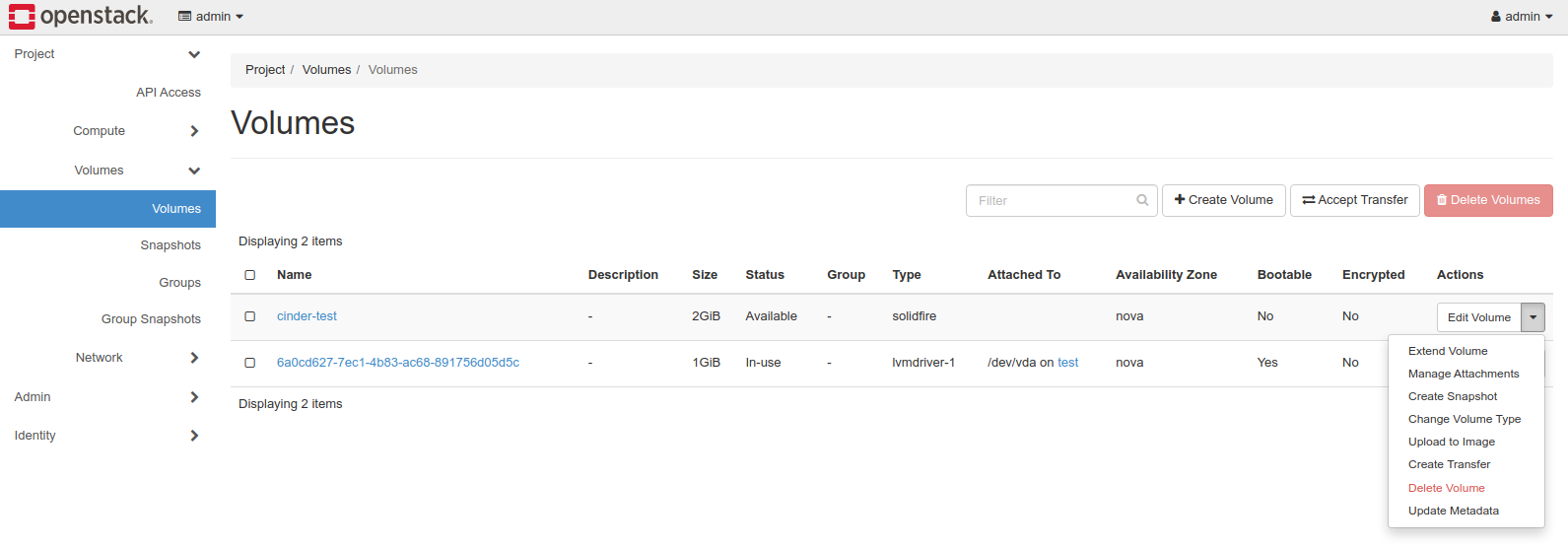
root@aio:/tmp# cinder list
+--------------------------------------+-----------+-------------+------+----------------+-------------+----------+--------------------------------------+
| ID                                   | Status    | Name        | Size | Consumes Quota | Volume Type | Bootable | Attached to                          |
+--------------------------------------+-----------+-------------+------+----------------+-------------+----------+--------------------------------------+
| 6a0cd627-7ec1-4b83-ac68-891756d05d5c | in-use    |             | 1    | True           | lvmdriver-1 | true     | f5c5973c-4af9-4b06-a8d0-2c22d6f36a13 |
| e6e4c6e5-391f-43e0-bd5e-a20828ecd67e | available | cinder-test | 2    | True           | solidfire   | false    |                                      |
+--------------------------------------+-----------+-------------+------+----------------+-------------+----------+--------------------------------------+
Find the VM instance and attach cinder-test volume to it. Now the SolidFire volume is attached to the VM.
- Attach SolidFire volume to a VM instance
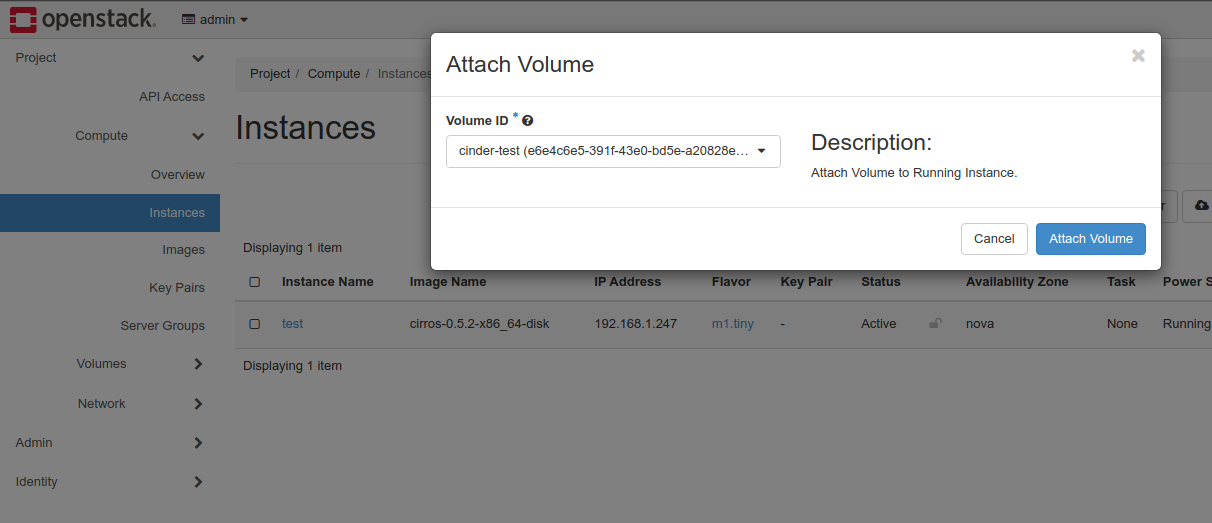
root@aio:/tmp# cinder list
+--------------------------------------+--------+-------------+------+----------------+-------------+----------+--------------------------------------+
| ID                                   | Status | Name        | Size | Consumes Quota | Volume Type | Bootable | Attached to                          |
+--------------------------------------+--------+-------------+------+----------------+-------------+----------+--------------------------------------+
| 6a0cd627-7ec1-4b83-ac68-891756d05d5c | in-use |             | 1    | True           | lvmdriver-1 | true     | f5c5973c-4af9-4b06-a8d0-2c22d6f36a13 |
| e6e4c6e5-391f-43e0-bd5e-a20828ecd67e | in-use | cinder-test | 2    | True           | solidfire   | false    | f5c5973c-4af9-4b06-a8d0-2c22d6f36a13 |
+--------------------------------------+--------+-------------+------+----------------+-------------+----------+--------------------------------------+
- SolidFire volume attached to compute instance
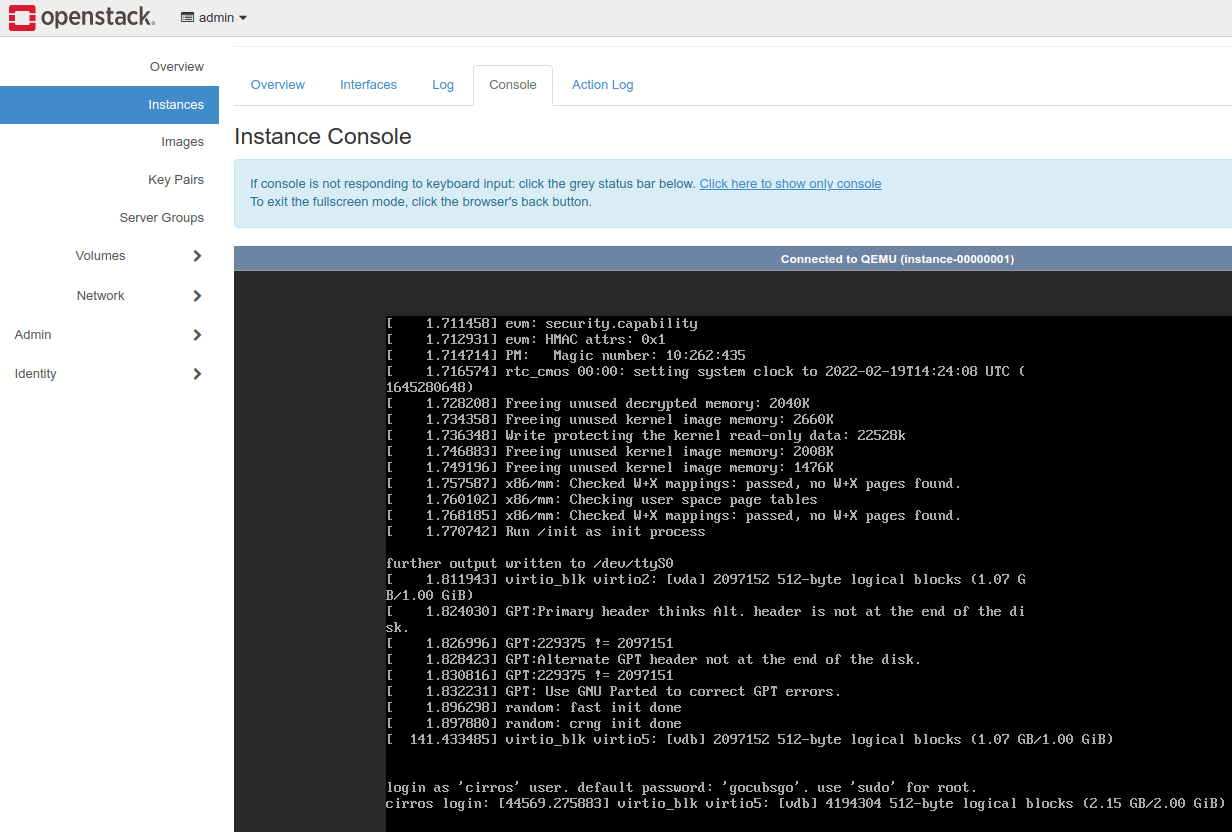
From the console we see that the 2GiB SolidFire volume attached as /dev/vdb.
- Three volumes attached to the VM instance (one LVM boot volume and two SolidFire data volumes)
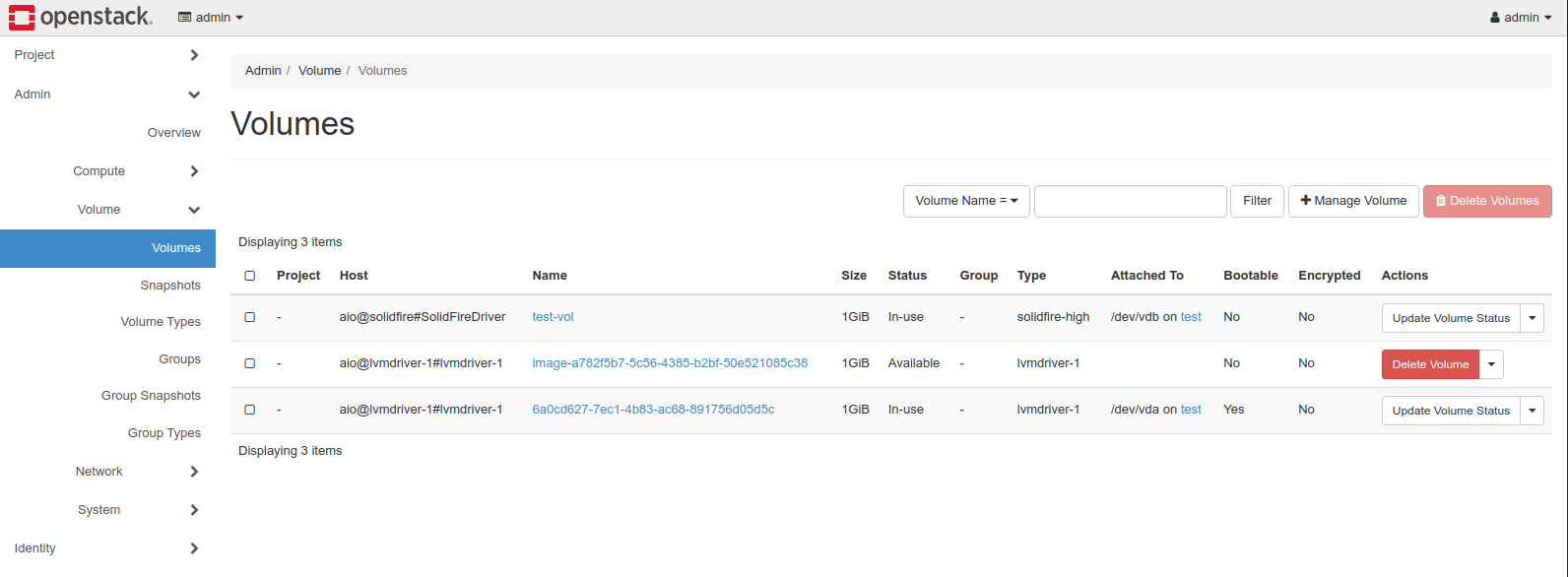
I chose to not use SolidFire for boot volumes because SolidFire Demo VM used for this PoC has limited IOPS. Many SolidFire users boot Openstack VMs from SolidFire because of its QoS, DR/BC features and built-in efficiencies (deduplication and compression) that do not impact QoS.
Next, we need to deploy Kubernetes with Cinder CSI. If I write that post, I'll post a link to it here.
Appendix A
This script helps you quickly configure SolidFire Volume Type and QoS settings.
You need to be authenticated (apply the Openstack credentials) for this script to work. SolidFire Cinder driver must be up, running and working in order for volume types created this way to work. You can run this before or after Cinder is installed (if it's installed before, types won't work because volume driver isn't usable).
#!/usr/bin/env bash

###############################################################################
# https://github.com/scaleoutSean                                             #
# Adopted from solidfire-ai & licensed under the Apache 2.0 License           #
# https://github.com/scaleoutsean/solidfire-ai/blob/master/LICENSE            #
###############################################################################

function get_field {
    while read data; do
        if [ "$1" -lt 0 ]; then
            field="(\$(NF$1))"
        else
            field="\$$(($1 + 1))"
        fi
        echo "$data" | awk -F'[ \t]*\\|[ \t]*' "{print $field}"
    done
}

# --- setup Volume Types ---
# set VOLUME_BACKEND_NAME to the name of your SolidFire cluster
VOLUME_BACKEND_NAME="solidfire"

cinder type-create solidfire
cinder type-key solidfire set volume_backend_name=$VOLUME_BACKEND_NAME

# Setup 4 arrays corresponding to your Volume types and QoS settings
VOL_TYPES=( "silver" "bronze" "gold" "webserver" "platinum" )
DESCRIPTION=( '$[$1.12/GB/month]' '$[0.50/GB/month]' '[$2.10/GB/month]' '[$0.35/GB/month]' '[$3.00/GB/month]' )
MIN=(        500    100      1000   100       2000    )
MAX=(        800    200      1500  1000       2000    )
BURST=(      900    400      1700  1500       2500    )

INDEX=0
for VOL_TYPE in "${VOL_TYPES[@]}"
do
   echo "Create Volume Type: ${VOL_TYPE}"
   TYPE_DESC="IOPS=${MIN[${INDEX}]}/${MAX[${INDEX}]}/${BURST[${INDEX}]} ${DESCRIPTION[${INDEX}]}"
   TYPENAME_TYPEID=$(cinder type-create --description "${TYPE_DESC}" ${VOL_TYPE} | grep ${VOL_TYPE} | get_field 1)
   echo "Creating QoS Specs"
   QOS_ID=$(cinder qos-create ${VOL_TYPE}-qos minIOPS=${MIN[${INDEX}]} maxIOPS=${MAX[${INDEX}]} burstIOPS=${BURST[${INDEX}]} | grep id | get_field 2)
   echo "Setting volume backend name ..."
   cinder type-key ${TYPENAME_TYPEID} set volume_backend_name=${VOLUME_BACKEND_NAME}
   echo "Associating QoS specs with volume type .... "
   cinder qos-associate ${QOS_ID} ${TYPENAME_TYPEID}
   ((INDEX++))
done

echo "Created Types and Extra-Specs:"
cinder extra-specs-list