Backup and restore NetApp BeeGFS CSI PVs with Kanister
Introduction
In my previous post on BeeGFS CSI I touched upon the topic of data protection with BeeGFS CSI.
Here's a screenshot from that post, showing a restore of Kanister backup for flat files (Wordpress Web site) and a database (MySQL back-end).

I didn't want to put additional screenshots or notes to that post because it's already too long, and secondly, Kanister (and Kasten K10) can also backup other CSI volumes (such as Trident CSI - see this post about logical database backup in Kasten with SolidFire).
Kanister is open source software that can be used in a stand-alone fashion - what I'll do here - or via recent releases of Kasten K10 (as demonstrated in that Kasten & Trident post).
What Kanister does
My simple explanation is: it does a subset of what Kasten can do.
- Kanister docs: https://docs.kanister.io/
- Kasten K10's functionality can be extended with Kanister: https://docs.kasten.io/latest/kanister/kanister.html
As I mentioned in previous post (on BeeGFS CSI), Kanister has several backup functions that can be used to backup or copy BeeGFS PV data. If you're just after use-cases that Kasten mentions it their documentation, it will use tasks suitable for those workloads which means that - for an example - some database will be backed up using "logical" backup i.e. a database's native backup interface or possibly a dump command.
If you want to backup flat files, there's no native BeeGFS CSI backup API or CLI that we can use to optimize things, so we'd just use (a) no CSI snapshot in pre-backup job, and (b) run generic backup or copy commands from Kanister. This is kind of odd and niche so the Kasten documentation doesn't cover that use case yet. But it can work for us here.
As you know, or have guessed, BeeGFS as a cluster filesystem can allow many clients to read-write to the same block (i.e. not network) shared file system - and even the same file - at the same time. Because of that and a lack of snapshots, when we run a backup job with Kanister we preferrably like to stop workload and backup or copy PV files to S3 and restart applications once backup is done.
Of course, there are scenarios where we don't have to make this very sophisticated:
- Say you have a 50TB filesystem with experiment data that's constantly coming in. There's two good things about that: (a) old files are rarely deleted in an unexpected way, and (b) only new files are modified as they are uploaded to BeeGFS every few minutes or hours. We may not be able to pause that, but we also don't need to worry what happens if two most recent files don't get fully backed up
- Maybe you have a single-pod application (example: WordPress) that uses one PVC. That's not very common for BeeGFS, but it's possible. In this case you could use Kanister without issues as long as the application can work on BeeGFS
Kanister backup and restore require two things:
- a blueprint specific to application (or filesystem, if I were to backup BeeGFS PVC without any application integration)
- action scripts (backup, restore, etc.)
You can read either Kanister or Kasten's docs for the details and examples. The bottom line is once Kanister and its CLI are installed, in order to backup to S3 we create an S3 profile and credentials (secret) for it, and then we move on to "integration" by installing a blueprint and backup actions file.
In the case of MySQL, we'd use a ready-made blueprint that both Kasten and Kanister have, which can be a MySQL dump script or other way to backup MySQL (you can write your own). For flat files (such as WordPress or generic BeeGFS CSI applications), we'd use BackupData (which backs up data to S3).
# ...
actions:
  backup:
    phases:
      - func: BackupData
        name: BackupToObjectStore
        args:
          namespace: "{{ .Deployment.Namespace }}"
          pod: "{{ index .Deployment.Pods 0 }}"
          container: kanister-sidecar
          includePath: /var/www/html # this is PV path mounted inside of the Pod
# ...
In all "backup to S3" scenarios, PV data ends up in a bucket. Example for MySQL:
# s3://backup-bucket/mysql-backups/wordpress/wordpress-mysql/2022-04-12T18/
[2022-04-13 02:12:55 CST] 766KiB dump.sql.gz
Every backup action spits out a backup artifact or key, by which we can identify that backup job.
When we want to restore - depending on how much stuff our Kanister blueprint covered - we may need to do a small or not-so-small amount of work.
As as example: if our blueprint backup action made a copy of application namespace and various application metadata, we'd not have to restore those manually. But if it backed up only PV contents and the entire namespace was lost, we'd have to figure out a way to do the rest before we restore PV contents, or improve our blueprint.
In this case, as you can see from screenshots and in the demo, I have to recreate namespace and deployments manually. The latter restores the application and PVCs included in deployment.
# ...
  restore:
    # type: Deployment
    phases:
      - func: RestoreData
        name: RestoreFromObjectStore
        args:
          namespace: "{{ .Deployment.Namespace }}"
          pod: "{{ index .Deployment.Pods 0 }}"
          image: kanisterio/kanister-tools:0.29.0
          backupArtifactPrefix: wordpress-backups
          backupTag: "{{ .ArtifactsIn.backupInfo.KeyValue.backupIdentifier }}"
# ...
If you use some form of GitOps, deployments, services, etc. can be recreated automatically. Or you can back them up so that they can be restored with or without data.
Like Kanister's backup action, restore actions may take parameters to identify our application (such as namespace) and a backup key to know what to restore. Let's say our last WordPress backup returned the key backup-xzrsj.
kanctl create actionset \
  --action restore \
  --namespace kanister \
  --from backup-xzrsj
Restore action kicks off a restore job for WordPress data (at this point we already have a deployment with a pod and PVC, created earlier):
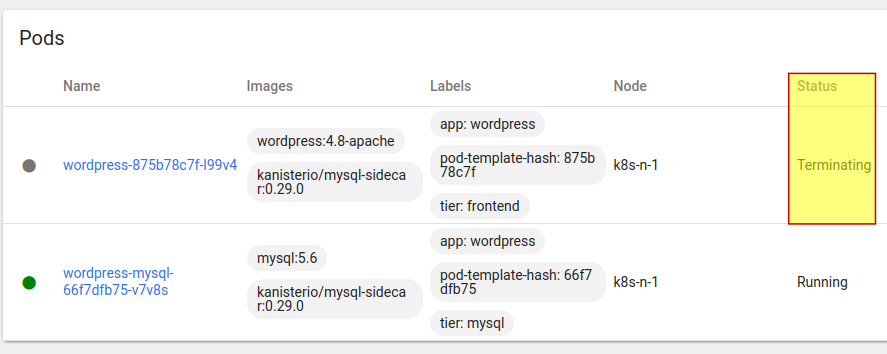
Kanister sidecar starts, terminates the pods (see the screenshot above), runs a Restore action (which can be complex with pre- and post-steps), as per below:
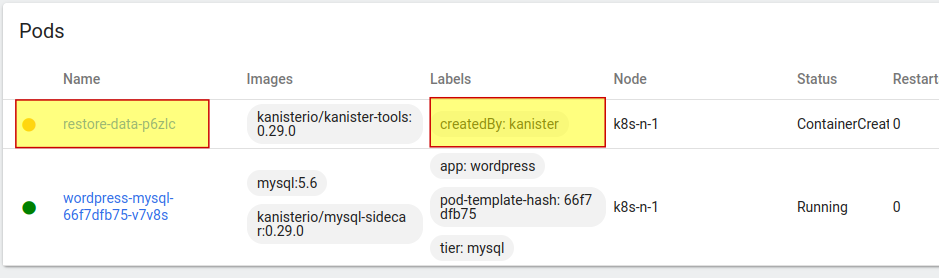
After it completes, it reverts our deployment to original specification i.e. WordPress and MySQL pods come up.
Kanister has many functions that can be combined to create sophisticated blueprints, from KubeExec (limited by your imagination), over BackupData (backup data to S3) to CopyVolumeData (which copies data into an Object Store, which can serve as a backup copy, but also be used in data pipelines). All three methods, plus application-specific blueprints (such as those you can find in Kasten documentation) can be used to create workflows for data protection on BeeGFS CSI PVs.
It's worth noting that Kanister also has powerful Restore features. Consider this (from Kanister's RestoreData function):
For advanced use cases, it is possible to have concurrent access but the PV needs to have RWX mode enabled and the volume needs to use a clustered file system that supports concurrent access.
This means we can both backup as well as restore BeeGFS PV data in parallel. With a sufficiently fast on-prem Object Stores perhaps even 100TB large PVs could be fully backed up over night.
Kasten nicely integrates Kanister and you can use, schedule and monitor everything through a nice Web UI, obviously, but as I said earlier I have to revisit it and find a way to create a backup policy that skips taking a snapshot which BeeGFS CSI doesn't support. When I tested logical backups with Trident CSI and SolidFire (link at the top), I didn't have this problem and I can't remember why (maybe CSI snapshots were taken although they weren't used).
Summary
In the previous post focusing on BeeGFS CSI I used Velero with Restic to make a snapshotless backup of a BeeGFS PV and restore that data. It just worked.
Kasten K10 integrates Kanister, a toolset which provides building blocks for building both application-specific and generic data protection workflows.
Kanister is very powerful because it allows a variety of workflows and approaches, including parallel backup and restore for BeeGFS CSI. But it is also harder to use, especially if you use it directly (not through Kasten).
Apart from application-specific blueprints which work with BeeGFS CSI if the application can work on top of BeeGFS, fast flat file backup and restore workflows may be the best use case for stand-alone Kanister use.
But although basic backup and restore works fine, for parallel execution across many pods we'd have to develop non-trivial blueprints to split workload among multiple Kanister pods.