Kubernetes, Trident and SolidFire configuration - part 2
This series of posts has several parts:
- Part 1 - Kubernetes, Trident and SolidFire configuration visibility
- Part 2 - this post
Introduction
In part 1 of this series, I went through various inputs and outputs and got to a point where I have a mapping between Kubernetes, Trident and SolidFire.
Now for every Trident volume, I have this at my disposal.
{   'name': 'pvc-d793176f-2484-48ea-9255-f70215a7c5f7',
    'internalName': 'pvc-d793176f-2484-48ea-9255-f70215a7c5f7',
    'accessInformation': {   'iscsiTargetPortal': '192.168.105.30:3260',
                             'iscsiTargetIqn': 'iqn.2010-01.com.solidfire:wcwb.pvc-d793176f-2484-48ea-9255-f70215a7c5f7.139',
                             'iscsiInterface': 'default',
                             'iscsiUsername': 'tridentk2'},
    'sf_vol_id': 139,
    'sf_vol_name': 'pvc-d793176f-2484-48ea-9255-f70215a7c5f7',
    'sf_iqn': 'iqn.2010-01.com.solidfire:wcwb.pvc-d793176f-2484-48ea-9255-f70215a7c5f7.139',
    'sf_fifo_min': 0,
    'sf_fifo': 5,
    'sf_size': 2147483648,
    'sf_account': 11}

What can we do with that?
Well, originally (see part 1) the idea was pretty generic - make Kubernetes-on-SolidFire easier to observe and monitor.
This post will talk about some use cases that I can think of. I've had these ideas for a while and some of them were mentioned in the post related to SFC v2, but now that I've made progress I can think about the details.
Use cases
Feed Trident volume list to Velero
As new PVCs appear, I can that information to automatically create Velero (or other) backup jobs on Kubernetes.
That's fantastic! But wait, that must be hard!
How can we know how/where/when I want to backup each volume (or whether I want to backup all Trident volumes)? There are different kinds of backup jobs, with different backup schedules, etc.
That's right! Read on.
Create backup-to-S3 jobs on SolidFire
As SolidFire users know, SolidFire has a basic built-in "backup-to-S3" (also "restore-from-S3") feature.
It's basic, but free and good for simple use cases.
Assuming unique volume names, all we need is a volume name and if the rest is fixed for the entire cluster, we just loop through the volumes every day and dispatch jobs. If they fail, we log it and move on - we'll do it again tomorrow.
Where do we log it? Wherever you log stuff.
I could send it to SFC, but you can send it to Splunk, Elasticsearch or other syslog destination.
This post shows how I send logs to InfluxDB and use Grafana to visualize and alert.
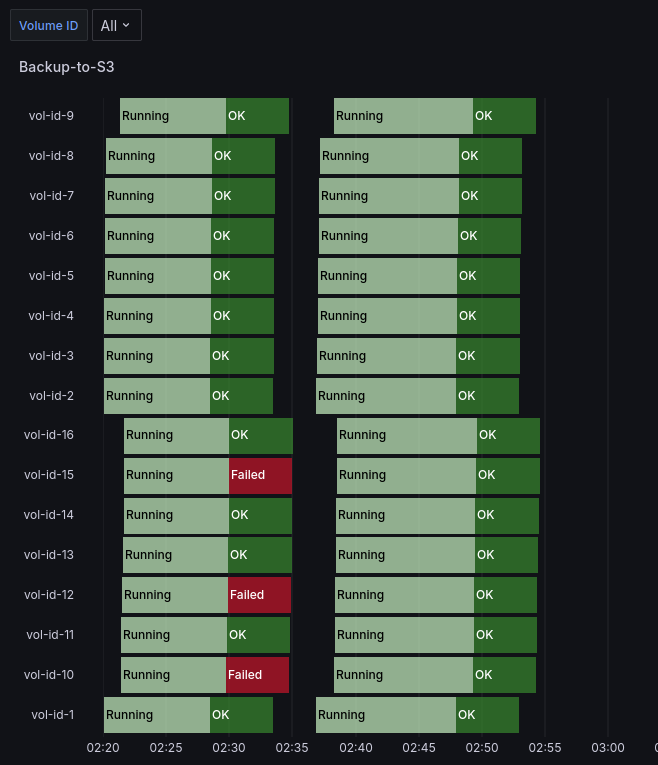
The post has an example for alerting as well.
All that was missing was a way to get the list of Trident volumes (as far as backup-to-S3 for Trident volumes is concerned).
As those familiar with SolidFire know, restores from S3 also must be done by SolidFire admin user. Because a volume may be destroyed, he'd need to create the same sized volume and restore that backup into that new volume.
Where does he get that info? From SFC (see SQL queries in part 1), Splunk or Elastic. Just search for the destroyed volume ID or internal Trident name, check the size and create a new volume with the same volume and block size and with the same QoS settings.
Then restore S3 backup to it, re-assign volume ownership to the Trident account and let Trident/Kubernetes admin know they can import volume into Kubernetes.
Set up cross-site replication for PVCs
This seems trivial. Let's say we get a list of PVCs from K8s #1 on Site #1.
- Get a list of volumes, connect to SolidFire on remote Site #2
- Create volumes (same name as on Site #1, but it's not essential, same size, QoS settings, etc), and assign new volumes to Trident account in K8s #2, but set them to replicationTarget (i.e. read-only access)
- Set up replication relationships between site #1 and site #2
- Modify FIFO and snapshot retention settings on source volumes (site #1) and target volumes (site #2)
Now when we want to failover, we already have a list of volumes to loop through:
- Make volumes on site #1 replicationTarget (if the site is reachable)
- Stop replication relationship on SolidFire on site #2
- Make all SolidFire PVC volumes involved readWrite
- Import volumes into K8s #2
- When site #1 is reachable, consider
- Taking a snapshot of all PVCs on site #1, just in case
- Set up reverse replication relationship (site #2-> site #1)
- Before failing back, stop K8s on site #2 as volumes will go read-only (once we set them to the usual replicationTarget mode)
We have all the information required for failover and failback, except (as mentioned in part 1), on failback we may have to nuke Trident, install it again and import volumes as all traces of them will disappear when we uninstall Trident.
I went through this workflow back in 2021, but semi-manually and I forgot to tidy up and publish those scripts.
Because setting up SolidFire site replication, failover and failback is extremely easy and can be used with anything (Kubernetes, Docker, Hyper-V, KVM, etc.) I think I will write and publish at least that script at a later time (Edit: 2024/06/11 - done, see Project Longhorny). As for the Trident part, because for SolidFire and free Trident the requirement to re-install was ugly then and it's ugly now, I'm not too eager to touch it.
Manage QoS settings
Earlier we mentioned the complexity of scheduling Velero backup jobs without knowing any details about data, business requirements, etc.
How can we address that?
Well, it just occurred to me that we may have an easy solution for that!
Consider this:
- NetApp Trident does not support volume retyping. That means you can't use use a command to change a volume's Storage Class from "silver" to "gold"
- The Trident API (see in part 1) in fact offers a patch method for tridentStorageClass object, but it's not exposed through
tridentctl(or maybe it's not even functional, not just exposed)
Might the following be true?
Existing SolidFire volumes used and managed by Trident will never have their QoS settings changed by Trident. I think this is very likely, especially for SolidFire (Trident's solidfire-san driver).
This sounds 99% likely to me. But just in case, let's also watch release notes every time we upgrade NetApp Trident. If that statement changes one day, that would be even better for SolidFire! We'd just need to spot it before it changes, and slightly modify our approach.
What approach?
Oh, yes.
If you look at Appendix A, Trident's "tridentctl get backend" shows SCs in its output.
 "silver": {
    "name": "silver",
    "storageAttributes": {
        "IOPS": {
        "max": 800,
        "min": 601
        }
    }
 }
When a volume is created by Trident, Trident does not use a QoS policy ID. Instead, it uses a different volume keyword, qos, to set custom settings on the volume (rather than qos_policy_id).
"qos": {
    "burstIOPS": 1000,
    "maxIOPS": 800,
    "minIOPS": 601
}
Since Storage Class settings won't be changed by Trident, would it be useful to replicate them on SolidFire?
For example, create silver QoS policy like this.

Now I can apply this QoS policy ID (say, this is QoS Policy ID 5) to the Trident volume.
What good does that do???
Well, for one, I can also retype this volume to QoS Policy ID 10, to retype a PVC myself. Yay!
Would Trident "crash"? I doubt, but we could check the source code or verify experimentally.
Compare the approaches:
| Item | QoS setting | Value |
|---|---|---|
| 1 | Trident "silver" SC | 601/800/1000 (set in Trident's config file and K8s SC) |
| 2 | SolidFire QoS (no QosId) | 601/800/1000 (set by Trident at volume creation) |
| 3 | SolidFIre QosId 5 | 601/800/100 (set by SolidFire admin initially) |
| 4 | SolidFIre QosId 10 | 601/15000/100000 (set by SolidFire admin on-demand) |
When Trident is configured, SC is set in Trident configuration and Kubernetes (item 1).
When a PVC is created, Trident uses that to configure storage QoS in item 2.
We create a QoS policy (item 3) based on that - which is no change for K8s - but we can flip the volume to other QoS policy ID and back as we see fit.
Now, when we need that extra boost which Trident can't provide, we can do it on our own.
If you didn't know, there's a script for that. I'd just test this to make sure Trident doesn't complain (I doubt it checks at all, since it's set-and-forget).
And finally, in the area of the less intrusive tricks, let's say we have no intention of actually changing any volume's QoS settings by bypassing Trident.
One way we could address the Velero question from the top of this post is we'd simply create specific SCs on Trident.
Before:
- bronze
- silver
- gold
After:
- bronze
- bronze2s3
- bronze2velero
- silver
- silver2s3
- silver2velero
- gold
- gold2dr
- gold2velero
Can existing volumes be moved? I think we could clone, retype, and then import as managed Trident volumes. Or simply introduce this as a new feature for the environment.
Yes, that bloats SCs a bit, but consider the benefits - now we have a direct way to figure out what to do with which volume based on Trident's get backend:
- if .Config.Types.Type = bronze2s3
- kick off a backup to S3 job
- elif .Config.Types.Type = silver2velero
- create a Velero backup job
- elif .Config.Types.Type = gold2dr OR .Config.Types.Type = gold2velero
- create a velero backup job and setup cross-site SolidFire volume replication
- …
Optionally, if change of QoS was possible without Trident going nuts, we could set the volume to a high performance QoS policy before backup to S3, and restore the Trident QoS setting after that.
In my original script (Set-SFQosException, the source is in Awesome SolidFire), that script refuses to run if the volume isn't currently using a QoS policy ID. The reason is I'd have to remember those settings and store them somewhere in the case my script crashes or something like that.
But with Trident output in InfluxDB or some other place (Trident configuration file, Kubernetes SC, etc.), we need just one occurrence of tridentctl get backend - because Trident SC Type never changes - in it to be able to find and reset the volume to its original Trident setting.
Just in case, I'd fetch that info hourly, and wouldn't use these tricks in hectic environments because it increases the risk. On the other hand, if backup is a requirement, you have to find a way and automate, because doing it manually is even more likely to result in a disaster.
Alternatively you could do it in a supervised way, where a script offers a list of changes, and a person "approves" or matches it against some Git file with what corporate policies demand.
Conclusion
Getting Trident configuration out - for which we have a sample script now - opens up a bunch of use cases to SolidFire users of Kubernetes (and even Docker).
If develop these scenarios further, I may create additional parts or blog about it in new posts.