Project Longhorny
- Introduction
- What exactly does Longhorny do?
- Longhorny walk-through
- Site-level actions
- Conclusion
- Demo
Introduction
An introduction has already been written in Kubernetes, Trident and SolidFire configuration visibility, where I said a tool for managing replication relationships was one of my use cases motivated by the recent progress of scripting/automating Kubernetes-to-SolidFire volume mapping.
It all started after I recently finished SFC v2 and thought about two things:
- it'd be nice to be able to monitor SolidFire replication, which is no tool - apart from SolidFire UI - currently offers. We'd only need to "list" replication relationships and send them to database as we do for all other things in SFC
- it'd be also nice to monitor Trident volumes and their attributes
Then I revisited Trident-to-SolidFire mapping (link at the top) and after that the next logical step was to make it easier to use information from Trident to set up replication on SolidFire.
At first, all I wanted was list and pair, to list paired clusters and volumes, and be able to add (pair) volumes from (say) Trident on your production site. But then I got carried away and added more stuff. Eventually I though it should be posted to its own repository rather than to the usual place (the scripts folder in Awesome SolidFire repo). Which has been done today.
What exactly does Longhorny do?
Longhorny is well-documented, so you can read all about it in the repo. But briefly:
- Pair two clusters for replication. Also list and unpair (if they have no paired volumes between them).
- Pair one or more volume pairs for replication. Also list and unpair (one pair at a time).
- Find mismatched volume pairs.
- Take a snapshot of all volumes at the source.
- Reverse replication direction for all paired volumes.
- Change replication mode for all or selected volumes (at the source).
- Prime the remote site using a list of volumes from the source site.
First we use cluster --pair to pair two clusters.
Then we use volume actions (you may open in new tab to see it clearly):
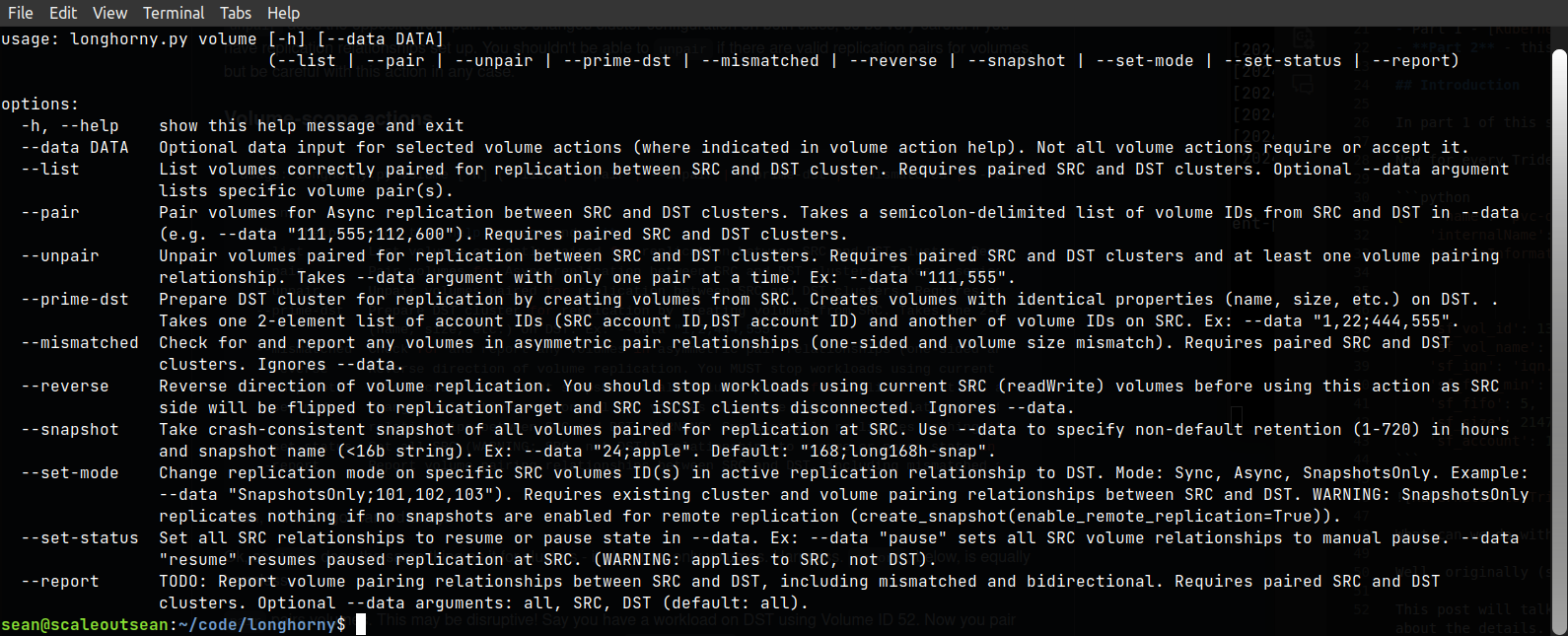
Normally volume pair would be the first action to use, but there are others.
Once I did list and pair, I thought I also needed unpair, then it ocurred to me I may as well do reverse for failback, prime-dst to save time, etc.
site-related actions are just two and work-in-progress as I'm not sure if I really need them.
Longhorny walk-through
Let's see an example. Assume our production site has Hyper-V or something like that, owned by Account ID 13.
- Cluster PROD
- Account 13 has volumes 40, 41, 42
- Cluster DR
- (nothing)
Pair PROD with DR without providing the passwords (so that we get prompted to enter them):
~$ ./longhorny.py \
  --src "{ 'mvip': '192.168.1.30', 'username':'admin', 'password':''}" \
  --dst "{ 'mvip': '192.168.105.32', 'username':'admin', 'password':''}" \
  cluster --pair
List clusters (below I remove --src and --dst to make it easier to follow):
~$ ./longhorny.py cluster --list
This shows the clusters have been paired, latency is 1ms (good for all modes) and they're connected. Exclusive 1-to-1 relationship is the only one supported, by the way. (People who have more clusters surely can write a Longhorny that works with several sites at a time.)
{'PROD': [{'clusterName': 'DR',
           'clusterPairID': 55,
           'clusterPairUUID': 'b9322478-3779-4cd3-908f-2a48f22202fe',
           'clusterUUID': 'bgn0',
           'latency': 1,
           'mvip': '192.168.105.32',
           'status': 'Connected',
           'version': '12.5.0.897'}],
 'DR': [{'clusterName': 'PROD',
         'clusterPairID': 61,
         'clusterPairUUID': 'b9322478-3779-4cd3-908f-2a48f22202fe',
         'clusterUUID': 'wcwb',
         'latency': 1,
         'mvip': '192.168.1.30',
         'status': 'Connected',
         'version': '12.5.0.897'}]}
All right, that's good. The next step is to create an account and volumes on the remote site. You may create them manually and set them to replicationTarget mode and then --pair them.
On the remote site cluster we created account ID 3 and one volume with the same properties (size, etc.) as volume 40 from the source site. Its volume ID is 5.
~$ ./longhorny.py volume --pair --data "40,5"
That pairs volume ID 40 from the source cluster with volume ID 5 on the destination cluster. SolidFire sets up pairing in Async replication mode by default. Output from: volume --list:
[{'clusterPairID': 55,
  'localVolumeID': 40,
  'localVolumeName': 'test',
  'remoteVolumeName': 'testr',
  'remoteReplicationMode': 'Async',
  'remoteReplicationPauseLimit': 3145728000,
  'remoteReplicationStateSnapshots': 'PausedDisconnected',
  'remoteReplicationState': 'PausedDisconnected',
  'remoteVolumeID': 5,
  'volumePairUUID': '44df1d5e-8694-4ed1-bdaf-fa773fb9b165'}]
It may take a few minutes for the volumes to sync, depending on network bandwidth and volume data size.
For the other two source volumes (41, 42), we can try --prime-dst. When we use --prime-dst, the first DATA element is account IDs (from the source and destination) and the second is list of volume IDs from the source that we want to create replication targets for.
~$ ./longhorny.py volume --prime-dst --data "13,3;41,42"
This takes the properties of volume IDs 41 and 42 that belong to account ID 13 and creates "the same" at the remote site with the remote account ID 3 as their owner. Let's say these new, remote volumes have IDs 6, 7.
They have the same properties as 41, 42 from the source, including name and priming changes the new volumes to replicationTarget mode, so our task is now very easy - we just need to pair them.
~$ ./longhorny.py volume --pair --data "41,6;42,7"
Now volume --list shows three volume pairs.
Let's say volumes 40 and 42 are less important apps and I would be content with SnapshotOnly replication mode. Let's do that!
~$ ./longhorny.py volume --set-mode --data "SnapshotsOnly;41,42"
What if I need to failover to the remote site? There's volume reverse, but let's take a snapshot of the replicated volumes at the source site first, just in the case this DR test craps out.
The snapshots are taken individually, so if you have consistency groups, take those snapshots separately. Longhorny currently does not know what volume is or isn't in some logical grouping.
~$ ./longhorny.py volume --snapshot --data "24;before-dr"
Three local (not replicated) snapshots named "before-dr" have been created on the source and have a 24 hour retention. We can execute our DR test now.
Now we should stop all workloads that use paired volumes as we'll make the paired volumes on the source replication targets, which will deny access to iSCSI clients at the source site. At the remote site you also don't want to be having any workloads attempting to use the remote volumes (they can't be used yet, they're in replication target mode).
~$ ./longhorny.py volume --reverse
This makes replicated volumes at the second site read-write. Now we can start using replica volumes at the remote site.
To fall back, stop remote workloads, wait until reverse replication is in sync and then run the same workflow again (maybe take a snapshot at the remote site before failback, too).
~$ ./longhorny.py volume --reverse
I mentioned that in the documentation but in the case you didn't notice, Longhorny doesn't have a super-pretty CLI output. That's on purpose.
Take an example of this "volume --mismatched" (finds "orphaned" paired volumes) output that you'd see if someone unilaterally removed 5,40 replication pair at the remote site (where that pair is 40,5). We could identify this quickly with three paired volumes on the source, but then what?
[{'PROD': {'volumeID': 40,
           'volumePairUUID': '44df1d5e-8694-4ed1-bdaf-fa773fb9b165',
           'mismatchSite': 'DR',
           'remoteVolumeID': 5}}]
Longhorny outputs Python "sequences" to the shell so that you can take this output, paste it into your Python shell and do something with it.
All Longhorny output is like that - it's meant to be used elsewhere (send to SFC, send to Splunk, send to own script, etc.) and not something that merely lets you do in the CLI what you can already do in the Web UI.
Site-level actions
I haven't used any site-level actions in this walk-through, so here are some quick notes on that:
- As of now, Longhorny connects to both the source and destination, because usually it needs information on how each side views cluster and volume relationships.
- That means although I have some
site-level actions, they can't really work if the other site is unreachable, which sometimes defeats the purpose. - I could modify the code to ignore the unreachable site, but it's not that simple; we'd also have to have some idea on how to reconcile the relationships after that, etc.
To make an example, I'll expand on something from the Longhorny README file, which is that Longhorny doesn't prevent you from setting up replication pairs for volumes that belong to multiple accounts on the same site. Maybe you have three Kubernetes clusters on site A, which means you need three storage accounts for Trident CSI on site A. Fair enough.
But we know what's coming next - now different accounts/cluster owners want, or don't want - to failover to site B. Some do, some don't. Now we need per-account "volume --reverse". Okay, let's add that feature (I haven't, though).
Then a site fails. "Okay, not a problem - I'll use a site action to override!"
Well, sure, but now you may have a mess at your hands, especially if said Kubernetes admins are allowed to use Longhorny on their own. Some volumes are read-write on both sites, some on a site where a site-action was used to severe relationships and promote the site to read-write, some are read-only (replicationTarget mode) on both sites and no one remembers what exactly they did, there are no pre- or post-failover snapshots, etc. Mr. Storage Admin, can you figure it out for us?
I recognize the need for more features, but I think this is where things can get very complicated. At this moment site-level features are limited and as I don't really want to make them completely useful for the situations where a site is down or unreachable.
Conclusion
Longhorny isn't perfect and I could have done it better, but it's decent enough. I wrote it after I finished SFC v2 early this month - in fact I started writing it before I pushed the SFC v2 to Github (I haven't done that yet, but that's next).
Longhorny doesn't do anything you can't do by yourself in the SolidFire Web UI, except that it can take input from, and send output to, other programs. Which is the main thing about it.
It's usable and serves as reference to myself as I now have code to gather replication relationship information with SFC. I - and anybody who wants, really - also have a way to connect Trident configuration with SolidFire configuration, so that we can have a decently automated site failover for Kubernetes with SolidFire.
As I mentioned in part 2 of the Kubernetes, Trident and SolidFire series, there are some other scenarios where the Longhorny code will be useful.
In terms of programming languages, I'm a beginner, but I think it would have been easier and nicer to do Longhorny in PowerShell. But I almost had no choice but to do it in Python, considering that SFC is in Python and other integration (Trident, etc.) works better with Python. Before I wrote (didn't publish the code) a PowerShell wrapper for kubectl and it worked great, but with Python I and others don't need a wrapper there's a native Python client. So I think Python is the right choice, although not the best tool for this particular purpose.
Demo
- Project Longhorny - 5m11s