Velero AWS Plugin and SignatureDoesNotMatch nonsense
- Introduction
- Before
- After
- Workarounds
- Conclusion
- Appendix A - ONTAP S3 backup listing and Velero backup describe
Introduction
Apparently world improvers from the Velero team applied the latest and greatest AWS S3 feature to Velero Plugin for AWS (i.e. S3) and as people are upgrading, their backup stops working.
Brilliant!
This broke Velero-to-StorageGRID, ONTAP S3 as well as many others (IBM COS, Backblaze, etc.).
Before
Last time I tested with ONTAP S3 was last year.
In this post from approximately 1 year ago I used the following and recorded a demo video, so I'm quite sure it worked.
- Velero v1.11
- Velero Plugin for AWS v1.7.1
- ONTAP 9.12.1 with "standard" S3 bucket served over HTTP (I didn't use HTTPS)
After
After this Velero debacle that seems to have kicked in at the time of that commit at the top (Plugin for AWS v1.9), I get this with ONTAP S3 9.14.1 RC1 (which is what I have now):
An error occurred: request failed:
<?xml version="1.0" encoding="UTF-8"?><Error><Code>
SignatureDoesNotMatch
</Code><Message>
The request signature we calculated does not match the signature you provided.
Check your key and signing method.
</Message></Error>
Workarounds
In the related Github issue, some have reported success with the proposed "None" setting, i.e. checksumAlgorithm="". That's supposed to be set in Velero's backupStorageLocation aka BLS parameters when installing.
velero install \
  --backup-location-config checksumAlgorithm="" \
  ...
You can also set that with Helm.
That reportedly works for StorageGRID, but does not for ONTAP S3.
For ONTAP S3, I tried different things (about 20-30 combinations) and one of the finds was that there seems to be some stale caching somewhere in the stack because it took me a while to get this combination to work although I tried it early on, then kept trying other things, then later it worked. Anyway, this is what worked for me:
- Velero v1.14.0
- Velero Plugin for AWS v1.8.2 or v1.9.2 (supposedly the last release prior to the genius switchover to AWS SDK v2)
- ONTAP v9.14.1 RC1
- ONTAP S3 with "standard" S3 bucket served over HTTP (same as last year)
You do not need checksumAlgorithm here because in Velero Plugin for AWS v1.8, that parameter does not exist.
I used Kubernetes 1.30 this time, but I doubt that matters. I did not use CSI as I was concerned only about the S3 issue.
My ONTAP S3 bucket is backup, hostname http://s55(.datafabric.lab). You can see there's no checksumAlgorithm. I use signatureVersion=4 on ONTAP S3, but that's the default so it doesn't need to be set.
{
  "provider": "aws",
  "config": {
    "region": "us-east-1",
    "s3ForcePathStyle": "true",
    "s3Url": "http://s55:80"
  },
  "objectStorage": {
    "bucket": "backup"
  },
  "default": true
}
Backup a volume with 2 pods, 1 PVC, 1 PV to ONTAP S3:
$ velero backup create v114-nginx2ontaps3 \
  --include-resources pvc,pv,pod \
  --include-namespaces nginx \
  --default-volumes-to-fs-backup
Backup request "v114-nginx2ontaps3" submitted successfully.

$ velero backup get
NAME                 STATUS      ERRORS   WARNINGS   CREATED                         EXPIRES   STORAGE LOCATION   SELECTOR
v114-nginx2ontaps3   Completed   0        0          2024-07-13 08:24:58 +0000 UTC   29d       default            <none>
I still get the checksum error in "velero backup describe", but Velero can connect to S3 and backup is reportedly successful.
Velero version details:
$ velero version
Client:
	Version: v1.14.0
	Git commit: 2fc6300f2239f250b40b0488c35feae59520f2d3
Server:
	Version: v1.14.0

$ kubectl get pods -n velero
NAME                                                         READY   STATUS      RESTARTS        AGE
nginx-default-kopia-2kcbx-maintain-job-1720861637261-8d7bk   0/1     Completed   0               4h2m
nginx-default-kopia-2kcbx-maintain-job-1720875137932-vcr76   0/1     Completed   0               17m
node-agent-cvvq5                                             1/1     Running     1 (3h15m ago)   5h7m
velero-f6dc7df46-r54vd                                       1/1     Running     1 (3h15m ago)   5h7m

$ kubectl describe pod velero-f6dc7df46-r54vd -n velero | grep Image
    Image:          velero/velero-plugin-for-aws:v1.8.2
    Image ID:       docker-pullable://velero/velero-plugin-for-aws@sha256:edfb14403fc4ee45ac99f34930125869a06465c44ffacaf57e351e477e2c6b53
    Image:         velero/velero:v1.14.0
    Image ID:      docker-pullable://velero/velero@sha256:b871c72cd59908f5ca1ee1690952085b628e010771dba1485f2ed6d8d5e917fe


$ kubectl describe pod velero-f6dc7df46-r54vd -n velero | grep Image
    Image:          velero/velero-plugin-for-aws:v1.8.2
    Image ID:       docker-pullable://velero/velero-plugin-for-aws@sha256:edfb14403fc4ee45ac99f34930125869a06465c44ffacaf57e351e477e2c6b53
    Image:         velero/velero:v1.14.0
    Image ID:      docker-pullable://velero/velero@sha256:b871c72cd59908f5ca1ee1690952085b628e010771dba1485f2ed6d8d5e917fe
As you can see filesystem backup (Kopia) was used instead of CSI with Velero v1.14.0 and Velero Plugin for AWS v1.8.2 ("old", but not even a year).
If you decide to fall back to an older Velero version, you may need to install CSI plugin (if you plan to use it). For Velero v1.14.0, plugin for CSI is included, but you can disable it if you don't want to use it.
HTTPS weirdness
I assumed HTTPS should work just fine, but in my latest configuration:
- ONTAP 9.14.1 RC1 (HTTPS; TLSv1.2 with cipher is ECDHE-RSA-AES256-GCM-SHA384)
- Velero v1.14.0
- Velero plugin for AWS v1.9.2
I get: SignatureDoesNotMatch: The request signature we calculated does not match the signature you provided. Check your key and signing method.
The same plugin for AWS works fine with HTTP (I tried twice), which may explain why v1.9.2 didn't work for me last Saturday (as I was originally trying with HTTPS), but it "started working" later (as I switched to HTTP).
Confusingly the error looks the same as related to checksumAlgorithm (maybe it even the same root cause).
Alternatively, this problem may be something related to my HTTPS configuration. I know my internal certificates are valid on the host, but I'm not 100% sure if they're valid inside of Velero containers (I did load them properly when installing). I'm not in a mood to debug further and Velero encrypts backups at source, so there's no technical need to use HTTPS, but if you must, then be ready to investigate this further and try HTTP to confirm it's related to HTTPS.
The same cluster works fine with HTTPS if I downgrade Velero Plugin for AWS to v1.8.2:
- ONTAP 9.14.1 RC1 (HTTPS; TLSv1.2 with cipher is ECDHE-RSA-AES256-GCM-SHA384)
- Velero v1.14.0
- Velero plugin for AWS v1.8.2
After this my best guess is something else changed in Plugin for AWS between v1.8.2 and v1.9.2.
Conclusion
If you've upgraded to Velero v1.14.0, you may try to uninstall it and then install with Plugin for AWS v1.9.2, v1.9.1, v1.9.1, or even one of the v1.8 versions, but you need to check if Velero can remain aware of your S3 backups if you re-install it. If you've installed Velero v1.14.0, you may do the same; since you probably haven't been successful backing up to S3 with Plugin v1.9+, you probably have little to worry in terms of S3 backups, but maybe you have other backups.
Another possibility is to downgrade Velero as well: since Velero probably doesn't test latest Velero with older Plugin for AWS, using older Velero may be safer (but who really knows). There's also a potential risk here, related to backup format. Velero backup job taken with Velero v1.14.0 reports "Backup Format Version: 1.1.0". You need to check the Velero documentation to make sure that downgrading is safe. For what it's worth, it seems Velero should be safe to downgrade from v1.14 to v1.11 (the one I tested last summer) or one of in-between versions, if needed:
- Velero v1.14 - current backup output format is version 1.1 (https://velero.io/docs/v1.14/output-file-format/)
- Velero v1.11 - also uses Velero backup format 1.1 (https://velero.io/docs/v1.11/output-file-format/)
The third option is to wait until Velero fix their implementation (if they be willing). Now checksumAlgorithm="" doesn't work for ONTAP S3, but works for StorageGRID. The option doesn't work for quite a few other object stores, so maybe Velero will fix their plugin to work around and use older style access when accessing object stores which can't support any checksumAlgorithm that's currently available ("CRC32", "CRC32C", "SHA1", "SHA256", "" (i.e. none)).
The fourth option is to wait until ONTAP S3 starts supporting one of these algorithms, but my guess is this could take longer than just weeks.
Personally, depending on urgency, I'd downgrade Plugin for AWS only and if that's too risky, wait for 2-3 weeks to see if Velero fixes the plugin.
If downgrading Velero (or Velero plugin for AWS) doesn't work, try giving it a couple of hours just in the case there's some stale caching going on, as I think that's what happened to me today (or maybe I was looking only at the logs (where the error keeps appearing) and didn't notice that backup had started working, I don't know).
Appendix A - ONTAP S3 backup listing and Velero backup describe
- Successful backup with old Velero Plugin for AWS v1.8.2:
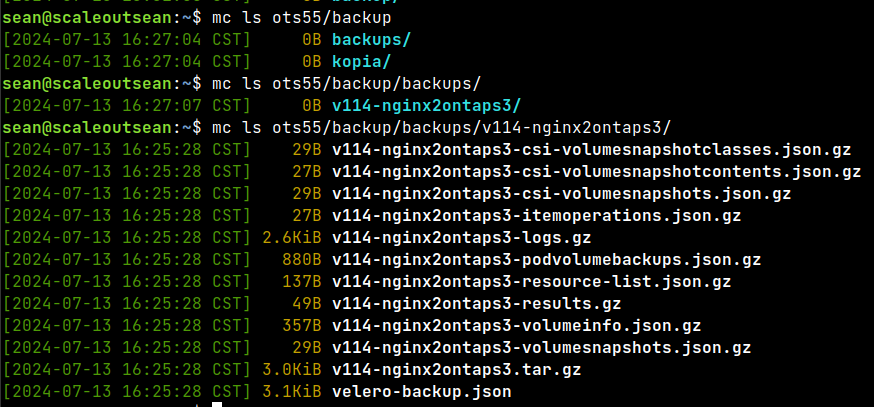
- ONTAP S3 bucket listing
$ mc ls ots55/backup/backups/v114-nginx2ontaps3/
[2024-07-13 16:25:28 CST]    29B v114-nginx2ontaps3-csi-volumesnapshotclasses.json.gz
[2024-07-13 16:25:28 CST]    27B v114-nginx2ontaps3-csi-volumesnapshotcontents.json.gz
[2024-07-13 16:25:28 CST]    29B v114-nginx2ontaps3-csi-volumesnapshots.json.gz
[2024-07-13 16:25:28 CST]    27B v114-nginx2ontaps3-itemoperations.json.gz
[2024-07-13 16:25:28 CST] 2.6KiB v114-nginx2ontaps3-logs.gz
[2024-07-13 16:25:28 CST]   880B v114-nginx2ontaps3-podvolumebackups.json.gz
[2024-07-13 16:25:28 CST]   137B v114-nginx2ontaps3-resource-list.json.gz
[2024-07-13 16:25:28 CST]    49B v114-nginx2ontaps3-results.gz
[2024-07-13 16:25:28 CST]   357B v114-nginx2ontaps3-volumeinfo.json.gz
[2024-07-13 16:25:28 CST]    29B v114-nginx2ontaps3-volumesnapshots.json.gz
[2024-07-13 16:25:28 CST] 3.0KiB v114-nginx2ontaps3.tar.gz
[2024-07-13 16:25:28 CST] 3.1KiB velero-backup.json
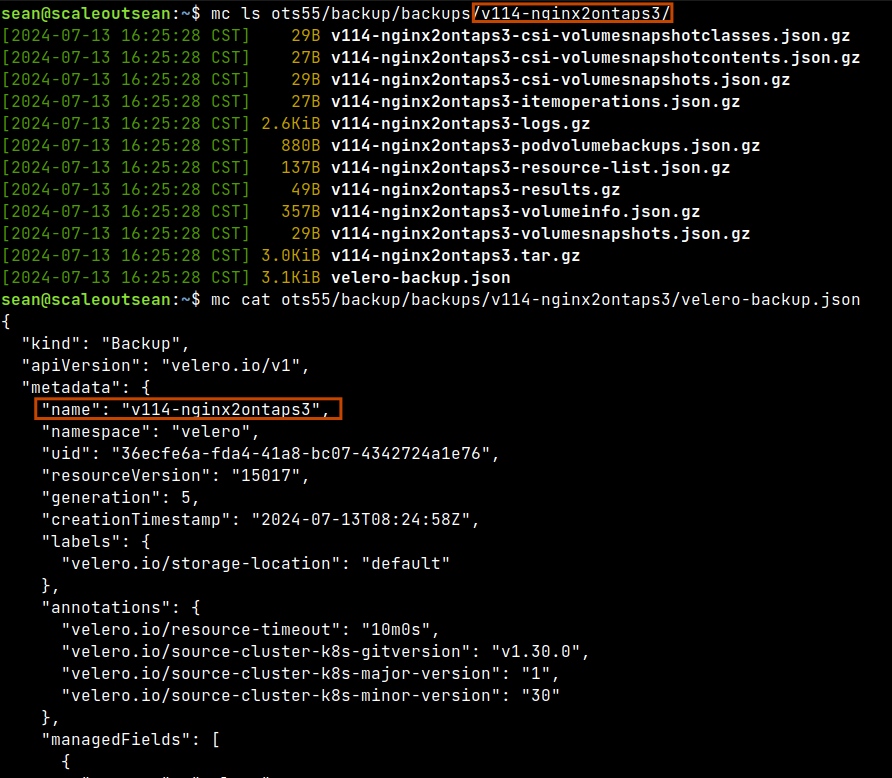
- Backup describe (notice how the error still appears near the end)
$ velero backup describe v114-nginx2ontaps3
Name:         v114-nginx2ontaps3
Namespace:    velero
Labels:       velero.io/storage-location=default
Annotations:  velero.io/resource-timeout=10m0s
              velero.io/source-cluster-k8s-gitversion=v1.30.0
              velero.io/source-cluster-k8s-major-version=1
              velero.io/source-cluster-k8s-minor-version=30

Phase:  Completed


Namespaces:
  Included:  nginx
  Excluded:  <none>

Resources:
  Included:        pvc, pv, pod
  Excluded:        <none>
  Cluster-scoped:  auto

Label selector:  <none>

Or label selector:  <none>

Storage Location:  default

Velero-Native Snapshot PVs:  auto
Snapshot Move Data:          false
Data Mover:                  velero

TTL:  720h0m0s

CSISnapshotTimeout:    10m0s
ItemOperationTimeout:  4h0m0s

Hooks:  <none>

Backup Format Version:  1.1.0

Started:    2024-07-13 08:24:58 +0000 UTC
Completed:  2024-07-13 08:25:01 +0000 UTC

Expiration:  2024-08-12 08:24:58 +0000 UTC

Total items to be backed up:  3
Items backed up:              3

Backup Volumes:
  <error getting backup volume info: request failed: <?xml version="1.0" encoding="UTF-8"?><Error><Code>SignatureDoesNotMatch</Code><Message>The request signature we calculated does not match the signature you provided. Check your key and signing method.</Message></Error>>

HooksAttempted:  0
HooksFailed:     0
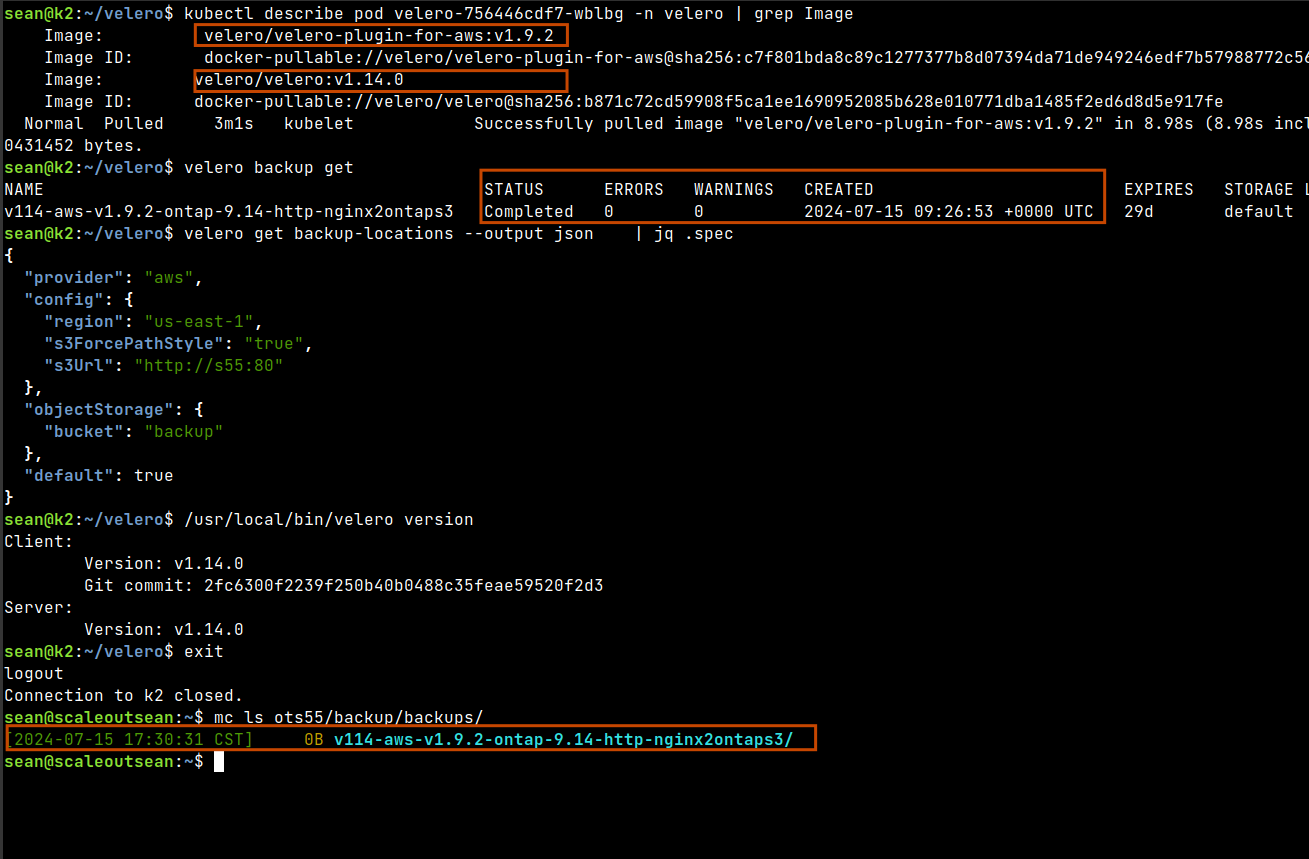
Update (2024/07/15): - ONTAP 9.14.1 HTTP with Velero v1.14.0 and Plugin for AWS v1.9.2 also works. In my environment HTTPS works only with Plugin for AWS v1.8.2.