Speed up PowerShell startup time on Linux with environment
Problem
Recently, whenever I ran a PowerShell script, it's seemed a bit slow.
- PowerShell 7.4 and 7.5
- Ubuntu LTS 24.04
I executed those from Bash so I didn't really think much of it, except that it seemed a bit slow which was probably "some snapd or Flatpak stuff".
Well, today I was using a very "light" script and it still took a very long time. So I took a look.
$ pwsh
PowerShell 7.4.6

   A new PowerShell stable release is available: v7.5.1
   Upgrade now, or check out the release page at:
     https://aka.ms/PowerShell-Release?tag=v7.5.1

Loading personal and system profiles took 15017ms.
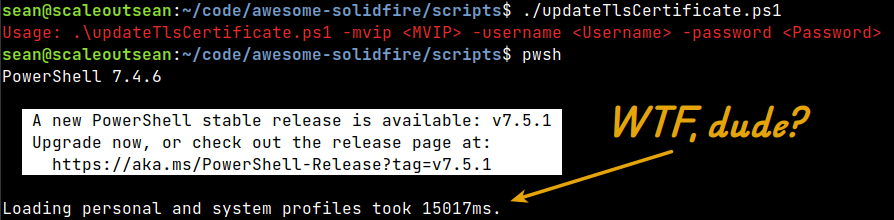
15s? WTF, dude!
Background
After some fiddling, it turned out it was Flatpak. Just not the way I thought.
Error reading or writing history file '/var/lib/flatpak/exports/share...'
Access to the path '/var/lib/flatpak/exports/share:' is denied.
Flatpak is the new DNS!
I thought my PowerShell was a Flatpak package, but it wasn't. Then when exiting I also saw this.
This error will not be reported again in this session. Consider using a different path with:
    Set-PSReadLineOption -HistorySavePath <Path>
Or not saving history with:
    Set-PSReadLineOption -HistorySaveStyle SaveNothing
Oh, okay… So PowerShell was set to save history to some Flatpak location. Why would it do that?
I think I may have had a snapd or Flatpak version in the past (that's why got used to such crappy PowerShell startup times).
Time to check another box. Fast startup, but also some weirdness. Ubuntu 24.04, by the way.
$ pwsh
PowerShell 7.5.1
PS /home/sean> Get-PSReadLineOption
Error reading or writing history file
 '/home/sean/.local/share/powershell/PSReadLine/ConsoleHost_history.txt':
 Access to the path '/home/sean/.local/share' is denied.
Oh, so we just create the directory, and… Right?
Wrong! I couldn't.
$ mkdir -p /home/sean/.local/share
mkdir: cannot create directory '/home/sean/.local/share': Permission denied
So even this system was screwed up, just in a non-Flatpaky way.
Solution(s)
If the common path is missing, you may even need to use sudo to create it. That's what I had to do on the "less complicated" box.
sudo mkdir /home/sean/.local/share # use sudo if you have to
sudo chown sean:sean -R /home/sean/.local/share # chown for yourself
Then, as they said above, set it and forget it. PS creates the full path by itself, it appears.
$choice="SaveIncrementally" # or SaveNothing or SaveAtExit
$path="/home/sean/.local/share/powershell/PSReadLine/ConsoleHost_history.txt"
Set-PSReadLineOption -HistorySaveStyle $choice
Set-PSReadLineOption -HistorySavePath $path
$(Get-PSReadLineOption).HistorySavePath
# /home/sean/.local/share/powershell/PSReadLine/ConsoleHost_history.txt
Another funny thing was I already had this history file on the "15s wonder" machine! It simply got messed up by Flatpak or snap or something at one point, and that's when problems started.
I expected that would be it. But:
$ pwsh
PowerShell 7.5.1
Loading personal and system profiles took 13863ms.
Yep, 13s. Much better! And I still get the stupid Flatpak error about access denied to path /var/lib/flatpak/exports/share.
The Flatpak junk paths are still there!
HistorySavePath : /var/lib/flatpak/exports/share:/usr/share/xfce4:/home/sean/.local/share/flatpak/exports/share:/var/lib/
                flatpak/exports/share:/usr/local/share:/usr/share:/var/lib/snapd/desktop:/usr/share/powershell/PSReadLi
                ne/ConsoleHost_history.txt
I thought to check if there are multiple PS profiles. This StackOverflow post said to do this:
PS> $PROFILE | select *

AllUsersAllHosts       : /opt/microsoft/powershell/7/profile.ps1
AllUsersCurrentHost    : /opt/microsoft/powershell/7/Microsoft.PowerShell_profile.ps1
CurrentUserAllHosts    : /home/sean/.config/powershell/profile.ps1
CurrentUserCurrentHost : /home/sean/.config/powershell/Microsoft.PowerShell_profile.ps1
Length                 : 62
I have only the last one. Nothing in it.
Checked snap and Flatpak installations, nothing suspicious.
Let's do this in CurrentUserAllHosts profile, shall we?
Set-PSReadLineOption -HistorySaveStyle SaveNothing
$path="/home/sean/.local/share/powershell/PSReadLine/ConsoleHost_history.txt"
Set-PSReadLineOption -HistorySavePath $path
Get-PSReadLineOption # confirm
Set-PSReadLineOption -HistorySaveStyle SaveIncrementally # re-enable history
After a restart, it's back to the Flatpak-infested HistorySavePath.
Then finally, I found the offending paths in XDG variables!
I had just checked $PATH, but not other variables. So, those needed to be pruned to whatever PS could accept.
Here's how to list all PS env values:
Get-ChildItem env:* | Sort-Object name
Epilogue
On the simple box, after HistorySavePath was created, PS starts quickly. I didn't have the XDG problem there.
On the "more complicated", Flatpak-infested box, the only way I could get history to work was to edit ~/.config/powershell/Microsoft.PowerShell_profile.ps1 and use the minimum viable options.
$env:XDG_DATA_HOME = "/home/sean/.local/share/powershell"
$env:XDG_DATA_DIRS = "/usr/local/share:/usr/share"
Even removing Flatpak env variables from Bash didn't help! I would have preferred to remove Flatpak from my system, but I have some Flatpak apps that aren't packaged for Linux, so…
With this "minimal setup", I no longer get "access denied" when I set PS shell history or start/exit PowerShell.
I may have added /var/lib/flatpak/exports/share to my Bash $XDG_DATA_DIRS at some point in the past (maybe last year?). Bad idea.
It still takes 9 seconds to start. Crazy! There may be other problems that need fixing, but I'll leave that for later.
A little something about PS history files:
$ ll /home/`whoami`/.local/share/powershell/PSReadLine/ConsoleHost_history.txt
-rw-rw-r-- 1 sean sean 158 Jun  7 04:37 /home/sean/.local/share/powershell/PSReadLine/ConsoleHost_history.txt
I also spotted 'Visual Studio Code Host_history.txt' in that directory.
$ ll /home/`whoami`/.local/share/powershell/PSReadLine/Visual\ Studio\ Code\ Host_history.txtxt
Nice! The grepping is left as an exercise for the reader (and other interested parties), as they say…