Single volume snapshot and clone with SANtricity Go client library for NetApp E-Series
Introduction
This is another post on the topic of Reautomating E-Series.
Since last Demcember, I've created:
- PowerShell modules
- Python client
- Go client
Not all can do everything, and some can do more than others. PowerShell is the best CLI tool overall, so I usually build for it first.
This post is about the Go client that's catching up in one aspect, and that is snapshots and (linked) clones for individual volumes.
How does it work?
First, we need a what SANtricity calls a "snapshot reserve", which is a capacity reserve for snapshots. SolidFire doesn't have it (snapshots share the same "general use" capacity with regular volumes), but a disadvantage is you can't know how much capacity snapshots might use and how much they do use. On SANtricity, a "snapshot reserve" can be created in two ways:
- Create a snapshot schedule for a volume
- Create a snapshot "group" which creates "hidden" reserve capacity volumes for Copy-on-Write. Those are "repository" (
repos*) volumes
Let's see how to use Go CLI to create a snapshot and linked clone.
Find a volume you want to backup, either with get volumes -o json or with get volumes --volume-name:
santricity-cli get volumes \
  --volume-name pvc-1f6ac50e-7a82-433_9e33622a
Create a new snapshot group for it. I reserve just 5% of capacity because I plan to keep snapshots in this thing just until I am done backing up the data and I never have more than one (most recent) snapshot.
$ santricity-cli create snapshot-group \
  --volume-id "020000006D039EA000493A260000096369A479B2" \
  --name k0s_pvc1 --repo-pct 5
Created Snapshot Group: k0s_pvc1 (ID: 330000006D039EA000493A9C00000AEF69A5B74C)
Now I have my snapshot group name and ID which identifies the volume. A snapshot is created like so:
$ santricity-cli create snapshot-image \
  --group-id 330000006D039EA000493A9C00000AEF69A5B74C
Created Snapshot Image: 340000006D039EA000493A260063096469A5B4E4 (Group: 330000006D039EA000493A9C00000AEF69A5B74C)
For the above create snapshot-image, I might add --volume-name instead of --group-id later.
Since all I have is a snapshot, I can't access it yet. I need a snapshot volume which is what people normally call a linked clone.
Linked clones need own reserve if they're writeable. I have a tiny reserve for writes to linked clone volume becuase I won't write to this clone at all. It's for reading data off the volume and coying it to an S3 bucket.
$ santricity-cli create snapshot-volume \
  --image-id 340000006D039EA000493A260063096469A5B4E4 \
  --mode readWrite \
  --name "pvc-clone" \
  --repo-pct 1
Created Snapshot Volume: pvc-clone (ID: 350000006D039EA000493A9C00000AF469A5BB60, BasePIT: 340000006D039EA000493A260063096469A5B4E4)
My linked clone volume pvc-clone is good to go. Let list 'em all.
$ santricity-cli get snapshot-images
PitRef                               Volume               Status     Timestamp           Seq
340000006D039EA000493A260063096469A5B4E4 pvc-1f6ac50e-7a82... optimal    2026-03-02 12:49:24 123
The formatting isn't nice, and that's on purpose:
- PiT Ref is the only one that's guarnateed to be unique, so that one is not truncated
- You can do
-o jsonif you need to see all the details - You can get snapshots for specific volume and sort by time or snapshot sequence number
$ santricity-cli get snapshot-images \
  --volume-name "pvc-1f6ac50e-7a82-433_9e33622a"
PitRef                               Volume               Status     Timestamp           Seq
340000006D039EA000493A260063096469A5B4E4 pvc-1f6ac50e-7a82... optimal    2026-03-02 12:49:24 123
To rollback and recover volume data from a snapshot, stop access on the volume and use santricity-cli rollback to recover. Pick the right PiTRef. I'm gooing to use the newer of the two snapshot images on sixtyfour_ddp (340000006D039EA000493A9C00630B0E69A67E10).
$ santricity-cli get snapshot-images
PitRef                               Volume               Status     Timestamp           Seq
340000006D039EA000493A260063096469A5B4E4 pvc-1f6ac50e-7a82... optimal    2026-03-02 18:49:24 123
340000006D039EA000493A260063096569A673DC two_ddp              optimal    2026-03-03 08:24:07 124
340000006D039EA000493A9C00630B0569A677B4 two_r1_vg            optimal    2026-03-03 08:29:28 126
340000006D039EA000493A9C00630B0669A677BD twelve_ddp           optimal    2026-03-03 08:29:37 127
340000006D039EA000493A9C00630B0769A67816 twelve_r1_vg         optimal    2026-03-03 08:31:06 128
340000006D039EA000493A9C00630B0C69A6786D sixty_four_r1_vg     optimal    2026-03-03 08:32:33 129
340000006D039EA000493A260063097569A67B64 sixtyfour_ddp        optimal    2026-03-03 08:56:15 131
340000006D039EA000493A9C00630B0E69A67E10 sixtyfour_ddp        optimal    2026-03-03 08:56:35 132

$ santricity-cli  rollback volume --image-id 340000006D039EA000493A9C00630B0E69A67E10
WARNING: Rolling back volume from Snapshot Image 340000006D039EA000493A9C00630B0E69A67E10. Current data on the base volume will be OVERWRITTEN.
Rollback operation initiated successfully. Monitor volume status for completion.
That concludes this CLI introduction.
If you haven't seen the UI for a while (or at all), here's how a writeable linked clone looks like.
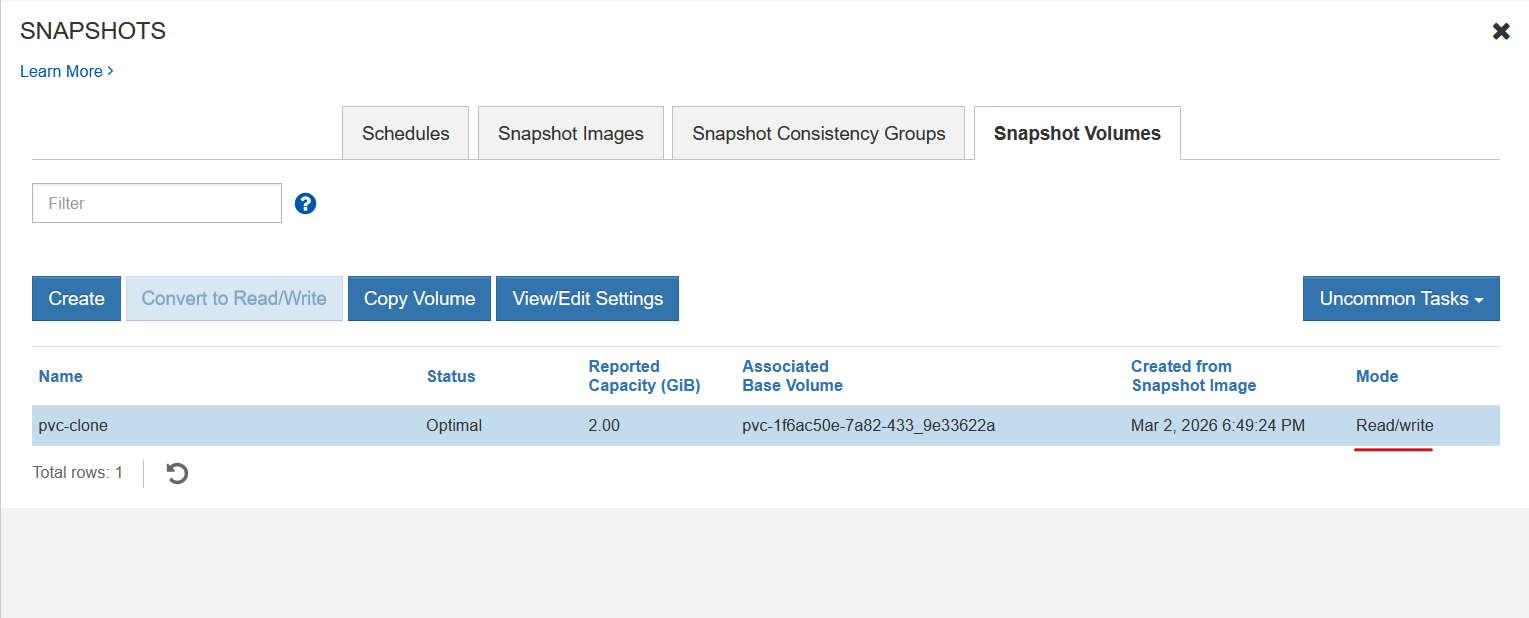
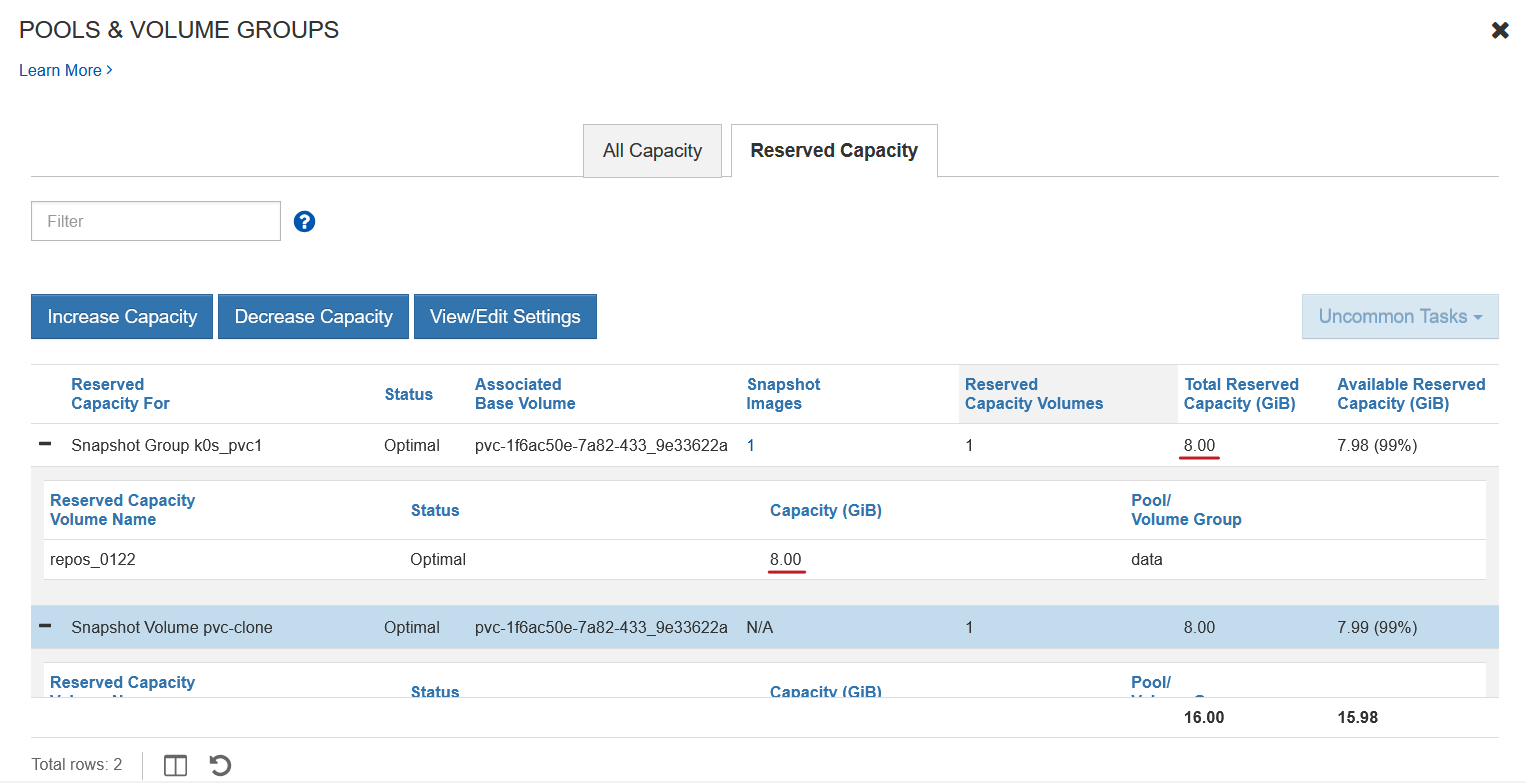
Its snapshot group is very large: 8GiB for a 2GiB volume! This coarsness is a disadvantage of using DDP if you use a ton of tiny volumes.
My obervations on that repo size coarseness:
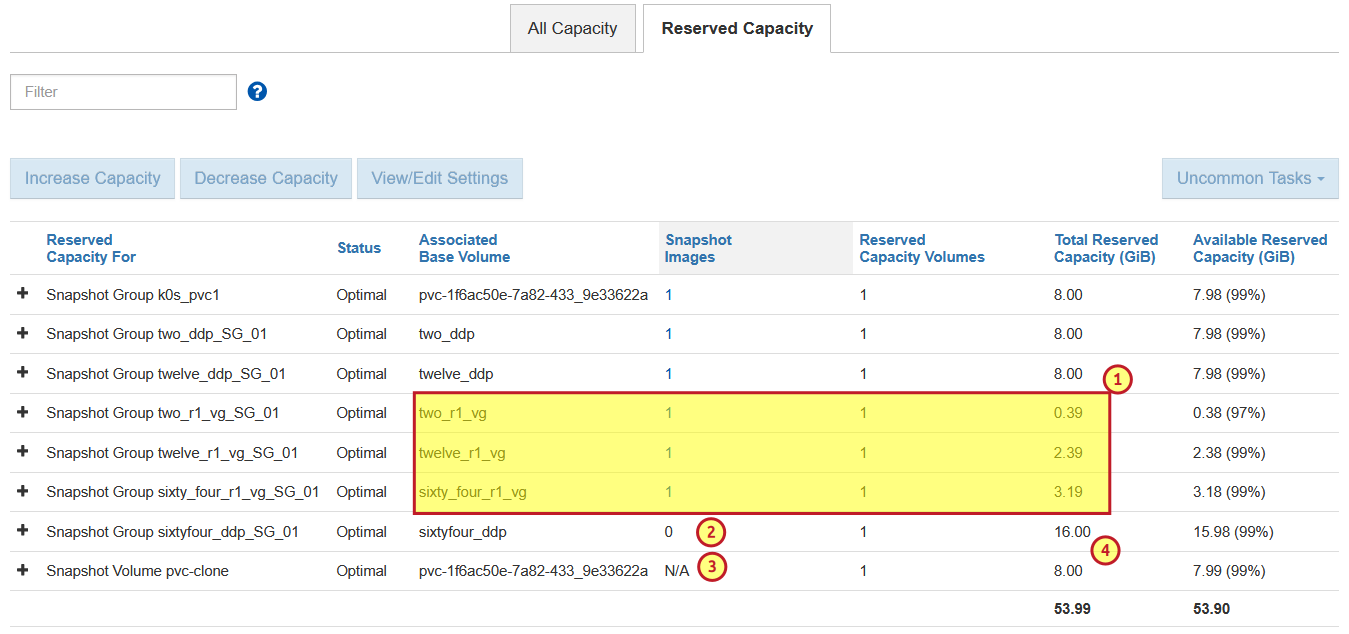
- (1) You may attempt to economize through micro-management. While DDP allocates repo volumes in 8GiB increments, traditional RAID groups are precise. You can see how two, 12 and 64 GiB volumes with a 20%, 10% and 5% snapshot group reserve behave very well.
- (2) Notice how there are 0 snapshot images in the snapshot group, indicating repo volume(s) are wasting capacity if this isn't temporary.
- (3) The PVC volume at the bottom has no snapshot images, but that's different from having 0 snapshot images.
- (4) On the DDP, a 64GiB volume uses no less than 8GiB in repo volume capacity (even though just 5% or 10% is reserved). Just above that, a 64GiB volume on a RAID 1 group uses 3.19GiB for a repo that's 5% of volume size. And just below that, a 2GiB volume uses 8GiB (minimum on DDP)
Let's first deal with (4): the reason there are N/A snapshots here is I have a linked clone living off an on-demand snapshot in this snapshot group.
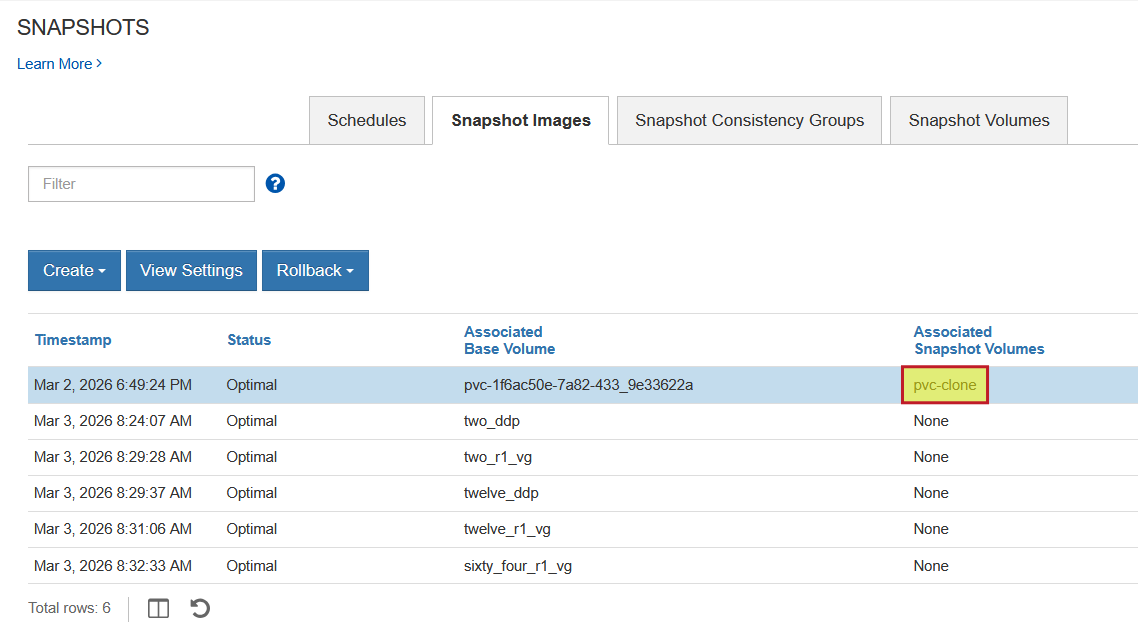
Writeable linked clones use own repo for changes, but they are "linked" to base volume via their snapshot group, so we can't delete that group despite there being no "regular" snapshots in it.
Now you may think classic groups are a no-brainer for snapshot-focused use cases. Maybe. But maybe not. To get started, you need at least 2 disks (which will be slower compared to this 14-disk DDP) and then you need one hot spare. So you're three disks down and for what?
What I want to run on R1 volumes - which I can create on a DDP or R1 disk group - is mostly database logs and indexes for busy databases. Since those volumes are usually small but not tiny, if I default to 24GiB volume size and have 8GiB in snapshot reserve (30%) for each, that's not such a bad deal. Normally, we'll have just a few of those anyway. So I'd stick with DDP unless I had very busy sequential worklaods on the same DDP or some other justification.
Maintenance of snapshot groups
Your DBs are probably be larger than 10GiB, so even if you take and keep just one snapshot for the time required to backup to S3, that might take hours, so allocating a few GBs to this snapshot group would be wise (and the writeable linked clone may need its own, separate reserve just for basic writes). Both of these should be temporary in any case. On medium sized volumes (100-1,000 GiB) short-lived snapshot reserve capacity won't matter cost- or capacity-wise.
Also consider that, even if you have 100 tiny 2 GiB volumes, 100 snapshot groups would occupy less than 1TiB - hardly a financial or IT disaster. My main objection to having many of those linger around for weeks is that it's silly. Run create snapshot-volume --host-id <backup_host>, ship data off to S3 and delete that snapshot as well as snapshot "group" (reserve) if you don't have any other snapshots that use it. If you don't have unnecessary snapshot groups or clones, you also avoid the impact of Copy-on-Write, which is another benefit of not using snapshots incorrectly. An easy way to keep a minimum number of snapshots around is create a snapshot schedule that takes and keeps just one snapshot.
The E-Series documentation has couple of paragraphs on orphaned reserved capacity volumes, which are unused snapshot groups. You won't have that problem if you automate, which is now very easy.
It may be helpful to watch your snapshot group usage capacity, which is basically all the "repo" volumes, and delete empty snapshot groups - to get rid of repo volume junk. You can see them with get volumes --show-repo-vols -o json, but you can't easily determine which ones to delete. SANtricity Web UI reminds you to reclaim wasted snapshot group reserve when such useless repo volumes pile up, so if you login to the Web UI once every few days, it's one click away. Users in high churn environments could use the CLI or API to find 'em and delete 'em. The trick is - as the link about orphaned capacity volumes explains - is to find and delete only the unused and orphaned ones. Because a bug in CLI could destroy valid snapshot images, I haven't attempted to automate that. It can be done, but it'd be risky and one bug away from losing snapshot (or even non-snapshot) data. For now I recommend:
- Automate management so that you don't have this problem in the first place
- Monitor repo usage, repo volume count, etc. so that you can see when you should access the UI and clean up
How to use SANtricity snapshots and linked clones
SANtricity isn't meant for taking hundreds of snapshots of tiny volumes. Don't do it.
It's good for creating few short-lived snapshots of fewer volumes. If you create snapshots of many smaller volumes, create them for backup and delete them after that. Or create linked clones when you need to, and delete them when you don't.
For careless use, use Terraform Provider SANtricity to deploy Linux with Btrfs or ZFS and offload junk snapshots to the users of that physical server or KubeVirt VM. If they want to take hundreds and let them linger around, they can. You (the SANtricity administrator) will see just one well-behaved volume on your end and you can even back it up for them.
Why this Go CLI matter?
My SANtricity PowerShell module can already do these things and it's easier to use because PowerShell is a better scripted language and shell. It can also take group volume snapshots and create group volume clones. The most important thing about this Go CLI is: it's not meant to be used, really.
The important part is the library, and the CLI just showcases it. Since that's now done (which is why the CLI works), we can use these in utilities and applications.
The CLI examples above isn't all there is to it, and additional convenience parameters can be added if justified. For example, when I create a linked clone, I can already do create snapshot-volume --host-id "023...ABC" to create a writeable linked clone and present it to a host that's supposed to access it. Since I already know the volume details, I can use that to access the volume at desired path, mount it, do my thing with data, log out and then delete the linked clone. So even this CLI, as basic as it is, is much more powerful than anything that existed up to my "reautomation" post in late 2025.
As a side note, and I mentioned this in the SANtricity PowerShell post on snapshots, too: E-Series had a thing called Cloud Connector, which was wound down. Now you can build your own similar to what I built for SolidFire. I may build a version for E-Series, but I'm still thinking about that because users have a wide variety of utilities or backup applications. The CLI gives you a fast a reliable way to create hardware-consistent clones and delete them, too.
Modern applications don't need even that, as many have own "backup to S3" built in and recover from handle crash-consistent snapshots so having a scehdule is enough. And any filesystem-level backup application that does need hardware-assisted snapshots, now has them with SANtricity PowerShell (recommended for Windows) and Go CLI (recommended for Linux/UNIX).
Conclusion and what's coming
Three months ago, the only choice for CLI automation was SMcli, which, in my opinion is not really usable. Maybe that's too harsh, but when was the last time you saw a SMcli snapshot script that does anything in a generic way?
Now we can do (almost) whatever we want - PowerShell, Python, Go, and any other language that wraps any of these (especially Go CLI). What's missing is the fancy snapshot-related options that you can get in SMcli, API and SANtricity Web UI, but those can be added if anyone needs them (let me know in santricity-go issues).
What we can't do is change how SANtricty snapshots work. You need to exercise caution, but thankfully:
- You can, and should, offload the junk snapshots and writeable clones (CI/CD, for example) to VMs with Btrfs or ZFS
- Most modern applications already do snapshots in software, so:
- Even when you need snapshots, you can take them on schedule, disregarding the application
- Rarely, when we need ephemeral snapshots for quiesce purposes, we can now take them and those can be deleted in a day or two
- Most applications that need to be snapshotted aren't meant to have those snapshots restored. You'd take them before major application upgrades, or for the purpose of shipping data off to S3 or doing quick tests. No one should keep snapshots on block storage longer than necessary - it just does not make any sense
About those upper layers that matter I've mentioned earlier: here's what's coming next.
- Terraform Provider SANtricty will add snapshot-related resources, so both deploying, and taking a pre-upgrade snapshot of your MongoDB will take seconds. Likewise, creating a writable clone for dev/test purposes. All for free, with one open source tool, Hashicorp Terraform. Update: Done! Here's a demo that shows how it works
- Snapshot and clone support in SANtricity CSI so that we can backup/restore them with Velero.