NetApp SolidFire and Trident CSI failover automation with Powershell
While experimenting with SolidFire and Trident CSI failover for Kubernetes, I came across a challenge:
- SolidFire Tools for Powershell provide unbeatable convenience and ease of SolidFire automation, but
tridentctl,kubectland the rest of Linux shell commands are not easy to use from Powershell, while using two shells results in complexity
In the process I wrote a several throw-away scripts:
- Failover: Bash script with a SolidFire-related Powershell script called from Bash
- Failback: Bash script with a SolidFire-related Powershell script called from Bash
- SolidFire volume pairing: two Powershell scripts (with hardcoded parameters; could be one script with a
-Regionparameter)
I didn't like this approach. I examined various possibilities and none seemed appealing enough so I slept over it and today attacked the problem again.
One approach that's looking promising right now is to create a Powershell wrapper for NetApp Trident CLI (tridentctl). tridentctl in turn uses kubectl, which we don't have to worry about right now.
My first successful attempt:

(I should have named the cmdlet Get-TridentBackend, but I'm still thinking about this, because Get-NaTriBackend may be even better).
This approach gives me the ability to eliminate the (direct) use of non-Powershell shells for Trident-related operations.
Main benefits:
- Speed (should be a bit faster)
- Single language
- Cut number of scripts in half (ideally down to one)
- Ease of use - this is self-evident
For example, it takes just one line to find a suitable backend based on a number of criteria.

In the case you can't see it clearly (you may open that image in full size in another window or tab, by the way), here's what we may do to check if there's a backend in a particular "region" (just a tag I added to backend configuration):
> $region="dr"
> (Get-TridentBackends -Namespace trident | `
  Where-Object { $_.config.TenantName -eq "ocp" -and `
  $_.config.storageDriverName -eq "solidfire-san" -and `
  $_.config.region -eq $region}).backendName
SF-DR-192.168.1.34

> $region="prod"
> (Get-TridentBackends -Namespace trident | `
  Where-Object { $_.config.TenantName -eq "ocp" -and `
  $_.config.storageDriverName -eq "solidfire-san" -and `
  $_.config.region -eq $region}).backendName
SF-PROD-192.168.1.30
This gets the name(s) of solidfire-san backend(s) in the switch-to region of interest.
With only two SolidFire clusters it doesn't have to be so complicated, but Trident can be set up in complex ways and when that is the case figuring out these details can become non-trivial.
What does one need for a basic storage cluster swap in a NetApp SolidFire+Trident CSI environment?
| tridentctl command | Powershell wrapper cmdlet |
|---|---|
| install | Install-Trident |
| uninstall | Uninstall-Trident |
| obliviate | Clear-Trident |
| create backend | New-TridentBackend |
| delete backend | Remove-TridentBackend |
| get backend | Get-TridentBackend |
| import volume | Import-TridentVolume |
| get volume | Get-TridentVolume (optional) |
As I wrote in that lengthy failover post I currently use a very primitive approach - I reinstall Trident on failback, and for that I need the first three cmdlets. upgrade, version and update are missing because I don't need them for this purpose.
We'd also need a CSV file with volume pairs, which a separate Powershell script would use to pair volumes for replication and swap the direction of replication after a site becomes active.
This is a TODO item for time being, but if we had VolumeIDs pairs and their PVC file name in a CSV file, we could import this volume & restore PVC like this:
> $volid = 309
> $configFile = "pg-pvc.yaml"
> (Get-SFVolume -VolumeId $volid).Name | `
  Import-TridentVolume -Namespace trident SF-PROD-192.168.1.30 `
  -PvcFile $configfile
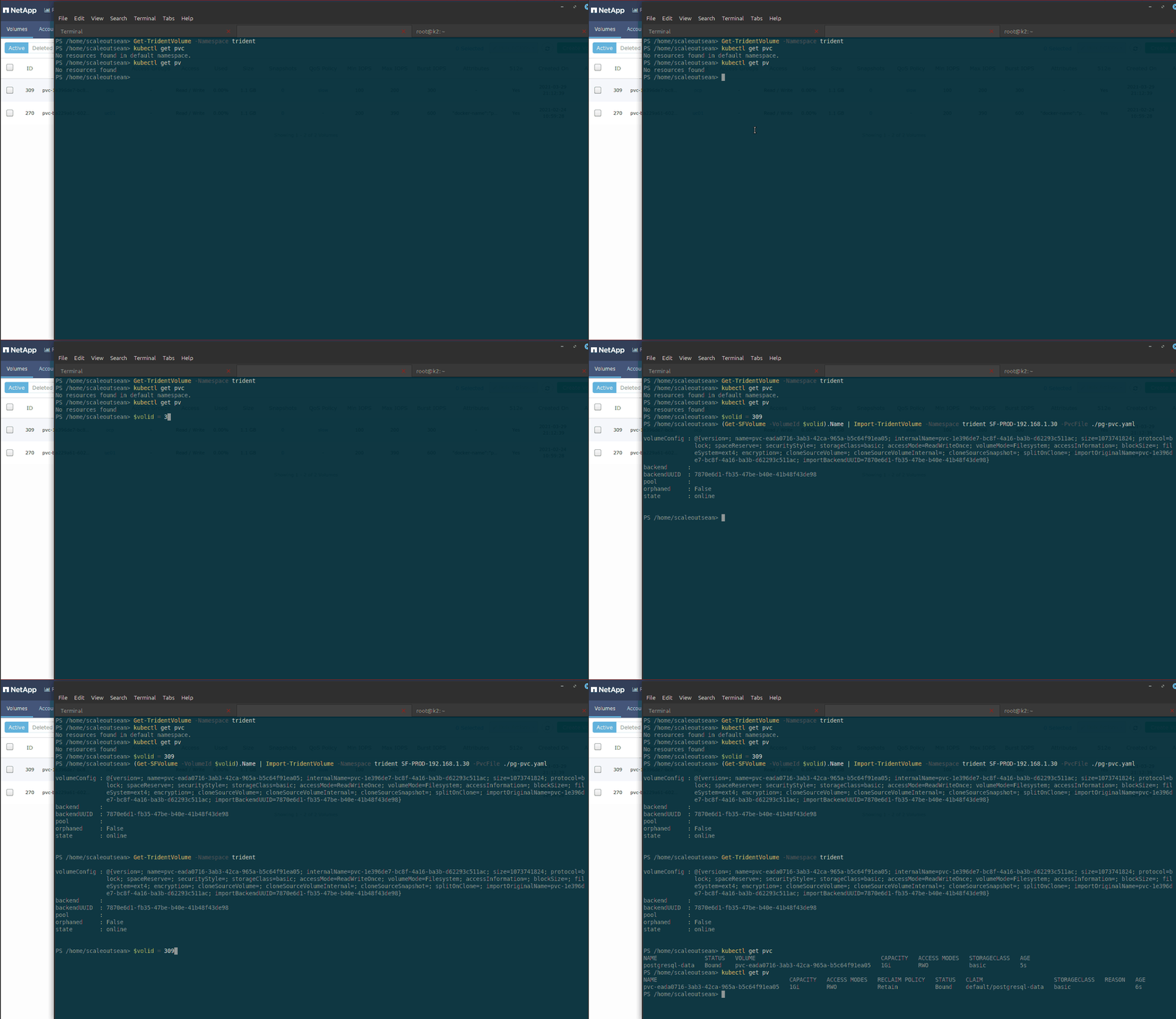
The kubectl commands essential to failover - get deployments, pods, PVCs, PVs - can be wrapped just as easily. kubectl describe doesn't seem essential to failover or failback. I'm yet to investigate Set and Remove verbs required for a kubectl wrapper to modify deployments and PVCs.
But all kubectl-related stuff could be left to the Kubernetes admin, so that SolidFire/Trident failover becomes just one of three steps in their workflow (scale Kubernetes user workload down to 0, failover (or failback) SolidFire and Trident, scale Kubernetes up and out to the pre-failover state).
Whether it's single Kubernetes connected to two SolidFire backends, or two separate Kubernetes clusters each with its own SolidFire backend we have enough to automate Trident backend (SolidFire storage cluster) changes and leave other steps to the Kubernetes administrator and applications that orchestrate service availability.
As demonstrated in this video (2m56s), even an approach with two shells and unnecessary "get" commands takes mere seconds which indicates that Powershell-driven failover and failback for SolidFire and Trident CSI may be able to provide easy storage swap in either direction in less than 30 seconds.