Testing Edge-to-DC using Photon IoT and ONTAP
- Introduction
- What does it do
- Storing and protecting your IoT data
- Object Stores for Photon IoT C2C (Cloud to Container)
- How to process IoT data uploaded to the cloud?
- Containers, Photon and Trident together on ARM64
- Summary
Introduction
- NOTE: this post describes an experimental tech (build) of ONTAP for ARM which is currently not a product and not commercially available from NetApp.
Maybe it's Industry 4.0, maybe IoT, or other use case involving small devices such as those based on ARM64 processors, but sometimes your applications need a place to store data, and your busines needs a way to protect that data generated by such applications.
Edge devices can also store data on object storage - it doesn't have to be a local file system - which has its own advantages. When that is a requirement, for on-premises use cases we recommend NetApp StorageGRID.
But sometimes you simply can't use S3 and sometimes even the smallest all-flash ONTAP is still too big.
ONTAP on ARM for IoT (aka Photon IoT) was first mentioned at NetApp Insight 2019. ONTAP on ARM is not (not yet anyway) a product, but neither is NetApp Trident on ARM64 - that's no reason to not try it out!
ARM-ed with a cluster of idling ARM64 micro-servers bought on impulse last year and with NetApp Trident for ARM64 off my to-do list, I've been looking for new ways to spend free time and Photon came to my mind.
Unlike with NetApp Trident, I don't have a copy of the ONTAP source code laying around but ONTAP Engineering thankfully did all the work for me: all I had to do is to run ansible-playbook -i host install.yaml and minutes later Photon was up and running.
To be fair I had to modify 2-3 setup files to make it work on:
- An OS that Photon IoT wasn't built for, or tested with
- An ARM64 device that it wasn't built for, and tested with
This "doesn't meet basic system requirements on multiple levels" part went better than expected.
It took me an hour to get around these self-inflicted problems. (I spent a few more on another attempt on another system with a 16 GB MicroSD card, and just couldn't find a way to free the last 200 MB of disk space needed to meet the minimum free disk space requirement).
What does it do
It stores and protects IoT data.
Let us take a look. Login to ARM64 system:
$ ssh root@k2
Welcome to Ubuntu 20.04.2 LTS (GNU/Linux 4.9.241-69 aarch64)
...
Last login: Fri Mar 26 10:49:43 2021 from 192.168.1.2
Is Photon is up and running?
$ docker ps -a
CONTAINER ID        IMAGE                               COMMAND                  STATUS
b10337d794d1        netapp/iot/photon_iot:1.0.0         "/usr/local/bin/star…"   Up About an hour
bbf20bda181d        25dbdd806019                        "/opt/bin/flanneld -…"   Up 2 hours
087c3ccbb641        5e833ff1ece6                        "/csi-node-driver-re…"   Up 2 hours
a77b024edc78        788e63d07298                        "/usr/local/bin/kube…"   Up 2 hours
57227d636ca5        83094eacdba7                        "/trident_orchestrat…"   Up 2 hours
e5378708d0fc        k8s.gcr.io/pause:3.2                "/pause"                 Up 2 hours
8be33dd784fc        k8s.gcr.io/pause:3.2                "/pause"                 Up 2 hours
fc4b96d6d452        k8s.gcr.io/pause:3.2                "/pause"                 Up 2 hours
It's a system with 4 CPU (cores) and 4GB RAM. With less than 1 GB allocated to ONTAP approximately 3GB was left for the OS and Kubernetes (which didn't play a role in my evaluation - more on that later).
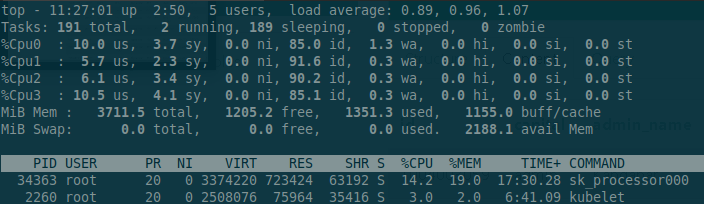
Below you can see Photon using 20% (in CPU core units; there's 4 cores so it's consuming approximately 5% of total system CPU resources):
Tasks: 185 total,   2 running, 182 sleeping,   0 stopped,   1 zombie
%Cpu(s): 10.1 us,  3.0 sy,  0.0 ni, 84.8 id,  2.0 wa,  0.0 hi,  0.0 si,  0.0 st
MiB Mem :   3711.5 total,   1170.6 free,   1350.0 used,   1190.9 buff/cache
MiB Swap:      0.0 total,      0.0 free,      0.0 used.   2189.1 avail Mem

    PID USER      PR  NI    VIRT    RES    SHR S  %CPU  %MEM     TIME+ COMMAND
  34363 root      20   0 3374220 723452  63192 S  20.0  19.0  20:38.55 sk_processor000
In this screnshot Photon IoT is consuming 10% of RAM (approximately 800 MB RAM).
Is any ONTAP filesystem mounted? Yes, but it's not WAFL!
$ df | grep fuse
/dev/fuse         356268    5012    351256   2% /mnt/ontap/ntapvol
FUSE "lets non-privileged users create their own file systems without editing kernel code. This is achieved by running file system code in user space while the FUSE module provides only a "bridge" to the actual kernel interfaces." (source)
What lies beneath? A 64-bit FlexVol:
$ photon_iot_cli vol-status
         Volume State           Status                Options
        ntapvol online          raid0, flex           create_ucode=on, convert_ucode=on,
                                cluster               schedsnapname=create_time, guarantee=none,
                                64-bit                fractional_reserve=0,
                                                      batched_free_log_cap=1.50%, space_slo=none,
                                                      zombie_reclamation_priority=low,
                                                      single_instance_data_logging=on, dir_holes=on,
                                                      logical_space_enforcement=on
                         Volume UUID: 7c07ccaf-ba93-4a47-b9a7-cc662645403b
		Containing aggregate: 'aggr0'
                        Volinfo mode: cluster-mode
Storing and protecting your IoT data
Photon could do a lot (it could be full-featured and very similar to ONTAP running on large appliances), but it seems to aim to do only what was necessary, and do that on very small devices (systems with 2 CPU cores and 2 GB RAM). That's my theory anyway - I haven't discussed Photon IoT with the folks related to this project.
First, you can store data on it (surprise!):
$ ls -lat /mnt/ontap/ntapvol/
total 316
drwx------ 2 root root    4096 Mar 26 10:52 .
-rw-r--r-- 1 root root 2535424 Mar 26 10:52 edge.db
drwxr-xr-x 3 root root    4096 Mar 26 09:36 ..
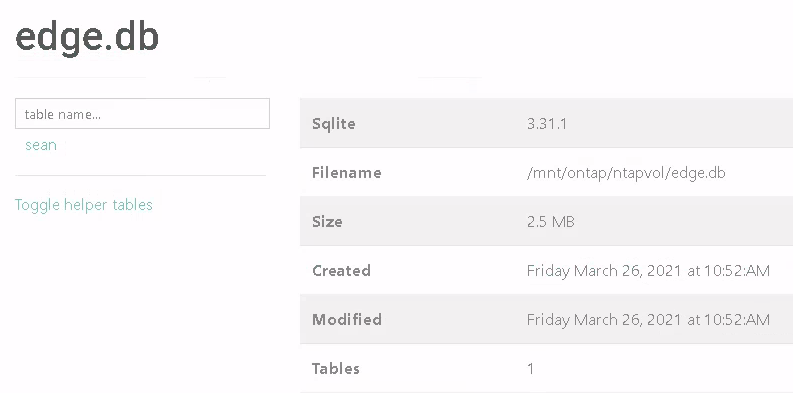
Python app with a SQLite database backend running on Photon IoT storage:
Second, Photon appears sufficiently instrumented to provide visibility to system builders.
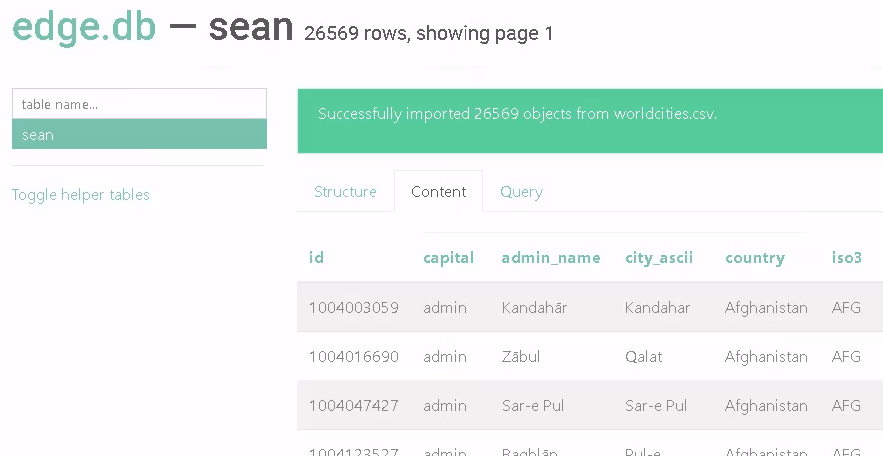
To get some action going I uploaded stuff to the DB.
$ photon_iot_cli show-sys-stats
 CPU     Reads   Writes  Total  Read(ms)  Write(ms)    Disk   kB/s    Cache  Cache    CP           CP_Ty               CP_Ph
                                latency    latency     read  write      age    hit  time  [T--H--F--N--B--O--#--:]  [n--v--p--f]
  5%       0       0       0       0         0           4    324      >60    100%    0%   0--0--0--0--0--0--0--0    0--0--0--0
  0%       0       0       0       0         0           0      0      >60      -     0%   0--0--0--0--0--0--0--0    0--0--0--0
I don't know why only two rows (maybe one for FUSE and another for WAFL?). I didn't spend much time on this puzzle, as the container didn't seem to have a shell.
Third, as data is gathered and stored on Photon, it can be protected by the proven NetApp Snapshot technology:
$ photon_iot_cli snap-create sean-update02

$ photon_iot_cli snap-list
Volume ntapvol
working...

  %/used       %/total  date          name
----------  ----------  ------------  --------
 36% (36%)    1% ( 1%)  Mar 26 15:37  sean-update02
 39% ( 3%)    1% ( 0%)  Mar 26 10:53  sean-update01
With good old ONTAP snapshots in place it's easy to recover data from any point-in-time for which there's a snapshot available: stop the app, recover file(s), start the app.
$ # data corruption
$ rm /mnt/ontap/ntapvol/edge.db

$ # data recovery
$ cp /mnt/ontap/ntapvol/.snapshot/sean-update01/edge.db /mnt/ontap/ntapvol/edge.db
And four, Photon snapshots can be shipped away using NetApp SnapMirror:
$ photon_iot_cli c2c-status
Copy To Cloud is enabled.

$ photon_iot_cli c2c-trigger
Copy To Cloud transfer scheduled for the snapshot(uuid:e14e2d9e-37e4-4dfe-8746-dc5ba0d6492d) in data volume.
Copying a live, open and changing file or database can easily corrupt the copy (and interfere with the original).
With Photon, you take a snapshot and 1-2 seconds later all files from the snapshot are available in the directory ${MOUNTPOINT}/.snapshot/${SNAPSHOT} as they were the moment snapshot was taken.
After recovery is complete or after you're done uploading data to the cloud, you may delete the snapshot. You can also keep it. I'm not sure about Photon, but ONTAP 9 supports thousands per each volume - it's unlikely you'd need to keep thousands on an IoT device, but 10-20 may be in order.
You may think "but I can come up with a way to freeze my DB…" and that is true, but it's usually much easier and cheaper to freeze everything at once, rather than write, test and maintain your own code and delay application development (or limit application choices) because of that.
If we take a closer look at what we have in our "copy to the cloud" pocket, we can get a list of all snapshots we've shipped to the cloud:
$ photon_iot_cli c2c-snap-list
End Point UUID: 9a0d5700-ae67-4650-86a2-7657297bff9c
Transferred Snapshot list:
Snapshot name   							Snapshot UUID   			Creation Time
-------------------------------------------------------------------	------------------------------------	------------------------------------------------
snapmirror.9a0d5700-ae67-4650-86a2-7657297bff9c_0.2021-03-26_095839	5d87c1e3-1aba-460b-a537-543502f5f4af	Friday, March 26, 2021 09:58:39 AM UTC
snapmirror.9a0d5700-ae67-4650-86a2-7657297bff9c_0.2021-03-26_103035	ef05f5a1-381b-41ad-a487-b4395871107f	Friday, March 26, 2021 10:30:35 AM UTC
snapmirror.9a0d5700-ae67-4650-86a2-7657297bff9c_0.2021-03-26_103331	4c0b3a71-8bc3-47c2-8e8b-30b887a90da5	Friday, March 26, 2021 10:33:31 AM UTC
snapmirror.9a0d5700-ae67-4650-86a2-7657297bff9c_0.2021-03-26_105336	e14e2d9e-37e4-4dfe-8746-dc5ba0d6492d	Friday, March 26, 2021 10:53:37 AM UTC
Of course, this "cloud" can be the public or private cloud.
Some of you may now be wondering - what the heck does that mean? At least that's what I mumbled as I read that.
And here's an answer as of now (it's not the only way it can be done, it's only one of several ways that ONTAP can integrate with the cloud and that is available in Photon IoT):
$ photon_iot_cli c2c-objstore-info

 object store name is cloud_snapshot
 container is verticalimit
 access id is XCSAj2rn7J7c82r8A4887
 ip_address is 192.168.1.55
Object Stores for Photon IoT C2C (Cloud to Container)
If your IoT data is collected and initially stored far away from your own infrastructure, you may as well upload that IoT data to the public cloud for processing, backup, compliance and other reasons.
If you have the bandwidth, infrastructure and requirements that mean you can handle it yourself, take a look at NetApp Storage GRID.
And finally - I don't remember if this possibility was mentioned at Insight 2019 - today you could also ship these snapshots to another ONTAP system! That's right, baby - ONTAP S3!
This is our ip_address 192.168.1.55 from c2c-objstore-info output (ONTAP Select 9.8 VM running on VMware vSphere 7.0U2):
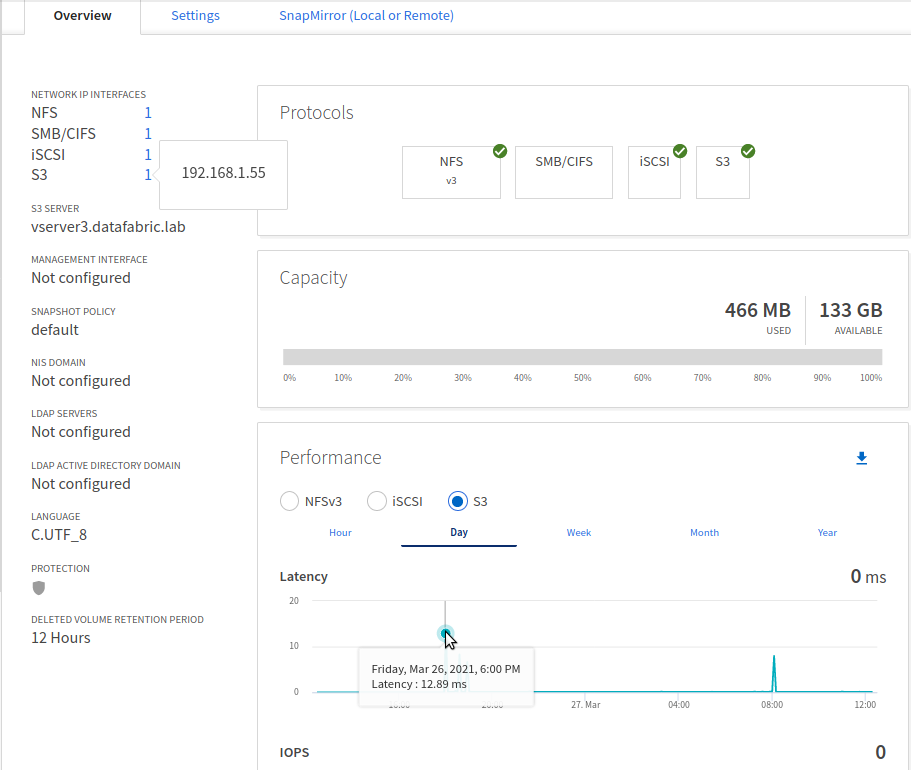
At the bottom you can see S3 activity created by C2C on March 26 when the first of those snapshots hit the ONTAP S3 API endpoint.
How to process IoT data uploaded to the cloud?
In all likelihood the correct answer is "it depends". If you want a more educated and better-informed answer for your specific use case - please reach out to NetApp!
Main approaches:
- Use Photon IoT-equivalent of NetApp Cloud Backup Service to restore a snapshot to another ONTAP storage system
- Use a data synchronization tool from NetApp, OSS, or 3rd party ISV
Restore Photon IoT snapshots to ONTAP in the cloud or on-premises
We need to pull c2c-snap data generated on Photon devices from the S3 bucket where we stored it.
NetApp Cloud has a backup (and restore) service that works like this: "Backups are automatically generated and stored in an object store within your cloud account, independent of volume Snapshot copies used for near-term recovery or cloning, so that you can effortlessly restore data anytime and to anywhere you need it."
Sound familiar?
NetApp Cloud Backup service is commonly used from a Web UI caled Cloud Manager, but here's how that would work from ONTAP Select 9.8 and Photon IoT (if it was available for purchase today) using ONTAP CLI:
- "Register" the S3 bucket with your ONTAP system using
snapmirror object-store config create- For S3 storage on AWS, use the provider type
AWS S3and specify a region - For StorageGRID and ONTAP S3, use the provider type
S3_Compatible(have TLS certs, DNS, HTTPS and other requirements in place) - Prepare other details needed when connecting ONTAP to object stores (container name (bucket name, here
verticalimit), Access and Secret Key) are required
- For S3 storage on AWS, use the provider type
- Create a "restore target" volume on the ONTAP system
- I did a
df -Hon Photon IoT and saw the filesystem size was 365 MB. I then usedvol createon ONTAP Select to create a 365 MB volume of the typeDP - This filesystem I named
edge2core_2
- I did a
- Run a
snapmirror restorecommand to restore a Photon IoT snapshot from the ONTAP S3 bucket calledverticalimitto this target volume- For that I needed an End Point UUID and source Snapshot UUID - I got the both with
photon_iot_cli c2c-snap-liston Photon IoT. I picked a snapshot I took on March 27, 2021:
- For that I needed an End Point UUID and source Snapshot UUID - I got the both with
# /opt/netapp/photoniot/bin/photon_iot_cli c2c-snap-list
End Point UUID: 9a0d5700-ae67-4650-86a2-7657297bff9c
Transferred Snapshot list:
Snapshot name                                                       Snapshot UUID                        Creation Time
------------------------------------------------------------------- ------------------------------------ ------------------------------------------------
snapmirror.9a0d5700-ae67-4650-86a2-7657297bff9c_0.2021-03-26_095839 5d87c1e3-1aba-460b-a537-543502f5f4af Friday, March 26, 2021 09:58:39 AM UTC
...
snapmirror.9a0d5700-ae67-4650-86a2-7657297bff9c_0.2021-03-27_000003 ca3dcc86-4e71-4421-83f9-366abee5eda0 Saturday, March 27, 2021 12:00:03 AM UTC
I executed snapmirror restore using the aforementioned inputs and checked the logs.

That looked promising, so I went to the ONTAP Web UI to see if this attempt really resulted in Photon IoT data being downloaded to ONTAP Select:
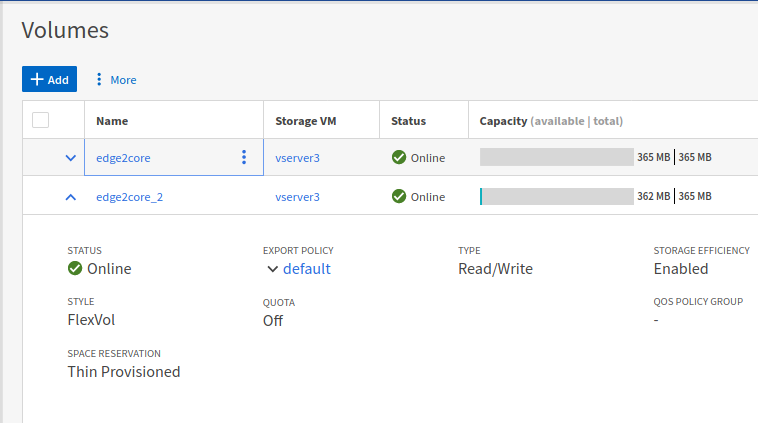
Still incredulous, I used the new (or maybe it's just something I hadn't noticed before) filesystem explorer and indeed - edge.db was there!
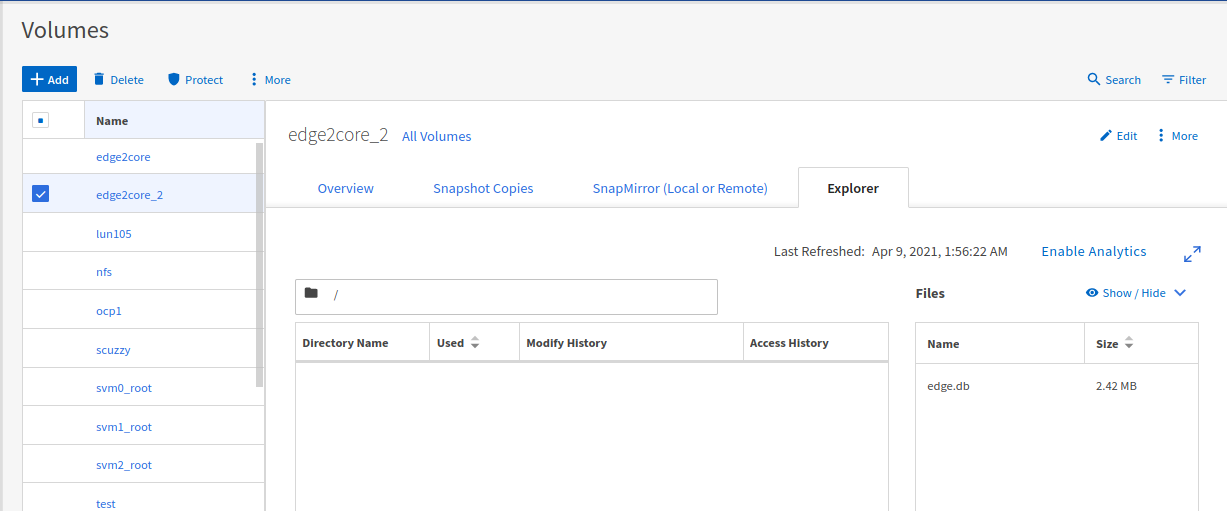
Although "Cloud Backup Service for Photon IoT" doesn't exist, Photon IoT snapshots could be restored using the same technology and workflow I described.
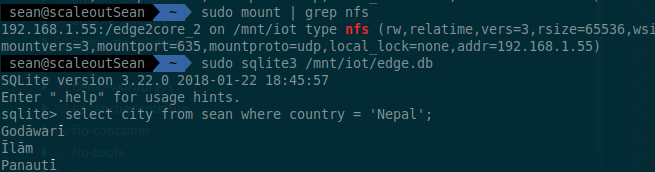
Can we access this data without a problem? I shared the restored ONTAP volume via NFSv3 and used my Linux client to access it:
$ sudo mkdir /mnt/iot
$ sudo mount -t nfs 192.168.1.55:/edge2core_2 /mnt/iot
$ sudo sqlite3 /mnt/iot/edge.db
SQLite version 3.22.0 2018-01-22 18:45:57
Enter ".help" for usage hints.
It works!
We don't have to restore data from Photon IoT snapshots to ONTAP. We can also copy the files over the network using standard protocols (NFS or SCP) and in both cases (SnapMirror restore to ONTAP, or network copy) we don't need to use ARM64 servers to access that data.
Copy Photon IoT data to other systems in the cloud or on-premises
To demonstrate that I copied my SQLite database with 26,000 records to my x86_64 computer using scp:
$ scp root@k2:/mnt/ontap/ntapvol/edge.db demos/ontap-on-arm
edge.db                                                     100% 2476KB   6.9MB/s   00:00

$ cd demos/ontap-on-arm

$ uname -a
Linux scaleoutSean 4.15.0-122-generic #124-Ubuntu SMP Thu Oct 15 13:03:05 UTC 2020 x86_64 x86_64 x86_64 GNU/Linux

$ sqlite3 edge.db
SQLite version 3.22.0 2018-01-22 18:45:57
Enter ".help" for usage hints.
sqlite> .databases
main: /home/sean/Documents/demos/ontap-on-arm/edge.db
sqlite> .tables
sean
sqlite> select city from sean where country = 'Zimbabwe';
city
Bulawayo
Masvingo
Mutare
...
It works exactly the same as it did when we accessed it over NFSv3 on ONTAP Select: I had no problem accessing this data from Intel/AMD-based Linux (and Windows clients should work, too).
Of course, you may prefer to access some data format on a local block device rather than over NFS, but in other cases you may prefer NFS v4 or v3. You have the flexibility to do whatever is more suitable for task at hand.
As mentioned earlier, rather than copy live data, we could take a point-in-time snapshot on Photon IoT and copy that "frozen" data over network:
- Export Photon directory NetApp XCP to pull IoT data over NFS from the Data Center (Photon IoT FUSE filesystem can be exported via nfs-kernel-server; I tried)
- rsync (sync Photon data from Photon IoT to the Data Center; rsync can run either at source or destination)
- something else that works for you
Containers, Photon and Trident together on ARM64
That was one use case I wanted to examine, but containerized storage serving of FUSE volumes to kubelet, with the OS, Photon and all other containers sharing one and the same MicroSD card… Ouch… Doesn't sound like a recipe for a happy weekend!
Trident on ARM64 can't work with Photon because Photon was made to be tiny - there's no public API or 95% of the features ONTAP users take for granted. But that's how you get ONTAP to run in less than 800 MB of memory.
Other approaches to get Kubernetes work with hostPath and FUSE may be possible, but I suspect that would take more time, and possibly better hardware or skills than I have.
Summary
I was surprised by how tiny Photon IoT is. If you can visualize a NetApp C190 next to a Raspberry Pi 3 - that's roughly how ONTAP compares to Photon in terms of features.
Given its focus on the ability to work with modest resources, in its current form Photon is suitable for data acquisition on the edge, especially when that data needs local (snapshots) and remote (snapshot replication, aka SnapMirror) protection. It would probably also work well for two-way data distribution (replicate databases from, but also to, the edge).
A bigger version of Photon that includes additional ONTAP features (required by Trident CSI), could be useful as container storage.
One ONTAP feature that I'd like to see on a micro-server (not IoT) version of ONTAP/Photon would be FlexCache, but for that Photon would need NFS support and with it a lot of other things IoT devices don't have and need. That would easily take few additional GB of RAM. And - commenting as an outsider as far as Photon and ONTAP engineering is concerned - if I had 8 GB of RAM at my disposal it would probably be easier to shrink the current ONTAP Select and run it on small x86_64 devices (such as UP2 (aka UP Squared), which supports Intel Celeron and Pentium processors and up to 8GB RAM)).
I'm pleased that the wild idea to test Photon with ONTAP S3 (rather than with NetApp StorageGRID or Amazon S3) worked out. In some use cases it could be useful to replicate IoT data to an ONTAP S3 bucket located on a smaller ONTAP all-flash appliance (such as the C190) or even ONTAP Select VM, perform processing using NFS or iSCSI clients (we'd need to be able to restore those S3 snapshots), and at the same time take advantage of the ONTAP's public cloud integrations for further data processing, long term backup or archiving.
Demo
- Photon IoT storage on ARM64: a walk-through (3m17s)
- Note that demo doesn't include "Restore Photon IoT snapshot from ONTAP S3 to ONTAP NFS" as that part was done later
- Photon IoT storage on ARM64: restore C2C snapshot from ONTAP S3 to ONTAP FlexVol for export via NFS (1m52s)
- Just the C2C snapshot restore part using ONTAP Select 9.8
Notes
- World Cities CSV data set used in my demo by simplemaps.com (CCY 4.0 License)