Mirantis Kubernetes Engine 3.4 with NetApp SolidFire 12.2
NOTICE: any and all credentials and tokens on this page are samples, not leaked.
Yesterday I realized that NetApp Trident v21.04 introduced support for Mirantis Kubernetes Engine (MKE). In the past NetApp Trident and SolidFire couldn't work with Docker EE so I was curious if this change that would give additional choices to SolidFire users, some of whom may have used Mirantis & SolidFire with OpenStack.
- Deploy nodes and Mirantis Kubernetes Engine
- Install and configure NetApp Trident with SolidFire back-end
- Summary
- Reference
- Demo
Deploy nodes and Mirantis Kubernetes Engine
Create a storage account on SolidFire and create one test volume to test your iSCSI configuration on worker(s).
Deploy two Linux VMs (master1, worker1) with at least 4 GiB RAM and 25 GiB of OS disk space and connect the worker node to iSCSI network. Make sure it can access the test volume, and then log out. Enable passwordless access for root for easier installation. Configure fixed IPv4 IPs and give the nodes some hostnames. I used Ubuntu 18.04 with the following network configuration:
- ens192 - "external" network (192.168.1.0/24)
- ens224 - iSCSI network (192.168.103.0/24)
- ens256 - it was just there, configured but not used (192.168.104.0/24)
Get the installer (launchpad) from here and use it to generate a template file as per launchpad instructions. For this post I used launchpad 1.3.0 beta 3, currently the newest available.
My first attempt failed. I had to specify privateInterface, perhaps because I had 3 NICs on each VM (one of them was for iSCSI).
My second attempt failed:
INFO [ssh] 192.168.1.197:22: time="2021-05-02T04:53:52Z" level=fatal msg="unable to validate system resource requirements: unable to verify memory requirements: Your system does not have enough memory. UCP suggests a minimum of 4.00 GB, but you only have 3.00 GB. You may have unexpected errors."
My third attempt failed:
INFO [ssh] 192.168.1.197:22: time="2021-05-02T05:17:11Z" level=fatal msg="unable to validate system resource requirements: unable to verify storage requirements: Your system does not have available disk space. UCP requires a minimum of 25.00 GB, but you only have 23.43 GB
My fourth attempt worked with this launchpad.yaml:
apiVersion: launchpad.mirantis.com/mke/v1.4
kind: mke
metadata:
  name: mke3
spec:
  hosts:
  - ssh:
      address: 192.168.1.197
      user: root
      port: 22
      keyPath: ~/.ssh/id_rsa
    role: manager
    privateInterface: ens192
  - ssh:
      address: 192.168.1.130
      user: root
      port: 22
      keyPath: ~/.ssh/id_rsa
    privateInterface: ens192
    role: worker
  mke:
    version: 3.4.0
    installFlags:
    - --default-node-orchestrator=kubernetes
    installFlags:
    - --pod-cidr="192.169.200.0/22"
    - --admin-username=admin
    - --admin-password=NetApp123$
    - --force-minimums
  mcr:
    version: 20.10.0
  cluster:
    prune: false
root@master1:~#
But it worked only up to this point:
INFO [ssh] 192.168.1.197:22: time="2021-05-02T05:52:31Z" level=fatal msg="unable to verify that no UCP components already exist: the following containers appear to be from an existing UCP installation and must be removed before proceeding with a new installation: ucp-auth-api.uskyyh8canpeuhqo89q0y9jou.lhmnrymq4pncbmv6fp7oif7yg ucp-auth-worker.uskyyh8canpeuhqo89q0y9jou.s07t6ebpcoeuycaheb51qxdp8 ucp-auth-api.uskyyh8canpeuhqo89q0y9jou.v3n5ykdyb947gum9crtuqduux ucp-auth-worker.uskyyh8canpeuhqo89q0y9jou.0an9610cewsltdwjqqcxswj63 ucp-auth-api.uskyyh8canpeuhqo89q0y9jou.zy6z9griqxsdnkgpl4zu1uasw ucp-auth-worker.uskyyh8canpeuhqo89q0y9jou.e0oesa2d80m5cg1s5bnjexvwm ucp-auth-api.uskyyh8canpeuhqo89q0y9jou.rihn5erd47qyi33ej3qibb8t2 ucp-auth-worker.uskyyh8canpeuhqo89q0y9jou.ukembo9xk5hpzk110nstx6hue ucp-auth-api.uskyyh8canpeuhqo89q0y9jou.5heko0emuc5lfl55wgqygddpc ucp-auth-worker.uskyyh8canpeuhqo89q0y9jou.hjmy0pmmgxen78kax1o36db3x"
Removing all containers with launchpad reset and even manually did not help.
Even after several retries I couldn't get past that error.
At this point I cleaned up everything including Docker volumes, rebooted both nodes and switched to MKE 3.4.0 (YAML file above already accounts for that change). Initially launchpad set version to 3.3.7. I don't know why - I used the latest launchpad and the Mirantis Web site currently mentions version 3.4.0 as available.
Success
Despite warnings about possible conflicts between this and that range, the next try worked.
INFO [ssh] 192.168.1.197:22: time="2021-05-02T06:18:29Z" level=info msg="Your engine version 20.10.0, build 1e08f21 (4.15.0-142-generic) is compatible with UCP 3.4.0 (4486503)"
INFO [ssh] 192.168.1.197:22: time="2021-05-02T06:18:29Z" level=info msg="Bootsrapper image org: mirantis"
INFO [ssh] 192.168.1.197:22: time="2021-05-02T06:18:29Z" level=info msg="Bootsrapper image version: 3.4.0"
INFO [ssh] 192.168.1.197:22: time="2021-05-02T06:18:29Z" level=info msg="Your Docker daemon version 20.10.0, build 1e08f21 (4.15.0-142-generic) is compatible with UCP 3.4.0 (4486503)"
INFO [ssh] 192.168.1.197:22: time="2021-05-02T06:18:29Z" level=warning msg="Your system does not have available disk space. UCP requires a minimum of 25.00 GB, but you only have 20.01 GB"
INFO [ssh] 192.168.1.197:22: time="2021-05-02T06:18:32Z" level=warning msg="None of the Subject Alternative Names we'll be using in the UCP certificates [\"192.168.1.197\" \"master1\"] contain a domain component. Your generated certs may fail TLS validation unless you only use one of these shortnames or IP addresses to connect. You can use the --san flag to add more aliases"
INFO [ssh] 192.168.1.197:22: time="2021-05-02T06:18:32Z" level=info msg="Checking required ports for connectivity"
INFO [ssh] 192.168.1.197:22: time="2021-05-02T06:18:38Z" level=info msg="Checking required container images"
INFO [ssh] 192.168.1.197:22: time="2021-05-02T06:18:38Z" level=warning msg="Possible conflict between Kubernetes pod CIDR range 192.168.200.0/22 and default address pool for Docker Engine interface and bridge networks 192.168.0.0/16"
INFO [ssh] 192.168.1.197:22: time="2021-05-02T06:18:38Z" level=warning msg="Possible conflict between Kubernetes service CIDR range 10.96.0.0/16 and default address pool for Swarm overlay networks 10.0.0.0/8"
INFO [ssh] 192.168.1.197:22: time="2021-05-02T06:18:38Z" level=info msg="disabling checks which rely on detecting which (if any) cloud provider the cluster is currently running on"
INFO [ssh] 192.168.1.197:22: time="2021-05-02T06:18:38Z" level=info msg="Running install agent container ..."
INFO [ssh] 192.168.1.197:22: time="2021-05-02T06:18:39Z" level=info msg="Loading install configuration"
INFO [ssh] 192.168.1.197:22: time="2021-05-02T06:18:39Z" level=info msg="Running Installation Steps"
INFO [ssh] 192.168.1.197:22: time="2021-05-02T06:18:39Z" level=info msg="Step 1 of 39: [Setup Internal Cluster CA]"
INFO [ssh] 192.168.1.197:22: time="2021-05-02T06:18:42Z" level=info msg="Step 2 of 39: [Setup Internal Client CA]"
INFO [ssh] 192.168.1.197:22: time="2021-05-02T06:18:42Z" level=info msg="Step 3 of 39: [Initialize etcd Cluster]"
INFO [ssh] 192.168.1.197:22: time="2021-05-02T06:18:46Z" level=info msg="Step 4 of 39: [Set Initial Config in etcd]"
INFO [ssh] 192.168.1.197:22: time="2021-05-02T06:18:46Z" level=info msg="Step 5 of 39: [Deploy RethinkDB Server]"
INFO [ssh] 192.168.1.197:22: time="2021-05-02T06:18:48Z" level=info msg="Step 6 of 39: [Initialize RethinkDB Tables]"
INFO [ssh] 192.168.1.197:22: time="2021-05-02T06:18:53Z" level=info msg="Step 7 of 39: [Create Auth Service Encryption Key Secret]"
INFO [ssh] 192.168.1.197:22: time="2021-05-02T06:18:53Z" level=info msg="Step 8 of 39: [Deploy Auth API Server]"
INFO [ssh] 192.168.1.197:22: time="2021-05-02T06:18:59Z" level=info msg="Step 9 of 39: [Setup Auth Configuration]"
INFO [ssh] 192.168.1.197:22: time="2021-05-02T06:18:59Z" level=info msg="Step 10 of 39: [Deploy Auth Worker Server]"
INFO [ssh] 192.168.1.197:22: time="2021-05-02T06:19:03Z" level=info msg="Step 11 of 39: [Deploy MKE Proxy Server]"
INFO [ssh] 192.168.1.197:22: time="2021-05-02T06:19:04Z" level=info msg="Step 12 of 39: [Initialize Swarm v1 Node Inventory]"
INFO [ssh] 192.168.1.197:22: time="2021-05-02T06:19:04Z" level=info msg="Step 13 of 39: [Deploy Swarm v1 Manager Server]"
INFO [ssh] 192.168.1.197:22: time="2021-05-02T06:19:06Z" level=info msg="Step 14 of 39: [Deploy Internal Cluster CA Server]"
INFO [ssh] 192.168.1.197:22: time="2021-05-02T06:19:07Z" level=info msg="Step 15 of 39: [Deploy Internal Client CA Server]"
INFO [ssh] 192.168.1.197:22: time="2021-05-02T06:19:08Z" level=info msg="Step 16 of 39: [Deploy MKE Controller Server]"
INFO [ssh] 192.168.1.197:22: time="2021-05-02T06:19:11Z" level=info msg="Step 17 of 39: [Deploy Kubernetes API Server]"
INFO [ssh] 192.168.1.197:22: time="2021-05-02T06:19:19Z" level=info msg="Step 18 of 39: [Deploy Kubernetes Controller Manager]"
INFO [ssh] 192.168.1.197:22: time="2021-05-02T06:19:23Z" level=info msg="Step 19 of 39: [Deploy Kubernetes Scheduler]"
INFO [ssh] 192.168.1.197:22: time="2021-05-02T06:19:27Z" level=info msg="Step 20 of 39: [Deploy Kubelet]"
INFO [ssh] 192.168.1.197:22: time="2021-05-02T06:20:06Z" level=info msg="Step 21 of 39: [Deploy Kubernetes Proxy]"
INFO [ssh] 192.168.1.197:22: time="2021-05-02T06:20:06Z" level=info msg="Step 22 of 39: [Wait for Healthy MKE Controller and Kubernetes API]"
INFO [ssh] 192.168.1.197:22: time="2021-05-02T06:20:06Z" level=info msg="Step 23 of 39: [Create Kubernetes Pod Security Policies]"
INFO [ssh] 192.168.1.197:22: time="2021-05-02T06:20:11Z" level=info msg="Step 24 of 39: [Install default storage class based on cloudprovider (for deprecated InTree providers)]"
INFO [ssh] 192.168.1.197:22: time="2021-05-02T06:20:11Z" level=info msg="Step 25 of 39: [Install Kubernetes CNI Plugin]"
INFO [ssh] 192.168.1.197:22: time="2021-05-02T06:20:25Z" level=info msg="Step 26 of 39: [Install CoreDNS]"
INFO [ssh] 192.168.1.197:22: time="2021-05-02T06:20:32Z" level=info msg="Step 27 of 39: [Install Cloud Controller Manager based on cloudprovider]"
INFO [ssh] 192.168.1.197:22: time="2021-05-02T06:20:32Z" level=info msg="Step 28 of 39: [Install Container Storage Interface Driver based on cloudprovider]"
INFO [ssh] 192.168.1.197:22: time="2021-05-02T06:20:32Z" level=info msg="Step 29 of 39: [Install Istio Ingress]"
INFO [ssh] 192.168.1.197:22: time="2021-05-02T06:20:52Z" level=info msg="Step 30 of 39: [Create MKE Controller Kubernetes Service Endpoints]"
INFO [ssh] 192.168.1.197:22: time="2021-05-02T06:20:54Z" level=info msg="Step 31 of 39: [Install Metrics Plugin]"
INFO [ssh] 192.168.1.197:22: time="2021-05-02T06:20:56Z" level=info msg="Step 32 of 39: [Install Kubernetes Compose Plugin]"
INFO [ssh] 192.168.1.197:22: W0502 06:20:56.650591       1 warnings.go:70] apiextensions.k8s.io/v1beta1 CustomResourceDefinition is deprecated in v1.16+, unavailable in v1.22+; use apiextensions.k8s.io/v1 CustomResourceDefinition
INFO [ssh] 192.168.1.197:22: time="2021-05-02T06:21:03Z" level=info msg="Step 33 of 39: [Deploy Manager Node Agent Service]"
INFO [ssh] 192.168.1.197:22: time="2021-05-02T06:21:03Z" level=info msg="Step 34 of 39: [Deploy Worker Node Agent Service]"
INFO [ssh] 192.168.1.197:22: time="2021-05-02T06:21:03Z" level=info msg="Step 35 of 39: [Deploy Windows Worker Node Agent Service]"
INFO [ssh] 192.168.1.197:22: time="2021-05-02T06:21:03Z" level=info msg="Step 36 of 39: [Deploy Cluster Agent Service]"
INFO [ssh] 192.168.1.197:22: time="2021-05-02T06:21:03Z" level=info msg="Step 37 of 39: [Set License]"
INFO [ssh] 192.168.1.197:22: time="2021-05-02T06:21:03Z" level=info msg="Step 38 of 39: [Set Registry CA Certificates]"
INFO [ssh] 192.168.1.197:22: time="2021-05-02T06:21:03Z" level=info msg="Step 39 of 39: [Wait for All Nodes to be Ready]"
INFO [ssh] 192.168.1.197:22: time="2021-05-02T06:21:09Z" level=info msg="All Installation Steps Completed"
INFO ==> Running phase: Upgrade MKE components
INFO [ssh] 192.168.1.197:22: cluster already at version 3.4.0, not running upgrade
INFO ==> Running phase: Join managers to swarm
INFO [ssh] 192.168.1.197:22: already a swarm node
INFO ==> Running phase: Join workers
INFO [ssh] 192.168.1.130:22: joined succesfully
INFO ==> Running phase: Validating MKE Health
INFO [ssh] 192.168.1.197:22: waiting for MKE to become healthy
INFO ==> Running phase: Label nodes
INFO [ssh] 192.168.1.197:22: labeling node
INFO [ssh] 192.168.1.130:22: labeling node
INFO ==> Running phase: Close Connection
INFO [ssh] 192.168.1.130:22: disconnected
INFO [ssh] 192.168.1.197:22: disconnected
INFO ==> Running phase: MKE cluster info
INFO Cluster is now configured.
INFO MKE cluster admin UI: https://192.168.1.197/
INFO You can download the admin client bundle with the command 'launchpad client-config'
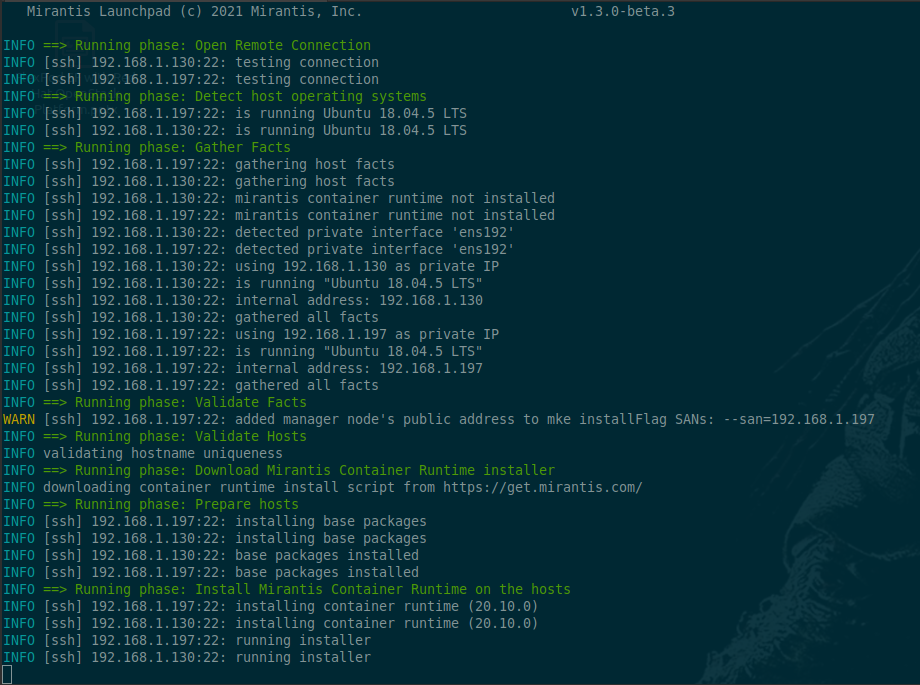
MKE wrap-up
# launchpad client-config
# ls -lat /root/.mirantis-launchpad/cluster/mke3/bundle/admin/
total 48
drwxr-xr-x 3 root root 4096 May  2 06:28 .
drwxr-xr-x 3 root root 4096 May  2 06:28 ..
-rw-r--r-- 1 root root 1129 May  2 06:28 ca.pem
-rw-r--r-- 1 root root  741 May  2 06:28 cert.pem
-rw-r--r-- 1 root root  177 May  2 06:28 cert.pub
-rw-r--r-- 1 root root 1105 May  2 06:28 env.cmd
-rw-r--r-- 1 root root 1270 May  2 06:28 env.ps1
-rw-r--r-- 1 root root 1089 May  2 06:28 env.sh
-rw------- 1 root root  227 May  2 06:28 key.pem
-rw-r--r-- 1 root root 3263 May  2 06:28 kube.yml
-rw-r--r-- 1 root root  285 May  2 06:28 meta.json
drwx------ 4 root root 4096 May  2 06:28 tls
Now, this is probably not how it should be done, but I didn't want to RTFM:
root@master1:~# snap install kubectl --classic; cd .mirantis-launchpad/cluster/mke3/bundle/admin
root@master1:~/.mirantis-launchpad/cluster/mke3/bundle/admin# . env.sh
Cluster "ucp_192.168.1.197:6443_admin" set.
User "ucp_192.168.1.197:6443_admin" set.
Context "ucp_192.168.1.197:6443_admin" modified.
root@master1:~/.mirantis-launchpad/cluster/mke3/bundle/admin# kubectl get nodes
NAME      STATUS   ROLES    AGE     VERSION
master1   Ready    master   12m     v1.20.1-mirantis-1-3-g71afa0ba032bfd
worker1   Ready    <none>   9m33s   v1.20.1-mirantis-1-3-g71afa0ba032bfd
This will do (unless it doesn't).
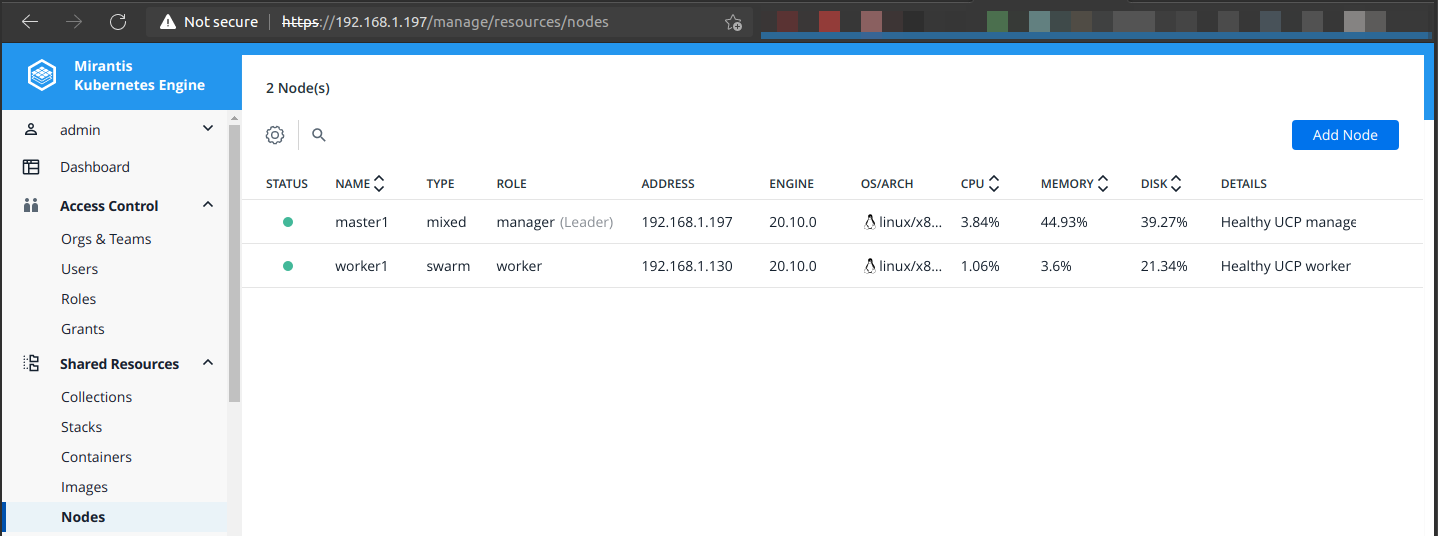
MKE dashboard was easy to access: visit management IP from the YAML and log in using the admin creds. Check out that Swarm menu item!
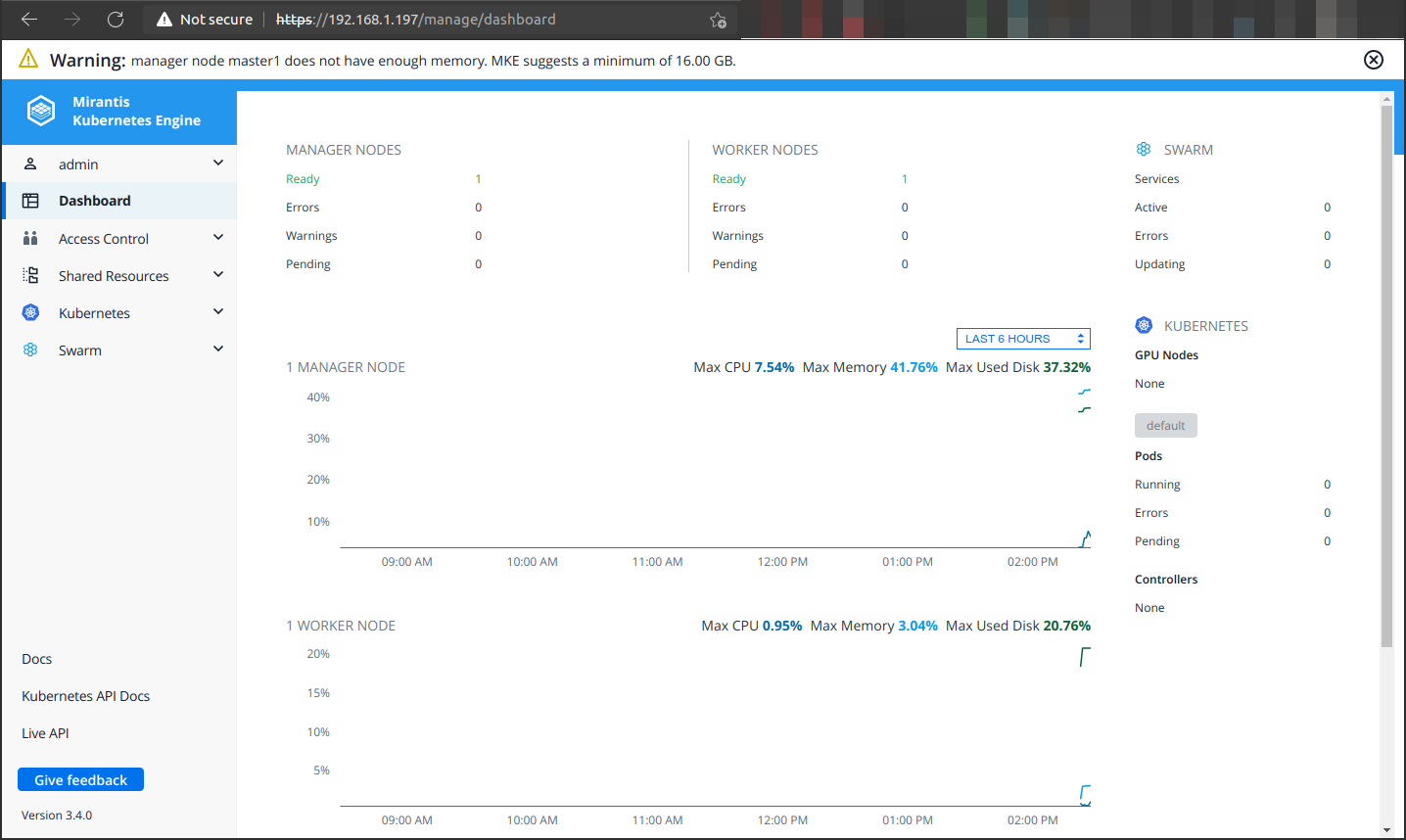
One master, one worker, one beer (reward for the hard work; not shown in screenshot)…
Install and configure NetApp Trident with SolidFire back-end
Get NetApp Trident v21.04 and install it. Create a SolidFire back-end and one or more Storage Classes.
root@master1:~# ./trident-installer/tridentctl install -n trident
INFO Starting Trident installation.                namespace=trident
INFO Created namespace.                            namespace=trident
INFO Created service account.
INFO Created cluster role.
INFO Created cluster role binding.
INFO Installer will create a fresh tridentvolumes.trident.netapp.io CRD.
INFO Created custom resource definitions tridentvolumes.trident.netapp.io.  namespace=trident
INFO Installer will create a fresh tridentnodes.trident.netapp.io CRD.
INFO Created custom resource definitions tridentnodes.trident.netapp.io.  namespace=trident
INFO Installer will create a fresh tridenttransactions.trident.netapp.io CRD.
INFO Created custom resource definitions tridenttransactions.trident.netapp.io.  namespace=trident
INFO Installer will create a fresh tridentsnapshots.trident.netapp.io CRD.
INFO Created custom resource definitions tridentsnapshots.trident.netapp.io.  namespace=trident
INFO Installer will create a fresh tridentversions.trident.netapp.io CRD.
INFO Created custom resource definitions tridentversions.trident.netapp.io.  namespace=trident
INFO Installer will create a fresh tridentbackends.trident.netapp.io CRD.
INFO Created custom resource definitions tridentbackends.trident.netapp.io.  namespace=trident
INFO Installer will create a fresh tridentbackendconfigs.trident.netapp.io CRD.
INFO Created custom resource definitions tridentbackendconfigs.trident.netapp.io.  namespace=trident
INFO Installer will create a fresh tridentstorageclasses.trident.netapp.io CRD.
INFO Created custom resource definitions tridentstorageclasses.trident.netapp.io.  namespace=trident
INFO Created custom resource definitions.
INFO Created Trident pod security policy.
INFO Added finalizers to custom resource definitions.
INFO Created Trident service.
INFO Created Trident secret.
INFO Created Trident deployment.
INFO Created Trident daemonset.
INFO Waiting for Trident pod to start.
INFO Trident pod started.                          namespace=trident pod=trident-csi-bbdd8b965-4q796
INFO Waiting for Trident REST interface.
INFO Trident REST interface is up.                 version=21.04.0
INFO Trident installation succeeded.
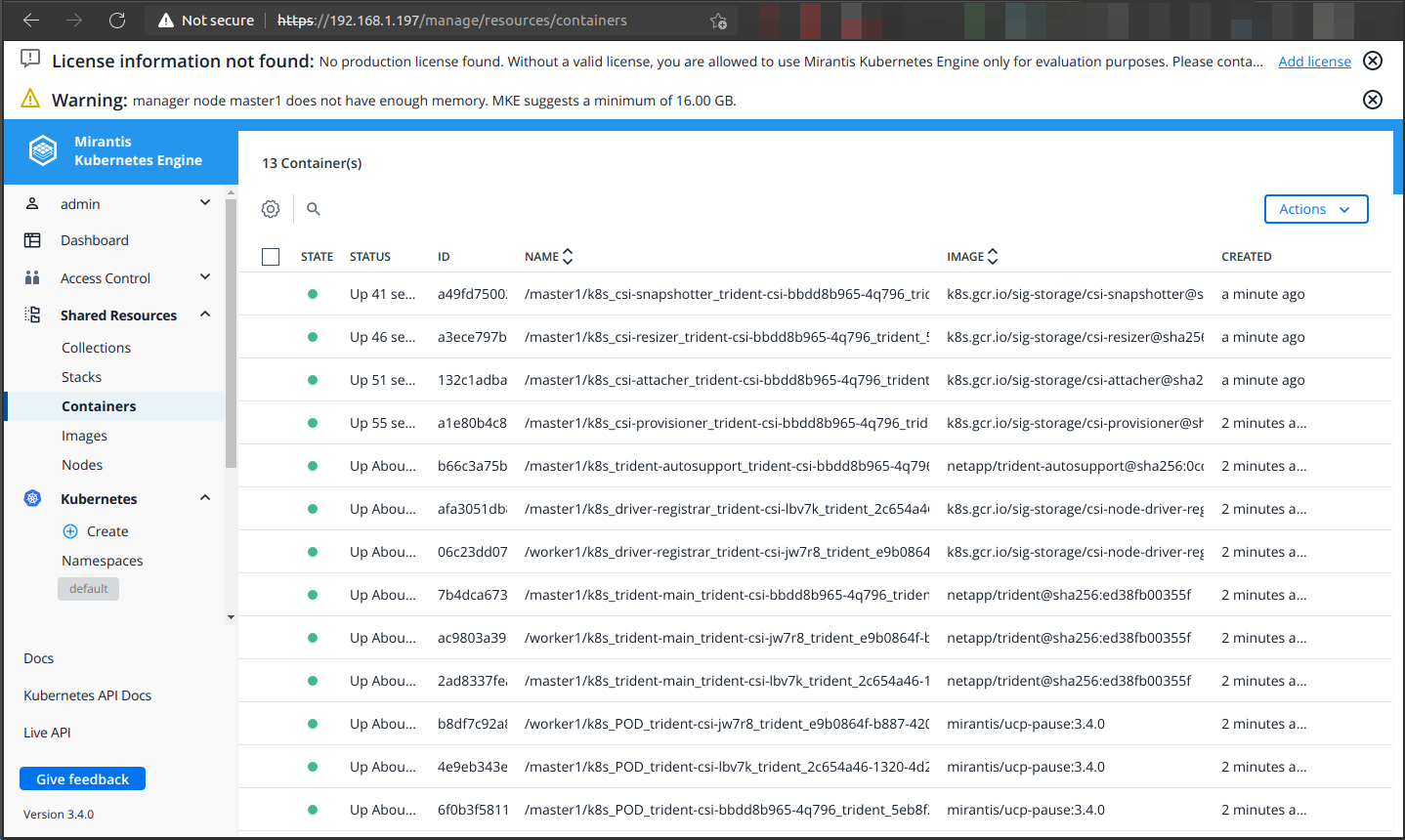
Now that we've survived this step, we can appreciate the view in the Web UI:
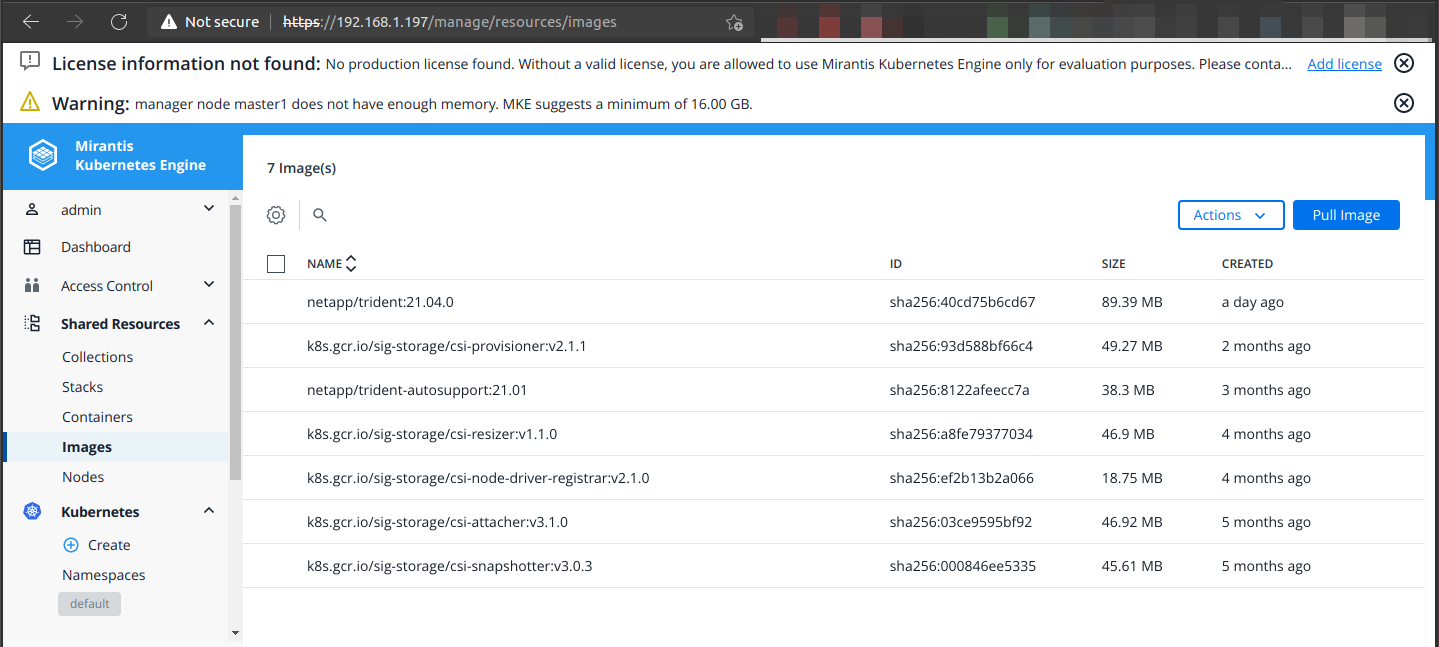
Trident v21.04 containers:
root@master1:~# ./trident-installer/tridentctl create backend -n trident -f back-end.json
+--------------------------+----------------+--------------------------------------+--------+---------+
|           NAME           | STORAGE DRIVER |                 UUID                 | STATE  | VOLUMES |
+--------------------------+----------------+--------------------------------------+--------+---------+
| solidfire_192.168.103.30 | solidfire-san  | d1127f2c-964c-448c-a284-e2ca2666fa3b | online |       0 |
+--------------------------+----------------+--------------------------------------+--------+---------+

root@master1:~# kubectl create -f sc-bronze.yaml
storageclass.storage.k8s.io/solidfire-bronze created

root@master1:~# kubectl create -f sc-silver.yaml
storageclass.storage.k8s.io/solidfire-silver created

root@master1:~# kubectl get sc
NAME                         PROVISIONER             RECLAIMPOLICY   VOLUMEBINDINGMODE   ALLOWVOLUMEEXPANSION   AGE
solidfire-bronze             csi.trident.netapp.io   Delete          Immediate           false                  5m16s
solidfire-silver (default)   csi.trident.netapp.io   Retain          Immediate           false                  5m12s
Create a PVC to use one of Trident storage classes that use SolidFire:
root@master1:~# kubectl create -f pvc.yaml
persistentvolumeclaim/logs created

root@master1:~# kubectl get pvc
NAME   STATUS   VOLUME                                     CAPACITY   ACCESS MODES   STORAGECLASS       AGE
logs   Bound    pvc-b9fce918-e48d-4239-8209-2cf9a86e580b   1Gi        RWO            solidfire-silver   6s
root@master1:~# kubectl get pv
NAME                                       CAPACITY   ACCESS MODES   RECLAIM POLICY   STATUS   CLAIM          STORAGECLASS       REASON   AGE
pvc-b9fce918-e48d-4239-8209-2cf9a86e580b   1Gi        RWO            Retain           Bound    default/logs   solidfire-silver            8s
Seen from the Mirantis Kubernetes Engine Web interface, this is my storage configuration:
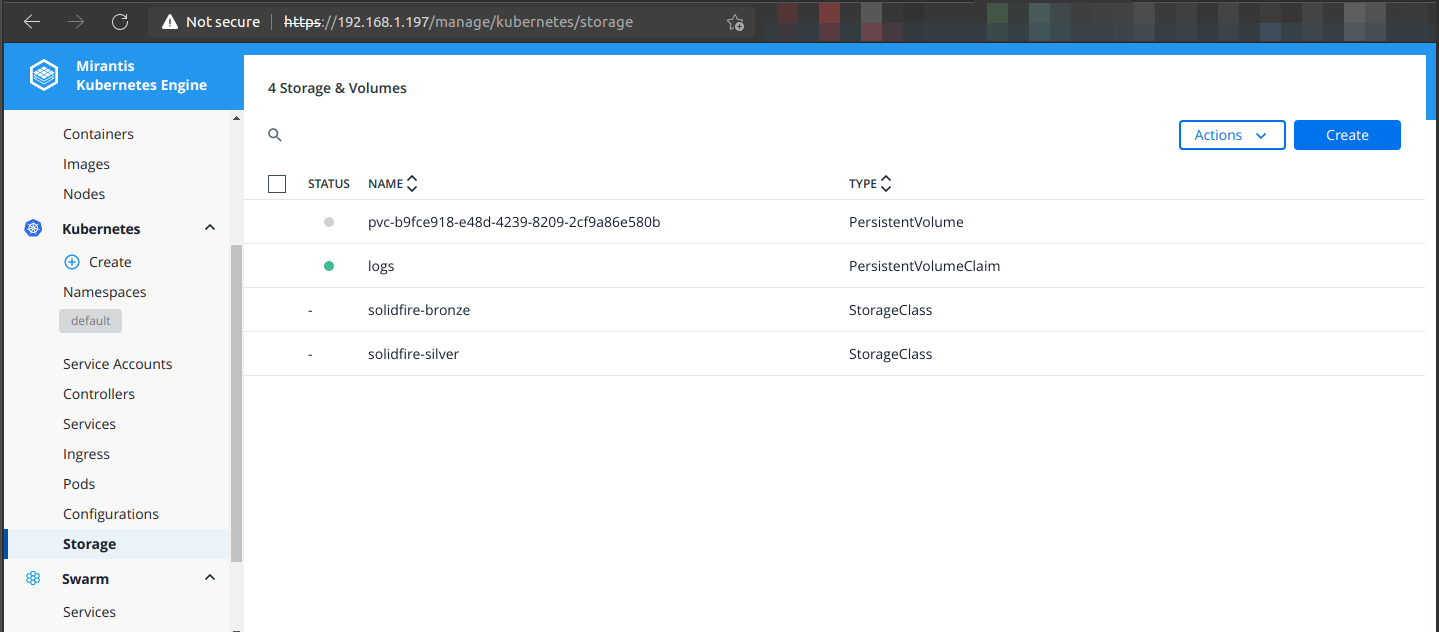
It's a bit unusual to see storage classes, PVCs and PVs in the same pane. But to be honest the "classic" K8s Web UI which has (had?) them all over the place wasn't much better.
New PV on SolidFire:
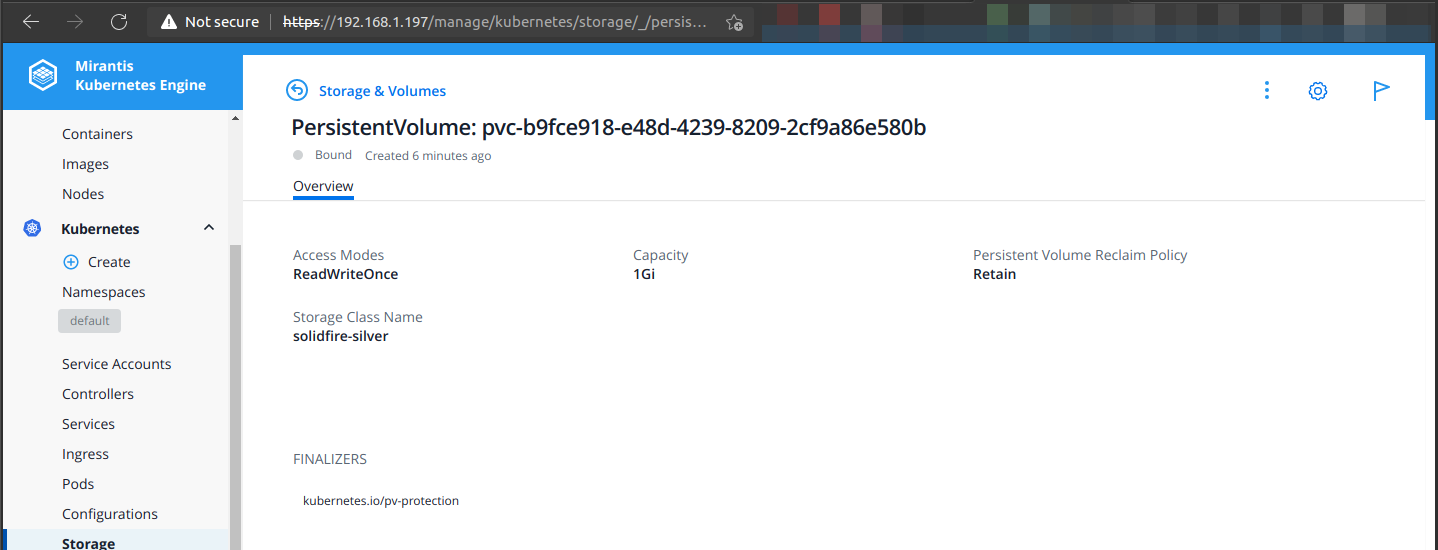
Using the SolidFire Web UI in this volume's attributes we can observe that platform version is v1.20.1-mirantis-1-3-g71afa0ba032bfd. Version 1.3 is coming from launchpad.

Summary
I can't say I know a whole lot about MKE, but I was able to install it with minimal effort and the Web UI is frustration-free.
NetApp Trident v21.04 and SolidFire 12.2 didn't require any unusual steps to deploy or use (to the extent I tried - create, delete).
I was surprised to see Swarm in the MKE management interface (and also in launchpad install log). This deserves some follow up and RTFM, but remember that Swarm and Docker EE don't work with Trident's solidfire-san driver, so MKE users with NetApp HCI or SolidFire will probably want to ensure to not use Swarm with Trident 21.04 and SolidFire 12. Based on my touch tests it did not appear that Swarm was involved.
MKE supports Hyper-V workers and has other interesting features which deserve further exploration.
Note that both Trident and MKE may (or may not) have each other - or maybe not these exact versions - in their compatibility charts. Please verify this information before making decisions for production use.
Reference
Demo
- Touch-test with quick walk-through: Mirantis MKE 3.4.0 with NetApp Trident v21.04 and SolidFire 12.2 - 1m39s