S3 Select and other new features of NetApp StorageGRID 11.6
What's new in StorageGRID 11.6
StorageGRID 11.6 just came out and it has several very nice new features. You can find them in the documentation (finally, it's on Github Pages!) or read the announcement.
I'll focus on two of the new features, S3 Select and log forwarding.
S3 Select
AWS S3 Select has been around for a while and many AWS S3 users know about it.
Here's how AWS put it:
Amazon S3 has a built-in feature and complementary services that query data without needing to copy and load it into a separate analytics platform or data warehouse. This means you can run big data analytics directly on your data stored in Amazon S3. S3 Select is an S3 feature designed to increase query performance by up to 400%, and reduce querying costs as much as 80%. It works by retrieving a subset of an object's data (using simple SQL expressions) instead of the entire object, which can be up to 5 terabytes in size.
In other words S3 Select turns S3 into a read-only database. Instead of downloading an entire table (object without S3) or set of tables, you query it with SQL-like syntax.
Another comparison would be instead of importing data into a NOSQL DB and having to maintain a separate DB cluster, simpler queries can be done directly off S3. Of course, S3 Select can't and won't fully replace HBase and such, but just moving 10% of data off HDFS to S3 can translate into nice savings for a PB sized deployment. Not to mention that you can run such queries against StorageGRID from any location in your organization or even the public cloud. Heck, you can even run S3 analytics from your existing Hadoop cluster (S3A) until you retire it!
StorageGRID 11.6 introduces a subset of AWS S3 Select features. You can see the details related to SQL grammar and more in the documentation.
What is that good for? Look at the AWS S3 Select use cases and examples and see what others are doing with the feature.
Example 1: Basic
Let's consider this basic example (source):
resp = s3.select_object_content(
    Bucket='s3select-demo',
    Key='sample_data.csv',
    ExpressionType='SQL',
    Expression="SELECT * FROM s3object s where s.\"Name\" = 'Jane'",
    InputSerialization = {'CSV': {"FileHeaderInfo": "Use"}, 'CompressionType': 'NONE'},
    OutputSerialization = {'CSV': {}},
)
Without this approach maybe you'd open this stuff in Excel and create some queries there. Now you can have this in a JavaScript-powered dashboard.
Or you'd copy (from NAS) or get (from S3) the entire file/object, and parse it with Python or shell script to get only 2-3 rows of results.
Or you'd stuff such CSV files into a DB which can turn out to be a very expensive and slow container for such data. And then you'd have to backup and maintain the database and application rather than pay cents per GB for S3-compatible storage that requires almost no management and usually doesn't have to be backed-up or replicated while still providing solid performance and availability for workloads like this.
With S3 Select, you can do all the reads on the remote S3 storage and just retrieve the result, often saving huge amounts of network bandwidth and time.
And this isn't just the time to get the result out, but also time to make data usable: whereas with other approaches you may need to download objects, copy them over WAN and maybe even multiple hosts. Here, once data is on StorageGRID, you can securely query it from anywhere - the HQs, Branch 1, Branch 2, your K8s in the Public Cloud….
Some verticals and use cases where S3 Select could be useful:
- Verticals: manufacturing, finance, life sciences and more
- Use cases: analytics, data warehousing, hybrid cloud analytics, SIEM, etc.
Example 2: Network-efficient log grep
I know, I know… There are packaged, feature-rich applications for this problem and I've used them too. But let's say your requirements are basic: you upload logs to S3 where you retain them for simple troubleshooting. Maybe you're into simple data exploration and your organization won't stand up or otherwise maintain a variety of applications that could make this easier.
Or maybe it's logs from machines in your factory. Maybe you're interested in data that matches a certain time span.
With S3 Select it's easy to make queries - both from scripts and browsers - to select such data from a large set of objects. See the first video demo (at the bottom) on how I query a StorageGRID audit log to find all access between two time stamps.
Example 3: Brute Force Sizer for SolidFire
I pre-recorded Examples 1 & 2 while StorageGRID was still in beta, but today I happened to have some extra time and I also had an idea (both ingridients are required for a good demo). The idea came from yesterday's experience when I spent 2 hours trying to:
- figure out how various terms and units in our monitoring and sizing tools map to each other
- find an optimal sizing for a SolidFire hardware refresh
It occurred to me that - because SolidFire appliance models are currently three and a cluster can consist of up to 40 nodes - the number of all possible configurations should be about right for this use case.
First I wrote a script to create all possible combinations, while respecting some criteria:
- no cluster should have less than 4 nodes
- no node should have more capacity than 33% of total cluster capacity
- no cluster should have more than 40 nodes
Storage efficiency of 3x was hardcoded in the script because I wasn't too concerned about it (I wanted to size based on usable).
By the time I was done, I had something like this:
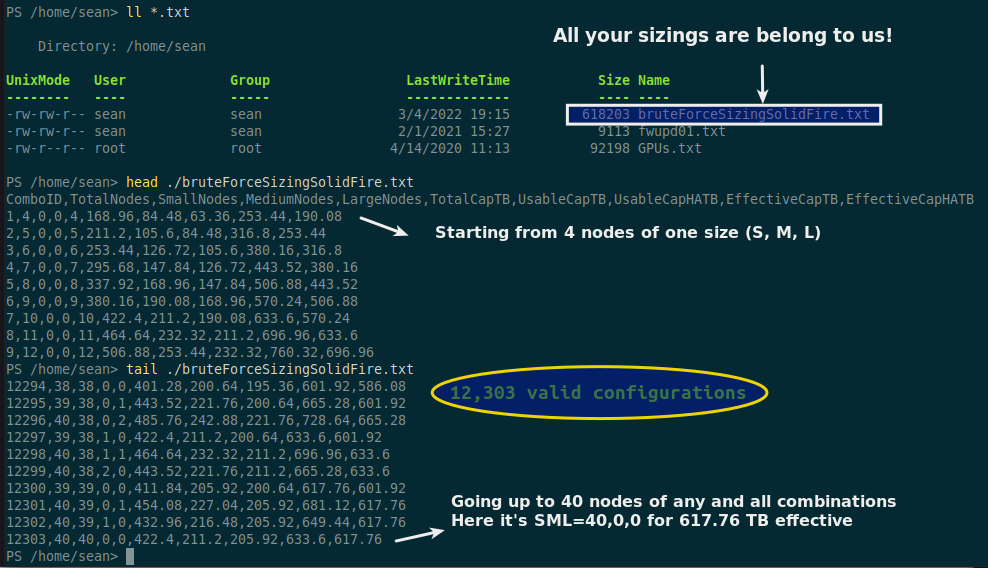
Or, if that is not easy to read:
$ cat bruteForceSizingSolidFire.txt
ComboID,TotalNodes,SmallNodes,MediumNodes,LargeNodes,TotalCapTB,UsableCapTB,UsableCapHATB,EffectiveCapTB,EffectiveCapHATB
1,4,0,0,4,168.96,84.48,63.36,253.44,190.08
2,5,0,0,5,211.2,105.6,84.48,316.8,253.44
3,6,0,0,6,253.44,126.72,105.6,380.16,316.8
4,7,0,0,7,295.68,147.84,126.72,443.52,380.16
...
12299,40,38,2,0,443.52,221.76,211.2,665.28,633.6
12300,39,39,0,0,411.84,205.92,200.64,617.76,601.92
12301,40,39,0,1,454.08,227.04,205.92,681.12,617.76
12302,40,39,1,0,432.96,216.48,205.92,649.44,617.76
12303,40,40,0,0,422.4,211.2,205.92,633.6,617.76
Field names show that we calculate total capacity, usable capacity, effective capacity, and also cover some "N-1" scenarios in the case the largest sized node in the cluster fails. The entire "universe" of possible valid combinations was 12303 and this "flat file database" size was around 600kB - just about right for my purpose!
I uploaded that file to a bucket on StorageGRID 11.6.
Next I needed a sizing tool.
I wrote the above in Powershell and had half a mind to do the same for the sizing tool but it was getting late so I recycled Amazon's example script but made it a bit more "real life" - not all variables were hardcoded.
Brute Force Sizer for SolidFire is similar to previous examples except that it takes three arguments each of which has a default value and obviously SQL queries are different.
$ ./bfsizing.py -h
usage: bfsizing.py [-h] [-min MINIMUM] [-max MAXIMUM] [-n NODES]

optional arguments:
  -h, --help            show this help message and exit
  -min MINIMUM, --minimum MINIMUM
                        Minimum usable capacity in TB (default: 10)
  -max MAXIMUM, --maximum MAXIMUM
                        Maximum usable capacity in TB (default: 50)
  -n NODES, --nodes NODES
                        Maximum number of SolidFire nodes (default: 10)
All right! Let's fire up this sucker…
I'm looking for 25 nodes or less and targeting usable capacity between 120-130 TB:
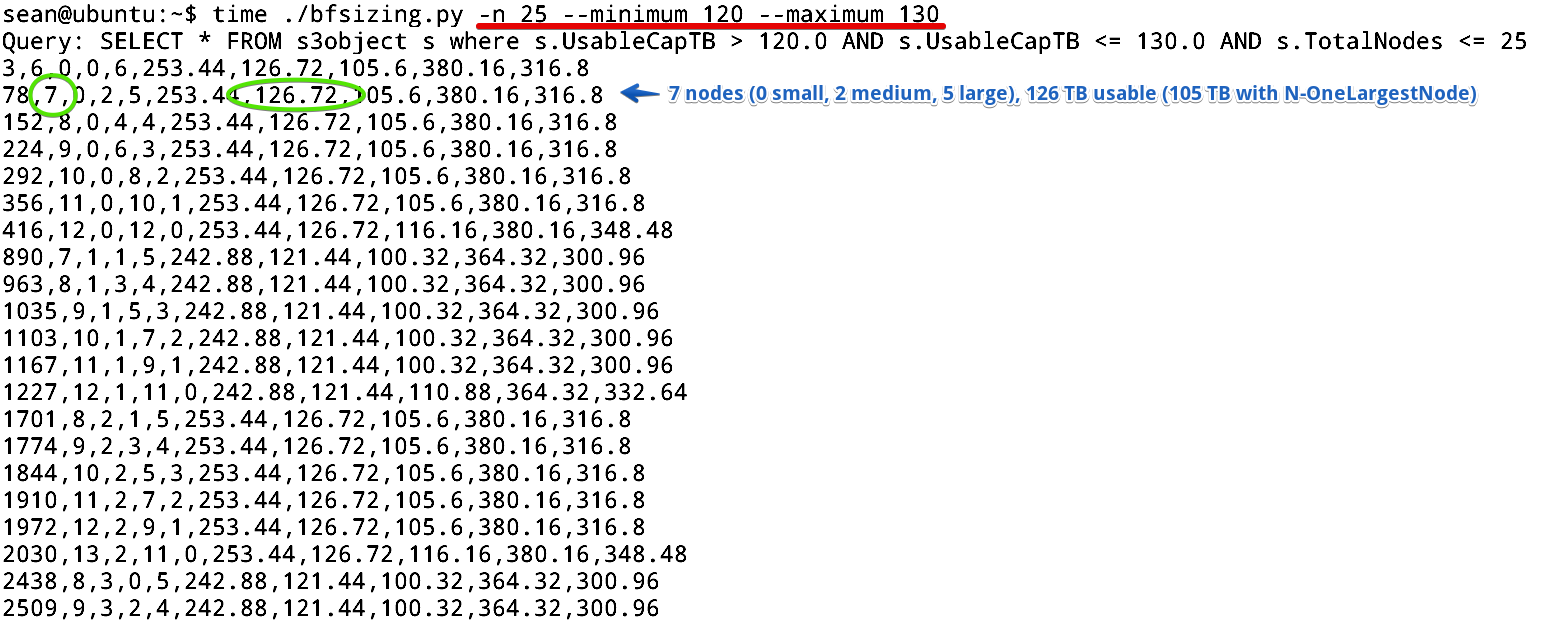
I didn't put any effort into formatting query output - after all it's just a PoC script and it's not difficult to figure it out by reading CSV.
Second result below (configuration ID #78), for example, proposes 7 nodes (2 medium, 5 large) with 126.72 TB usable.
$ time ./bfsizing.py -n 25 --minimum 120 --maximum 130
Query: SELECT * FROM s3object s where s.UsableCapTB > 120.0 AND s.UsableCapTB <= 130.0 AND s.TotalNodes <= 25
3,6,0,0,6,253.44,126.72,105.6,380.16,316.8
78,7,0,2,5,253.44,126.72,105.6,380.16,316.8
...
10534,21,20,0,1,253.44,126.72,105.6,380.16,316.8
10574,22,20,2,0,253.44,126.72,116.16,380.16,348.48
10784,22,21,1,0,242.88,121.44,110.88,364.32,332.64
10993,23,22,1,0,253.44,126.72,116.16,380.16,348.48
11164,23,23,0,0,242.88,121.44,116.16,364.32,348.48
11335,24,24,0,0,253.44,126.72,121.44,380.16,364.32

Stats details bytesScanned:
618203
Stats details bytesProcessed:
618203
Stats details bytesReturned:
4415

real    0m1.794s
user    0m0.319s
sys     0m0.069s
This run took just 1.7 seconds. Normally I'd have to click around a Web based sizer for 5 minutes to get 5 good alternatives.
But my real desired number of nodes was 9-24 because I wanted to split them in three SolidFire Protection Domains. So I scrolled towards the end (the CSV file happened to be generated in ascending number of small nodes). Although I could have provided different output sorting options in the script, I didn't think I needed that.
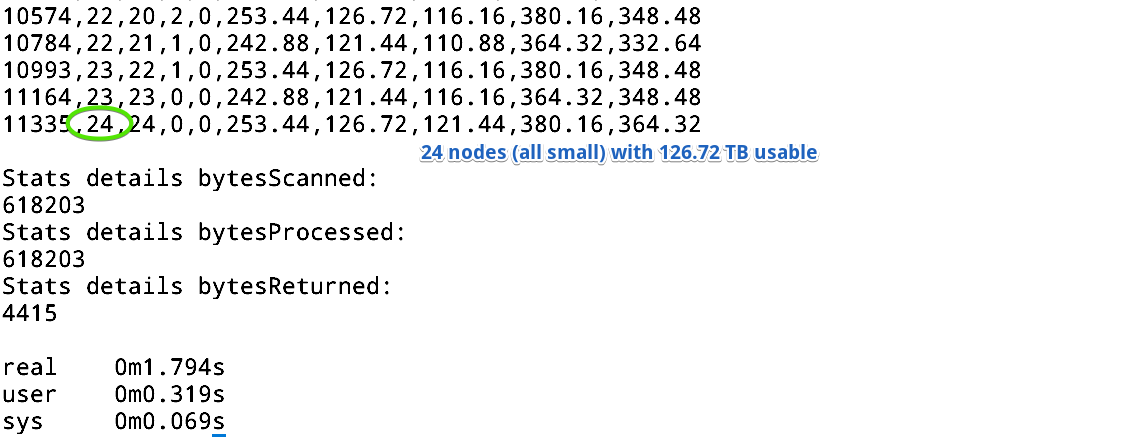
While this is a toy project that would be better with few additional arguments and options (sort by (variable), set both min and max number of nodes, set storage efficiency, maybe even relative cost factor) it's already useful enough for some sizing scenarios.
With 24 nodes and one failed Protection Domain (i.e. 16 nodes from the other two Protection Domain still up and running) we'd get 1.6 million IOPS (16 *100K, as all current SolidFire nodes have the same performance rating).
At this point I was happy with this "micro application" - I could get multiple valid sizing combinations in less than 2 seconds. Compare that to having to run a Web sizing tool for the fifth or sixth time… Not fun!
And remember - nothing prevents you from copying that CSV result and pasting it into a spreadsheet for easy analysis.
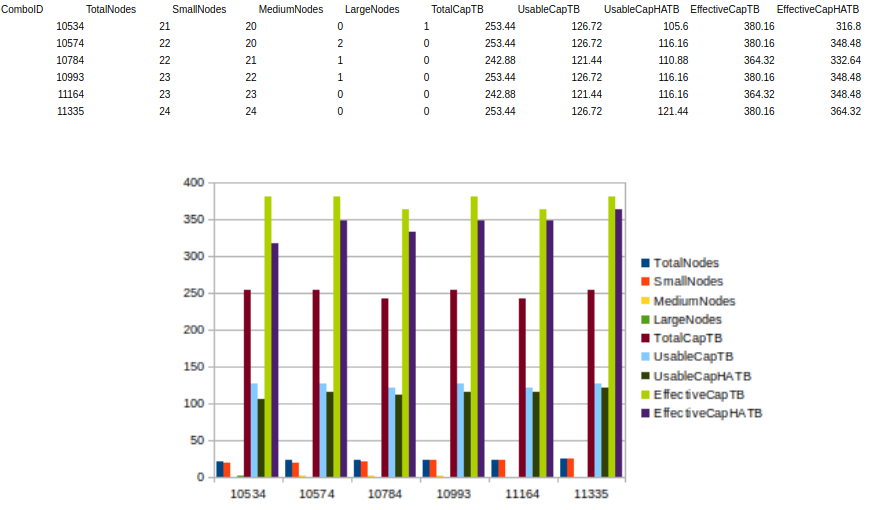
If I wanted a lower cost and if 1 million IOPS total was enough, I could have examined configs with a lower node count (maybe 18 nodes rather than 24).
If we used the sizer often we could download the CSV file from the Web and use it from Excel, but not all data is static and your CSV file could involve 1,200,000 rows rather than 12,000. Also, this approach eliminates the need for continous data distribution and downloads. Even the sizer script itself could be downloaded from the same S3 bucket.
I haven't done enough checking for correctness, so even if I used this I'd still verify BFSS's results in an official sizing tool.
A video demo of Brute Force Sizer for SolidFire is also available at the bottom of this page.
What you need to know when using StorageGRID S3 Select feature
This is from the StorageGRID 11.6 documentation so you can find about it in more detail there. I also added some comments (you can easily tell them apart, I hope).
- SelectObject calls aren't impacted by StorageGRID consistency controls
- The tenant account has to have the S3 Select permission. This will probably confuse some users who don't know how StorageGRID is administered and attempt to use S3 Select without it being enabled for their tenant account
- Users need s3:GetObject permission for the object they want to query
- Supported formats may be different from AWS S3: in version 11.6 that's CSV, either raw or compressed as GZIP or BZIP2
- SQL expression has a maximum length of 256 KB (for me this is more than enough - I can barely compose a 100 byte query)
- Any record in the input or results has a maximum length of 1 MiB (not too bad - if you result is > 1 MiB maybe you could run multiple queries or simply download the objects and compute locally)
If you want to query S3 data but not with SQL select, you can do that with Spark, Presto, Hadoop and other applications that implement their own client-side data access libraries over S3 API. See this for some examples.
StorageGRID log forwarding
Version 11.6 can forward both system logs and audit logs to an external syslog server.
There are several additional ways to forward logs (to StorageGRID Admin nodes, etc.), so this feature now probably covers over 95% of ways people need in order to better handle StorageGRID logs.
I think this feature was very nicely implemented.
What it does not do for StorageGRID audit log, though, is change the format of the StorageGRID audit log. This means you still need to parse and transform the log if you want to easily search and analyze it.
I (re)wrote an audit log converter for StorageGRID which StorageGRID users with version 11.0 - 11.5 can use to ingest StorageGRID logs into Elastic or elsewhere. It converts the log into JSON file.
We can use Filebeat to send processed logs in JSON format to a forwarder such as Logstash and from there to Elastic or other sink.
For 11.6 we'd want to transform the log to JSON on the fly, so we'd have to unpack the entries on-the fly, possibly by collapsing the two steps into one and do everything in Logstash. SGAC gets a few downloads every month but I haven't gotten any feedback for it so I'm not sure if I'll update SGAC for StorageGRID 11.6 and when.
Incidentally, the second example in the shortest (listed first) demo video below runs S3 Select against StorageGRID audit log file, if you're interested in S3 Select in the context of log search.
In version 11.6, StorageGRID service logs can also be forwarded but I haven't tried to parse them yet.
Demos
The first and shortest video shows examples with two CSV files (basic and "remote grep"). In each case S3-selecting a small subset of object data results in big egress savings. The second is Brute Force Sizer for SolidFire and the third is an official demo.
- S3 Select in StorageGRID 11.6 - 1m22s
- Brute Force Sizer for SolidFire with S3 Select - 2m16s
- Longer, "professional" S3 Select demo with S3 Select in Jupyter at NetApp TV - 4m21s