Block volume mode in Kubernetes with SolidFire
Introduction
Two days ago I revisited some old volume backup and cloning topics.
Digression
Later that day I spotted this query in a community forum:
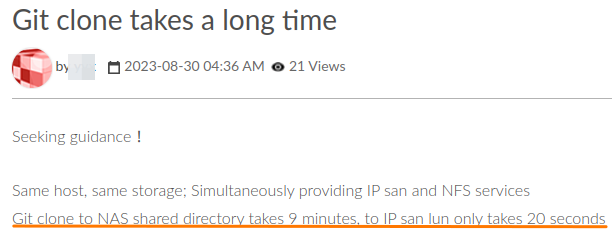
That's exactly one of the scenarios my blog post was about:
Some of these approaches (CopyVolume, for example) would be useful for large volumes with many files
Like I said there, while you may need or want to use "git clone", sometimes you may be able to clone the volume instead.
In the case of this screenshot, iSCSI worked well enough and NFS was the problem, but in the case of Android source code (250GB) even iSCSI-to-iSCSI cloning would lose to our smart approach. Why?
Because cloning a SolidFire volume with 250GB of Android source code would need to make a copy of the volume's slice (database) which would be a 1GB storage-side copy job. Compared to that, let's say we copied source code from one iSCSI device to another: at 25 MB/s that would take longer than making a SolidFire volume clone of a full 250GB volume.
This digression illustrates how these problems do exist although I may not necessarily get asked to solve them.
I also like that the problem exist, because like I said in that post, I've never got any requests to solve it and even some customers who I thought had it denied it was an issue for them…
Purpose
It is clear that data management in many environments can benefit from improvements, assuming users recognize there's a problem and want to invest resources in solving it.
In this area of cloning and backup jobs, being able to use Kubernetes to automate non-Kubernetes volumes is one interesting topic.
Since I've been revisiting this topic, I thought to spend some time on understanding block volume mode in Kubernetes. It's not a new thing, but I may be able to use it in future experiments.
Volume mode in PVC
These two volumes are the same.
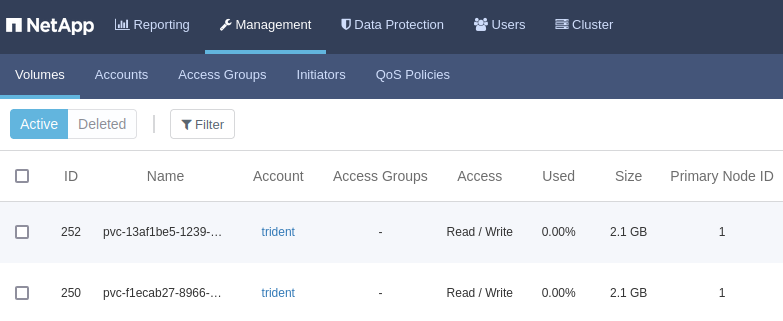
But only from the SolidFire perspective.
Inside of Kubernetes, they're different.
Even here, they look the same: the same back-end, capacity, storage class.
$ kubectl get pvc
NAME              STATUS   VOLUME                                     CAPACITY   ACCESS MODES   STORAGECLASS      AGE
solidfire-fs      Bound    pvc-f1ecab27-8966-40b0-a94a-818bb2a1ee4f   2Gi        RWO            bronze            92s
solidfire-block   Bound    pvc-34aa5c31-bfc5-4ffd-ad99-5127b57fbaa8   2Gi        RWO            bronze            49s
But one of them uses the default volume mode, which with Trident formats the volume with ext4, ext3 or XFS (the choice may be set in Storage Class configuration) and lets containers mount PV into a filesystem path such as /data.
$ kubectl describe pvc solidfire-fs
Name:          solidfire-fs
Namespace:     default
StorageClass:  bronze
Status:        Bound
Volume:        pvc-f1ecab27-8966-40b0-a94a-818bb2a1ee4f
Labels:        <none>
Annotations:   pv.kubernetes.io/bind-completed: yes
               pv.kubernetes.io/bound-by-controller: yes
               volume.beta.kubernetes.io/storage-provisioner: csi.trident.netapp.io
               volume.kubernetes.io/storage-provisioner: csi.trident.netapp.io
Finalizers:    [kubernetes.io/pvc-protection]
Capacity:      2Gi
Access Modes:  RWO
VolumeMode:    Filesystem
Filesystem type is set in Storage Class:
apiVersion: storage.k8s.io/v1
kind: StorageClass
metadata:
  name: solidfire-gold
provisioner: csi.trident.netapp.io
parameters:
  fsType: "xfs"
This is the actual SC used in this demo: I usually use XFS for filesystem-mode volumes.
$ kubectl describe sc bronze
Name:                  bronze
IsDefaultClass:        No
Annotations:           <none>
Provisioner:           csi.trident.netapp.io
Parameters:            IOPS=300,backendType=solidfire-san,fsType=xfs
AllowVolumeExpansion:  <unset>
MountOptions:          <none>
ReclaimPolicy:         Delete
VolumeBindingMode:     Immediate
The other volume mode does no filesystem formatting. Because of that, the PV can only be exposed as a raw block device (say, /dev/sdb). After that it's up to the user to figure out how to use the device.
$ kubectl describe pvc solidfire-block
Name:          solidfire-block
Namespace:     default
StorageClass:  bronze
Status:        Bound
Volume:        pvc-34aa5c31-bfc5-4ffd-ad99-5127b57fbaa8
Labels:        <none>
Annotations:   pv.kubernetes.io/bind-completed: yes
               pv.kubernetes.io/bound-by-controller: yes
               volume.beta.kubernetes.io/storage-provisioner: csi.trident.netapp.io
               volume.kubernetes.io/storage-provisioner: csi.trident.netapp.io
Finalizers:    [kubernetes.io/pvc-protection]
Capacity:      2Gi
Access Modes:  RWO
VolumeMode:    Block
I just said fsType is enforced in Storage Class and that means I shouldn't use the same storage class name to create volumes of both filesystem and block type. But if you look above, that's why I did. Why?
I violated that rule for this demo because I didn't plan to use the block volume. Sorry!
Volume mode setting is set in PVC YAML and has been around since Kubernetes v1.18 in 2019.
But… nobody uses it! That's not really true. The truth is: barely anyone uses it.
Joking aside, in a Kubernetes environment with SolidFire, what can we do with them?
Here we see that volume access modes are RWO and RWOP and that supported filesystems cover only three: xfs, ext3, ext4.
The first part means we can't use solidfire-san to create cluster filesystems that span more than one worker node (RWOP). The second part means we need another way to support other filesystems.
Therefore, some situations where we'd use volumeMode="block" may be:
- Containers that need a filesystem type that Trident's solidfire-san driver does not support
- Containers that need to concatenate block devices - where we use a volume manager such as LVM to create larger RAID0-like logical volumes
- Rare databases or applications that use no filesystem and require "raw" device access
- Weird use cases such as mounting NTFS, ZFS or other filesystems from Kubernetes to back them up (my script SolidBackup that's meant to run in Docker could be modified to use Kubernetes and make use of this)
- Testing of parallel/cluster file systems on single worker (RWOP) - we could (probably) test containerized BeeGFS or GPFS on Trident devices
- Crazy "CSI tiering" approaches similar to Host-Path CSI: use Trident CSI to provision devices to VMs, then use DirectPV or other CSI driver to work with "local" (not really, but it looks local) devices visible to individual pods (the difference vs. Host-Path is SCSI block mode devices are exposed as SCSI devices)
- Access volume partitions (I wasn't able to get this to work, but in it might be possible)
Note that pods that use block-mode volumes need something like "init" script that checks if the device is blacklisted, unformatted and such, and does its thing similar to how database pods have scripts that create initial database if the volume is empty.
apiVersion: v1
kind: Pod
metadata:
  name: bla-bla-bla
spec:
  containers:
    - name: blockmode-container
      image: ubuntu:latest
      command: ["/bin/sh", "-c"]
      args: [ "tail -f /dev/null" ]
      volumeDevices:
        - name: blockdev1
          devicePath: /dev/xvda
  volumes:
    - name: blockdev1
      persistentVolumeClaim:
        claimName: block-pvc
Example output:
$ kubectl get pvc
NAME              STATUS   VOLUME                                     CAPACITY   ACCESS MODES   STORAGECLASS      AGE
solidfire-fs      Bound    pvc-f1ecab27-8966-40b0-a94a-818bb2a1ee4f   2Gi        RWO            bronze            68m
solidfire-block   Bound    pvc-13af1be5-1239-4bd5-bcc2-760c3b155d6e   2Gi        RWO            bronze            66m
In the classic example, path-mounted PV formatted with XFS is mounted to a path by MountVolume.MountDevice.
Volumes:
  sff:
    Type:       PersistentVolumeClaim (a reference to a PersistentVolumeClaim in the same namespace)
    ClaimName:  solidfire-fs
    ReadOnly:   false
...
Events:
  Type     Reason                  Age              From                     Message
  ----     ------                  ----             ----                     -------
  Normal   Scheduled               12s              default-scheduler        Successfully assigned default/pv-pod-file to trident
  Normal   SuccessfulAttachVolume  12s              attachdetach-controller  AttachVolume.Attach succeeded for volume "pvc-f1ecab27-8966-40b0-a94a-818bb2a1ee4f"
XFS-formatted PV is mounted to /data:
$ df
Filesystem                                    1K-blocks     Used Available Use% Mounted on
overlay                                        24199616 18585912   5597320  77% /
tmpfs                                             65536        0     65536   0% /dev
/dev/mapper/36f47acc10000000062676e30000000fa   2086912    47652   2039260   3% /data
/dev/root                                      24199616 18585912   5597320  77% /etc/hosts
shm                                               65536        0     65536   0% /dev/shm
tmpfs                                           8854860       12   8854848   1% /run/secrets/kubernetes.io/serviceaccount
tmpfs                                           4478628        0   4478628   0% /proc/acpi
tmpfs                                           4478628        0   4478628   0% /proc/scsi
tmpfs                                           4478628        0   4478628   0% /sys/firmware
The second PV is used in block mode: MapVolume.SetUpDevice is used to map pvc-13af1be5-1239-4bd5-bcc2-760c3b155d6e to /dev/xvda.
Containers:
  pv-container-block:
    Container ID:
    Image:         ubuntu:jammy
    Image ID:
    Port:          <none>
    Host Port:     <none>
    Command:
      /bin/sh
      -c
    Args:
      tail -f /dev/null
    State:          Waiting
      Reason:       ContainerCreating
    Ready:          False
    Restart Count:  0
    Environment:    <none>
    Mounts:
      /var/run/secrets/kubernetes.io/serviceaccount from kube-api-access-2lvj8 (ro)
    Devices:
      /dev/xvda from sfb
...
Volumes:
  sfb:
    Type:       PersistentVolumeClaim (a reference to a PersistentVolumeClaim in the same namespace)
    ClaimName:  solidfire-block
    ReadOnly:   false
...
Events:
  Type     Reason                  Age               From                     Message
  ----     ------                  ----              ----                     -------
  Normal   Scheduled               2m10s             default-scheduler        Successfully assigned default/pv-pod-block to trident
  Normal   SuccessfulAttachVolume  2m9s              attachdetach-controller  AttachVolume.Attach succeeded for volume "pvc-13af1be5-1239-4bd5-bcc2-760c3b155d6e"
Let's find that block device…
It looks like Kubernetes doesn't care about my /dev/xvda designation!
root@pv-pod-block:/# lsblk
NAME    MAJ:MIN RM   SIZE RO TYPE MOUNTPOINTS
loop0     7:0    0    73M  1 loop
loop1     7:1    0  63.3M  1 loop
loop2     7:2    0  90.3M  1 loop
loop3     7:3    0   9.1M  1 loop
loop4     7:4    0  73.9M  1 loop
loop5     7:5    0  59.8M  1 loop
loop6     7:6    0  18.8M  1 loop
loop7     7:7    0 111.9M  1 loop
loop8     7:8    0  49.8M  1 loop
loop9     7:9    0  49.8M  1 loop
loop10    7:10   0   103M  1 loop
loop11    7:11   0  63.3M  1 loop
loop12    7:12   0 116.8M  1 loop
loop13    7:13   0     2G  0 loop
sda       8:0    0     2G  0 disk
sdb       8:16   0     2G  0 disk
sr0      11:0    1  1024M  0 rom
vda     254:0    0    24G  0 disk
|-vda1  254:1    0  23.9G  0 part /etc/resolv.conf
|                                 /etc/hostname
|                                 /dev/termination-log
|                                 /etc/hosts
|-vda14 254:14   0     4M  0 part
`-vda15 254:15   0   106M  0 part
Let's see if /dev/sd* are good for anything… Nope. I wonder if those are just "leaked" from the host.
After failing to do anything with /dev/sda and /dev/sdb, I tried the invisible /dev/xvda and…
root@pv-pod-block:/# mkfs.btrfs -f /dev/xvda
btrfs-progs v5.16.2
See http://btrfs.wiki.kernel.org for more information.

Performing full device TRIM /dev/xvda (2.00GiB) ...
NOTE: several default settings have changed in version 5.15, please make sure
      this does not affect your deployments:
      - DUP for metadata (-m dup)
      - enabled no-holes (-O no-holes)
      - enabled free-space-tree (-R free-space-tree)

Label:              (null)
UUID:               4b7de025-6f0c-4a79-9f54-c9875d366e8b
Node size:          16384
Sector size:        4096
Filesystem size:    2.00GiB
Block group profiles:
  Data:             single            8.00MiB
  Metadata:         DUP             102.38MiB
  System:           DUP               8.00MiB
SSD detected:       yes
Zoned device:       no
Incompat features:  extref, skinny-metadata, no-holes
Runtime features:   free-space-tree
Checksum:           crc32c
Number of devices:  1
Devices:
   ID        SIZE  PATH
    1     2.00GiB  /dev/xvda

WARNING: failed to open /dev/btrfs-control, skipping device registration: No such file or directory
Darn, this is pretty good - even SolidFire SSD media was detected!
SolidFire UI registered activity on the volume, as expected.
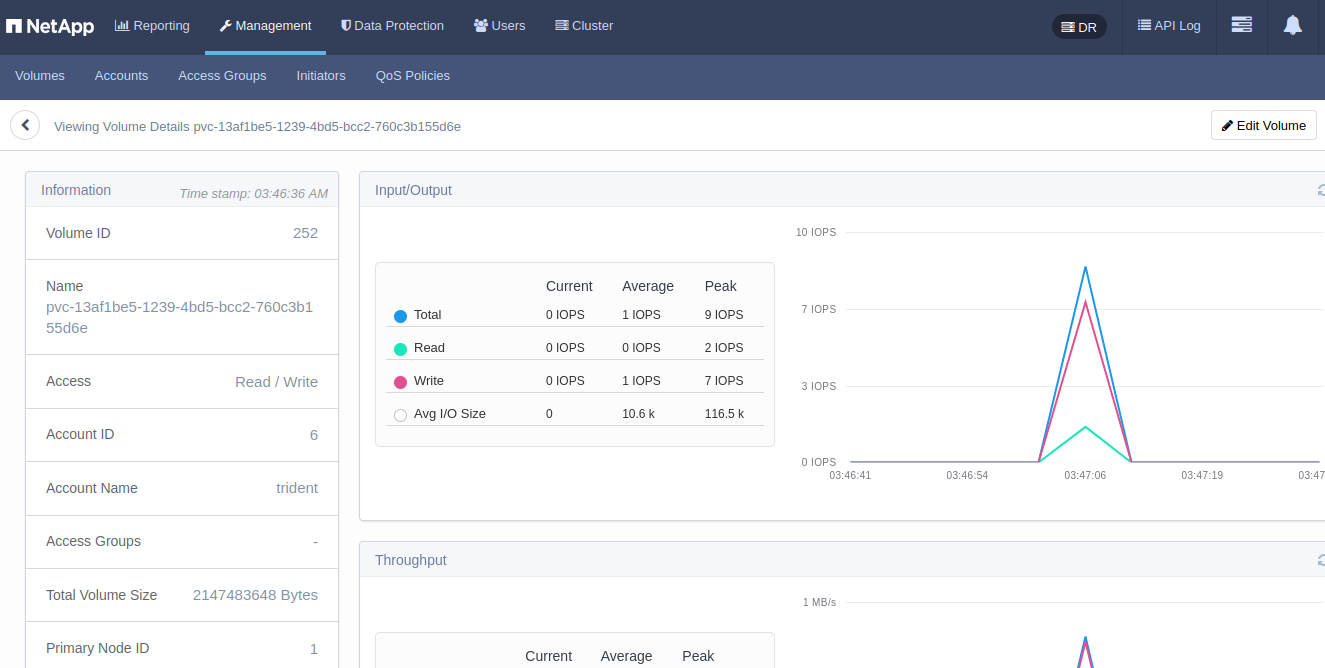
Unsurprisingly, we cannot get root-ish behavior inside the container:
root@pv-pod-block:/# mount /dev/xvda /btrfs/
mount: /btrfs: cannot mount /dev/xvda read-only.
What does that mean? It means the container's default privileges are too freakin' low. Change security context to privileged and retry as root.
root@pv-pod-block:/# mkdir /btrfs; mount -o rw /dev/xvda /btrfs
root@pv-pod-block:/# df
Filesystem     1K-blocks     Used Available Use% Mounted on
overlay         24199616 18634956   5548276  78% /
tmpfs              65536        0     65536   0% /dev
/dev/root       24199616 18634956   5548276  78% /etc/hosts
shm                65536        0     65536   0% /dev/shm
tmpfs            8854860       12   8854848   1% /run/secrets/kubernetes.io/serviceaccount
/dev/xvda        2097152     3616   1870080   1% /btrfs
root@pv-pod-block:/# touch /btrfs/muahahahaha.txt
root@pv-pod-block:/# date >>  /btrfs/muahahahaha.txt
root@pv-pod-block:/# cat /btrfs/muahahahaha.txt
Fri Sep  1 04:04:36 UTC 2023
And after these changes we're getting some regular filesystem activity as well.
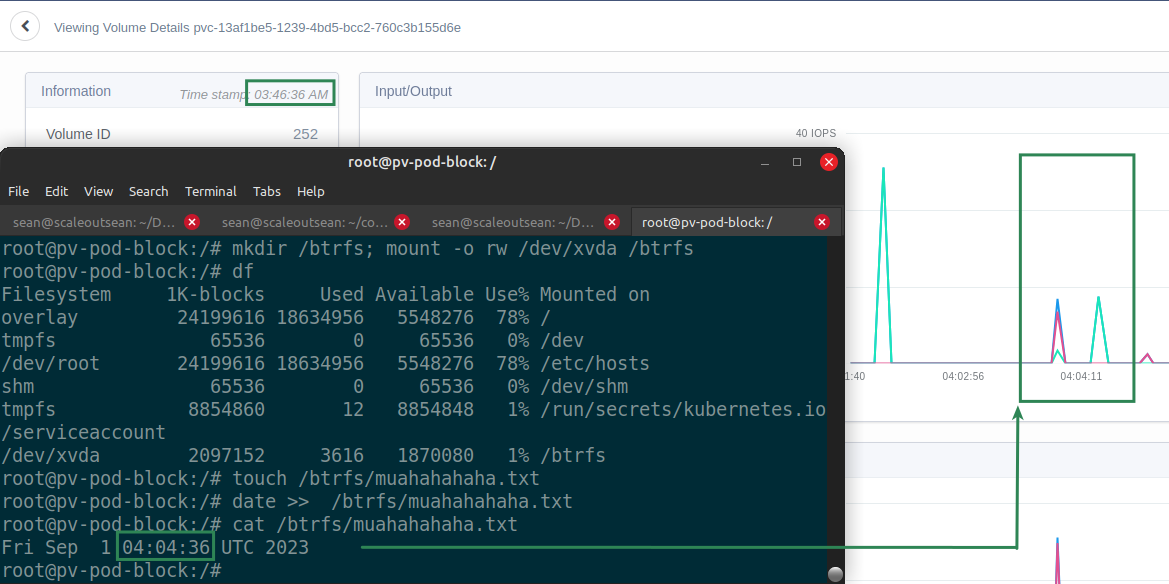
Now that the volume has been formatted, if we didn't mind running it as a privileged user, we'd just need to add the mount command in our service startup script: that may be simpler if your configuration is static. Otherwise, use that "init" style container as indicated earlier.
So that's about it.
If you want to read an expert take on block mode, start with this post by one of the Kubernetes CSI maintainers.
How does this help us with git clone problem
As noted at the top, iSCSI performance was satisfactory and it appears the client was not containerized.
If destination environment was Kubernetes, block mode could be used to allow volume cloning on SolidFire followed by non-managed import to Kubernetes - possibly even if the volume was partitioned. Or if the entire workload moved to containers, we could take advantage of storage-side cloning and import any Linux filesystem.
Not all ways of taking advantage of new features are always immediately obvious, but at least one is: any Linux filesystem ought to be usable. Even if we ignore all SolidFire features and just imagine ZFS to ZFS replication between two containers, that's another way to efficiently move filesystem data from one container to another.
Conclusion
We can use volume block mode for various use cases in which the conventional filesystem mode cannot work.
Using with this approach we can create a container with ZFS, btrfs, and NTFS packages and use it to backup Windows and Linux VMs: the same thing that SolidBackup did in Docker, but in Kubernetes and for most filesystems and not just ext and XFS:
- clone a VM or Docker container volume
- temporarily import (do not "manage") it to Kubernetes with
tridentctl - fire backup or clone jobs from a pod that uses block mode PVC to mount these "unsupported" filesystems
Without detailed information passed on we still wouldn't know how to re-assemble LVM volumes, but we could some some of challenges from SolidBackup, namely access to non-supported filesystems and potentially to partitioned devices (which SolidBackup works around by using binary backup on the entire device).
Using LVM, btrfs, or ZFS on Trident-provisioned volumes are probably more popular use cases, as is (presumably possible) access to filesystems on partitions of Trident-imported volumes.
Appendix A - example with Trident v24.06 and SolidFire
PVC firstblock in the namespace bla-bla:
kind: PersistentVolumeClaim
apiVersion: v1
metadata:
  name: firstblock
  namespace: bla-bla
spec:
  accessModes:
    - ReadWriteOnce
  volumeMode: Block
  resources:
    requests:
      storage: 2Gi
  storageClassName: bronze
Pod bla-bla-bla using the PVC:
apiVersion: v1
kind: Pod
metadata:
  name: bla-bla-bla
  namespace: bla-bla
spec:
  containers:
    - name: blockmode-container
      image: ubuntu:24.04
      command: ["/bin/sh", "-c"]
      args: [ "tail -f /dev/null" ]
      volumeDevices:
        - name: firstblock
          devicePath: /dev/xvda
  volumes:
    - name: firstblock
      persistentVolumeClaim:
        claimName: firstblock
Multipathd must be running on the worker node. Privileged security context may be needed to format and mount the device inside the pod.