Get SolidFire volume attributes created by Trident, other apps
This series of posts has several parts:
- Part 1 - Kubernetes, Trident and SolidFire configuration visibility
- Part 2 - Kubernetes, Trident and SolidFire configuration - part 2
-
Part 3 - this post
- Introduction
- How Trident creates SolidFire volume attributes
- What's in volume attributes
- How to use volume attributes
- Getting SolidFire volume attributes
- Conclusion
- Appendix A - Trident volume attributes in volume measurements (SFC)
Introduction
Part 1 explained the background of volume attribute values in SolidFire and why that information may be valuable in automation.
Among the applications you may have heard of currently only Trident CSI - maybe Veeam B&R, although I am not sure about the latter - store values there.
ONTAP recently gained the ability to store volume "labels" and since Trident CSI v24.06 Trident can make use of that feature, but SolidFire has had that for many years and Trident has used volume attributes on SolidFire forever (I don't remember any version of Trident CSI that did not use SolidFire volume attributes.)
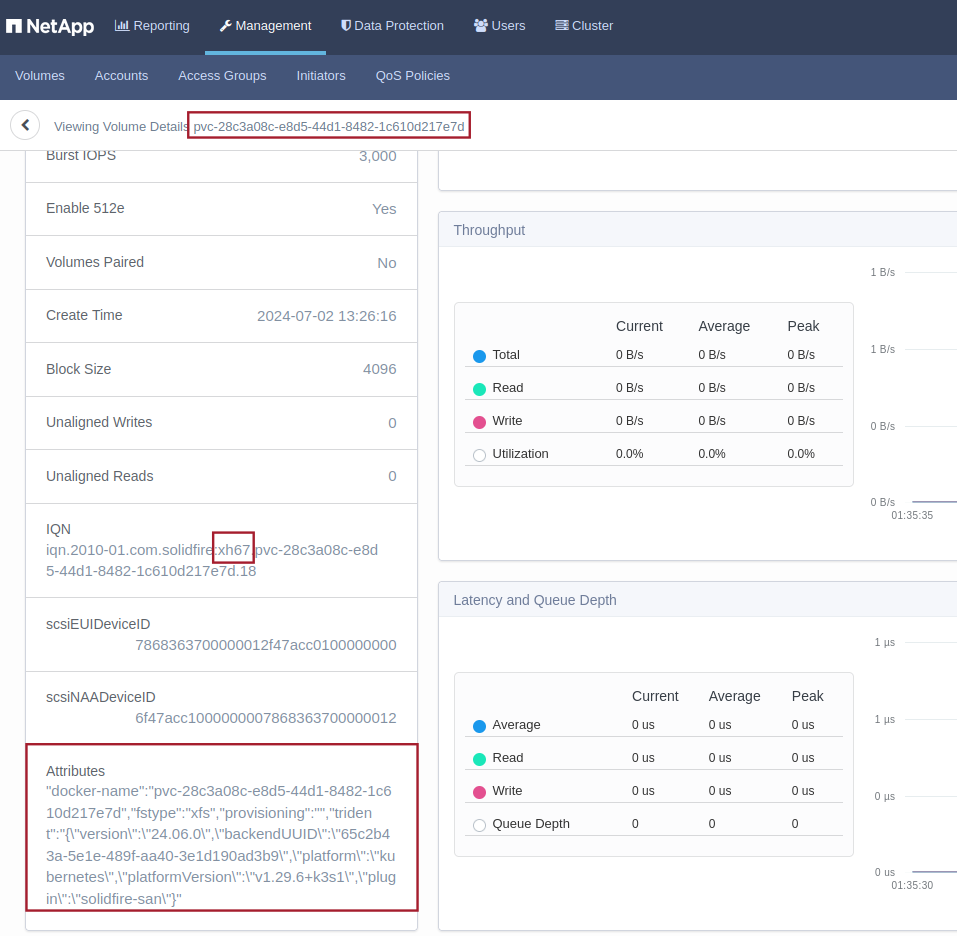
As a reminder, you can see an example of Trident volume attributes here:
This post talks about getting that data out and using it.
How Trident creates SolidFire volume attributes
It's automatic. Create a PVC or import a volume, and Trident will store its metadata in its attributes.
In this case I have the PVC "first" in the namespace "test":
$ kubectl get pvc -n test
NAME    STATUS   VOLUME                                     CAPACITY   ACCESS MODES   STORAGECLASS   VOLUMEATTRIBUTESCLASS   AGE
first   Bound    pvc-28c3a08c-e8d5-44d1-8482-1c610d217e7d   2Gi        RWO            bronze         <unset>                 20m
What's in volume attributes
As a reminder, you may store arbitrary values as long as it fits in and doesn't conflict with keys used by another application.
This is an example of what Trident v24.06 stored in a volume I created while writing this post:
{
    'docker-name': 'pvc-28c3a08c-e8d5-44d1-8482-1c610d217e7d',
    'fstype': 'xfs',
    'provisioning': '',
    'trident': '{"version":"24.06.0","backendUUID":"65c2b43a-5e1e-489f-aa40-3e1d190ad3b9","platform":"kubernetes","platformVersion":"v1.29.6+k3s1","plugin":"solidfire-san"}'
}
fsType is XFS because that's what the Storage Class specifies. In addition to xfs, other supported filesystems are currently ext3 and ext4. For volume mode "block" we would have "raw", so these four (xfs, ext3, ext4, raw) exhausts the possibilities that I know of as of v24.06.
Above, provisioning value none and I think this is always empty for SolidFire because it appears in ONTAP it may be thin or thick, whereas in SolidFire it's always thin by default.
The Trident key contains a JSON document which has Trident version, Trident backend UUID, platform (Kubernetes, I suppose Docker is also possible), platform version (Kubernetes v1.29) and the type of Trident backend (SolidFire SAN).
{ "version": "24.06.0",
  "backendUUID": "65c2b43a-5e1e-489f-aa40-3e1d190ad3b9",
  "platform":"kubernetes",
  "platformVersion":"v1.29.6+k3s1",
  "plugin":"solidfire-san"
}
Backend UUID and PVC come from backend registration with Trident and Kubernetes:
~$ tridentctl get backend -n trident
+--------------------------+----------------+--------------------------------------+--------+------------+---------+
|           NAME           | STORAGE DRIVER |                 UUID                 | STATE  | USER-STATE | VOLUMES |
+--------------------------+----------------+--------------------------------------+--------+------------+---------+
| solidfire_192.168.105.34 | solidfire-san  | 65c2b43a-5e1e-489f-aa40-3e1d190ad3b9 | online | normal     |       1 |
+--------------------------+----------------+--------------------------------------+--------+------------+---------+

~$ kubectl get pv -n test
NAME                                       CAPACITY   ACCESS MODES   RECLAIM POLICY   STATUS   CLAIM        STORAGECLASS
pvc-28c3a08c-e8d5-44d1-8482-1c610d217e7d   2Gi        RWO            Delete           Bound    test/first   bronze
This image is from Part 1 and I'm showing it again to remind that docker-name may or may not be the same as internalName.

How to use volume attributes
The image above is output of a a script that maps Kubernetes PVC information to Trident and SolidFire.
With that we technically don't need additional information to be able to recover PVC to PV mapping even on a replicated SolidFire cluster, but having volume attributes helps us monitor changes over time and create point-in-time reports before or after upgrades.
For example, "Velero doesn't support restoring into a cluster with a lower Kubernetes version than where the backup was taken" (source), so from time to time we may want to check platformVersion value between replicated volumes.
Another example: we may want to check how many volumes have been created with particular version of Kubernetes or Trident, perform "by filesystem" (XFS, ext3, ext4) accounting of PVs, make sure which volume on one SolidFire cluster is replicated to which volume on another, even if their names differ across clusters (which they usually will) or when the Kubernetes name (PVC name) is different from the "internal" name (actual volume name on SolidFire).
Getting SolidFire volume attributes
Here's an example of getting volume attributes from a list of volumes.
>>> for v in lv:
...   if v['attributes']!= {}:
...     print("Volume attributes:", v['attributes'])
...     for k in v['attributes']:
...       if k == 'trident':
...         print("Trident key:", k)
...         print("All Trident values:", v['attributes'][k])
...         tv = json.loads(v['attributes'][k])
...         for tk in tv:
...           print("Trident key:", tk)
...           print("Trident value:", tv[tk])
...       else:
...         print("Other key:", k)
...         print("Other value:", v['attributes'][k])
...
Volume attributes: {'docker-name': 'pvc-28c3a08c-e8d5-44d1-8482-1c610d217e7d', 'fstype': 'xfs', 'provisioning': '', 'trident': '{"version":"24.06.0","backendUUID":"65c2b43a-5e1e-489f-aa40-3e1d190ad3b9","platform":"kubernetes","platformVersion":"v1.29.6+k3s1","plugin":"solidfire-san"}'}
Other key: docker-name
Other value: pvc-28c3a08c-e8d5-44d1-8482-1c610d217e7d
Other key: fstype
Other value: xfs
Other key: provisioning
Other value:
Trident key: trident
All Trident values: {"version":"24.06.0","backendUUID":"65c2b43a-5e1e-489f-aa40-3e1d190ad3b9","platform":"kubernetes","platformVersion":"v1.29.6+k3s1","plugin":"solidfire-san"}
Trident key: version
Trident value: 24.06.0
Trident key: backendUUID
Trident value: 65c2b43a-5e1e-489f-aa40-3e1d190ad3b9
Trident key: platform
Trident value: kubernetes
Trident key: platformVersion
Trident value: v1.29.6+k3s1
Trident key: plugin
Trident value: solidfire-san
SolidFire Collector could store these attributes in Volumes measurement by adding half a dozen new columns, or maybe create a new measurement just for attributes.
Since SolidFire Collector is permissively licensed, once that sample code is out, it will be easier for others to modify and use it as they see fit.
Conclusion
This year I've been working more on SolidFire-Kubernetes integrations and this is what I have so far:
- Longhorny, script that makes it easy to configure and report on volume replication between SolidFire clusters and has some features related to Kubernetes environments (e.g. the ability to upsize the remote replica)
- Volume replication-related data collection in SFC (which itself was rewritten from scratch) so that volume replication can be monitored in near real-time (with a 60s delay)
- Trident-to-SolidFire mapping script which makes it easier to understand and visualize Kubernetes-to-SolidFire mapping for replicated clusters
With volume attributes in SFC it should be possible to gain good visibility into the status of Kubernetes provisioning on SolidFire in both single-site and replicated two-site SolidFire environments and feed that information to other applications such as Velero.
Another option is to output backup schedules from Velero on one site and use that information to create SolidFire DR replication relationships using Longhorny.
While these may not seem like much, imagine wanting to query or filter SolidFire volume attributes. Currently there's no way to do it from the SolidFire UI or API, and there's no way to create point-in-time reports either.
Appendix A - Trident volume attributes in volume measurements (SFC)
The first query shows volume ID and some Trident volume attributes stored in the past 15 minutes.
The second shows only those created by Trident v24.06.0. One of them is in Filesystem mode (xfs) while the other is in Block mode.
> SELECT id,va_docker_name,va_fstype,va_trident_version,va_trident_backend_uuid FROM volumes WHERE time > (now()-15m)
name: volumes
time                 id  va_docker_name                           va_fstype va_trident_version       va_trident_backend_uuid
----                 --  --------------                           --------- ------------------       -----------------------
2024-07-03T07:41:35Z 111 pvc-8d31e43b-f942-4cf8-94db-a08762c745ee xfs       24.02.0-custom+unknown   8f1221e5-ff50-40b9-afba-85ec352e219a
2024-07-03T07:41:35Z 112 pvc-14a51322-16c8-4b95-a7e4-28d9963450b3 xfs       24.02.0-custom+unknown   b3680925-a9c1-4552-a1b4-1e4a0a273e8e
2024-07-03T07:41:35Z 113 pvc-4fb5d7f5-4d98-429e-ab36-1b2118b7e55c xfs       24.02.0-custom+unknown   b3680925-a9c1-4552-a1b4-1e4a0a273e8e
2024-07-03T07:41:35Z 115 pvc-fc799089-9559-4d97-84c8-d98e9dfbf884 xfs       24.02.0                  6ebdc64a-76bd-4e2e-969f-64bcd575e288
2024-07-03T07:41:35Z 116 pvc-a7b61fe0-7e9d-40f4-bc06-9c1623adade4 xfs       24.02.0                  6ebdc64a-76bd-4e2e-969f-64bcd575e288
2024-07-03T07:41:35Z 117 pvc-9812208f-72f5-41d8-9348-4fb42db8e6af xfs       24.02.0                  6ebdc64a-76bd-4e2e-969f-64bcd575e288
2024-07-03T07:41:35Z 120 pvc-bd1254e7-4102-4b58-960c-70be158c75fc xfs       24.02.0                  6ebdc64a-76bd-4e2e-969f-64bcd575e288
2024-07-03T07:41:35Z 121 pvc-58d35404-479b-4c5d-a67b-d96521f63ce2 xfs       24.02.0                  6ebdc64a-76bd-4e2e-969f-64bcd575e288
2024-07-03T07:41:35Z 122 pvc-afc3936c-9cd4-47bb-bdf1-b1c46fd910ad xfs       24.02.0                  6ebdc64a-76bd-4e2e-969f-64bcd575e288
2024-07-03T07:41:35Z 123 pvc-c47a3f9f-4628-4e3b-8a86-313ec02f49b4 xfs       24.02.0                  6ebdc64a-76bd-4e2e-969f-64bcd575e288
2024-07-03T07:41:35Z 124 pvc-515bccf3-577b-4149-9633-9da86913c933 xfs       24.02.0                  6ebdc64a-76bd-4e2e-969f-64bcd575e288
2024-07-03T07:41:35Z 125 pvc-910cc289-64b8-4cc9-a411-524fd713d950 xfs       24.02.0                  6ebdc64a-76bd-4e2e-969f-64bcd575e288
2024-07-03T07:41:35Z 127 pvc-a9531e89-7900-4265-9910-030142b4646a xfs       24.02.0                  6ebdc64a-76bd-4e2e-969f-64bcd575e288
2024-07-03T07:41:35Z 133 pvc-4bf6f5e2-bd1c-4908-88d0-62ecd66f6d33 xfs       24.02.0                  6ebdc64a-76bd-4e2e-969f-64bcd575e288
2024-07-03T07:41:35Z 139 pvc-d793176f-2484-48ea-9255-f70215a7c5f7 xfs       24.02.0-custom+unknown   b3680925-a9c1-4552-a1b4-1e4a0a273e8e
2024-07-03T07:41:35Z 157 pvc-a5f21571-e002-493f-b2dc-df01f40c1fa1 xfs       24.02.0-custom+unknown   b3680925-a9c1-4552-a1b4-1e4a0a273e8e
2024-07-03T07:41:35Z 176 pvc-2435957e-cb7d-42fd-9f2e-d0c52700db7e xfs       24.06.0                  8957837e-6a62-4f19-b158-2bb7cd143d93
2024-07-03T07:41:35Z 178 pvc-cea17a61-0017-4bd5-9623-0b2303d89630 raw       24.06.0                  8957837e-6a62-4f19-b158-2bb7cd143d93

> SELECT id,va_docker_name,va_fstype,va_trident_version,va_trident_backend_uuid FROM volumes WHERE va_trident_version='24.06.0' AND time > (now()-15m)
name: volumes
time                 id  va_docker_name                           va_fstype va_trident_version va_trident_backend_uuid
----                 --  --------------                           --------- ------------------ -----------------------
2024-07-03T07:41:35Z 176 pvc-2435957e-cb7d-42fd-9f2e-d0c52700db7e xfs       24.06.0            8957837e-6a62-4f19-b158-2bb7cd143d93
2024-07-03T07:41:35Z 178 pvc-cea17a61-0017-4bd5-9623-0b2303d89630 raw       24.06.0            8957837e-6a62-4f19-b158-2bb7cd143d93