Firemox - an anti-plugin for Proxmox PVE with NetApp SolidFire
- Background
- Firemox
- What it does, and doesn't
- Known issues and limitations
- Conclusion
- Demo and source code
- Appendix A: Feature creep continues (2025/07/09)
Background
In "Do we need a NetApp SolidFire plugin for Proxmox" in looked into storage plugins for Proxmox and explained why I didn't like the idea of using the PVE way.
It's taken me since then - approximately three weekends and two weeks of evenings - to get somewhere with a different approach - an external "management client" for NetApp SolidFire and Proxmox PVE.
Why I like this approach:
- PowerShell (and APIs): I wrote it in PowerShell and avoided the use of Perl and PVE CLI
- Versatility: the same approach - and code - ought to work well with some other "alternative" virtualization platforms
- Simplicity: No need to have a tool that runs inside of Proxmox PVE and risks getting broken every time Promox is updated or reinstalled
I need to clean up the code, fix some bugs, write some documentation, but I don't plan to change it much so I thought to post a bit about it now. (Edit: the code has been posted to Github (2025/07/13).)
Firemox
"Firemox" reminds me of Firefox: it works, but has its fair share of annoyances.
So I picked Firemox over other alternatives. (Of course, there is a Firemox project… It's a game. I don't care.)
Unlike Firefox, Firemox does not spy on its users and is probably more secure in many ways. One dependency, zero junk. More about it in the README once I get it on Github.
What it does, and doesn't
Essentially, it helps SolidFire users get here:
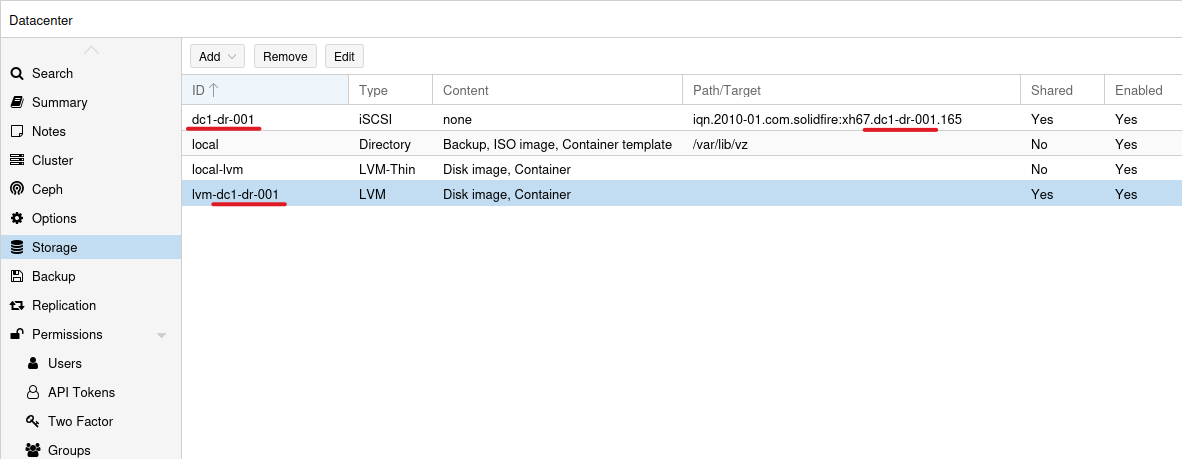
What does that mean?
- Your SolidFire iSCSI devices are used by PVE as iSCSI pools (LUNs registered in PVE)
- In PVE it creates LVM - one LVM VG per each iSCSI storage "pool" (single-disk LVM/VG, basically, which is like a Datastore on single-LUN VMFS in vCenter)
- You get effortless naming consistency in the process (
<pve-dc>-<solidfire-clustername>-<000>, prefixed withvg-andlvm-when appropriate) - You can put it together and tear it apart, VG by VG, LVM by LVM, and storage pool by storage pool
- It's not slow and it's easy to add or change features
To paraphrase that ad for compliance software, it's a storage plugin that doesn't suck… much.
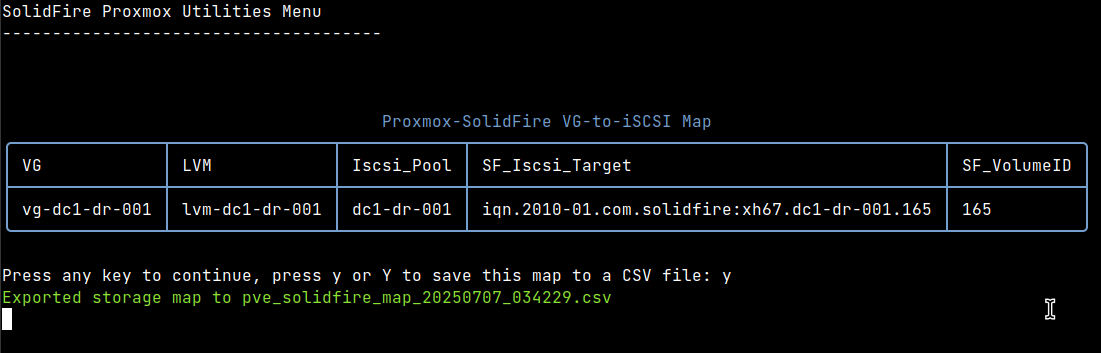
Another - from the Firemox side - look at that end-to-end consistency:
Or another, with a view of all SolidFire-related storage pools broken down by iSCSI and iSCSI-backed LVM pools.
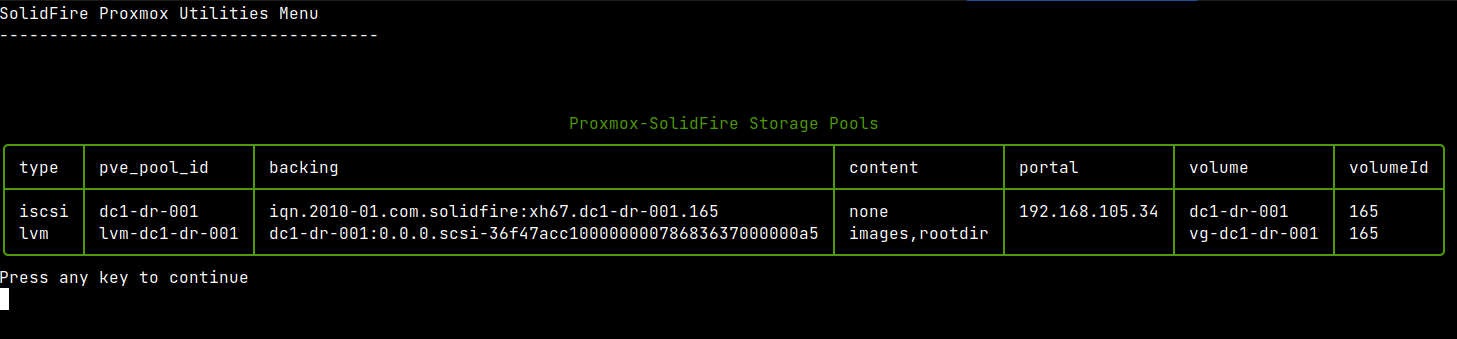
And yes, it is possible to have 4 iSCSI pools and just 1 LVM (on one of the 4), which is why the first view has a different purpose: it lets us see which VG and LVM configuration maps to which LUN, whereas the iSCSI/LVM screenshot with 3 iSCSI and 2 LVM pools would tell us one 1 iSCSI pool is "unused" in PVE. That pool wouldn't appear in the other screenshot.
All this frees you from having two browser windows or two tabs when you need to make storage-related changes. I hate the part where, when adding iSCSI and LVM pools - I have to copy-paste (because I always make typos) SolidFire volume names (for PVE iSCSI pools)and PVE iSCSI pool names (for PVE LVM).
(Stopping) scope creep
As I've started, I just wanted two basic features (present and un-present LUNs), then three and so on. This (possibly) explains the messy way I coded it - the lack of planning is obvious (and that's why cleaning it up will take days).
But having an external "not plugin" allowed me to do whatever I wanted.
Aside from "config" steps (where I configure SolidFire storage account, QoS, volumes and PVE iSCSI client), this is the main part of it where PVE-related stuff is exposed.
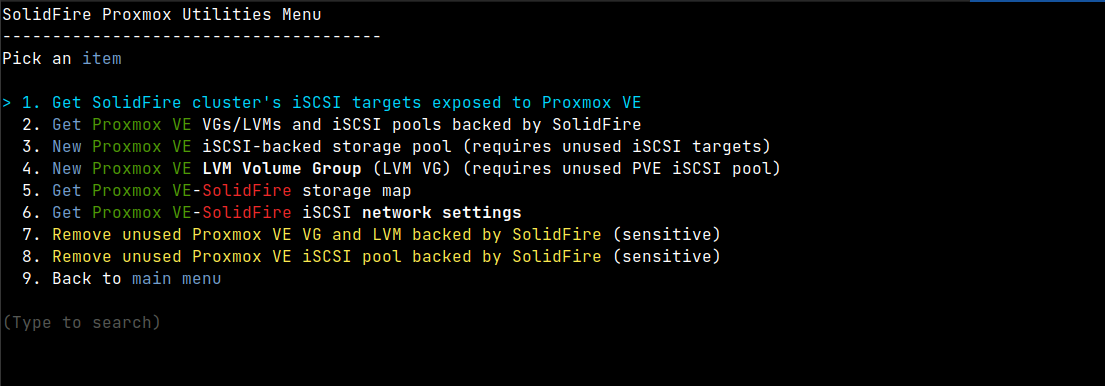
- View SolidFire LUNs exposed to PVE cluster
- View PVE VGs that use SolidFire iSCSI pools
- Create PVE iSCSI and LVM storage backed by SolidFire
- Get a resource mapping (PVE<->SolidFire) and network configuration
- Remove PVE VGs and iSCSI pools (SolidFire volumes can be removed in another area of Firemox)
What I decided to not develop was the functionality related to Promox storage QoS or, more precisely, integration of that with SolidFire's storage QoS. Actually, some of it is already in the Firemox code, but I decided to not finish it because it's really not my business. If PVE doesn't expose its QoS settings in an easy-to-use way, why should I go out of my way to deal with that?
From a user's perspective, it'd be nice if we could - similarly to how SolidFire and VMware storage policies work - automatically re-type QoS of my storage volumes depending on how individual VMs and containers were configured. Okay, that can be done, but…
But why do it when my array makes it easy (it's in Firemox) to retype a volume, while PVE has absolutely no tools or APIs for that? There's almost nothing! We're' supposed to extract PVE QoS as variously-delimited (not even consistent) lines of text from different (VMs vs LXC) API calls.
I know how to add up the various storage QoS settings from VMs and LXC containers and it works, but really - we should let Proxmox figure it out on their end and write a proper API first, then I'll think about using that. (Or not, since by then SolidFire will enter end-of-support.)
Currently we can retype SolidFire volumes from Firemox (turn the dial "up" or "down") which is the same users can do with SolidFire plugin for vCenter (and that still remains elusive to Trident users - I would have taken care of that for SolidFire if I knew anyone who needed it, but I never did.)
Another part that I'd like to have, but decided to not add, was a storage efficiency-related report. I'd like to have it in the same CLI, but really - anyone who needs that information should use SFC or a similar approach to gather both PVE and SolidFire metrics in a place that can be used to properly visualize these things.
Known issues and limitations
The gray question mark issue is when you add a storage resource (such as LVM configuration on shared iSCSI storage) to a PVE cluster and, while the shared storage resource appears on all cluster members, on some nodes there's a small gray question mark next to that resource.
I've seen this on the Internet with PVE and other shared storage, and I've seen it on PVE with SolidFire as well. Rescanning storage doesn't help, but a rolling-reboot of other nodes (the one used to add storage doesn't have that issue) does.
It's not a huge issue for non-mission critical environments, especially since (unlike VMFS) in PVE one host uses one LVM which has one VG, but PVE should fix that. But it may be Corosync- (or whatever) related, and they'll probably just wait until others fix their own code. (Otherwise, if they wanted to fix it, they would have fixed it by now.)
Rolling-reboot affects running VMs and CTs so those have to be live- (or cold-, if live doesn't work) migrated before a rolling reboot of PVE hosts. To minimize that, we can add two or more iSCSI pools and LVMs at a time, I guess, since SolidFire by default creates thin volumes - it doesn't cost us anything.
Other than that, I suppose I didn't use PVE long enough to find more problems. At the same time I don't expect that there would be "SolidFire-only" problems.
Regarding limitations, I haven't noticed anything SolidFire-specific. It's like any other shared iSCSI storage one would use with PVE.
One thing regarding PVE API access is each node has a cluster API endpoint, but switching between them is an excercise for the user. Or maybe one could install a reverse HTTPS proxy service to take care of that. Out of the box, though, if you're connected to cluster API on node1 and that node goes down, you'd have to retry on another node. I haven't implemented these multi-node retries; it's not hard, but PVE should take care of this on their side and secondly, if a PVE node is rebooting or down, it's better to fix the problem first and only then fool around with shared storage configuration (it can work, but it's just better to wait a minute and then continue.)
Conclusion
I think I've done just enough to make Firemox desirable in a a NetApp SolidFire and Proxmox PVE my home lab. I believe it's good enough for that.
Yes, I too can "write a shorter PVE-based Bash script that work faster", but that's just the PVE part. You'd still need a way to communicate with the SolidFire API, so… Would you call the SolidFire API from Python that would be called from Bash?
I'm convinced a CLI like this is a better way to manage PVE with SolidFire for home labs and small users. It's PowerShell 7, API-only, and it works on Windows, OS X and Linux and the UI is rich enough to not be too "Spartan".
Halfway through I thought about rewriting in Python (maybe with a Web UI) because I ran into some console bugs I couldn't find a way to solve. I decided to persist and keep it as a client and I think it paid back.
Now that this is almost done, maybe we should do a similar one for LXC or Incus with E-Series?
Demo and source code
- Quick demo of Firemox - 6m48s
- Firemox
Appendix A: Feature creep continues (2025/07/09)
After posting the above, I saw some people asking about snapshots.
So I've added snapshots today. To be exact: I've added the ability to add and remove PVE-exposed SolidFire volumes to any existing (SolidFire) snapshot schedule.
The way it works - as you might imagine - is Firemox lists snapshot schedules and PVE-exposed volumes, and the user picks one of the former and one or more of the latter. When removing, the user views the former and removes one or more of the latter (volume IDs, that is).
I don't like the idea, by the way. If you're in a CLI client like Firemox, you probably don't quite know what's where in terms of VMs and CTs, unless you're a well-organized person. So the ability to add or remove volumes from snapshot schedules is unlikely to help.
I deliberately did not add an option to restore a snapshot, because that could be potentially destructive to VMs and CTs on volumes where snapshots are recovered. I think enough users would make a mistake or typo in that situation. If something is screwed up to the extent that you need to restore a snapshot, you'd better check the situation in PVE and SolidFire UI and while there, perform all the actions in those two browser tabs is what I think is a good approach. I may be wrong, of course.
I think a better way would be a separate snapshotter service unrelated to Firemox, which would work along the line of my old Solidbackup script, where there's a service that lets you configure volumes that need to be protected and the service takes care of snapshots and other things (such as backup to S3). I may revisit this idea if I encounter anyone who actually needs that stuff.
For PVE I'd slightly change the approach and start with VMs and CTs, rather than SolidFire volumes, because I now can use VI's API. Each VM/CT can tell me what volumes are used, and then hardware snapshots can be created without the user knowing where's what. Or I would only create a lookup script that takes a list of VM and CT IDs and spits out a list of volume IDs that can be fed to a snapshot schedule, which would eliminate the need to add/remove volumes in Firemox.
But even in that case, one would also have to figure out how to create clones from snapshots and mount them for recovery of individual CTs, QCOW disk files and whatnot. I also know it may be easier to examine how Proxmox Backup could be used than reinvent the wheel. I haven't had time to do that.
For now, at least basic snapshots can be created while restores may be destructive. In the worst case (if you need to restore but just one VM or CT) it would be possible to clone a LUN for a PVE VM (with a different tenant ID), import the LUN there and scp the file(s) across.