Datalake-ish RAG with (only) NetApp StorageGRID S3
- Part I (this post) - Datalake-ish RAG with (only) NetApp StorageGRID S3
- Part II - Local agentic RAG with (only) NetApp StorageGRID S3
Introduction
This is going to be yet another post written from an S3-centric perspective.
In the recent hybrid cloud post I claimed hybrid cloud is a solved problem thanks to on-premises S3 object stores and I've been saying S3 has become the single source of truth because it's the only storage protocol that works well in hybrid cloud.
In this post, I will provide another example of why that is the case using RAG as an example. The reason I pick that and not some well-established analytics example is that there's already no other way to run analytics but on S3.
So, while this is's not something new, it may be new to those who aren't aware that AI workflows have adopted the well-established patterns from analytics.
Was it ever different?
You may say: "it was always like that - input data and models could be on S3 and we'd use file and block as usual".
It is true that various inputs (unstructured and structured data), models and artifacts are usually on S3. But without data lake patterns, your workflows, databases and the rest was running the old way, on VMs or containers attached to persistent volumes on block or file storage.
Last year AWS launched S3 Vectors, which was a major move in serverless vector databases. As you can see in that post, I was skeptical about it, because it seemed very limited. Even AWS recommended using "real" vector-enabled databases (or database services provided by AWS) for non-entry-level use cases.
I saw generic or specialized vector databases as essential and did not think S3 Vector would be widely used. What I did not see last year was that such databases did not have to run on block storage. Data lake vendors realized that right away. They and many others are now pushing in that same direction, making "serverless" vector databases work well on S3 for more than just entry-level cases.
Furthermore, data lake vendors, who already ran S3-backed databases and analytics workflows at the time, probably instantly realized those can be effectively adopted to AI. Among other things, they needed to add embeddings to data lake tables.
That brings enormous value to both entry-level users (those who use S3 Vectors today) but also mid-level where data lakes are "good enough" as far as inferencing performance is concerned. Both of these segments get provide superior, established workflows and security inherited from, and shared with, analytics workloads which many already have.
S3-only RAG with StorageGRID
Workflows that use S3 are the norm in analytics: data gets in, prepared, processed and finally served. We may have long-running services that use file or block storage, but it's highly unlikely we won't use object store as the single source of truth. One protocol - S3 - is for all practical purposes mandatory, while the rest may be optional.
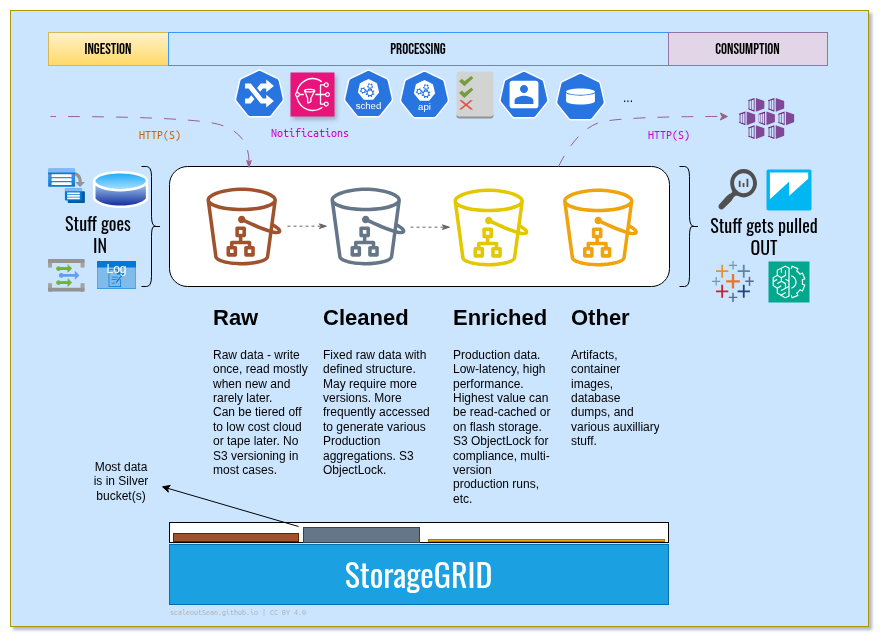
This basic demo with StorageGRID follows that approach for RAG. First, we upload, ingress, scrape or otherwise get raw data in. I used my own blog posts for that.
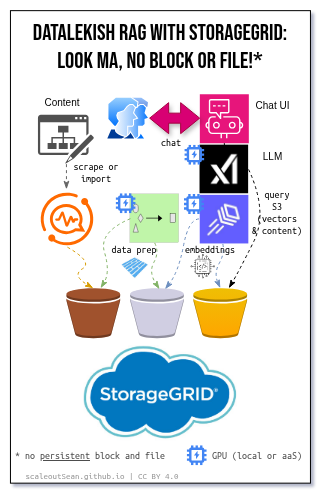
Then we run the data preparation. I extracted only S3-categorized posts to simulate data preparation and cleaning. I stored this data structured in a data lake table (post title, content, keywords, tags, and chunked text).
Finally, I created embeddings and stored them in an S3 table as well.
Because all these steps are just ephemeral containers or "task workers" that either succeed and update data on S3, or fail and be restarted, we can run them anywhere - on premises or any cloud. They just need to be able to reach StorageGRID. I used an on-premises Llama instance for data prep and embeddings creation because of price/performance reasons.
Once we're ready to serve data to users, we can also use on-premises LLMs, but in this case I picked xAI Grok because I wanted a fast chat LLM which my local GPU couldn't deliver.
The chatbot application runs that chat bot, and has a data lake client which can access content and embeddings in a table in the Gold bucket.
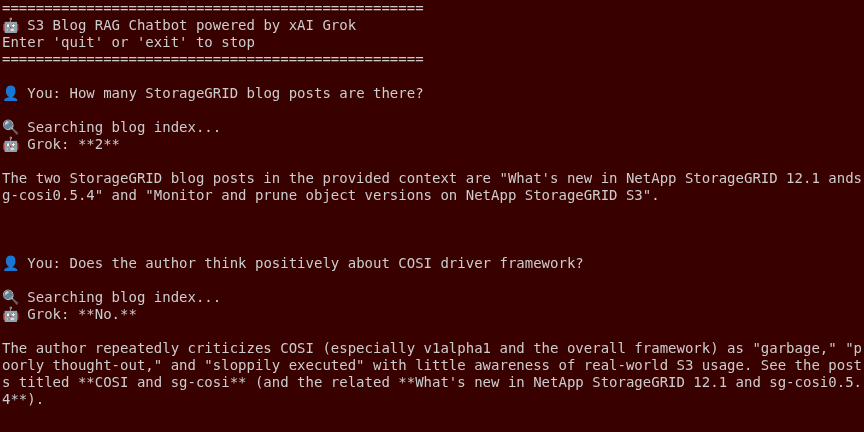
In production, this would be a lot more complex (catalogs, workflow orchestration, authentication/authorization, auditing, logging, guardrails, rate limits, and so on), but that doesn't change the fundamental fact: you can do everything by using only an S3 object store such as StorageGRID.
Also, this fundamental fact is the strongest argument in favor of using data lake and analytics patterns for AI: AI is a lot more complex than just reading S3 Vector data. Not just because it is, but because it happens to be even more government-regulated than most analytics workflows.
I can run these workloads anywhere while my StorageGRID is on-premises (in one or multiple locations). My off-hours spend for cloud-based RAG is $0 because there are no infrastructure services (like Milvus, for example) that I need to run 24x7. My chat app can spin up on its own in 5 seconds, while data processing runs only when there's something to do (example: daily refresh of content, which may take 60 seconds - download latest data, prepare data, create embeddings).
S3 bucket details
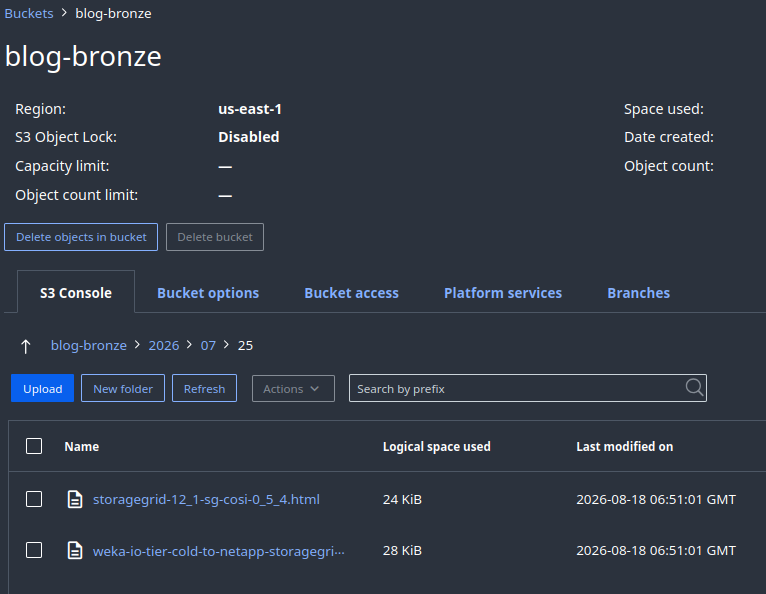
As per that diagram above, I created three buckets on StorageGRID 12.1 for this application: blog-bronze, blog-silver and blog-gold:
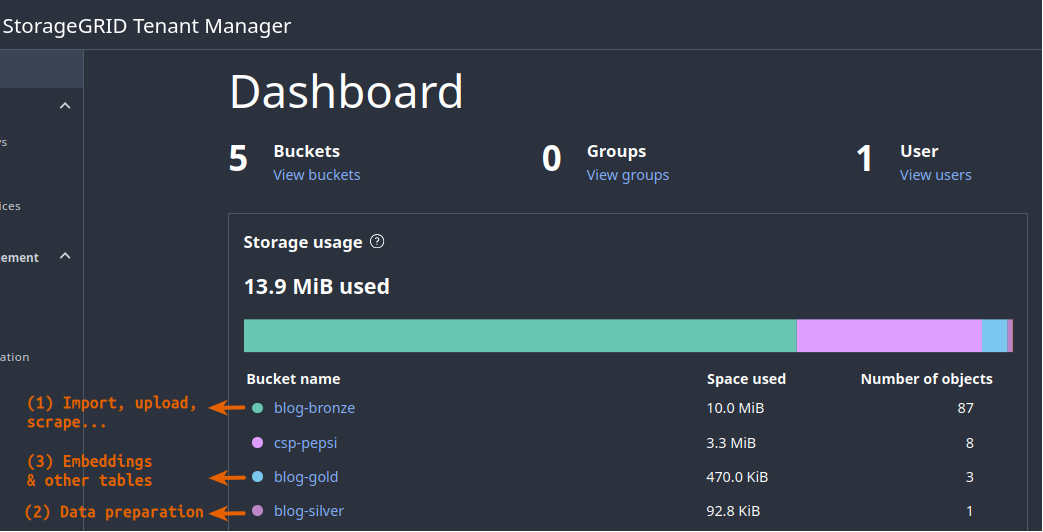
Raw data went to blog-bronze. Here we can see two posts (the first of them is this one).
The other two had just Parquet tables in them:
- Silver: structured content with text chunks (segments)
- Gold: table with vector embeddings
Storing both structured data and vectors in S3-based tables is what makes "serverless" AI possible.
Closing thoughts
S3-only RAG is already suitable for simple and departmental use cases. Users can get the simplicity and economics of S3 Vectors with stable, structured, repeatable and secure workflows of data lakes.
This "serverless RAG" example isn't a lab experiment but a simplified representation of how AI workloads run in data lakes today.
That's how Databricks does it, so one can perhaps complain it's "slow" or "expensive", but not that it's not a production-grade solution used by hundreds of enterprise AI users. The hybrid cloud post has a detail about "file-to-table" feature that Azure OneLake is launching this quarter. Its features includes all data-related steps from my demo for S3-based RAG, except for chat (which they already have). I think we'll only see a lot more of S3-only AI in coming quarters.
Data lake vendors will make S3-based AI work well for most use cases. If you've read the Databricks link above you would have noticed they have not one, but four patterns catering to these use cases, one of which is currently in beta, as they keep iterating to serve a growing variety of use cases and workloads.
Classic ways of running vector-enabled database services for analytics and AI workflows will of course remain, but most will be S3-only.
My hybrid cloud post linked here talks about zero copy analytics and the fact that data lakes, the S3 protocol and OpenSharing make the location of object stores often not relevant to applications. It all works, and it works better and better every month.
Transparently using S3 object stores in hybrid cloud environments frees the user from replication, copying and a lot of storage management and now, with all application stacks (including inferencing) supporting S3 storage, S3 object stores have become the first choice for AI workflows as well.
If your IT organizations is heavily focused on block and file, I think you will find it increasingly difficult to share data and onboard both AI and analytics applications without an object store with enterprise features because:
- S3 is increasingly the only choice of protocol for AI workloads, and
- Non-enterprise S3 won't do (even if you had it) because of compliance requirements (which Forrester Wave 2026 also mentioned as important in their review of on-premises object storage products this year).
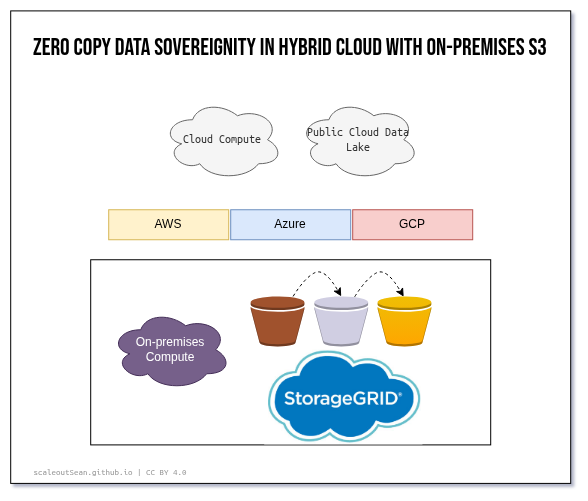
It is said that more than 50% of AI projects fail because of data access problems. Well, there's no reason to have them with S3. Fix your data lake access rules and off you go - you don't even have to touch bucket access policies (which are easy to modify as well). That's how access control works in OpenSharing, too.
StorageGRID users are ready for S3-only enterprise AI workloads in data lake environments today. They can process their data anywhere, write or export data to their on-premises object stores from anywhere. Any location, any application, any workflow.