MS SQL Server on Kubernetes with NetApp E-Series
Introduction
Only six months ago, if you wanted to automate SQL Server with E-Series maybe AI wouldn't have made much difference, because there was literally nothing to work with.
Since early 2026, that's become easy on bare metal servers and VMs.
After the CSI drivers came out, it's not just easy, but batteries are included (at least in the case of IBM Block CSI with SANtricity patch, as that one supports CSI snapshots, while the other one will soon).
As we've been exploring various databases on Kubernetes with E-Series lately, I realized I should revisit SQL Server on Kubernetes, something I haven't done even with SolidFire CSI driver yet!
I posted a demo of SQL Server for Linux with Docker and SolidFire back in 2018 or so - it's somewhere out there on YouTube - but SQL Server on Kubernetes was still on my to-do list.
Environment and deployment
- Kubernetes 1.36.1 (upgraded today!)
- IBM Block CSI 1.13.2 with SANtricity patch
- Microsoft SQL Server 2022
You need to follow the docs from the link above. I'll post my stuff to the usual place, but there's nothing fancy I do there. Also, Microsoft's documentation may be outdated or out of sync with Github repositories, so it's almost inevitable you'll have to search and troubleshoot.
It's more useful to mention key points, than details which will be outdated soon:
- Microsoft recommends using Stateful Sets. This isn't so that you scale out SQL Server - unless you set up Availability Groups, that won't happen - but so that each instance has own, distinct identity
- You "need" (not really, but the sample manifest refers to it) a secret created otherwise their StatefulSet manifest will get stuck (this isn't hard to spot, but avoiding that mistake will save you time)
- There's a comprehensive Helm Chart, which seems complex and probably has own bugs, so I did not use it
I figured I'd use a minimal approach as I wasn't interested in the benefits of Helm chart deployment this time.
The files are at the usual place:
- Create namespace
sales(this follows Microsoft's example) - Edit Storage Class name (I used
demo-storageclass-santricity) indeploy.yaml - When you apply deploy.yaml that will also create the secret
mssqlin the namespace (change it indeploy.yamlif you want)
After kubectl apply -f deploy.yaml:
$ kubectl get pods,pvc -n sales
NAME                READY   STATUS    RESTARTS   AGE
pod/mssql-sales-0   1/1     Running   0          57s

NAME                                        STATUS   VOLUME                                     CAPACITY   ACCESS MODES   STORAGECLASS                   VOLUMEATTRIBUTESCLASS   AGE
persistentvolumeclaim/mssql-mssql-sales-0   Bound    pvc-8f45b01d-6998-4713-82a3-75129916f8bf   10Gi       RWO            demo-storageclass-santricity   <unset>                 17m
SQL Server log check:
$ kubectl logs mssql-sales-0 -n sales
SQL Server 2022 will run as non-root by default.
This container is running as user mssql.
Your master database file is owned by mssql.
To learn more visit https://go.microsoft.com/fwlink/?linkid=2099216.
2026-05-28 14:18:46.57 Server      Setup step is FORCE copying system data file 'C:\templatedata\model_replicatedmaster.mdf' to '/var/opt/mssql/data/model_replicatedmaster.mdf'.
2026-05-28 14:18:46.62 Server      Setup step is FORCE copying system data file 'C:\templatedata\model_replicatedmaster.ldf' to '/var/opt/mssql/data/model_replicatedmaster.ldf'.
2026-05-28 14:18:46.62 Server      Setup step is FORCE copying system data file 'C:\templatedata\model_msdbdata.mdf' to '/var/opt/mssql/data/model_msdbdata.mdf'.
2026-05-28 14:18:46.64 Server      Setup step is FORCE copying system data file 'C:\templatedata\model_msdblog.ld into a tablef' to '/var/opt/mssql/data/model_msdblog.ldf'.
2026-05-28 14:18:46.67 Server      Microsoft SQL Server 2022 (RTM-CU25-GDR) (KB5095580) - 16.0.4260.1 (X64)
        May 14 2026 21:25:59
        Copyright (C) 2022 Microsoft Corporation
        Developer Edition (64-bit) on Linux (Ubuntu 22.04.5 LTS) <X64>
2026-05-28 14:18:46.68 Server      UTC adjustment: 0:00
2026-05-28 14:18:46.68 Server      (c) Microsoft Corporation.
Go-based sqcmd client
Microsoft has faulty instructions for their repos that didn't work for me on Linux. I got their latest build like this:
wget https://github.com/microsoft/go-sqlcmd/releases/download/v1.10.0/sqlcmd-linux-amd64.tar.bz2
bunzip2 sqlcmd-linux-amd64.tar.bz2
tar xfv sqlcmd-linux-amd64.tar && chmod +x sqlcmd
Connect and use
Check service port(s):
$ kubectl get svc -n sales
NAME            TYPE           CLUSTER-IP       EXTERNAL-IP    PORT(S)          AGE
mssql-sales-0   LoadBalancer   10.110.185.254   1.2.3.4       1433:30327/TCP   14h
I had MetalLB deployed before I installed SQL Server, and EXTERNAL-IP was picked from my pool of MetalLB IPs, so I had an external IP to connect to. SQL Server instance had that IP for itself so default port 1433 was available.
I used that IP and default SQL Server port 1433. The sa password was hard-coded in the manifest (mssql secret) mentioned earlier.
$ ./sqlcmd --user-name sa --password NetApp123$ --server 1.2.3.4,1433 -q "SELECT @@version"

-----------------------------------------------------------------------------------------------------------------------------
Microsoft SQL Server 2022 (RTM-CU25-GDR) (KB5095580) - 16.0.4260.1 (X64)
        May 14 2026 21:25:59
        Copyright (C) 2022 Microsoft Corporation
        Developer Edition (64-bit) on Linux (Ubuntu 22.04.5 LTS) <X64>

(1 row affected)
1> exit
All details of my setup:
$ kubectl get sc
NAME                           PROVISIONER                    RECLAIMPOLICY   VOLUMEBINDINGMODE   ALLOWVOLUMEEXPANSION   AGE
demo-kasten-santricity-sc      santricity.block.csi.ibm.com   Delete          Immediate           false                  15d
demo-storageclass-santricity   santricity.block.csi.ibm.com   Retain          Immediate           true                   15d

$ kubectl get pvc,pod,svc -n sales
NAME                                        STATUS   VOLUME                                     CAPACITY   ACCESS MODES   STORAGECLASS                   VOLUMEATTRIBUTESCLASS   AGE
persistentvolumeclaim/mssql-mssql-sales-0   Bound    pvc-8f45b01d-6998-4713-82a3-75129916f8bf   10Gi       RWO            demo-storageclass-santricity   <unset>                 34m

NAME                READY   STATUS    RESTARTS   AGE
pod/mssql-sales-0   1/1     Running   0          18m

NAME                    TYPE           CLUSTER-IP       EXTERNAL-IP    PORT(S)          AGE
service/mssql-sales-0   LoadBalancer   10.110.185.254   1.2.3.4        1433:30327/TCP   22m
Data management
How to backup and restore?
Use Velero, Kasten, or native backup. All CSI-compatible backup tools should be able to snapshot IBM Block CSI PVCs.
Built-in tools work, too.
You may backup to disk. But, since SQL is running inside of Kubernetes, you don't get data out that way.
1> SELECT Name FROM  sys.databases'
Name
--------------------------------------------------------------------------------------------------------------------------------
master
tempdb
model
msdb
Northwind

(5 rows affected)
1>
2> BACKUP DATABASE [northwind] TO DISK = N'/tmp/northwind.bak' WITH NOFORMAT, NOINIT, NAME = 'master', SKIP, NOREWIND, NOUNLOAD, STATS = 10
3> GO
12 percent processed.
21 percent processed.
...
91 percent processed.
100 percent processed.
Processed 344 pages for database 'northwind', file 'Northwind' on file 1.
Processed 2 pages for database 'northwind', file 'Northwind_log' on file 1.
BACKUP DATABASE successfully processed 346 pages in 0.080 seconds (33.740 MB/sec).
1> DROP DATABASE Northwind;
2> GO
1> RESTORE DATABASE [northwind] FROM DISK = N'/tmp/northwind.bak' WITH FILE = 1, NOUNLOAD, REPLACE, NORECOVERY, STATS = 5
2> GO
7 percent processed.
12 percent processed.
...
100 percent processed.
Processed 344 pages for database 'northwind', file 'Northwind' on file 1.
Processed 2 pages for database 'northwind', file 'Northwind_log' on file 1.
RESTORE DATABASE successfully processed 346 pages in 0.030 seconds (89.973 MB/sec).
1> SELECT Name FROM  sys.databases
2> GO
Name
--------------------------------------------------------------------------------------------------------------------------------
master
tempdb
model
msdb
northwind

(5 rows affected)
We could have a second PVC with the Retain reclaim policy for dump-to-disk, and use Velero File System Backup to backup that to S3 (you don't even need to snapshot that PVC!). Or simply mount it from an Rclone container, similar to what I did in the Qdrant post, and sync to S3.
Or, if you want to skip that, backup directly to S3.
That, however, requires some extra work (source: S3 link above):
SQL Server uses WinHttp to implement client of HTTP REST APIs it uses. It relies on OS certificate store for validations of the TLS certificates presented by the http(s) endpoint. However, SQL Server on Linux the CA must be placed on a predefined location to be created at /var/opt/mssql/security/ca-certificates…
I tried SQL Server's backup-to-S3 using SQL Server on Docker before. It works.
Performance
For performance reasons, you could create a storage class that uses classic RAID 1 or RAID 5 groups, although you can do RAID 1 on DDP as well. But classic RAID groups provide very precise allocation, so for small volumes - especially if you plan to have many databases - it's better to create classic RAID groups. If it's just a dozen or so, use DDP with RAID 1 (log, indexes) and RAID 6 (tables), for example.
I didn't run any performance tests because that would require multiple PVCs, some thinking about what's supposed to be tested and at least basic tuning (for which I wasn't in mood because I use this environment for different things and so I prefer to stick with system defaults). I'll do it when and if I have a good reason for that.
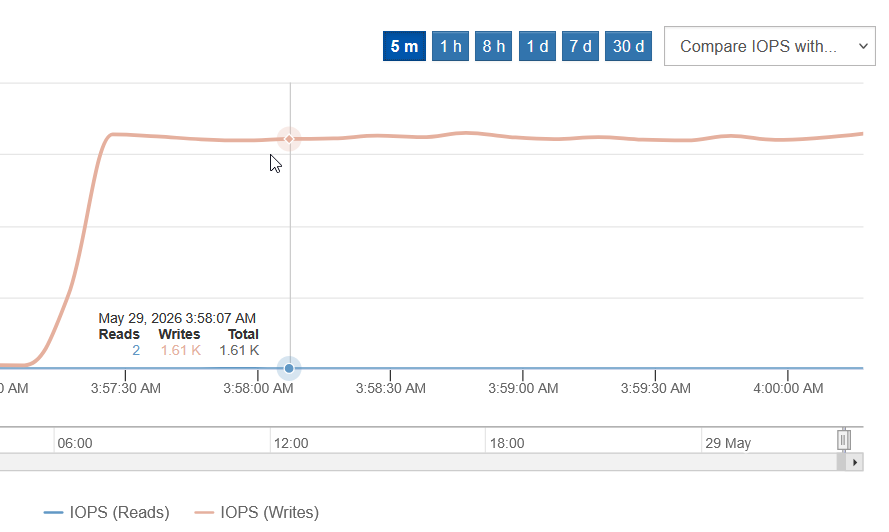
I did run a single-threaded loop that INSERT-ed 1 million random records to a table, just to see if disk I/O be consistent. That didn't stress storage as it created just 5 MB/s write.
As far as SQL Server and Linux are concerned, Microsoft has a long page about performance optimization.
Conclusion
SQL Server on Kubernetes with E-Series is not just possible, but simple.
Adding new instances for Sales team can be done by expanding the StatefulSet, or you can use stand-alone approach which is supported, but Microsoft doesn't recommend it.
Either way, storage provisioning and data protection work predictably, and performance should be close to bare metal and VMs, especially if the basic Microsoft tuning recommendations are applied. E-Series has always performed very well in database workloads and yes - both SANtricity CSI and IBM Block CSI with SANtricity patch let you create RAID 10-based Storage Classes, in addition to the common RAID 6.