Velero CSI backup with SANtricity Snapshots and read-only Linked Clones
Introduction
Continuing from previous post on this topic, Backup SANtricity CSI volume with Velero and Versity S3 Gateway, today we'll look at a better different way to backup E-Series-backed PVCs.
IBM Block CSI, for which I have a SANtricity patch, last week released a minor update in v1.13.1 and then, in a hurry, security patches in v1.13.2. That meant another patching festival for me, so I used that opportunity to do a bit of extra work. The default branch, santricity, still hasn't been fully updated for v1.13.2.
In the first Velero-with-SANtricity post (the link above), I demonstrated poor man's backup without snapshots, which used FSB File System Backup - it backups live file systems. Many users use that approach, especially on file servers and "database dump" volumes, but it's not usable for live databases, for example. uthe This post is about making a backup from a static, ephemeral thin clone volume, which my SANtricity patch could not do at the time. IBM Block CSI has the feature, but SANtricity CSI code can't take advantage of it without knowing how to work with storage to fulfill such requests.
Since yesterday, it's a bit smarter, making another approach possible. While the default santricity branch in my repo has generic updates for v1.13.2, this CSI-related work is in a separate branch in the same repo, but I won't link it as that branch will be merged into the main anyway.
Better or just different?
Backups with CSI snapshots aren't necessarily better than FSB backups.
There are cases where data is relatively static. Maybe you dump PostgreSQL to a backup PVC four times a day, or have a batch job that uploads data to a database every 6 hours and your backup takes only 30 minutes. FSB is fine for these situations.
Heck, you don't even need Velero for that - you can simply rclone those to S3 at will. It's not hard. Velero (or other backup application's) value add consists of keeping track of these in one place.
CSI snapshots with Velero Data Mover
fsfreeze, documented here, can be put in place before, and undone after, a snapshot is taken.
General workflow:
- freeze workload using
fsfreeze - create CSI snapshot using VolumeSnapshotClass for a SANtricity driver (which uses only SANtricity storage)
- unfreeze workload
- create ephemeral clone volume
- Velero data mover pod is instantiated and copies data to backup repo (e.g. S3)
- once copying is done, ephemeral clone and snapshot are both deleted
Almost all applications are resistant to crashes and fsfreeze isn't necessary. And if you want perfect application consistency, you should also freeze the application, not just the container.
For single volume apps, I wouldn't do either (fsfreeze or application-specific actions), but some academically-orientated folks like to talk about it. I blogged about that in the past, and
- full example of using Velero with hooks
- post about using NetApp's Verde scripts for application-consistent freezes
- I also have several posts about Kanister, both Kasten-related and stand-alone
The post that explains how Velero data mover uses ephemeral snapshots can be found here. There's a video demo on the same page (with Trident CSI and SolidFire).
Setup and workflow
- Kubernetes v1.35
- IBM Block CSI with SANtricity patch v1.13.2
- E-Series EF600 (11.9) with NVMe/RoCE
- Velero v1.18.0 with AWS (S3) plugin v1.14.0
- Versity S3 Gateway v1.4.1
In the FSB-related Velero post, I used Versity in a Kubernetes name space but this time I used Versity S3 Gateway on a bare metal server to make a point (more on that later).
Unlike there, Velero was installed with CSI enabled and Velero node agent (required for data movement in backup/restore jobs) was installed as well.
velero install \
  --features=EnableCSI \
  --use-node-agent \
  --image docker.io/velero/velero:v1.18.0 \
  --provider aws \
  --plugins velero/velero-plugin-for-aws:v1.14.0 \
  --bucket velero \
  --secret-file  ~/.aws/credentials \
  --use-volume-snapshots=true
Among the pods on the box, ibm-block-csi-operator is the (unpatched) IBM Block CSI Operator, ibm-block-csi-controller is the (patched) CSI controller and ibm-block-csi-node is the node, also patched for SANtricity.
root@h2:~/code# kubectl get pods -A
NAMESPACE      NAME                                      READY   STATUS    RESTARTS      AGE
default        ibm-block-csi-controller-0                8/8     Running   0             42s
default        ibm-block-csi-node-x5vcz                  3/3     Running   0             41s
default        ibm-block-csi-operator-6f9878b875-kcpjm   1/1     Running   0             10d
demo           pvc-mounter                               1/1     Running   0             88m
kube-flannel   kube-flannel-ds-qml8x                     1/1     Running   7 (12d ago)   67d
kube-system    coredns-668d6bf9bc-56nmf                  1/1     Running   9 (12d ago)   67d
kube-system    coredns-668d6bf9bc-754wz                  1/1     Running   9 (12d ago)   67d
kube-system    etcd-h2                                   1/1     Running   0             12d
kube-system    kube-apiserver-h2                         1/1     Running   0             12d
kube-system    kube-controller-manager-h2                1/1     Running   0             12d
kube-system    kube-proxy-5qjxd                          1/1     Running   7 (12d ago)   67d
kube-system    kube-scheduler-h2                         1/1     Running   0             12d
kube-system    snapshot-controller-cc4c98c9d-5tkft       1/1     Running   0             7d10h
kube-system    snapshot-controller-cc4c98c9d-p985p       1/1     Running   0             7d10h
velero         node-agent-5j997                          1/1     Running   0             5h57m
velero         velero-7cd8f46bc6-vhzsx                   1/1     Running   0             5h57m
A manual workflow used to proof creation of a SANtricity snapshot and read-only linked clone from it used two YAML files.
snap-demo-pvc.yml:
apiVersion: snapshot.storage.k8s.io/v1
kind: VolumeSnapshot
metadata:
  name: demo-pvc-snap
  namespace: "demo"
spec:
  volumeSnapshotClassName: demo-volumesnapshotclass
  source:
    persistentVolumeClaimName: demo-pvc
clone-demo-pvc.yml:
apiVersion: v1
kind: PersistentVolumeClaim
metadata:
  name: demo-clone
spec:
  storageClassName: demo-storageclass-santricity # Use your actual StorageClass name
  dataSource:
    name: demo-pvc-snap                    # Name of the VolumeSnapshot to restore from
    kind: VolumeSnapshot
    apiGroup: snapshot.storage.k8s.io
  accessModes:
    - ReadWriteOnce                          # Can also be ReadOnlyMany if supported
  resources:
    requests:
      storage: 4Gi                          # Must match or exceed the original PVC size
To do it manually, we create a PVC, snapshot it, and create a read-only Linked Clone from that snapshot.
$ kubectl apply -f snap-demo-pvc.yml
volumesnapshot.snapshot.storage.k8s.io/demo-pvc-snap created

$ kubectl get volumesnapshot -n demo
NAME            READYTOUSE   SOURCEPVC   SOURCESNAPSHOTCONTENT   RESTORESIZE   SNAPSHOTCLASS              SNAPSHOTCONTENT                                    CREATIONTIME   AGE
demo-pvc-snap   true         demo-pvc                            4Gi           demo-volumesnapshotclass   snapcontent-d1faf0e9-764f-4538-a492-63a49eee491a   7s             9s

$ kubectl get pvc -n demo
NAME       STATUS   VOLUME                                     CAPACITY   ACCESS MODES   STORAGECLASS                   VOLUMEATTRIBUTESCLASS   AGE
demo-pvc   Bound    pvc-54a54fdf-f7a1-4558-a631-e1337dd6dadc   4Gi        RWO            demo-storageclass-santricity   <unset>                 87m

$ kubectl create -f clone-demo-pvc.yml -n demo
persistentvolumeclaim/demo-clone created

$ kubectl get pvc -n demo
NAME         STATUS   VOLUME                                     CAPACITY   ACCESS MODES   STORAGECLASS                   VOLUMEATTRIBUTESCLASS   AGE
demo-clone   Bound    pvc-5211c332-d073-4a98-85e4-93612cbbf450   4Gi        RWO            demo-storageclass-santricity   <unset>                 3s
demo-pvc     Bound    pvc-54a54fdf-f7a1-4558-a631-e1337dd6dadc   4Gi        RWO            demo-storageclass-santricity   <unset>                 88m
demo-clone isn't a "real" volume, it's a read-only, "thin", linked clone volume.
There are two kinds of linked clones on SANtricity, the other one is read-write Linked Clones. I wrote about that stuff in several posts, most recently here for those who may be interested.
Here's how that looks in SANtricity Web UI:
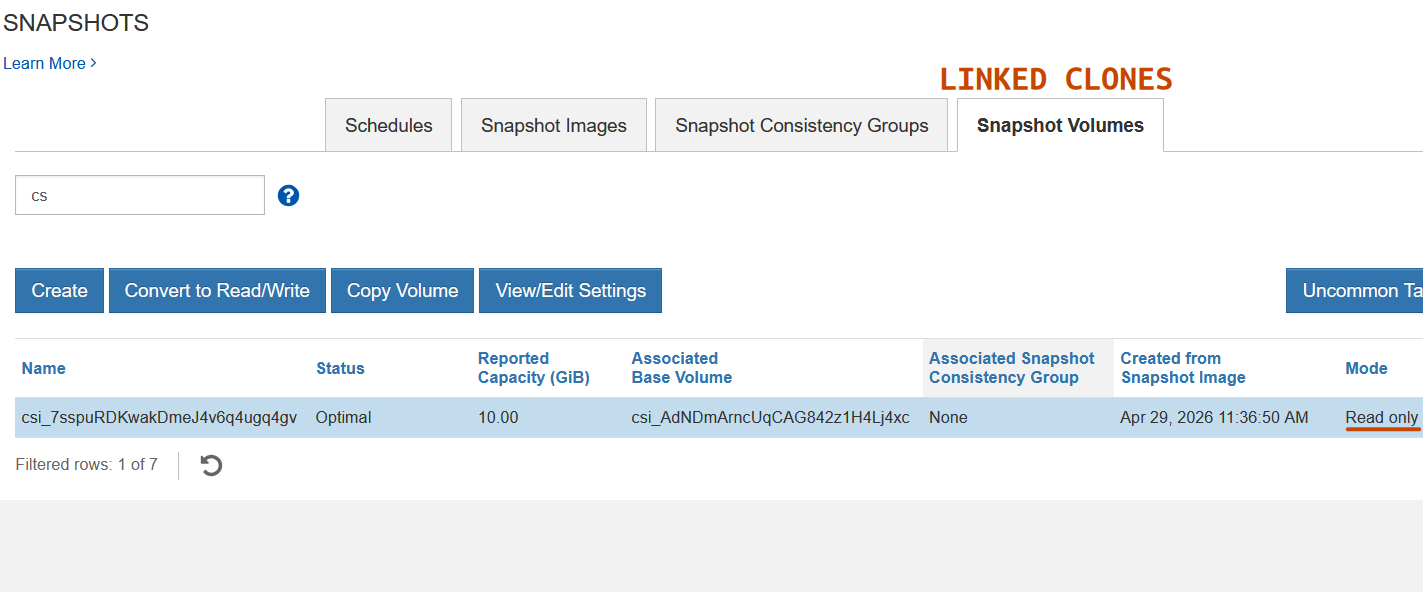
When that clone isn't presented to a host, it wouldn't have any mapping.
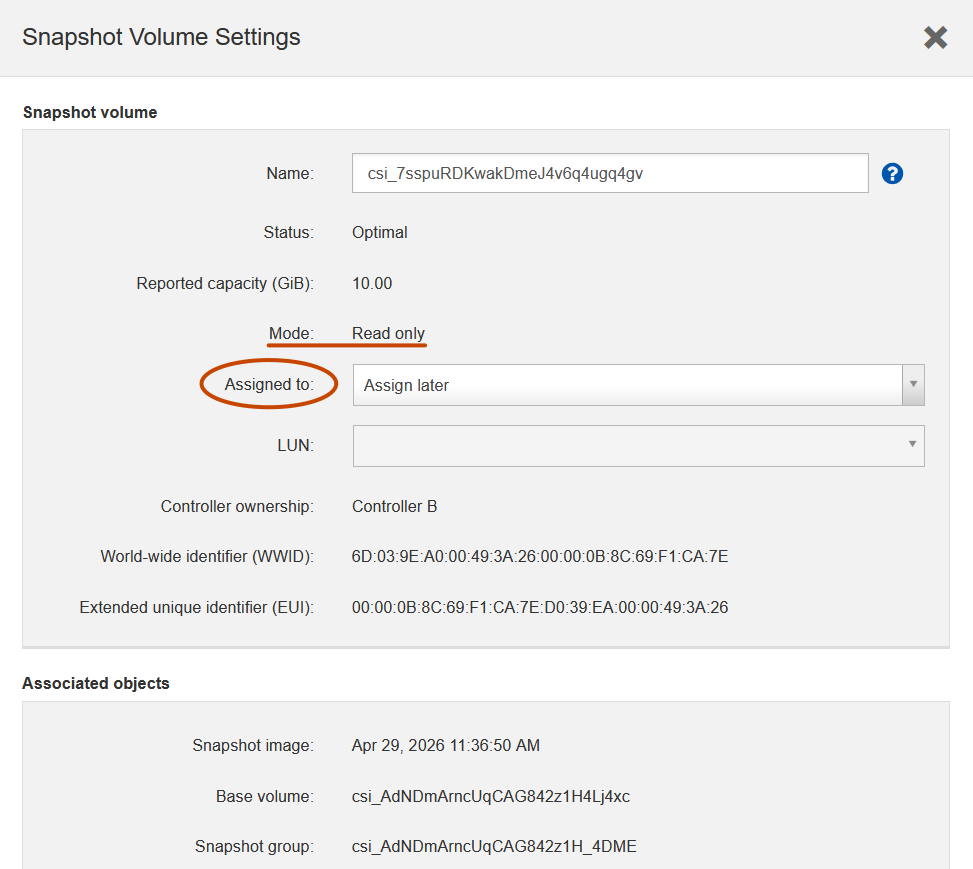
That's what Velero CSI snapshot with snapshot data mover does as well, except it maps a volume to its data mover, and it also cleans up the clone and snapshot after itself. If it works well, you don't see anything but a backup that's completed without errors.
$ velero backup create demo --include-namespaces demo --snapshot-volumes --snapshot-move-data
Backup request "demo" submitted successfully.
Run `velero backup describe demo` or `velero backup logs demo` for more details.

$ velero backup get
NAME   STATUS                       ERRORS   WARNINGS   CREATED                         EXPIRES   STORAGE LOCATION   QUEUE POSITION   SELECTOR
demo   WaitingForPluginOperations   0        0          2026-04-29 17:08:12 +0000 UTC   29d       default                             <none>

$ velero backup get
NAME   STATUS      ERRORS   WARNINGS   CREATED                         EXPIRES   STORAGE LOCATION   QUEUE POSITION   SELECTOR
demo   Completed   0        0          2026-04-29 17:08:12 +0000 UTC   29d       default                             <none>
WaitingForPluginOperations can take an "unreasonably" long time, but by then snapshot was already taken and it's just Velero taking its time to work on data. Snapshot itself takes a second or two, so that's the duration of any freeze (if you do use that).
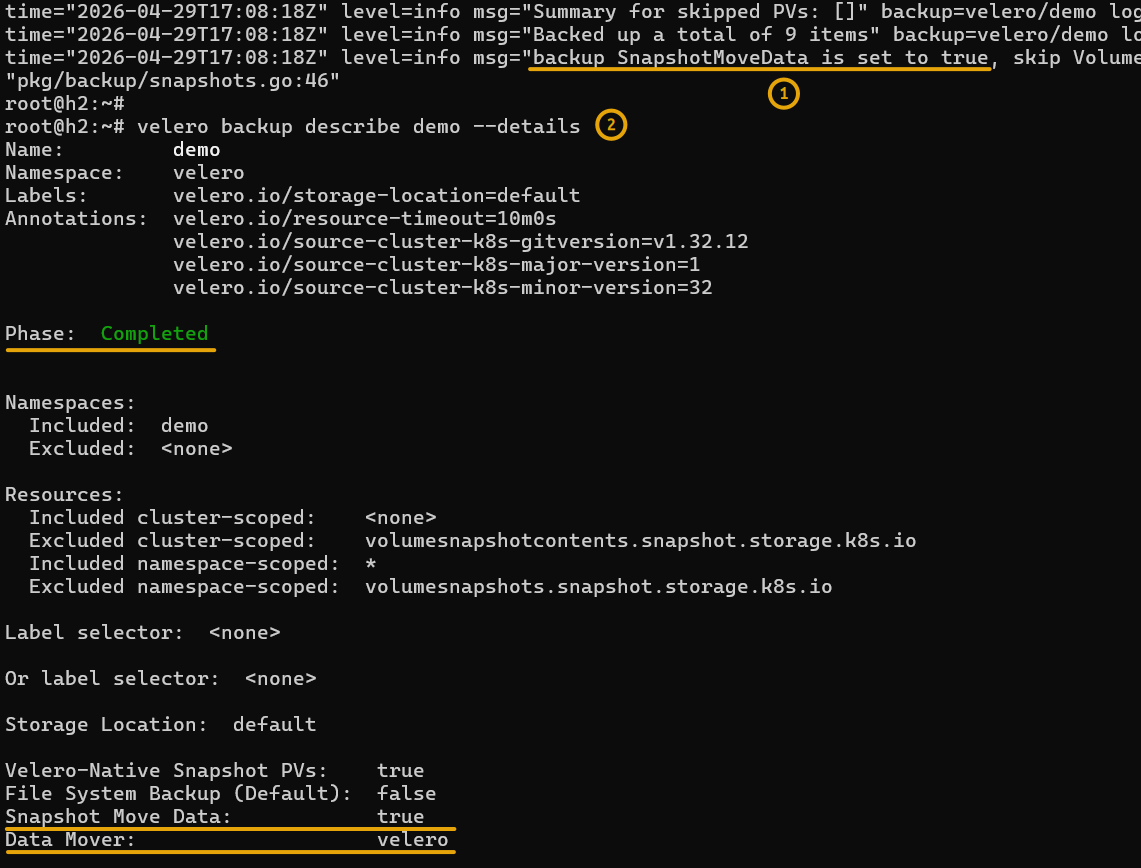
Backup logs and job details are expected to show CSI snapshots and Velero data mover were used.
S3 repository
Since we backup to Versity S3 Gateway, it's easy to visually inspect the path BUCKET/backups/BACKUP_JOB:
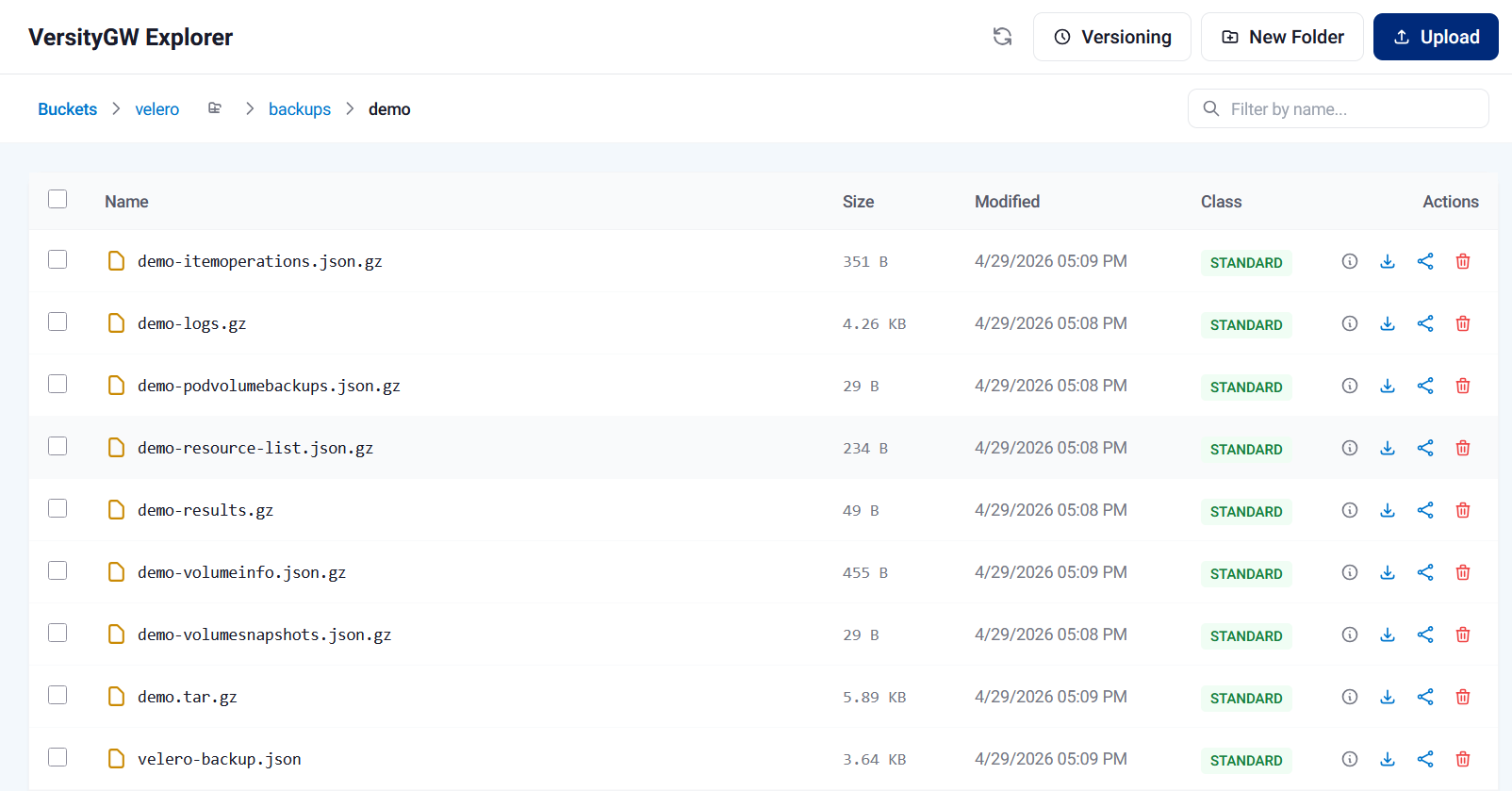
And while I'm at it, let's demonstrate one of the key points here, without any elaboration at first:
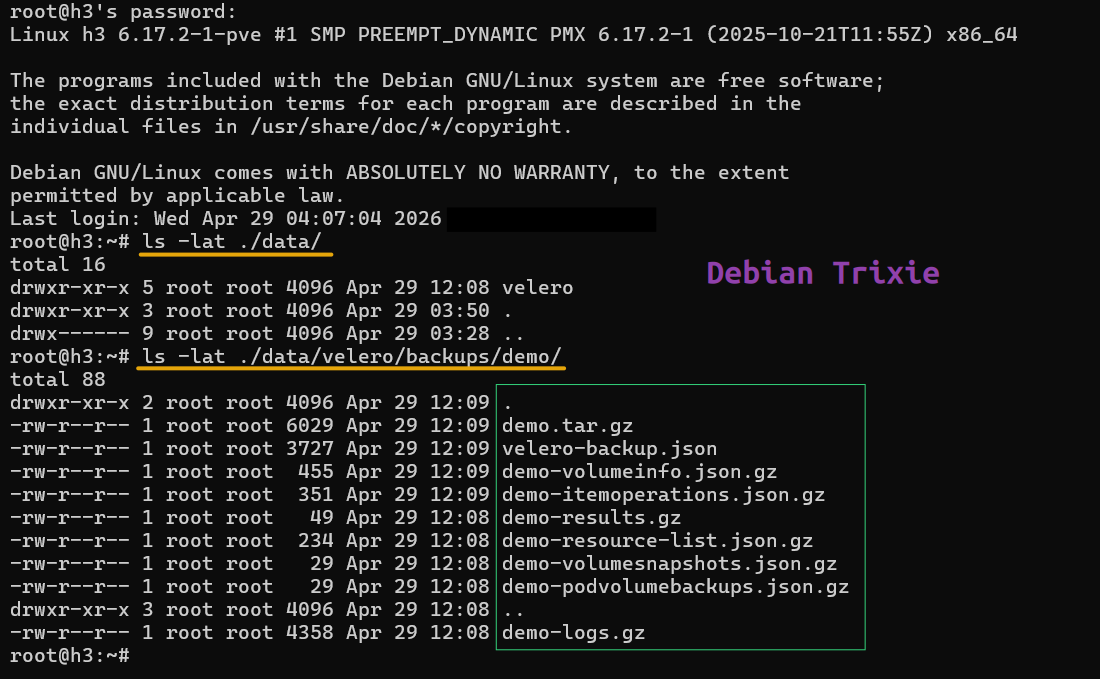
That's a directory listing of this job's backup path on system. What about it?
Last login: Wed Apr 29 04:07:04 2026 from 10.113.4.16

root@h3:~#$ ls -lat ./data/velero/backups/demo/
total 88
drwxr-xr-x 2 root root 4096 Apr 29 12:09 .
-rw-r--r-- 1 root root 6029 Apr 29 12:09 demo.tar.gz
-rw-r--r-- 1 root root 3727 Apr 29 12:09 velero-backup.json
-rw-r--r-- 1 root root  455 Apr 29 12:09 demo-volumeinfo.json.gz
-rw-r--r-- 1 root root  351 Apr 29 12:09 demo-itemoperations.json.gz
-rw-r--r-- 1 root root   49 Apr 29 12:08 demo-results.gz
-rw-r--r-- 1 root root  234 Apr 29 12:08 demo-resource-list.json.gz
-rw-r--r-- 1 root root   29 Apr 29 12:08 demo-volumesnapshots.json.gz
-rw-r--r-- 1 root root   29 Apr 29 12:08 demo-podvolumebackups.json.gz
drwxr-xr-x 3 root root 4096 Apr 29 12:08 ..
-rw-r--r-- 1 root root 4358 Apr 29 12:08 demo-logs.gz
Apart from the obvious (which is that I wouldn't run Versity S3 Gateway as root): this being a stateless S3 gateway, my DR solution can be a single command in OS job scheduler. I don't even need to use rclone, let alone storage-based replication.
rsync /root/data/velero remote_site_host:/data/
The data landed in BUCKET/kopia/BACKUP_JOB.
$ ll ./data/velero/backups/demo/
total 80
-rw-r--r-- 1 root root  351 Apr 29 12:09 demo-itemoperations.json.gz
-rw-r--r-- 1 root root 4358 Apr 29 12:08 demo-logs.gz
-rw-r--r-- 1 root root   29 Apr 29 12:08 demo-podvolumebackups.json.gz
-rw-r--r-- 1 root root  234 Apr 29 12:08 demo-resource-list.json.gz
-rw-r--r-- 1 root root   49 Apr 29 12:08 demo-results.gz
-rw-r--r-- 1 root root 6029 Apr 29 12:09 demo.tar.gz
-rw-r--r-- 1 root root  455 Apr 29 12:09 demo-volumeinfo.json.gz
-rw-r--r-- 1 root root   29 Apr 29 12:08 demo-volumesnapshots.json.gz
-rw-r--r-- 1 root root 3727 Apr 29 12:09 velero-backup.json

I can use Proxmox Backup client to backup entire backup "bucket" to a remote Proxmox Backup Server, for example. Or rclone to low-cost public cloud or NetApp StorageGRID with Object Lock.
These Versity S3 Gateway volumes can be snapshot on SANtricity (not CSI-related) and cloned for backup by any Linux client (Proxmox Backup client, Kopia, rsync, etc.). Replicating externally with rclone to another S3 target has less friction, but there are other ways to do it if you need to.
Limitations
SANtricity snapshots have numerious limitations, so it's not like this is some super-magnificent break through that frees us from those limitations. I wrote about that in the Velero FBS post and also in recent posts related to SANtricity snapshots. What I also wrote in those other posts is the importance of snapshots is declining, so most users don't need more than just basic functionality:
- Ephemeral snapshots for backups (which we can do)
- Precautionary snapshots before major upgrades (which doesn't even need to be done in Kubernetes, but yes, we can do that as well now)
Related to how Velero backups are created:
- Velero can also take a "backup" by simply creating a snapshot (and using that as backup location). This exists - I suppose - because it's definitively faster to revert from a snapshot than restore potentially TBs of data from S3
- SANtricity (and not just SANtricity) doesn't care if you delete a volume that has snapshots and linked clones that depend on it
- That means that without that "data mover" approach, you can fat-finger a PVC together with all its snapshots and linked clones. If you try to restore from a snapshot, Velero will tell you that snapshot can't be found
Related to how SANtricity snapshots are deleted:
- Oldest first
That means you can't just take and delete snapshots in any order you like. I wrote about this in other snapshot-related posts, but the bottom line is: it's possible to mitigate that, but I'm not going to try because I see ephemeral snapshots as sufficient. We can create a CSI snapshot, remove it just before next Velero CSI backup job and create it after. And we can create a SANtricity snapshot schedule to create and rotate crash-consistent snapshots completely independently from CSI snapshots. Or we could create different Volume Snapshot Classes that allow "parallel CSI snapshot tracks" which would require a bit of extra development. It's not an unsolvable problem - it's just not very convenient and workarounds exist. If you need to maintain a snapshot at all times, I recommmend using a SANtricity snapshot schedule because it can't be accidentally messed up.
There are also implementation-related limitations - currently this is single/individual volume only and read-only Linked Clones (not read-write).
Velero has its own limitations and bugs, which are out of scope here. But - on the happy side - IBM Block CSI happens to be tested with OpenShift. While that doesn't mean my SANtricity patch is tested or supported (it isn't!), OpenShift OADP has helpful hints for OpenShift users.
Monitoring
As I mentioned in the EPA 4 post, I look forward to documenting ways to monitor snapshots, clones and backups.
You can see in that post that snapshots and clones are already monitored. The dashboards aren't super complex, but the metrics are in there and can create better dashboards for your own use.
I won't add Velero dashboards, but I do intend to document how to monitor both in same Grafana instance. Velero has own metrics and there are community dashboards out there. Some are outdated and others usable but maybe not suitable for this specific purpose, so it takes time to check out a few and showcase an approach.
Related to IBM Block CSI, I mentioned in all posts that I don't intend to mess around with the way it names volumes and linked clones. See more here. Because of that the improvements in EPA 4 will be more helpful to these integrations when my own SANtricity CSI is used.
Why is monitoring important? Because you need to keep an eye on available space and snapshot count. For example, "orphaned" snapshots could interfere with Velero's ability to delete its newer ephemeral snapshots. Or they could keep consuming capacity or snapshot count. That's why it's smart to watch those things and start gradually.
Capacity utilization
One of the nice things about how this approach uses snapshots and clones is they don't take almost any capacity - these are purely ephemeral snapshots that consume capacity for base volume modifications while backup jobs run.
Linked clones don't even have any reservation capacity because they're read-only.
The moment backup job is done, the underlying snapshot is immediately deleted, freeing capacity in the reserve. That's why I like this approach. It doesn't "reserve" 20% or 40% of storage capacity just in case.
If volume data is changing at 5 MB/s rate and backup job takes 30 minutes, that's some 10 GB in Copy-on-Write data. Daily change is then around 423 GB, which at 4% change rate is what you may expect from a volume with 10 TiB of data. In other words, your repo group could be just 2% (20 GB) and still large enough for these backup jobs.
To be exact, the way it's implemented (read the various SANtricity snapshot posts here for the details) is a fixed reservation as percentage of Base Volume capacity is assigned and remains in place. Ephemeral snapshot deletion returns the capacity to the system, but snapshot reserve remains in place. However, since the snapshot goes away right after backup job is done, there's no harm in insta-nuking these reservations (repo groups). IBM Block CSI with SANtricity patch could default to a very tiny reserve and that could be configurable, but it already uses less than the default SANtricity snapshot wizard recommendation (40% of Base Volume capacity).
If you aren't a snapshot hoarder, you can delete those repo groups and let CSI plugin recreate them when/if next snapshot is taken. How? Simly loop through the repo groups and nuke all non-snapshot-schedule-owned ones that have 0 snapshots. That's it. Tools exist. If you don't delete them, you can simply monitor them in EPA just to see how much is being used (and not, i.e. wasted).
Conclusion
Snapshots and read-only Linked Clones for individual volumes are available in a feature branch and will be merged into the main santricity branch and tagged with v1.13.2. I can't say they're super-robust and production ready as I'm the only user, but I'll certainly use them with non-trivial use cases.
I said in here that block storage is most suitable for databases - even those that instantly tier to S3 need logging, disk cache and space for temporary data. E-Series excels at those workloads, but snapshots are barely ever used there. We don't really need snapshots.

That's why I believe basic CSI snapshot functionality, even with the various limitations outlined above and in other post, fills most of the gap.
There are various general workloads - virtual infrastructure, for example - where snapshots are needed a lot more, but as we saw in the Proxmox Backup Server and Proxmox with Veeam B&R post, snapshots are created, used and deleted on hypervisor. There's nothing for us to do there!
What's next for IBM Block CSI with SANtricity patch:
- Read-only Consistency Group (CG) Linked Clones. This is a somewhat common scenario for E-Series and needs to be added. Most modern scale-out databases take own cluster-wisde snapshots, but a few don't
- CG snapshots need to be implemented before that
As an example of how things work these days: at first, I used Splunk SOK namespace in testing. But, since SOK auto-recovers some resources, it's not possible to restore namespace resources without considering Operator - there be conflicts. Because of that I had to create a simpler workload in another namespace to test with. Elasticsearch also uses Operator, so neither of these can or should be protected with storage snapshots of moving targets such as these. It simply isn't supported and can't work well. That's why - although NOSQL and scale-out SQL databases are many - most people can't use CG snapshots as much as they expect. In fact, it is rare to find a DB that doesn't do it better on its own.
There's another CSI driver for SANtricity, SANtricity CSI, a Go-based CSI driver for SANtricity. I'd like to add read-only Linked Clones for both individual volumes and CGs to it as well. Solidfire CSI - obviously not SANtricity-related - already supports Consistency Groups, but hasn't been tested with Velero. That's another to-do item.
Read-write Linked Clones of individual volumes and CGs are "nice to have". It's not much harder, but it takes time to develop, test, document and I just don't think it's a popular use case. In theory it is but, in practice, it's rarely used and from what I've seen it's usually done wrong. I probably won't work on it unless someone needs it (and maybe wants to contribute). The few who really need this and aren't doing it wrong can simply snapshot volumes, create read-write Linked Clones and present them as static persistent volumes using Terraform Provider SANtricity or Ansible.
Appendix A: Velero backup details
Backup job details show data mover was used and backup successful.
$ velero backup describe demo --details
Name:         demo
Namespace:    velero
Labels:       velero.io/storage-location=default
Annotations:  velero.io/resource-timeout=10m0s
              velero.io/source-cluster-k8s-gitversion=v1.32.12
              velero.io/source-cluster-k8s-major-version=1
              velero.io/source-cluster-k8s-minor-version=32

Phase:  Completed


Namespaces:
  Included:  demo
  Excluded:  <none>

Resources:
  Included cluster-scoped:    <none>
  Excluded cluster-scoped:    volumesnapshotcontents.snapshot.storage.k8s.io
  Included namespace-scoped:  *
  Excluded namespace-scoped:  volumesnapshots.snapshot.storage.k8s.io

Label selector:  <none>

Or label selector:  <none>

Storage Location:  default

Velero-Native Snapshot PVs:    true
File System Backup (Default):  false
Snapshot Move Data:            true
Data Mover:                    velero

TTL:  720h0m0s

CSISnapshotTimeout:    10m0s
ItemOperationTimeout:  4h0m0s

Hooks:  <none>

Backup Format Version:  1.1.0

Started:    2026-04-29 17:08:12 +0000 UTC
Completed:  2026-04-29 17:09:17 +0000 UTC

Expiration:  2026-05-29 17:08:12 +0000 UTC

Total items to be backed up:  9
Items backed up:              9

Backup Item Operations:
  Operation for persistentvolumeclaims demo/demo-pvc:
    Backup Item Action Plugin:  velero.io/csi-pvc-backupper
    Operation ID:               du-2455cbbc-ef67-4caf-9151-00d42247889a.54a54fdf-f7a1-4559a1c8a
    Items to Update:
                           datauploads.velero.io velero/demo-zx9sf
    Phase:                 Completed
    Progress description:  Completed
    Created:               2026-04-29 17:08:18 +0000 UTC
    Started:               2026-04-29 17:08:33 +0000 UTC
    Updated:               2026-04-29 17:09:08 +0000 UTC
Resource List:
  v1/ConfigMap:
    - demo/kube-root-ca.crt
  v1/Event:
    - demo/velero-demo-pvc-wlw9w.18aae197997f03d3
    - demo/velero-demo-pvc-wlw9w.18aae19820ec63c8
    - demo/velero-demo-pvc-wlw9w.18aae19820ef05fb
  v1/Namespace:
    - demo
  v1/PersistentVolume:
    - pvc-54a54fdf-f7a1-4558-a631-e1337dd6dadc
  v1/PersistentVolumeClaim:
    - demo/demo-pvc
  v1/Pod:
    - demo/pvc-mounter
  v1/ServiceAccount:
    - demo/default

Backup Volumes:
  Velero-Native Snapshots: <none included>

  CSI Snapshots:
    demo/demo-pvc:
      Data Movement:
        Operation ID: du-2455cbbc-ef67-4caf-9151-00d42247889a.54a54fdf-f7a1-4559a1c8a
        Data Mover: velero
        Uploader Type: kopia
        Moved data Size (bytes): 0
        Result: succeeded

  Pod Volume Backups: <none included>

HooksAttempted:  0
HooksFailed:     0
A copy of backup job definition file lands in the Velero repository (s3://velero/backup/{NAMESPACE}), and in there, too, we can see snapshotMoveData was used.
{
  "kind": "Backup",
  "apiVersion": "velero.io/v1",
  "metadata": {
    "name": "demo",
    "namespace": "velero",
    "uid": "2455cbbc-ef67-4caf-9151-00d42247889a",
    "resourceVersion": "10882442",
    "generation": 8,
    "creationTimestamp": "2026-04-29T17:08:12Z",
    "labels": {
      "velero.io/storage-location": "default"
    },
    "annotations": {
      "velero.io/resource-timeout": "10m0s",
      "velero.io/source-cluster-k8s-gitversion": "v1.32.12",
      "velero.io/source-cluster-k8s-major-version": "1",
      "velero.io/source-cluster-k8s-minor-version": "32"
    },
    "managedFields": [
      {
        "manager": "velero",
        "operation": "Update",
        "apiVersion": "velero.io/v1",
        "time": "2026-04-29T17:08:12Z",
        "fieldsType": "FieldsV1",
        "fieldsV1": {
          "f:spec": {
            ".": {},
            "f:hooks": {},
            "f:includedNamespaces": {},
            "f:metadata": {},
            "f:snapshotMoveData": {},
            "f:snapshotVolumes": {}
          },
          "f:status": {}
        }
      },
      {
        "manager": "velero-server",
        "operation": "Update",
        "apiVersion": "velero.io/v1",
        "time": "2026-04-29T17:09:16Z",
        "fieldsType": "FieldsV1",
        "fieldsV1": {
          "f:metadata": {
            "f:annotations": {
              ".": {},
              "f:velero.io/resource-timeout": {},
              "f:velero.io/source-cluster-k8s-gitversion": {},
              "f:velero.io/source-cluster-k8s-major-version": {},
              "f:velero.io/source-cluster-k8s-minor-version": {}
            },
            "f:labels": {
              ".": {},
              "f:velero.io/storage-location": {}
            }
          },
          "f:spec": {
            "f:csiSnapshotTimeout": {},
            "f:defaultVolumesToFsBackup": {},
            "f:excludedClusterScopedResources": {},
            "f:excludedNamespaceScopedResources": {},
            "f:itemOperationTimeout": {},
            "f:storageLocation": {},
            "f:ttl": {},
            "f:volumeGroupSnapshotLabelKey": {},
            "f:volumeSnapshotLocations": {}
          },
          "f:status": {
            "f:backupItemOperationsAttempted": {},
            "f:backupItemOperationsCompleted": {},
            "f:expiration": {},
            "f:formatVersion": {},
            "f:hookStatus": {},
            "f:phase": {},
            "f:progress": {
              ".": {},
              "f:itemsBackedUp": {},
              "f:totalItems": {}
            },
            "f:startTimestamp": {},
            "f:version": {}
          }
        }
      }
    ]
  },
  "spec": {
    "metadata": {},
    "includedNamespaces": [
      "demo"
    ],
    "excludedClusterScopedResources": [
      "volumesnapshotcontents.snapshot.storage.k8s.io"
    ],
    "excludedNamespaceScopedResources": [
      "volumesnapshots.snapshot.storage.k8s.io"
    ],
    "snapshotVolumes": true,
    "ttl": "720h0m0s",
    "volumeGroupSnapshotLabelKey": "velero.io/volume-group",
    "hooks": {},
    "storageLocation": "default",
    "volumeSnapshotLocations": [
      "default"
    ],
    "defaultVolumesToFsBackup": false,
    "csiSnapshotTimeout": "10m0s",
    "itemOperationTimeout": "4h0m0s",
    "snapshotMoveData": true
  },
  "status": {
    "version": 1,
    "formatVersion": "1.1.0",
    "expiration": "2026-05-29T17:08:12Z",
    "phase": "Completed",
    "startTimestamp": "2026-04-29T17:08:12Z",
    "completionTimestamp": "2026-04-29T17:09:17Z",
    "progress": {
      "totalItems": 9,
      "itemsBackedUp": 9
    },
    "backupItemOperationsAttempted": 1,
    "backupItemOperationsCompleted": 1,
    "hookStatus": {}
  }
}