Cloud-Native Postgres with NetApp SANtricity and SolidFire CSI
- PART ONE: CloudNativePG with CSI snapshots (this post)
- PART TWO: CloudNativePG backup with Barman plugin
- PART THREE: CloudNativePG performance test EF-Series (NVMe/RoCE)
Introduction
The number of things known-to-work with IBM Block CSI patched for SANtricity is increasing: so far "first pass" CSI tests have been completed for Versity S3 Gateway, Splunk, Elasticsearch, and Qdrant.
Thanks to a public holiday, today I've had more time to work on my hobby projects. Today I've visited another item from my wish-list - CloudNativePG, which is…
the Kubernetes operator that covers the full lifecycle of a highly available PostgreSQL database cluster with a primary/standby architecture, using native streaming replication.
This post is about using CloudNativePG with one of E-Series CSI drivers and SolidFire CSI.
CloudNative PostgreSQL with E-Series
I should say something about that because the NetApp E-Series docs make vague reference to being "great for databases", but it's not easy to figure out why.
Here's what I think and my reasons are not necessarily PostgreSQL-specific, so readers may have seen them elsewhere in other context:
- Simple and reliable arrays
- Fast (see about the new EF80 model, for example, or check out this recent post with the previous NVMe model, EF600, as well as the PG with RAID 1 post linked further below)
- Simple data path - doesn't "enrich" your I/O, make it smart, efficient, etc. There's just data and uptime protection, both of which work well
- Choices of data protection schemas - RAID 0, 1, 5, 6 and DDP (Dynamic Disk Pools) with de-clustered RAID-6 and RAID-1 volume support
- Snapshots and clones are available, making it possible to use both CSI snapshots and plugins, depending on requirements
- Because the stack has no complexity, there are few CVEs and generally not much that can go wrong. Low cost and low maintenance!
It does what it says on the tin, nothing more, nothing less.
Why does this appeal to Linux and Kubernetes users? Many still like to offload data protection to classic storage arrays if they don't stand in their way. E-Series SANtricty systems don't.
Specific to PostgreSQL and CloudNativePG:
- For extremely fast and yet protected volumes, you have RAID 10 and RAID 1 on DDP.
- Hybrid SANtricity let you run replicas on slower, same or faster media. No need to manage 2-3 different SDS block solutions.
- You can run DBaaS with a variety of "flavors" - from RAID 10 on NVMe to RAID 6 on NL-SAS-based, to mixed.
- VLDBs can be snapshot by several CSI provisioners available. TopoLVM is a simple and reliable choice for 2-way or 3-way replicated HA clusters.
- For flexible use, DDP (pools) offer RAID 1 and RAID 6 in the same protected pool and you can grow capacity in single disk increments
CREATE TABLEhas theCOMPRESSIONargument. We can take advantage of it when and where appropriate without "hurting" storage efficiency - if you have server CPU cycles to spare, that can save you space and increase storage performance at the same time
"Classic" storage arrays that perform well enjoy somewhat of an advantage when it comes to "cloud-native" approaches: they fit, not fight, the patterns like CNPG's and replicas don't bother them. I've been blogging about that for years, but people - even storage professionals - generally don't get it. But that is why many users prefer E-Series over the more "modern" storage arrays such as SolidFire (which, by the way, is my favorite). It's simply how it is.
SolidFire, for example, is normally deployed as a single failure domain with one (global) pool of deduplicated storage. If it loses one block, it lose it in all volumes. You are not likely to lose any, but if you rely on application copies (like CloudNativePG does) and yet consolidate all data in one failure domain, you may not like that conundrum. SolidFire can have multiple failure domains, but most people don't use them (too expensive, requires a bunch of nodes, etc.).
With E-Series, there's no conundrum. You can place two or three copies on the same array, but you can also pick different disk groups. Or you can buy two (or more) smaller arrays (it doesn't have to be 9 nodes) and have fully physically separate failure domains that still deliver many GB/s. You have redundant copies that can't be deduplicated or compressed and therefore "waste" storage capacity. But you have fully redundant copies.
SANtricity CSI is created with such use cases in mind.
If you want replicas the way CloudNativePG recommends get two or three smaller disk arrays rather than one big one and spread them around. You can deploy one instances of SANtricity CSI per E-Series system.
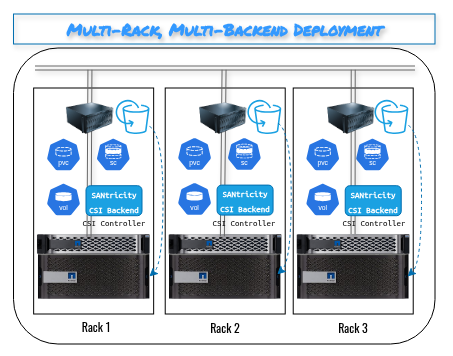
It's made to work similar to the way DAS works. But it can be used like SANs - two boxes, one PG-driven replica per box, one instance of CSI driver. Or just use TopoLVM if that's simpler.
Postgres clustering with CloudNativePG
This is a complex topic, to say the least. Not because it's hard, but because it's mature, comprehensive, and there are several good approaches that all have merits.
I've been using PostgreSQL clusters for many years, but not in a "sustained manner", so to speak. I deploy 'em when I need 'em, and for static workloads they're low maintenance. So, I'm not what one would call a DBA type.
Add to that the fact that the CloudNativePG documentation is rich and comprehensive, and I don't have much to add. I will, however, make comments from a storage, especially E-Series and SolidFire, perspective. These are mostly aimed at storage folks trying to do this better.
Approaches
Cloud Native PG relies on backup of the following:
- All database files, and
- WAL files
There's always a backup, and CloudNativePG doesn't use approaches such as logical backups with pg_dump.
- There are two main approaches to creating those: plugins (commonly with backup to object stores) and CSI volume snapshots (which, in the case of SolidFire and SANtricty systems, rely on storage-based snapshots)
- Plugin-based approaches are much more flexible. You may backup a hyper-scaler-based DB and restore it to an on-prem system.
- CSI snapshots can restore large databases in a fraction of time, but they are not backups so it's not like these don't have any disadvantages. Backups can be created from volumes created from cloned snapshots, and that can be done at a steady pace, usually without any impact on database workload (depending on how snapshots and clones are implemented on particular system). You can restore your large database from a snapshot very quickly - in seconds - even if that backup to tape or some other system that runs of a cloned snapshot volume is going on.
SolidFire lets you apply arbitrary storage QoS on a clone, so backup of those can be throttled without impact on PostgreSQL volume. SANtricity has no QoS, so you can simply backup at a slower pace (fewer worker threads, lower maximum bandwidth limit, etc.).
How many replicas do you want?
It's curious how many enterprise users (and dare I say it, "storage professionals") always want "none" (aside from the "original", i.e. "primary instance"), like it's 2005.
And it's not just PostgreSQL, it's everything (Splunk, Elasticsearch, whatever).
PostgreSQL isn't the same kind of database (aside from the more exotic variants), so and "Active-Standby" with data on shared SCSI storage has been in use for decades, so that's easier to understand. Still, this isn't HA, this is Cloud Native.
Let's see what TFM says:
Be cautious when using primary as the target for cold backups using volume snapshots, as this will require shutting down the primary instance temporarily—interrupting all write operations. The same caution applies to single-instance clusters, even if you haven't explicitly set the target.
"Bbbut, how I'm going to snapshot the secondary or tertiary instance if I don't have them?"
Precisely.
This is what CloudNativePG consists of:
- A single primary instance for write operations
- Optional replicas for High Availability and read scaling
You don't get HA by running 0 replicas. If you want, use classic Active-Passive HA for that.
What about storage replication?
This is one of the questions "storage professionals" sometimes ask me because SANtricity didn't implement synchronous replication in NVMe-native arrays (currently, only the NL-SAS (SSD, HDD) model - E4000 - has it).

Let's RTFM, shall we?
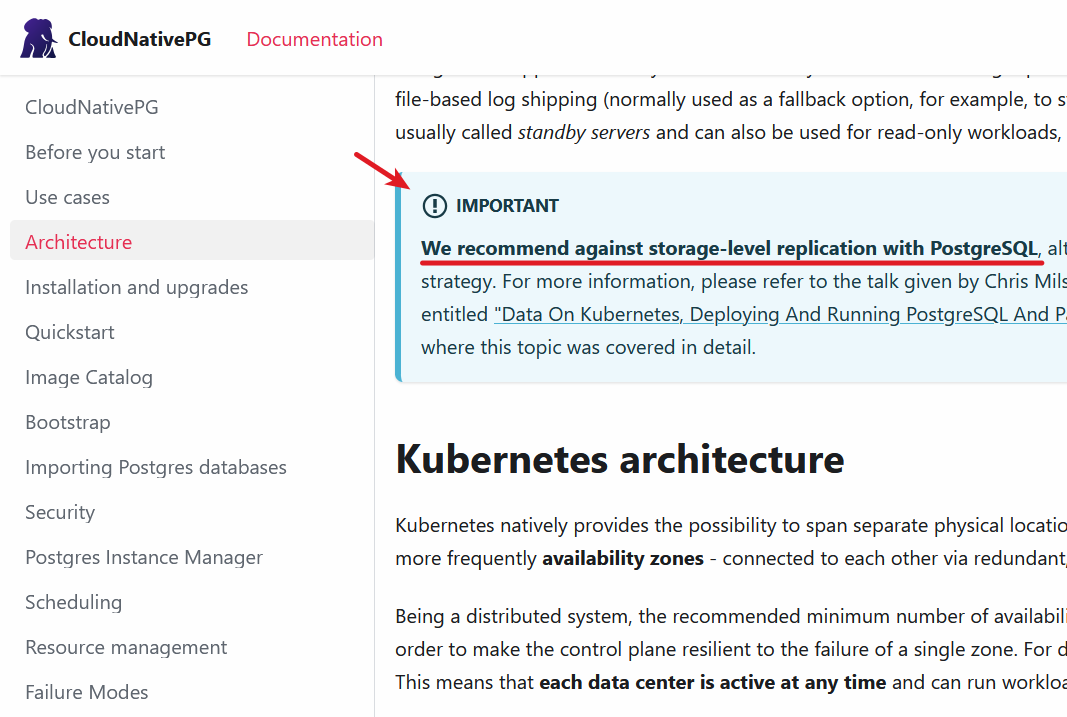
Sometimes, software vendors give storage advice that's myopic or even wrong. This isn't one of those cases, and the proof is in the CLI steps and tables further below.
CloudNative PG documentation on storage
Here, they say:
Before you deploy a PostgreSQL cluster with CloudNativePG, ensure that the storage you're using is recommended for database workloads.
Abso-freaking-lutely! I highlighted that when I wrote about "why E-Series" above.
Network storage, which is the most common usage pattern in Kubernetes, presents the same issues of throughput and latency that you can experience in a traditional environment. These issues can be accentuated in a shared environment, where I/O contention with several applications increases the variability of performance results.
Correct. The EF80 on SAN will work fine even for very large databases. But the DAS-like approach with several smaller EF arrays not only solves that, it also gives you DAS-like resilience on all levels, including CSI Controller/Driver.
Know your system: benchmark it.
I agree. And I did. Here's that link again: Faster PostgreSQL with DDP-based RAID 1 compared to DDP-based RAID 6 . (Note that this was an old server attached to an EF570 from 2017 or so - with SAS SSDs and without NVMe/RoCE. Today's "entry-level" model (EF50) is much faster).
CloudNativePG with CSI snapshots
All right, let's do it. We'll set up a two-node replicated cluster, create a backup (using CSI snapshots), and perform fail-over and fail-back to see what the fuss is all about.
Prepare SANtricity or SolidFire and CSI plugin
Let's consider what we can do today:
- SolidFire CSI supports Volume Group Snapshots (yay!), allowing me to do as much as any CSI driver out there
- IBM Block CSI with SANtricity patches supports single volume snapshots and read-only linked clones (groups are not yet supported)
- SANtricity CSI does not have snapshot support yet
Because of that, there's just one thing I can do across SolidFire and SANtricity and that is single volume databases. If I use SolidFire CSI and IBM Block CSI with SANtricity patches, CSI snapshots will work with one volume per database instance. So, one Storage Class is enough.
Because I was prototyping with SolidFire, that's what this post uses. The final version of scripts and manifests will be created for E-Series with IBM Block CSI v1.13.2 (with a SANtricity patch). There's no significant difference there except that, with IBM Block CSI, I'll have the ability to use any RAID level or DDP I want, but that depends on CSI configuration and not on our deployment manifest which just references Storage Class names.
I created a Storage Class that retains volumes, so that its snapshots don't get wiped out if the PVC gets deleted.
$ kubectl get sc | grep retain
solidfire-retain               csi.solidfire.com              Retain          Immediate           false                  5h7m
For that Storage Class, I have created a Volume Snapshot Class.
$ kubectl get volumesnapshotclass
NAME                         DRIVER              DELETIONPOLICY   AGE
solidfire-snapclass-retain   csi.solidfire.com   Retain           6h7m
Make sure PVCs can be created and used, and that snapshots work.
Deploy CloudNativePG
Next, deploy the operator. For that, I've created a deploy script that will be posted to my ESeries repository on Github where I've posted other Kubernetes templates for ESeries (the one for Qdrant yesterday, for example).
The script takes two parameters, <storage_class>,<volume_snapshot_class> (why, see further below).
$ ./deploy.sh solidfire-retain,solidfire-snapclass-retain

Using Storage Class: solidfire-retain
Using Volume Snapshot Class: solidfire-snapclass-retain
namespace/cnpg-backup created
Deploying CloudNativePG Cluster...
clusterimagecatalog.postgresql.cnpg.io/postgresql-global unchanged
secret/eseries-auth created
cluster.postgresql.cnpg.io/cluster-example created
service/cluster-example-nodeport created
==========================================================
PostgreSQL cluster deployed successfully to 'cnpg-backup' namespace.
Wait for the pods to be ready:
  kubectl get pods -n cnpg-backup -w

Access PostgreSQL via NodePort on port 31432.
Wait for the cluster to be completely healthy, then initiate a backup:
  kubectl apply -n cnpg-backup -f backup.yaml
As you can see, service uses NodePort which isn't what one would do in production, but it doesn't impact storage-focused testing.
Then we watch it until it's done.
$ kubectl get pods -n cnpg-backup -w
NAME                             READY   STATUS     RESTARTS   AGE
cluster-example-1-initdb-xc85x   0/1     Init:0/1   0          9s
This creates a pair of replicated databases and injects 100K records in a table to give the PG instances and volumes something to do.
$ kubectl get pods -n cnpg-backup
NAME                             READY   STATUS      RESTARTS   AGE
cluster-example-1                1/1     Running     0          76s
cluster-example-1-initdb-xc85x   0/1     Completed   0          2m14s
cluster-example-2                0/1     Init:0/1    0          7s
cluster-example-2-join-bjz22     0/1     Completed   0          62s
Once they settle:
$ kubectl get pods -n cnpg-backup
NAME                READY   STATUS    RESTARTS   AGE
cluster-example-1   1/1     Running   0          174m
cluster-example-2   1/1     Running   0          173m
Backup
Backups can be scheduled or on-demand. I used on-demand - no need to schedule them, and no need to wait either.
$ kubectl apply -n cnpg-backup -f ./kubernetes/postgresql_csi_snapshot_backup/backup.yaml
backup.postgresql.cnpg.io/backup-on-demand created
Check:
$ kubectl get backup -n cnpg-backup -w
NAME               AGE   CLUSTER           METHOD           PHASE       ERROR
backup-on-demand   6s    cluster-example   volumeSnapshot   completed
This is supposed to be the highlight of the post, I suppose, but I'm aiming to do that with E-Series, so I'll revisit this in Part Two (which will focus on CloudNativePG with plugins).
A snapshot did get created, all right, it's just that it's on SolidFire. You can see it here, created on the primary instance at the time, Volume ID 646.
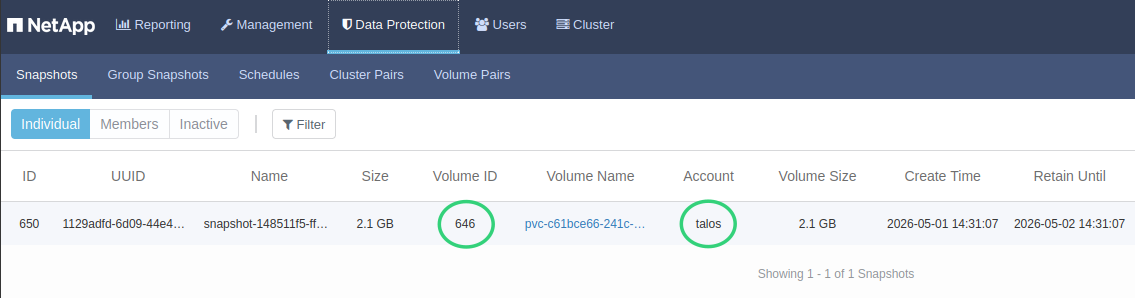
Because we have a replicated cluster and I'd likely have to delete both and re-install to test recovery from a full backup, I'll just leave this for next time. From TFM:
In CloudNativePG, recovery is not performed in-place on an existing cluster. Instead, it is used to bootstrap a new cluster from a physical backup.
So, there's really nothing to prove - we'd have to stand up a new one, using a backup - either from a CSI snapshot, or copy of data created by a CloudNative backup plugin, or a data mover (from a snapshot-derived clone, to something like S3 - see how that's done with Velero CSI and Kopia data mover with E-Series CSI).
Fail-over and fail-back
Let's nuke the primary instance!
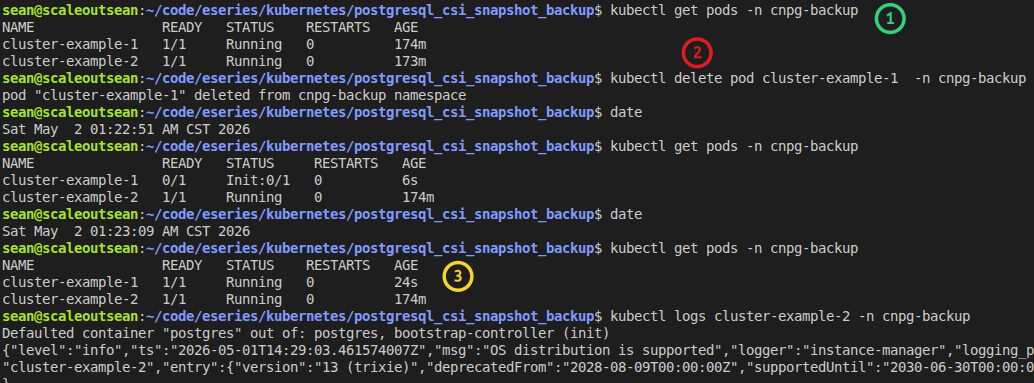
- (1) both pods are up
- (2) we delete the primary instance
- (3) it's back within seconds (can be scheduled on same or other worker)
It's even better to look at that log from the secondary instance, because my typing added delay - (2) happened around 22:45 and two seconds later the secondary was on it.
| Time | Event |
|---|---|
| 2026-05-01T17:22:47.19350122Z | "err":"getting replication slot status from primary: failed to connect… " |
| 2026-05-01T17:22:48.211066026Z | "msg":"Setting myself as primary" |
| 2026-05-01T17:22:48.21720731Z | "msg":"I'm the target primary, applying WALs and promoting my instance" |
| 2026-05-01T17:22:49.162637245Z | "message":"checkpoint complete…" |
| 2026-05-01T17:22:49.188734319Z | "msg":"Finished setting myself as primary" |
And it took it just two seconds to get its act together!
Later I performed fail-back by killing the the active secondary:
$ date; kubectl delete pod cluster-example-2 -n cnpg-backup; sleep 5; date; kubectl get pods -n cnpg-backup

Sat May  2 01:44:47 AM CST 2026
pod "cluster-example-2" deleted from cnpg-backup namespace
Sat May  2 01:44:53 AM CST 2026
NAME                READY   STATUS     RESTARTS   AGE
cluster-example-1   1/1     Running    0          22m
cluster-example-2   0/1     Init:0/1   0          4s
Five seconds later, it's been up already up for 4 seconds. Amazing.
No synchronously replicated storage system can match that.
Why just one SC?
I wanted to use two SCs and one VSC, but I can't do that with E-Series yet because I can't use Volume Group Snapshots which limits me to one volume per database. That is also why I haven't posted the deployment script to the ESeries repo yet.
Once Volume Group Snapshots are added to IBM Block CSI with SANtricity patch, we'll be able to do ./deploy.sh sc1,sc2,vsc and have Postgres data on a RAID 6 SC, WAL on RAID 1, and use CGs to snapshot both at the same time. SANtricity CSI should eventually be able to do that as well.
CSI-related monitoring
One of the nice things about SolidFire CSI (and SANtricity CSI) is these, unlike IBM's CSI driver (even the patched one), inject PVC metadata to SolidFire (and E-Series, respectively) volume properties.
Since I've worked on SolidFire CSI today, here's how that looks like (volume metadata shown on mouse hover in SolidFire UI, so I had to capture an area outside of browser window):
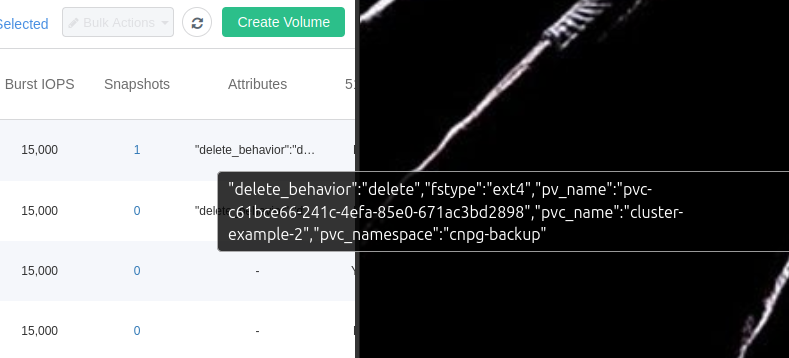
Volume metadata are collected by SolidFire Collector, and also by E-Series Performance Analyzer 4 (currently in beta).
What that means, of course, is that I'll be able to do WHERE pvc_namespace='cnpg-backup' and get my performance or other stats for that namespace selected without needing to care about PVC names.
There is more good news in that area, but I'll write about that in another post.
CloudNativePG has own monitoring and dashboards, as one would expect, and based on their documentation those seem very complete (better than mine, in any case).
SolidFire and SANtricity CSI plugins
I'll use this section to quickly summarize the status of my CSI plugins for SolidFire and SANtricity CSI.
| Array | Driver | Status (single/group snapshots/clones) |
|---|---|---|
| SolidFire | SolidFire CSI | Snapshots, Clones, Volume Group Snapshots, Volume Group Clones - all OK |
| E-Series | IBM Block CSI with SANtricity Patch | Single Snapshots and Read-Only Linked Clones - OK ; Groups - WIP |
| E-Series | SANtricity CSI | Single/group Snapshots and R-O Linked Clones - all WIP |
I aim to implement CSI Volume Group Snapshots and Linked Clones for the both E-Series drivers. Snapshots and R-O Linked Clones for the IBM-based driver were added earlier this week, so things are moving forward.
I haven't written much about SolidFire CSI since I posted it to Github, but because that thing could do everything the day I posted it. I used this opportunity to put SolidFire CSI to use with something "real", although I did run "stress tests" before. SolidFire CSI was released in March and technically it's still in "beta". Today I found and fixed several small bugs related to packaging; CSI driver itself did not have any problems at all. It looks robust and well behaved, and after many tiny updates, it's currently v1.0.0-beta.11. It's not like anyone delays using it because it's still in beta, or like anyone will use it when it's not, but I'll likely release v1.0.0 this month.
There are other drivers for both of these, NetApp Trident CSI for SolidFire and several other for E-Series (shared earlier) - check them out if interested!
Conclusion
CloudNative PG with CSI snapshots exceeded my expectations:
- Excellent - if overwhelming - documentation
- Fast - cloud-native, really - fail-over and fail-back
- Everything just works, including backups
In recent days I tried and blogged about various Kubernetes operators for "modern" databases such as Splunk and Elasticsearch, but CloudNativePG doesn't look like it manages a "legacy" database at all.
Every time I try one of the applications suitable for E-Series using one of my CSI drivers, it makes me even more convinced E-Series is most suitable for these workloads in Kubernetes environments, too.
I wouldn't recommend my driver(s) over TopoLVM as I haven't evaluated it for years, but that's not necessary either - the role of a CSI driver is to solve storage provisioning and ideally neither the driver nor the array should be visible or get in user's way. That's how SolidFire CSI and SolidFire work, too.
E-Series lacks many things, but none of them diminish - and some even help (the slim software stack) - its suitability for cloud-native workloads. We haven't even talked about the performance - possibly its most significant advantage compared with "modern" enterprise arrays these days - on something less ancient than EF570, but that will be subject of a separate post.
I look forward to Part Two (CloudNativePG using the plugin approach) in which we'll backup to Versity S3 Gateway. We'll also evaluate database recovery from CSI snapshots and S3 - all backed by E-Series.
Appendix A: SolidFire CSI v1.0.0-beta.11
I used a three-node Talos Linux cluster.
$ kubectl get node -o wide
NAME          STATUS   ROLES           AGE   VERSION   INTERNAL-IP     EXTERNAL-IP   OS-IMAGE          KERNEL-VERSION   CONTAINER-RUNTIME
talos-cp-01   Ready    control-plane   74d   v1.35.0   192.168.1.191   <none>        Talos (v1.12.4)   6.18.9-talos     containerd://2.1.6
talos-cp-02   Ready    <none>          74d   v1.35.0   192.168.1.168   <none>        Talos (v1.12.4)   6.18.9-talos     containerd://2.1.6
talos-cp-03   Ready    <none>          74d   v1.35.0   192.168.1.188   <none>        Talos (v1.12.4)   6.18.9-talos     containerd://2.1.6
With a values.yaml file like this…
solidfire:
  endpoint: "192.168.1.34" # MVIP
  username: "admin"        # admin
  password: "____"         # password
  defaultTenant: "talos"   # default tenant name

storageClass:
  create: true
  isDefault: true
… we clone https://github.com/scaleoutsean/solidfire-csi, enter the directory and run this:
$ helm upgrade --install solidfire-csi ./helm/solidfire-csi -f ~/values.yaml -n solidfire-csi --create-namespace
If it works, rm ~/values.yaml or at least clear the password value. This below would be "it works".
Release "solidfire-csi" has been upgraded. Happy Helming!
NAME: solidfire-csi
LAST DEPLOYED: Fri May  1 22:16:14 2026
NAMESPACE: solidfire-csi
STATUS: deployed
REVISION: 2
DESCRIPTION: Upgrade complete
TEST SUITE: None
NOTES:
Thank you for installing the SolidFire CSI Driver 0.1.0!

The driver is being deployed to the solidfire-csi namespace.

Check the status of the controller pods:
  kubectl get pods -n solidfire-csi -l app=solidfire-csi-controller

Check the status of the node pods:
  kubectl get pods -n solidfire-csi -l app=solidfire-csi-node

Verify the StorageClass is available:
  kubectl get sc solidfire-bronze

To create a PVC, use the storage class name 'solidfire-bronze'.

For more information and documentation, visit:
  https://github.com/scaleoutsean/solidfire-csi
CSI controller runs in Active-Standby pattern and there's one CSI node per worker.
$ kubectl get pods -n solidfire-csi
NAME                                        READY   STATUS    RESTARTS        AGE
solidfire-csi-controller-5dd55b5558-q2vkf   5/5     Running   0               166m
solidfire-csi-controller-5dd55b5558-wsjmz   5/5     Running   24 (169m ago)   175m
solidfire-csi-node-gzqzf                    2/2     Running   0               166m
solidfire-csi-node-kzlrb                    2/2     Running   0               165m
solidfire-csi-node-xpfg2                    2/2     Running   0               165m
Wait, why did that pod get restarted 24 times? OMG!!!
It got restarted because SolidFire CSI container image took 16 minutes to build, during which time deployment was failing.
Appendix B: CloudNative PG with SolidFire CSI in SolidFire UI
Volumes that belong to two deployed instances (primary, replica) with (2) partially showing CSI-injected metadata:
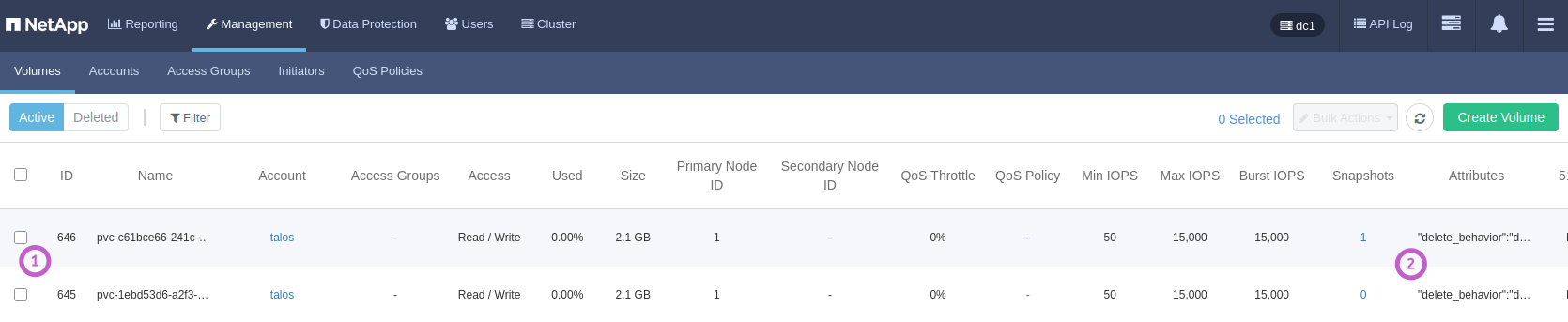
Volume of one of the instances (1) with metadata (2) visible:

Volume metadata shown on mouse hover:
The first metadata key is a SolidFire CSI setting related to the use of Recycle Bin for deleted volumes. delete means that even accidentally deleted PVCs with retention policy Delete would remain in Recycle Bin - fully rescue-able (together with any snapshots) - for several hours.
CloudNativePG-created CSI snapshot: