Cloud-Native Postgres Backup (Barman) with Kubernetes and NetApp SANtricity
- PART ONE: CloudNativePG with CSI snapshots
- PART TWO: CloudNativePG backup with Barman plugin (this post)
- PART THREE: CloudNativePG performance test with EF-Series (NVMe/ROCE)
Introduction
Parts one and three were done before part two, but I'm about to complete this initial set of three posts on Kubernetes-based PostgreSQL with NetApp E-Series, and - as incredible as it may seem - once again conclude E-Series is a great fit for CNPG in all its incarnations.
I've mentioned why in other posts, so I'll just skip all that.
PG Barman and CNPG Barman
In the past I'd used several backup and log-shipping utilities for PostgreSQL, but I hadn't used Barman. I can't recall why I didn't use it, but I think I used other plugins at the time PG Barman did not exist or wasn't well known (the first Github release is dated July 2021).
It seems to be the default for CNPG (understandably so, it seems EnterpriseDB backs both projects), so it's time to try it out. The official name is Barman Cloud CNPG-I plugin.
What's most interesting about this approach to me is: there's no Barman server and Barman disk in this CNPG-I approach. From the link above:
The Barman Cloud Plugin for CloudNativePG enables online continuous physical backups of PostgreSQL clusters to object storage using the barman-cloud suite from the Barman project.
From database to S3!
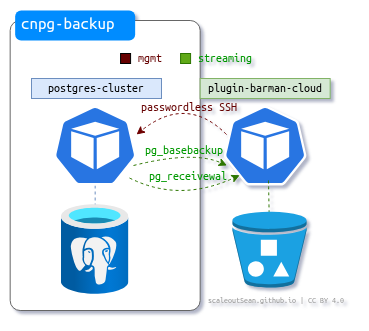
As depicted here - hopefully correctly, but it might not be - Barman gets data from PostgreSQL (the primary instance, in case of PG clusters), and ships that stuff to S3. It hasn't even a temporary PVC. There's the option to use SSH and rsync instead of this depicted approach, but that seemed silly, so I did not explore that.
My setup:
- Kubernetes v1.36.1
- CNPG v1.29.1 with Barman Cloud (CNPG-I) plugin 0.12.0
- Versity Gateway v1.5.0 (S3)
My initial approach used SolidFire CSI, Versity S3 in its own namespace. cert-manager is required by Barman Plugin. The cnpg-system namespace runs CNPG controller and Barman Cloud plugin, and cnpg-backup is where the databases run, and where backup and restore will happen.
$ kubectl get ns
NAME                   STATUS   AGE
cert-manager           Active   165m
cnpg-backup            Active   158m
cnpg-system            Active   2d14h
solidfire-csi          Active   8d
versitygw              Active   159m
Here's what I have in terms of pods and PVCs in the two relevant namespaces (my single instance cluster is running in cnpg-backup):
$ kubectl get pvc,pod -n cnpg-system
NAME                                        READY   STATUS    RESTARTS        AGE
pod/barman-cloud-bf7cc5cc7-bnvz6            1/1     Running   0               140m
pod/cnpg-controller-manager-b66cbbb-5mk94   1/1     Running   1 (2d13h ago)   2d14h

$ kubectl get pvc,pod -n cnpg-backup
NAME                                      STATUS   VOLUME                                     CAPACITY   ACCESS MODES   STORAGECLASS       VOLUMEATTRIBUTESCLASS   AGE
persistentvolumeclaim/cluster-example-1   Bound    pvc-721d8ba5-e81f-4b50-af75-d3c2d1f34d57   2Gi        RWO            solidfire-bronze   <unset>                 134m

NAME                    READY   STATUS    RESTARTS   AGE
pod/cluster-example-1   2/2     Running   0          119m
Like in the first post, I was using SolidFire CSI but I'll update this post with SANtricity CSI-based examples in parts where that is relevant (performance, especially).
Backup and restore
The first post already illustrated backup and restore with CSI snapshots. Here, we don't use CSI snapshots and they're not supported by CNPG Barman in any case (they are supported, but only in the three hyperscalers, not on-premises).
If you prefer CSI snapshots, use them, if you prefer this "cloud-native" way, use it. You can also use Barman Cloud and schedule snapshots separately.
Advantages of Barman's "backup to cloud" approach in CNPG:
- Point-in-time recovery is available thanks to continuous WAL log shipping
- Near 0 RPO without consuming Tier 1 storage capacity through CSI snapshot reservations (which is a major factor for E-Series, I would say, especially if you do it right and use RAID 10 NVMe-backed Storage Class for Postgres PVC(s)!)
- Hot backup only (no cold backup or old school "freeze and snapshot" stuff)
- Requires backup to object store ("backup to cloud"; other generic Barman approaches can't work)
So, the database administrator can restore (or make a clone of) a database cluster, single or multi-instance, to any point in time available on Barman Cloud timeline and stored on S3. There are no "snapshot schedules", there's just just a periodic full baseline backup schedule (say, on Sundays or nightly).
Assuming this sounds appealing, and you want to switch from CSI snapshots (or use this in addition to CSI snapshots) what does that mean for your E-Series?
It means more work for it. All WAL logs must be streamed, which amplifies the write workload that's creating WAL data by doing an equal amount of reads (on WAL files) to ship WAL files to Barman.
Then, if you happen to backup to S3-compatible object store (VM, bare metal server, container) using the same E-Series box (but maybe a nearline SAS backed volume), you have some extra sequential writes there.
As we've mentioned, periodically (weekly or nightly) we may stream the entire database to S3 to create a new baseline backup.
And finally, read and write performance during restores becomes very important - the faster you read from S3, the faster you can write to restore target PVC and the sooner you restore. Especially if you're restoring an entire database - which may be a multi-instance cluster with 2-3 PostgreSQL instances, each with own PVC(s) - and not just getting selected WAL files or downloading selected baseline backup:
- read compressed data from S3 at 500-1,000 MB/s
- restore data to single volume PVC at > 1,500 MB/s (or 3-4 GB/s for multi-instance CNPG clusters)
- avoid interfering with other workloads and ongoing Barman Cloud backups
Not all arrays can easily handle such workloads even with plenty of disks. It's reasonably safe to say that, if you can't read data from a PVC faster than 2 GiB/s, that baseline backup of a 2 TiB-sized database will take more than 1,000 seconds, while users complain about slow queries.
In Barman Cloud, full restores are done to a new cluster, hence postgres-cluster-nu here.
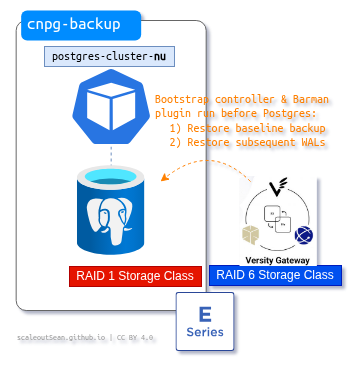
The restore process is not very simple; there's the usual magic of temporary pods that download all data from S3 backup bucket - a baseline backup plus all subsequent WAL files up to required point-in-time - and run a restore, then PostgreSQL init needs to change ownership of restored data and finally can start. You can find more about it in the Barman Cloud plugin documentation.
Most of these are "extra" workloads that we mentioned in this section don't appear in CSI snapshot workflows. There, we take a snapshot, create a read-only clone from it, and use a Data Mover to read data off that clone and copy it to S3. This is why array performance is important for anyone using CNPG backup-to-cloud plugin this way.
If the original cluster wasn't destroyed, you'd end up with another cluster on restore. In this output below, that's cluster-restore.
$ kubectl get pvc,pod -n cnpg-backup
NAME                                      STATUS   VOLUME                                     CAPACITY   ACCESS MODES   STORAGECLASS       VOLUMEATTRIBUTESCLASS   AGE
persistentvolumeclaim/cluster-example-1   Bound    pvc-721d8ba5-e81f-4b50-af75-d3c2d1f34d57   2Gi        RWO            solidfire-bronze   <unset>                 134m
persistentvolumeclaim/cluster-restore-1   Bound    pvc-99c2a755-9122-4b80-8e08-a018f4dd682a   2Gi        RWO            solidfire-bronze   <unset>                 67m

NAME                    READY   STATUS    RESTARTS   AGE
pod/cluster-example-1   2/2     Running   0          119m
pod/cluster-restore-1   1/1     Running   0          62m

$ kubectl get pvc,pod -n cnpg-system
NAME                                        READY   STATUS    RESTARTS        AGE
pod/barman-cloud-bf7cc5cc7-bnvz6            1/1     Running   0               140m
pod/cnpg-controller-manager-b66cbbb-5mk94   1/1     Running   1 (2d13h ago)   2d14h
I should add that even in this very particular configuration, there are still many options that can significantly impact backup and restore.
Workflow
Check if Barman is running in cnpg-system:
$ kubectl get pods   -n cnpg-system -l app=barman-cloud
NAME                           READY   STATUS    RESTARTS   AGE
barman-cloud-bf7cc5cc7-bnvz6   1/1     Running   0          4h3m
Our backup destination and restore source was a Versity S3 Gateway mentioned earlier.
$ kubectl get ObjectStore -n cnpg-backup
NAME        AGE
vgw-store   3h44m

$ kubectl describe ObjectStore -n cnpg-backup
Name:         vgw-store
Namespace:    cnpg-backup
Labels:       <none>
Annotations:  <none>
API Version:  barmancloud.cnpg.io/v1
Kind:         ObjectStore
Metadata:
  Creation Timestamp:  2026-06-03T07:34:23Z
  Generation:          1
  Resource Version:    2134847
  UID:                 2cd0d6df-2db0-4009-a33b-d3dd176945ca
Spec:
  Configuration:
    Destination Path:  s3://barman/
    Endpoint URL:      http://versitygw.versitygw.svc.cluster.local:7070
    s3Credentials:
      Access Key Id:
        Key:   ACCESS_KEY_ID
        Name:  vgw-creds
      Secret Access Key:
        Key:   ACCESS_SECRET_KEY
        Name:  vgw-creds
    Wal:
      Compression:  gzip
Status:
  Server Recovery Window:
    Cluster - Example:
      First Recoverability Point:   2026-06-03T08:01:15Z
      Last Successful Backup Time:  2026-06-03T08:01:15Z
Events:                             <none>
Alternatively, we could query Barman Object Store by name (vgw-store) with: kubectl get objectstores.barmancloud.cnpg.io -n cnpg-backup vgw-store -o yaml
Backup
Using declarative cloud backup approach, we run kubectl apply -f backup.yaml -n cnpg-backup on this backup.yaml file:
apiVersion: postgresql.cnpg.io/v1
kind: Backup
metadata:
  name: second-try
spec:
  cluster:
    name: cluster-example
  method: plugin
  pluginConfiguration:
    name: barman-cloud.cloudnative-pg.io
This creates a new baseline backup and Barman Cloud sends it to S3.
$ kubectl get backups.postgresql.cnpg.io -n cnpg-backup
NAME         AGE   CLUSTER           METHOD   PHASE     ERROR
second-try   5s    cluster-example   plugin   started

$ kubectl describe backups.postgresql.cnpg.io second-try -n cnpg-backup
Name:         second-try
Namespace:    cnpg-backup
Labels:       <none>
Annotations:  <none>
API Version:  postgresql.cnpg.io/v1
Kind:         Backup
Metadata:
  Creation Timestamp:  2026-06-03T07:57:50Z
  Generation:          1
  Resource Version:    2134849
  UID:                 1f20f5b1-0d09-498f-bf38-1f6519160418
Spec:
  Cluster:
    Name:  cluster-example
  Method:  plugin
  Plugin Configuration:
    Name:  barman-cloud.cloudnative-pg.io
Status:
  Backup Id:    20260603T075751
  Backup Name:  backup-20260603075751
  Begin Lsn:    0/D000060
  Begin Wal:    00000001000000000000001A
  End Lsn:      0/D0001C8
  End Wal:      00000001000000000000001A
  Instance Id:
    Container Id:  containerd://080334ac68f9f81aeeaff3d8c53f04c3d40a3fc992750450ecdbb3bef2ba0557
    Pod Name:      cluster-example-1
    Session Id:    a3f69424-b1f4-43e2-a86b-acf7a145ec82
  Major Version:   18
  Method:          plugin
  Online:          true
  Phase:           completed
  Plugin Metadata:
    Cluster UID:                 19d5ed3e-bdaa-4547-a3ed-12c92880eb18
    Display Name:                BarmanCloudInstance
    Name:                        barman-cloud.cloudnative-pg.io
    Plugin Name:                 barman-cloud.cloudnative-pg.io
    Timeline:                    1
    Version:                     0.12.0
  Reconciliation Started At:     2026-06-03T07:57:50Z
  Reconciliation Terminated At:  2026-06-03T08:01:55Z
  Started At:                    2026-06-03T07:57:53Z
  Stopped At:                    2026-06-03T08:01:15Z
Events:                          <none>
This took only 4 minutes because the "demo" database was small. (As I've mentioned, I did not use SANtricity CSI here; when that happens we'll use larger databases).
WAL log shipping
This is happening automatically on a continuous basis by barman-cloud-wal-archive as WAL files are rotated:
- WAL log file is read and streamed to S3
- That causes extra read workload on WAL logs (which are normally never "read")
- Writing to S3 - if on E-Series - results in extra write workload on S3 (compared to when there's no log shipping)
- If there's one or more replica, each causes extra write workload
Restore
Find a backup to restore and apply a restore manifest.
apiVersion: postgresql.cnpg.io/v1
kind: Cluster
metadata:
  name: cluster-restore
spec:
  instances: 1
  imagePullPolicy: IfNotPresent
  bootstrap:
    recovery:
      source: source
  externalClusters:
  - name: source
    plugin:
      name: barman-cloud.cloudnative-pg.io
      parameters:
        barmanObjectName: vgw-store
        serverName: cluster-example
  storage:
    storageClass: solidfire-bronze
    size: 2Gi
Note there's no "date" or PiT datetime in this restore job. In that case Barman Cloud restores latest.
If you wanted to restore a backup to a cluster for end-of-month reporting, you could use a PiT for that.
bootstrap:
  recovery:
    source: cluster-eom-report
    recoveryTarget:
      time: "2026-06-03 23:59:59+00"
Going with our "latest" approach:
$ kubectl apply -f /home/sean/code/eseries/kubernetes/postgresql_plugin_backup/restore.yaml -n cnpg-backup
cluster.postgresql.cnpg.io/cluster-restore created
This multi-step process takes a while. cluster-example-1 is our existing cluster, while cluster-restore-1-full-recovery is where database restore is happening.
$ kubectl get pods -n cnpg-backup -w
NAME                                    READY   STATUS     RESTARTS   AGE
cluster-example-1                       2/2     Running    0          51m
cluster-restore-1-full-recovery-g5w6v   0/2     Init:0/2   0          6s
cluster-restore-1-full-recovery-g5w6v   0/2     Init:0/2   0          21s
cluster-restore-1-full-recovery-g5w6v   0/2     Init:0/2   0          21s
cluster-restore-1-full-recovery-g5w6v   0/2     Init:1/2   0          23s
cluster-restore-1-full-recovery-g5w6v   0/2     Init:1/2   0          50s
cluster-restore-1-full-recovery-g5w6v   0/2     PodInitializing   0          51s
cluster-restore-1-full-recovery-g5w6v   1/2     PodInitializing   0          52s
cluster-restore-1-full-recovery-g5w6v   2/2     Running           0          52s
If you look at the logs of that pod, you can see those different steps mentioned earlier.
$ kubectl logs -n cnpg-backup cluster-restore-1-full-recovery-g5w6v
Defaulted container "full-recovery" out of: full-recovery, bootstrap-controller (init), plugin-barman-cloud (init)
{"level":"info","ts":"2026-06-03T08:42:27.952342373Z","msg":"Starting webserver","logging_pod":"cluster-restore-1-full-recovery","address":"localhost:8010","hasTLS":false}
{"level":"info","ts":"2026-06-03T08:42:28.054560343Z","msg":"Restore through plugin detected, proceeding...","logging_pod":"cluster-restore-1-full-recovery"}
{"level":"info","ts":"2026-06-03T08:42:32.04145153Z","msg":"Creating new data directory","logging_pod":"cluster-restore-1-full-recovery","pgdata":"/controller/recovery/datadir_3302259461","initDbOptions":["--username","postgres","-D","/controller/recovery/datadir_3302259461","--no-sync"]}
The end result is a second (single instance) cluster.
$ kubectl get pods,pvc -n cnpg-backup
NAME                                        READY   STATUS     RESTARTS   AGE
pod/cluster-example-1                       2/2     Running    0          51m
pod/cluster-restore-1-full-recovery-g5w6v   0/2     Init:0/2   0          10s

NAME                                      STATUS   VOLUME                                     CAPACITY   ACCESS MODES   STORAGECLASS       VOLUMEATTRIBUTESCLASS   AGE
persistentvolumeclaim/cluster-example-1   Bound    pvc-721d8ba5-e81f-4b50-af75-d3c2d1f34d57   2Gi        RWO            solidfire-bronze   <unset>                 67m
persistentvolumeclaim/cluster-restore-1   Bound    pvc-99c2a755-9122-4b80-8e08-a018f4dd682a   2Gi        RWO            solidfire-bronze   <unset>                 10s
If you wanted to protect this new cluster, you'd have to separately set it up for Barman Cloud backup.
E-Series CSI and Barman Cloud CNPG-I backup
Not everyone who uses Barman uses the CNPG-I approach. Those who don't run CNPG can't, and even those who do may prefer Barman on a separate VM or bare metal server.
Even if you run Barman containerized on Kubernetes, you can still use one of those "traditional" approaches.
Barman Cloud's approach is very different. It's really continuous backup and there's no backup server or even backup disk. Users can also retain CSI backups (or maybe just take CSI snapshots) and use CNPG for continuous backup; you get backup/restore, BC and DR. This is great for E-Series because you don't have to use array replication and - if you avoid CSI snapshots, or always rotate and keep just one CSI snapshot - you get best of both worlds.
Note, however, that an in-place roll-back of a CSI snapshot would mess up your Barman Cloud continuous backup, so it's not recommended to mess around with conflicting data protection schemas on the same database cluster. We would have to make a Linked Clone of that data elsewhere in order to avoid messing up Barman Cloud continuous backup, or roll-back regardless and give up on recent backups done in Barman Cloud (take another baseline and start from scratch).
Barman Cloud adds extra workloads and E-Series is well equipped to deliver on it. For large ,or many small-to-medium, environments:
- Run PostgreSQL on NVMe-based DDP storage pool with a RAID 1-based Storage Class
- If you use Versity S3 Gateway and have a hybrid (SSD/HDD) E-Series, you can put S3 data on a NL-SAS-based DDP with a RAID 6 Storage Class
As you could see in the performance post, it's easy to get more than 1 GB/s from a PostgreSQL instance (even on a NVMe DDP with a RAID 6-backed SC). We also saw in other posts that multiple GB/s can be achieved on a single volume. Assuming 800 MB/s restore performance seen in the CNPG performance post, that means we need just 20 minutes to restore a 1 TiB database in full without losing almost no transactions.
Let's not forget that CNPG could have an independent replica server, so we wouldn't necessarily have to restore anything if the primary server failed - as we saw in Part One, replica would take over in 35 seconds (unplanned) or much less (planned switch-over).
Also let's not forget that the CNPG approach gives us not just backups, but Business Continuity and Disaster Recovery, too, which is virtually impossible with E-Series as of now:
- There's no async replication for E4000 with iSCSI, for example
- For EF600 and EF300 controllers, the primary and secondary volumes of an asynchronous mirrored pair must match the same protocol, tray level, segment size, security type, and RAID level
- EF50 and EF80 support neither sync nor async mirroring
Conclusion
CNPG uses cloud-native ways (database replicas, continuous backup) to solve a lot of database and data protection problems related to PostgreSQL that E-Series has no realistic way of solving.
The official recommendation is basically to use CNPG (not literally, let me quote this):
It is recommended to use replication (mirroring) and erasure coding features available in modern applications.
Indeed.
Not only does it solve those problems, but it does so in ways that are highly complementary to what E-Series does - reliable, high-performance block targets that lower risks of losing cluster nodes and minimize risk.
By default, SANtricity reserves 40% of base volume capacity for snapshots. With CNPG-I, we can completely eliminate CSI snapshots, or maybe reserve 5% and run a schedule that takes a snapshot every 5 minutes. You save 20-30% of NVMe capacity with log shipping and with S3 bucket located outside the cluster has Object Lock enabled, those database backups are practically indestructible.
If a disaster strikes, CNPG can activate a replica within seconds (see the first post in this series) and if that's not possible, you still have near 0 RPO based on backups in object store. If you somehow lose both, then you can still decide to:
- Restore almost all data with Barman Cloud and suffer 5-30 minutes of downtime (recommended), or
- Roll-back in place from a CSI or hardware snapshot which would result in less downtime but in more data loss and your Barman Cloud would be broken so you'd have to spend some time on fixing that (not recommended, but if you have a very large database and can't be offline for hours, maybe this is not a terrible trade-off)
Before HA CSI drivers for E-Series existed, one could use something like TopoLVM CSI and run CPNG clusters with replicas for HA, which was fine but sometimes expensive. Now we can choose - replicated or single instance database that can be restarted from another Kubernetes node without putting a lot at risk - and E-Series can easily handle the extra workload of continuous backup and on-demand restores.
I don't know much about Barman and CNPG, but I can easily tell this is a perfect match for E-Series, and I hope to illustrate that with some backup & restore examples with SANtricity CSI in the coming days.