S3 GO NATS!
- Part 1 - S3 vector search: S3 vector search - DIY vs AWS S3 Vectors
- Part 2 - S3 vector search: S3 GO NATS! (this post)
The first part was a rant against the current (or you might say emerging) approaches. This part attempts to demonstrate why not all but many S3 users shouldn't use AWS S3 Vectors or their on-premises S3 vendor's vector DB integration.
- Introduction
- Poor man's S3 Vectors
- Bring your own vectors with "S3 GO NATS"
- How is that better?
- "We don't do DIY"
- Conclusion
- Appendix A: S3 GO NATS screenshots
Introduction
Continuing from the rant in Part 1, this post aims to demonstrate:
- how AWS S3 could have "solved" this better for its S3 users
- how on-premises S3 vendors could do vector search right rather than redundantly productize open source stuff with little-to-no value added
What you see in this post took me a few evenings and a full (last) weekend to create and it's similar (mostly better) than what some S3 vendors sell as products.
In other words, in my book that doesn't qualify as a "product" and shouldn't be tightly tethered to a storage product or service (AWS S3 or on-premises S3 storage).
Poor man's S3 Vectors
This idea originated before S3 Vectors was announced and after I started looking various "stacks" that many storage vendors are marketing these days, which was in the post about BeeGFS gRPC event notifications in version 8 (of BeeGFS). As I mentioned here and here, we have all the tools to do "our own thing" in terms of building data pipelines (including those for AI and therefore vector search).
More importantly, when "rolling your own", you don't have to come up with a highly proprietary, complex solution. You can use open source software and stick to established approaches while not without making compromises.
I spent most of my free time in late June and early July working on another thing (Firemox), so AWS S3 Vectors got released before I managed to create my own take on "vector search for on-prem S3 users", but seeing the S3 Vectors announcement also gave me the opportunity to reflect on S3 in general and their take on S3 vector search.
One of the scenarios in my S3-related data pipeline posts is creating and updating vector indices for directories and/or buckets.
I actually toyed with this idea last year in the post about StorageGRID Kafka notifications when I observed that notifications don't contain metadata or tags, but let's move on.
Bring your own vectors with "S3 GO NATS"
As I said in the first post of this "Vector search for S3" series, when it comes to vector search most on-premises S3 vendors spent half a decade totally asleep at the wheel and are now over-compensating with unnecessary bloat and productized "solution stacks".
When I started working with Versity S3 Gateway and BeeGFS anti-virus scanning solution, it didn't take me long to see it:
- most S3 storage has Webhooks or some other notifications for object events (and now BeeGFS has great notifications for FS events as well - see those posts)
- most databases have Webhook support or at least examples of how a to use Webhooks with their database
- 2 + 2 = …
That doesn't seem to equal "I need a $200K S3 vector search solution stack", but it depends on whom you ask.
So over several evenings I did approximately 1.5 iterations on this 2+2=4 thing before I started working on PoC/code. I call it "S3 GO NATS" because it uses S3, Go and NATS. (There's also Python, but I use that all the time.)
Half-way through I had to change some things, so it took me approximately 3 iterations to get here:
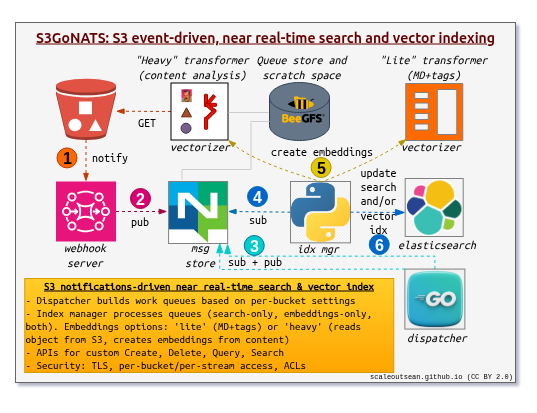
How it works:
- Step 1: configure S3 bucket(s) to send notifications to Kafka (or Kafka-to-message store)
- Step 2: store S3 notifications in some persistent storage (can be a DB or Kafka or a message queue). I used the last one which is the same what I used in the recent S3 anti-virus posts
- Step 3: dispatcher service monitors "per-bucket" queue and creates "indexing" jobs as per configuration/settings/preferences
- Step 4: index manager (or managers, if you want to completely prevent one index manager service from accessing buckets or indexes that belong to other users) watches indexing jobs, gets object metadata and tags from S3, and triggers vectorizer jobs
- Step 5: I have "2 and 1/2 kinds" of these jobs (one for plain search, and 1.5 for vector search)
- "Lite" vector embeddings are those where vectorizer service simply creates embeddings for object metadata and tags passed on to it by index manager service
- "Heavy" vector embeddings are those where vectorizer service also reads the object from S3 to create embeddings for it. This needs document/object segmentation and language (text) or image (images) analysis which are both implemented, so there are two kinds of "engines" used for "heavy" embeddings. More could be added (specialized OCR for PDF, or specialized vectorizer for video, for example)
- "Search-only" index - without vector embeddings; this is lightweight and done directly by index manager without dispatching jobs to vectorizer job queues
- When an S3 event name is
s3:ObjectRemoved:*, there's no indexing either - instead we delete key/object entry from ElasticSearch indexes configured for the bucket
- Step 6: push created or deleted index entries to your search DB - whether those are for simple search, heavy embedings, lite embeddings, or all three (depends on configuration, I can do "all of the above" or even none). Depending on per-bucket and per-object-type configuration, entries are sent to
<bucket>_searchor<bucket>_vector.
Obviously, none of this has to work this way. And I don't think AWS S3 Vectors should work like this at all (it should work better/smarter and use plain S3).
My point, rather, is that it does work. It took me just a few days to get it done properly. It is not production-ready, but a lot of details are handled and it doesn't need a re-write or a change of components or architecture.
Containers and services as implemented in S3 GO NATS:
- HTTPS reverse proxy (Caddy) for API and Webhook service
- Persistent message store (3 NATS containers with file-system-based message store and RF2; can be scaled out)
- DIY Webhook service (in Go; could be scaled out for HA; scale-out for performance is not needed (I evaluated that while working with BeeGFS file-system notifications), but by scaling out for HA you'd get scale out for performance as well)
- DIY Dispatcher service (also in Go, to keep up with hundreds (and probably thousands) of events per second; can scale by deploying one per each bucket)
- DIY API gateway which also runs watcher and vectorizer tasks (Python; async & multi-threaded; could be split in 3-4 services for scale-out). Some API calls are own (e.g.
CreateEmbeddings), others emulate S3 Vector service (PutVectors) which you can see in a screenshot further below - DIY CLI client for checks and testing
- DIY utilities container with tools, almost like a "management node"
- ElasticSearch 9 (just one container with RF1, but this is a well understood service that can be scaled out)
How is that better?
I don't think Amazon S3 Vectors is bad or worse than my PoC, but it seems to me in the early 20s they discovered that "regular" S3 simply can't work the way they needed it to work, so now services such as S3 Select are out and bolt-on "S3 sidecars" like S3 Tables and S3 Vectors are in. This is a problem.
In my own area of concern (say, NetApp StorageGRID or Versity S3 Gateway on BeeGFS), I can implement this (not even "poor man's") version that's not so bad and works well enough - worse in some ways, and much better in others:
- Consistent AWS S3 Vectors API for hot and cold vectors
- I implemented 2-3 S3 Vectors API methods in this PoC (more on that below)
- While AWS S3 Vectors users must use S3 Vectors APIs, once they expert data to OpenSearch Service they need to switch to using OpenSearch API
- My fake S3 Vectors API service proxies selected S3 Vectors API calls to ElasticSearch, so my "hot" vector index data is already in a (fast) ElasticSearch database while cold data can be tiered to S3 by ElasticSearch (or I can keep those indexes on E-Series NL-SAS storage). And we can bypass my API gateway and use ElasticSearch API as well - same data is accessible via both APIs
- Front-end is Webhooks- or Kafka-based, so it's easy to get notifications from any S3 product. My prototype receives StorageGRID Kafka notifications which use the standard AWS S3 SNS format, but its contents slightly differ between different on-premises S3 vendors. The same approach needs only minor changes to support Versity S3 Gateway notifications, which means I can use multiple S3 providers without any issues
- Back-end design is modular as well. I can use OpenSearch or Qdrant or whatever I like (flat files, for example)
- Thanks to this simple, scalable and flexible design it is possible to overcome AWS S3 Vectors service limitations (which exist to play nicely with AWS S3, but force you to export "hot" data to OpenSearch or build your own index server as a workaround)
Regarding the AWS claim (see the first post in this "vector search for S3" series) that keeping cold S3 Vectors data costs much less than keeping cold vector indexes in OpenSearch: that's obviously true, but these savings apply to cold vector data only and could be done with standard S3 APIs:
- store vector indexes on premium AWS S3 storage instead of adding novel "S3" API methods
- store data in flat files that are easy to download and bulk-import anywhere (in addition to OpenSearch) for use with any vector database that can support S3 Vectors embeddings
They chose not to do that.
If we wanted to avoid S3 Vectors APIs and stick to the general AWS S3 APIs we could store S3 Vectors' "non-filterable metadata" as objects in regular S3 buckets. Then we can access it directly with standard S3 clients and to make that easier, we can emulate the same S3 Vectors API in our API server (which is what I did) to emulate it for applications written for S3 Vectors API.
Now you may think: "but you can access non-filterable data in S3 Vectors with standard S3 Vectors client, too", but I think that's not the same:
- S3 Vectors: S3 clients need to specifically store, and request, non-filterable metadata (maybe at a higher price compared to standard S3 storage, too). Those are AWS S3 Vectors-only API methods.
- Regular S3 API: you don't develop your application to AWS S3 Vectors API. You use the standard AWS S3 APIs and can get that extended (meta)data as any other other S3 object. This can works anywhere - StorageGRID, GCP Cloud Storage, Versity S3 Gateway - and be replicated together with data in hybrid cloud environments
When "plain S3" is not possible we can emulate AWS S3 Vectors API methods (this includes "non-filterable metadata"), which is another option. I chose to not emulate non-filterable metadata in API server of my PoC because that seems like a workaround rather than something we should follow. I think S3 Vectors APIs (especially non-filterable metadata) should be rejected by users who have a choice.
Regarding AWS S3 Vector service limits: they can be found here, if you're curious. With the DIY approach you could easily work around them by changing whatever "limit" or step in that embeddings-creating process outlined above bothered you.
With AWS S3 Vectors you not only have to work within those limits, but also have to worry about OpenSearch limits (as long as they won't let you export vector data elsewhere). Of course, you can read S3 Vectors data directly via its S3 Vectors APIs and import that data to own database, but in that case you may as well skip S3 Vectors and do everything on your own.
But even that approach can't work very well because some S3 Vectors' limits are related to how embeddings are created.
You can't create or store more dimensions than S3 Vectors supports, so even with direct API lookup you may still need to access S3 objects on your own and create embeddings in a DIY fashion. Or alternatively remain stuck in whatever limits S3 Vectors has.
I'd rather create my own hot indexes and export cold index data as Parquet files to S3 for cold/slow lookup.
Versity S3 Gateway and BeeGFS options
With Versity S3 Gateway on BeeGFS we can read and write that "metadata blob" (S3 Vectors' "non-filterable metadata") on file-system, without ever downloading it over HTTPS.
If you want fast access to vector data, GDS reads on BeeGFS are likely to be faster than OpenSearch or ElasticSearch and faster than fancy S3 over RDMA as well.
We could also use BeeGFS file-system notifications (explored in recent posts) and trigger indexing, segmentation and embeddings for S3 PUTs on BeeGFS file-system level while completely avoiding S3 Vectors-like approach.
- S3 PUT on Versity S3 Gateway triggers BeeGFS file-system notification
- This creates an indexing job which reads object metadata and tags from Versity S3 Gateway API, but the object itself is accessed from GDS/BeeGFS so embeddings can be created much faster
- Vector indexes can be stored in a vector database, Parquet files,or PUT back to Versity S3 Gateway (
<bucket>_vector)
At most notifications, messaging, metadata and tags would use HTTPS, while data (BeeGFS) could be accessed over IB or ultra-fast Ethernet.
From the Versity S3 Gateway/BeeGFS post related to anti-virus scanning:
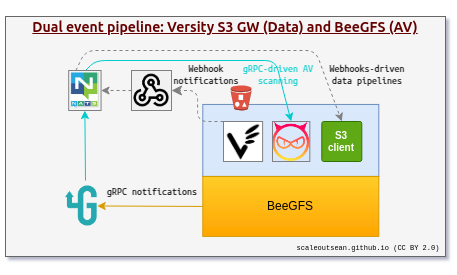
If we replace "gRPC-driven AV scanning" with "gRPC-driven embeddings with Faiss", that's 90% of what needs to be done to make this work faster than both S3 Vectors or regular S3-only approach for creating embeddings for large files/objects. And - look ma, no additional services! - we could easily use flat files for both warm and cold indexes.
"We don't do DIY"
Well, AWS S3 Vectors (and AWS OpenSearch Service) have enough limitations that, if vector search is important for your workloads, eventually you will have do something.
But that aside, I'd be remiss if I didn't point out that it's easy to derisk the tiny amount of work required to make this better. For example, say you wanted to evacuate "the hard part" and give it to the pros.
Let's say, Kafka and the database such as OpenSearch or PostreSQL (with pgvector extension). That could be done easily with Instaclustr: you could be up and running in hours.
I'm not trying to do their homework here (you could run this by one of the Instaclustr dudes) - this just is an example of how S3 GO NATS could be "professionalized": what's left on-premises isn't much and the embedding-generating services could be from NVIDIA or OPEA. You'd just need a dispatcher or not even that (if Instaclustr helps you implement that in Kafka).
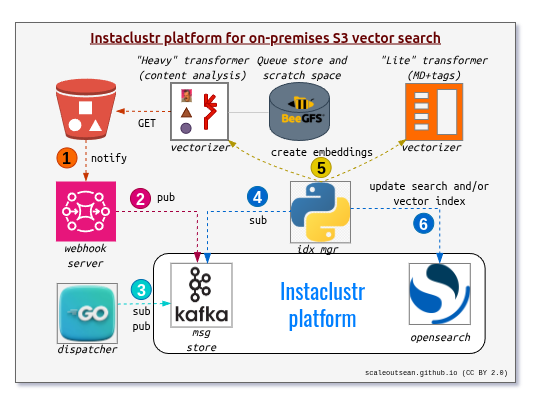
This way "S3 GO NATS" becomes "S3 goes enterprise", with key "data" services taken care of by Instaclustr and at scale I think this would work better than AWS S3 Vectors (with OpenSearch Service).
Notice that the Instacluster managed Kafka and database depicted here are in the public cloud. If you run them at scale, Instaclustr can manage these services on your premises as well (right next to your S3 "storages").
Regardless of where Instaclustr runs and where you S3 data is (on-premises, cloud, hybrid cloud), you can squeeze a lot of extra juice this way. How does "any cloud with local read-only OpenSearch database replicas" sound like?

It sounds good to me. Somebody should check with Instaclustr if that's at all possible, but I asked an AI and it told me "of course".
Notice that almost all of this works as-is today, out of the box! I mean, StorageGRID to Kafka to OpenSearch (or PostgreSQL, if Instaclustr or you process Kafka notifications differently).
The only missing piece is a watcher (step 4 in my diagram) that subscribes to notifications and dispatches embeddings-building tasks (embeddings can be crated in any AI stack).
Conclusion
In Part 1 I talked about the struggling AWS S3 and the supposed need for various "solutions" or "product stacks" that we see in AWS S3 Vectors (S3-side, cold vector search) and on-premises S3 storage-tethered database-side (hot vector search).
There's some value in that, but these approaches seem to be wrong. Specifically:
- AWS S3 Vectors: it's a workaround around S3 limitations and established vector database vendors' defensive licenses
- On-premises S3 storage: technically bad over-reaction after years of "ignorance is bliss"
As you can see from this post, I don't think S3 users should automatically follow the S3 Vectors approach on S3 API-side, or buy an object store-tethered "solution" from their on-premises S3 storage vendor.
Both of these approaches leave a lot to be desired.
If vector search (and S3 search in general) is important for your business, you should do it yourself, and do it well. Even if I liked specific database offered by the object storage vendor, I'd buy and deploy it separately and wouldn't tether it to object storage or compromise in terms which applications can use it and how, what version it uses, how it's configured and so on.
Vector search for power users is one of those potentially high-value services that aren't hard to get right. Whether you buy or build, getting one tethered to your S3 object store should probably be the last alternative to consider.
Appendix A: S3 GO NATS screenshots
You may open these in new browser tab or window.
The first shows S3 GO NATS in action: events are coming in through Webhook service, they land to a bucket-specific "topic", dispatcher service reads them and sends them to a "job queue topic" where watcher service decides processes them accordingly (as per the first diagram in this post).
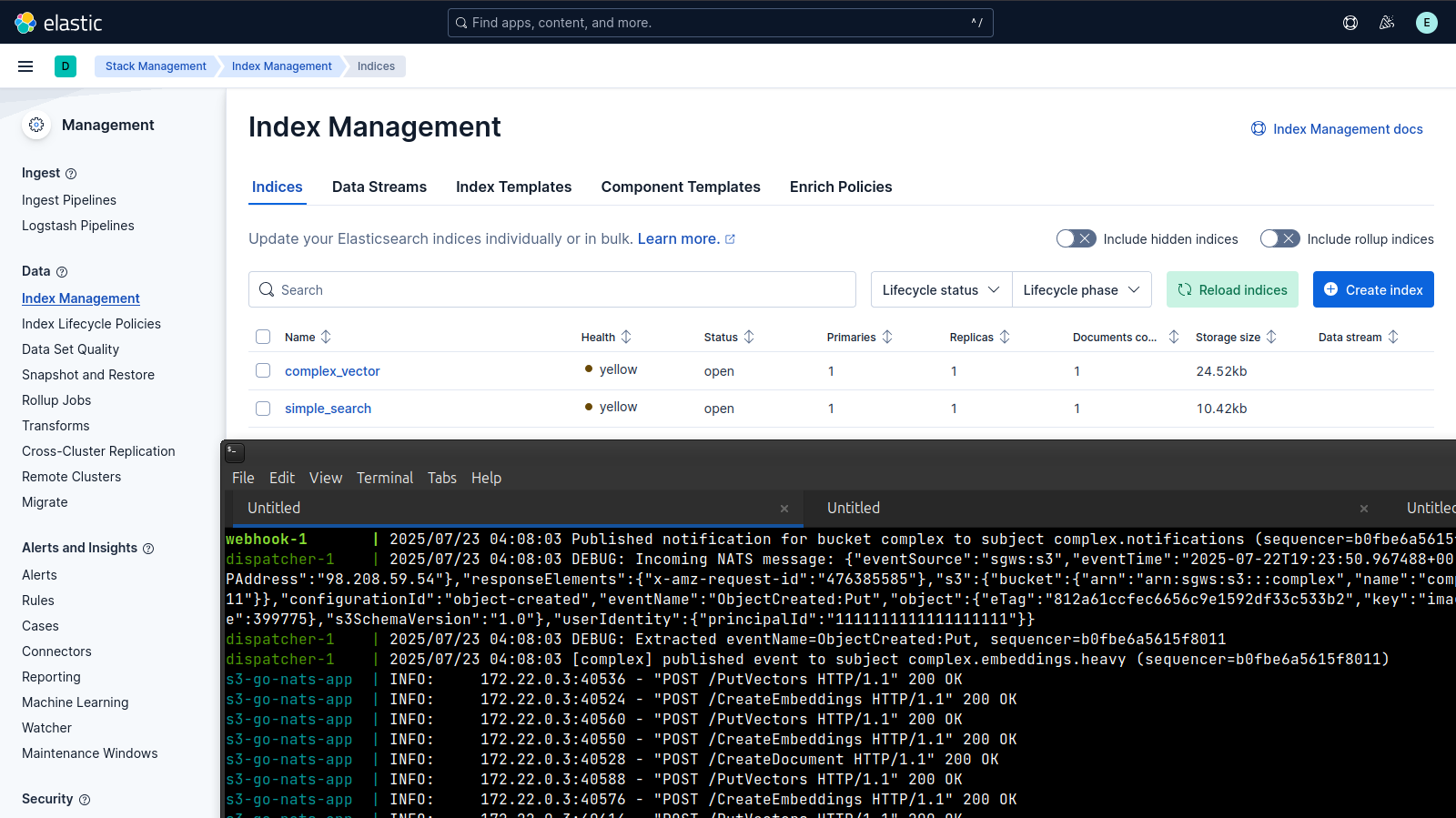
I chose to use ElasticSearch - which is roughly comparable to the sole AWS S3 Vectors' export target (AWS OpenSearch Service) - but the real reason is StorageGRID already has search integration with ElasticSearch, so this works fine.
I build search index the same way (despite the fact that Kafka notifications have different - I make an extra API call to S3 to get all the data needed), so anyone who uses Elasticsearch for StorageGRID search can use these indexes the same way.
(As I've mentioned earlier, one may say "but I prefer another database". That's fine, we can easily store data in another if we want to, but how is S3 Vectors/OpenSearch going to handle the same objection?)
This screenshot below shows the usual ElasticSearch search index StorageGRID users may be familiar with (<bucket>_search) which I built so in order to emulate StorageGRID-ElasticSearch search integration for general purpose search.
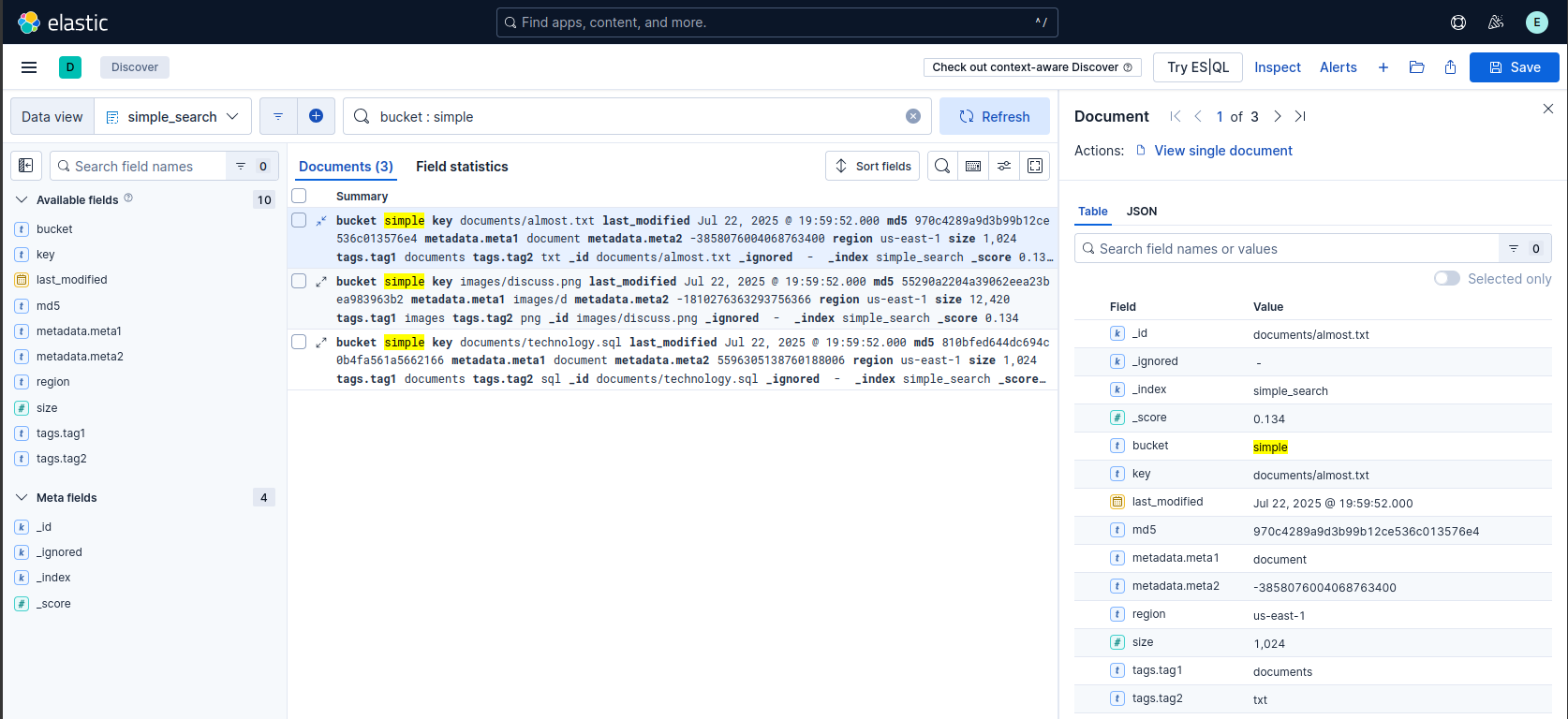
First, you may notice the content of the tags' KVs is garbage. That's because I create these documents automatically - the content, metadata and tags are all random junk. But they contain everything I need to test that it all works.
Second, you may wonder about the purpose of this index if all we want is vector search? Well, one rarely needs vector-only search, which is obvious if one looks at how eagerly vector database vendors have been implementing non-vector search features. The other reason is, with this "slim" index, I can easily find all objects that I want to create embeddings for using any other method.
This screenshot below shows a vector index, named <bucket>_vector.
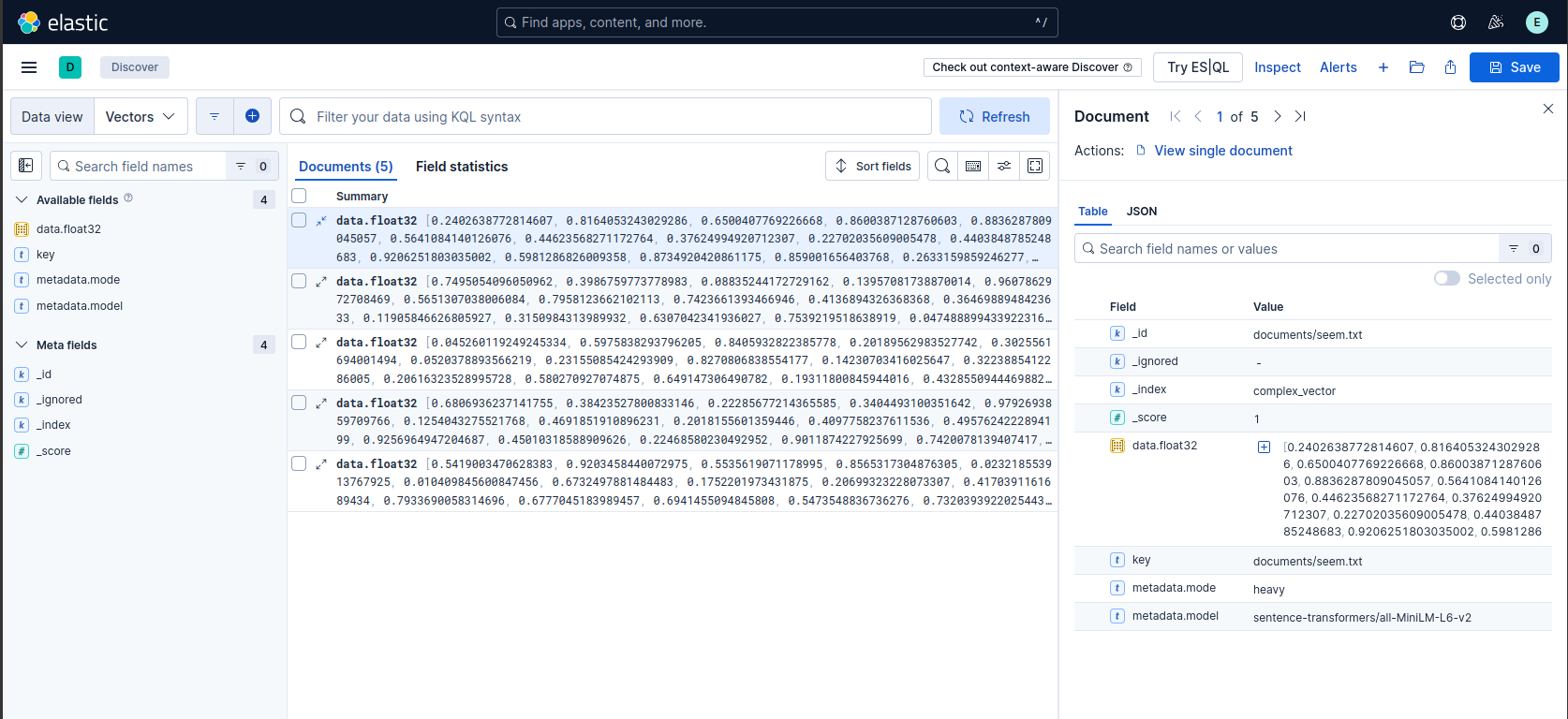
I've since added bucket_name to index fields and a configuration option (default: off) to add S3 metadata and tags in this index. That is off by default as I don't want to bloat this already bloated index.
But if someone's use case involves searching both indexes, including S3 metadata and tags to it may be worth it.
It's not obvious from the screenshot, but I create embeddings for both text and images, based on what I configure in S3 GO NATS settings for the bucket.
For example, currently I have .pdf, .html, .htm, .md, .sql for text embeddings, and .gif, .png, .jpeg, .jpg and .tiff for images.
S3 GO NATS can have a different model configured for each kind (text, images).
Different models could be be used for different buckets. I didn't implement that due to lack of VRAM, but it would be trivial to add.