DuckDB Quack server with NetApp E-Series
Introduction
In a recent post I wrote about DuckDB with E-Series (and ran some casual performance tests).
What I didn't do is focus more on the new Quack server, how it differs from hosting regular "in-process" DuckDB on block storage, and how remote access affects the performance compared to local access.
NetApp E-Series options
You have TBs of DuckDB or DuckDB-readable databases.
You know you can't compress DuckDB data because it's precompressed and you don't need storage with a steep learning curve and fancy features. You want a fast and reliable external storage that survives client failures and maybe provides encryption at rest.
From my perspective: that's E-Series for HDD, EF-Series for NVMe and hybrid.
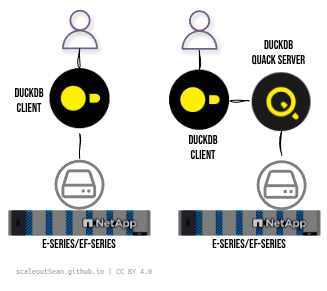
You can keep your DuckDB anywhere, including VMs. The same goes for your Quack server. What's "new" with Quack is not that much - you still keep DuckDB database(s) on the same block device, but now that's a server (on the right) is always up (but can also go down!).
If you want to run either or both containerized, pick one of the CSI drivers known to work (TopoLVM for static or SANtricity CSI for dynamic/HA, whatever works for you).
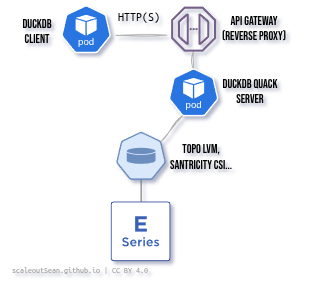
For Quack, it's recommended to pick an HA CSI driver for data availability reasons.
NetApp object storage options for DuckDB
There are several reasons why DuckDB data may be on object stores:
- Maybe your data are already there
- Maybe you have multiple users who need to share
- Maybe S3 is the right choice for your remote offices or sites
Whatever the reason, option (3) is available for that:
- Small, simple, Edge: Versity S3 Gateway (bare metal, VM, container) on E-Series
- Medium or large: StorageGRID (SDS VMs for enterprise edge, appliances for datacenter)
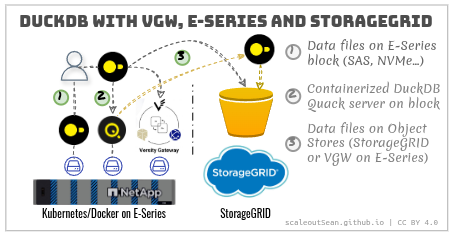
Yellow doted lines in pattern (3) show WAN access from a DuckDB client at DC, with a remote "select" to Quack server on Edge, followed by a local insert to datalake backed by StorageGRID S3. That may be more efficient than doing a push from Edge, if Quack server be more efficient over WAN than the destination engine/format on StorageGRID. This is just to illustrate that Quack server may have some less obvious advantages, too.
What to expect performance-wise with Versity S3 Gateway on all-flash E-Series you can see here and here. Over GB/s per volume should be possible even with a NL-SAS-based E-Series, but we'll see about that if I get to test and confirm.
Containerized Versity S3 Gateway works fine on E-Series.
Quack server with S3-based data
Maybe it's possible to attach Quack server to an S3-parked database and serve that over the Quack protocol, but I doubt that. The Quack server documentation doesn't mention it, and I don't have time to test right now.
I don't know if this is possible or expected to be popular (in case it is supported). I see some value in Quack-side caching (I guess everyone and their uncle will eventually support S3 caching).
You can - as I did here - download a DB from S3 on startup, and upload when application is shut down, but that's more of a workaround for single user scenario than a best practice or supported approach.
DuckDB Quack server with NetApp E-Series
My previous post on DuckDB didn't talk about DuckDB Quack server, so briefly:
- It doesn't change the equation for E-Series block storage. You still use E-Series if you need fast and reliable protected external storage
- Quack server does make sharing of DuckDB databases easier, so if - for example - you can choose and prefer Quack on Kubernetes instead of managing small S3 service instead, deploy Quack server with E-Series and rely on Kubernetes HA, and avoid S3. Fair enough
- Quack server makes sharing more efficient and (I think) allows easier integration with enterprise applications becaus instead of copying data to your client or accessing via SSH, you can use HTTPS with all the fancy gizmos that API gateways can provide
Quack server gives NetApp E-Series owners the possibility of concurrent, shared read-write access to DuckDB. Until now, even read-only shared access was inconvenient (on single host filesystems, all users would be limited by the resources of the server attached to the disk hosting DuckDB data).
A "ducklake" benefits from E-Series in the same way Lakekeeper does: access to fast, economic, simple and reliable protected block storage for databases. "Ducklakes" primarily manage datalakes with metadata in PostgreSQL which is similar to how the Lakekeeper benefits from CNPG. Maybe Quack server will become another option in the future, but today you'd use something like CNPG.
For those who haven't tried Quack server: you need v2 (currently still in alpha for a few more weeks):
curl https://install.duckdb.org | DUCKDB_VERSION=alpha bash
Quack should have a proper API gateway (and/or reverse HTTPS proxy), so you need to deploy one, which is where it gets annoying (especially when there are bugs, which is what I encountered), but you can skip that in testing. RTFM for the details.
CALL quack_serve('quack:192.168.1.11:9494');
Once that server is deployed, and has a database attached, you can connect from a remote client and query it.
Notice that I pretend I'm connecting to a reverse proxy (:8443), otherwise you'd go with TLS disabled and directly to the Quack port (:9494).
ATTACH 'quack:192.168.1.11:8443' AS quack (
    TOKEN 'copy-from-server-output',
    DISABLE_SSL false
);

-- ATTACH 'quack:192.168.1.11:9494' AS quack (TOKEN 'blah', DISABLE_SSL true); -- proxy bypass

FROM quack.query('SHOW TABLES');
The server then delivers data through a reverse proxy (or directly, if you avoid that which may be fine on LAN).
If you merely keep some data files on S3 and query it from DuckDB, that's different from using Quack; you're not using Quack protocol when data is on S3 accessed over HTTP(S). Maybe you're not even using a DuckDB, but merely accessing Parquet files on S3.
Performance
Since reliability and performance are probably among top 3 reasons why we'd do this (run Quack server on E-Series block), I should have something about that.
Using the same server I used in that previous post on DuckDB, a simple SELECT * FROM query on a TPC-H table resulted in several hundred MB/s reads on the server.
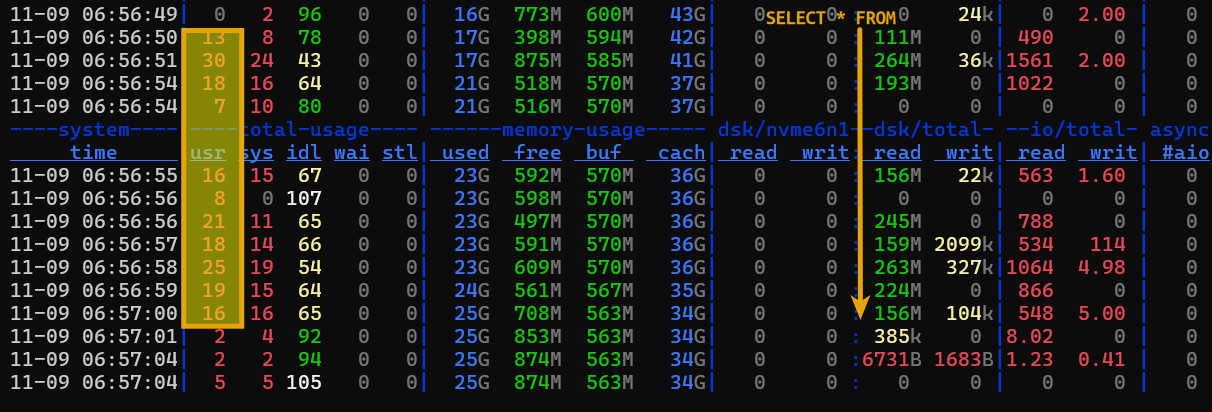
I haven't tried running TPC-H benchmark against Quack server - that currently doesn't work because DELETE hasn't been implemented yet.
I executed a small test with TPC-H data (SELECT * FROM lineitem) on my workstation over loopback and without any "tuning":
[local] run 1: 2.005s  6007037 rows  1001.3 MB  2,995,589 rows/s  499.3 MB/s
[local] run 2: 1.209s  6007037 rows  1001.3 MB  4,970,147 rows/s  828.4 MB/s
[local] run 3: 1.106s  6007037 rows  1001.3 MB  5,433,577 rows/s  905.7 MB/s
[local] median: 1.209s  4,970,147 rows/s  828.4 MB/s

--- quack: quack:localhost ---
[quack] run 1: 1.964s  6007037 rows  1001.3 MB  3,058,204 rows/s  509.7 MB/s
[quack] run 2: 1.970s  6007037 rows  1001.3 MB  3,049,936 rows/s  508.4 MB/s
[quack] run 3: 1.993s  6007037 rows  1001.3 MB  3,013,700 rows/s  502.3 MB/s
[quack] median: 1.970s  3,049,936 rows/s  508.4 MB/s
For now:
- see more simple tests in Appendix A
- you can get some hints of DuckDB-on-E-Series (not Quack server) performance on this blog, including runs with DuckDB v1 and v2 on NetApp E-Series EF600 here
Containerization
Make sure the storage class is optimal.
DDP-based is an easy generic choice, especially on flash media. Use a RAID 10-based DDP storage class if you have random access patterns. For sequential I/O and large capacity, we can create dedicated RAID 6 disk groups for DuckDB Quack PVCs.
Backup and restore
See the first DuckDB post. You'd need minutes or read-only time while backup is ongoing. Or use storage-side snapshots to make it seconds (switch to read-only mode, take a snapshot, switch back to read-write).
Conclusion
The big news is that Quack server makes E-Series 10 times more viable for DuckDB:
- Until now, sharing was hard and remote sharing was practically impossible
- Starting with v2.0, E-Series owners can run Quack server to share DuckDB data at multiple gigabytes per second, while spending less and getting more than with other arrays
For both block and object stores, the usual logic applies: pick the right tool for the job.
For block, you primarily need good performance and reliability, and possibly encryption for data-at-rest. That means E-Series block storage - hundreds of MB/s per table is the starting point. If you need to run it containerized, I recommend TopoLVM (non-HA, static CSI) or SANtricity CSI (dynamic, HA CSI).
For object - and this applies only if Quack can share remote data (likely not) - you may need something lighter for Edge deployments, so consider Versity S3 Gateway (small) or StorageGRID VMs (medium). For DataCenter, get StorageGRID appliances.
Quack server enables E-Series- and StorageGRID-based "ducklakes" not just possible, but the most suitable NetApp stack for DuckDB-powered lakehouses.
Appendix A: Comparison DuckDB (local) and Quack
Latest (v2.0.0-alpha41533 (Cyanoptera) 10de957379) alpha version was used for these runs.
I used TPC-H SF20 data to compare performance on localhost attached to E-Series EF600. It's a simple SELECT * query on a large table with default server and client settings.
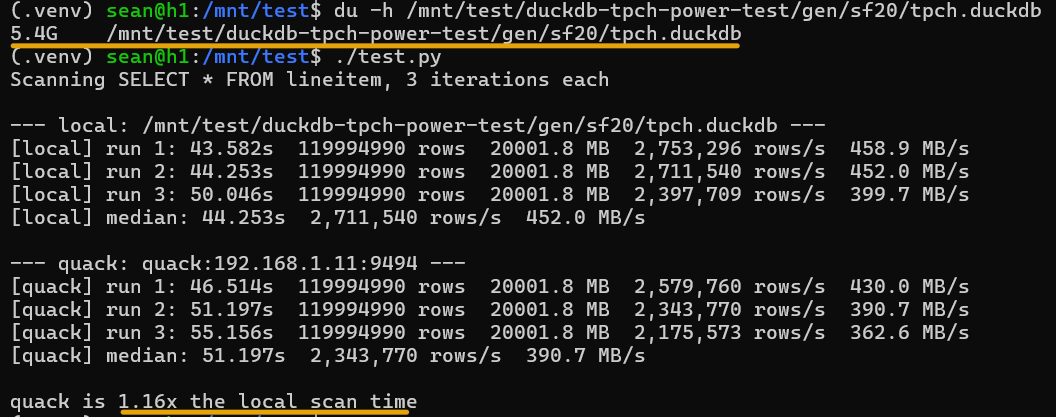
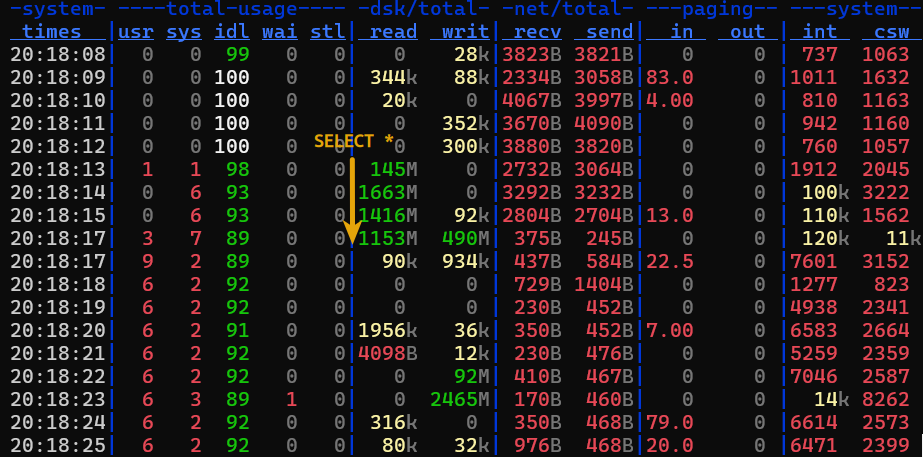
In the local test, that 5.4 GB database file is simply read and cached, so disk IO is only briefly involved to read, and write to a temporary Arrow table (which may be the 2,465 MB/s write shortly after that).
Because of that, we can't see much difference between local and Quack server performance.
Perhaps that's not so bad news after all - knowing that there's no significant difference for this type of workload - but more details are needed, and better tests, too.
I ran the same test with a fast CPU (64 vCPU on system) and slower storage (E4012 with 10 NL-SAS):
- DuckDB v2.0.0-alpha41533 (Cyanoptera) 10de957379
- AMD EPYC 9335 32-Core Processor (dual CPU)
- Storage: FC-connected E-Series E4000 (10 disks in RAID 6; 8 data, 2 parity)
- We measure
SELECTon lineitem table using DuckDB vs. doing the same on Quack server over loopback (HTTP)
$ python3 wirespeed_quack.py
Scanning SELECT * FROM lineitem, 3 iterations each

--- local: /mnt/dm-7/duckdb/duckdb-tpch-power-test/gen/sf100/tpch.duckdb ---
[local] run 1: 73.780s  600039419 rows  100019.5 MB  8,132,866 rows/s  1355.7 MB/s
[local] run 2: 63.369s  600039419 rows  100019.5 MB  9,468,997 rows/s  1578.4 MB/s
[local] run 3: 64.879s  600039419 rows  100019.5 MB  9,248,617 rows/s  1541.6 MB/s
[local] median: 64.879s  9,248,617 rows/s  1541.6 MB/s

--- quack: quack:localhost ---
[quack] run 1: 64.315s  600037902 rows  100019.3 MB  9,329,644 rows/s  1555.1 MB/s
[quack] run 2: 67.765s  600037902 rows  100019.3 MB  8,854,725 rows/s  1476.0 MB/s
[quack] run 3: 66.751s  600037902 rows  100019.3 MB  8,989,241 rows/s  1498.4 MB/s
[quack] median: 66.751s  8,989,241 rows/s  1498.4 MB/s

quack is 1.03x the local scan time
This is excellent. The same volume (there's just one on this RAID 6 disk group) delivers around 1.7 GB/s read with fio.
If you run similar queries on very large DuckDB databases, this is an economical way to do it - value proposition here is similar to running OpenSharing and the Versity S3 Gateway on E-Series for the same general purpose of remote analytics (read-only, in case of my OpenSharing server implementation): it's hard to do it more cost effectively on enterprise-grade external storage.
And finally, there are several simple Quack benchmarks in the Quack repo. They are application-focused so they don't exercise storage.
The only mildly interesting for storage-related purposes is this one, which measures client thread scaling with Quack server:
| MODE | THREADS | TPS |
|----|---|---|
|Mode.QUACK |   1  | 261.492 |
|Mode.QUACK |   2  | 507.121 |
|Mode.QUACK |   4  | 943.065 |
|Mode.QUACK |   8  | 1595.06 |
|Mode.QUACK |  16  | 1577.717 |
|Mode.QUACK |  32  | 728.467 |
|Mode.QUACK |  64  | 246.346 |
Even at 1500 tps, that results in just 14 MB/s in writes to storage, so it's of little consequence to storage selection.