Elasticsearch performance with E-Series
- Introduction
- Environment
- Elasticsearch performance in Docker
- Simple Web log indexing workload
- SIEM indexing workload
- Time-series database (TSDB) indexing workload for general monitoring use cases
- Indexing latency
- Search latency
- Effect of Elasticsearch replicas
- Saturating E-Series controllers
- Performance observations
- Which RAID level?
- Which protocol?
- E-Series storage layout examples
- Summary
Introduction
I wrote a lengthy "generic" post on Elasticsearch 7 with NetApp storage and while all arrays mentioned therein have a sweet spot for Elasticsearch workloads, E-Series is my favorite because it works great for all scenarios, large, small, Hot, Warm, Cold, and even online snapshots (if you prepare a software S3 server backed by E-Series storage).
It works great because most Elasticsearch users need what E-Series offers: reliability, simplicity, performance, scalability, cost-effectiveness.
Instead of planning, provisioning and maintaining storage on every Elasticsearch node, you maintain it in one place, and use it from all Elasticsearch nodes. Rather than having two replicas (i.e. RF=3), you make one (RF=2) or even none.
I wrote about these things in other posts (including one about VM-based Elasticsearch with EF280, you can use the search feature and look for Elasticsearch or ELK), but I wanted to re-visit the topic of Elasticsearch performance and do more testing (which is never easy as I don't have a proper lab).
Environment
Configuration:
- Elasticsearch 8.6.2 in Docker on Rocky Linux 9
- One server with 2 x Intel Xeon 6136 CPUs and 96 GB RAM
- One EF-Series EF570 with SSDs (iSER, i.e. iSCSI over IB), with both data inputs and Elasticsearch disks on DDP (RAID6-like disk pool)
On this system I ran Elasticsearch two ways:
- Single large Docker container with zero replicas (copies) - just one original
- Three Docker containers with one replica (one original, and one secondary copy, RF=2)
Tests:
- General performance metrics - that's what most people use Elasticsearch for
- SIEM - very popular Elasticsearch workload
- TSDB metrics - from a Kubernetes environment
Popular use cases I did not test, but will if I come across customers who use them:
- Full-text indexing - although that's the classic use case for Elasticsearch, it's less common compared to the three I tested, and use case-specific (bookstores, forums, etc.)
- Indexing of other niche data sets - didn't have time
What I wanted to see:
- One vs. three nodes
- One vs. two copies of index data
- Impact of different workloads on Docker (server) resources
- Comparison in indexing performance between different data sources
- Other minor details (batch size, number of clients, etc.)
Although this isn't nearly enough to be able to devise E-Series sizing recipes for specific workloads, it's better than guessing it based on what I had before with Elasticsearch 7 (much simpler, less extensive, less comprehensive).
In all tests I used the same Rocky Linux box to also run Kibana, and clients to submit data, plus other (idle) services weren't shut down. I wasn't looking for "maximum performance" since I knew I'd run out of CPU resources no matter what I did.
Elasticsearch performance in Docker
Unlike Splunk, Elasticsearch has supported Docker (and Kubernetes) for a while and has been production-ready for years. So there's nothing new here - it works, and it works well. It also runs well on Kubernetes on E-Series (see this post for more).
But I don't spend much time using it in Docker and Kubernetes, so I appreciate these opportunities.
With one Elasticsearch instance, CPU utilization varied, but generally didn't go above 50%.

With three Elasticsearch instances and one replica, CPUs can get busy, but I/O wait time is still close to nill.

Simple Web log indexing workload
This shows indexing HTTP logs on a single Docker instance (without replicas/copies). These logs are simple, and therefore relatively faster to index, than other data types: 400,000 documents/second.

EF570 needed less than 200 MB/s for that.
I marked IOPS (~2,000) and MB/s (~200) in this chart to highlight that the average I/O request is around 100 kB.

With three Elasticsearch nodes and one replica, we expect to see twice as much write activity. But before I move on to that, let's see the effect of "force-merge one segment" on storage: > 1 GB/s from a single container.

You may say it's just 537 MB/s write, which is true, but data has to be read off disk and written back, so in this case 1,148 MB/s isn't something to be taken lightly when one has 10 or 20 Elasticsearch nodes and force-merges need to be considered in addition to other read and write workloads.
I mention this as a warning that we shouldn't rely solely on estimates for indexing requirements when estimating total storage performance requirements.
SIEM indexing workload
This SIEM workload was "heavier" than Web log workload above, and a single Docker node could do around 110,000 documents per second.

The array wasn't busy, just 400-600 MB/s, which is perhaps 10% of its maximum performance.

I saw writes peak at 750 MB/s with SIEM data. (The blue (read) line in MiB/s charts appears because JSON data is read from SSD DDP before it's sent to Elasticsearch to be indexed and ingested.)

What about search tests and performance? Not much. With E-Series and SSDs, search is much less likely to cause storage saturation or slow performance. More on that below.
Time-series database (TSDB) indexing workload for general monitoring use cases
Time-series metrics gathering and dashboarding in a medium-to-large Kubernetes environment can result in a busy Elasticsearch cluster.
In addition to hundreds or thousands of Kubernetes objects, one may also have application metrics, so it adds up.

What would it take to generate 40K records per second? I don't know, but probably a cluster with 64 or more Kubernetes VM workers.
Or, if you use Elasticsearch for TSDB-style data, SIEM and application logs, then maybe much less, such as 16 workers.
Indexing workload on the array:

TSDB indexing with one Elasticsearch node and no replicas peaked at below 300 MB/s.

Small environments - especially without data copies - can run this workload on SolidFire, but medium-to-large Kubernetes clusters require significant throughput and capacity and it's just expensive to not use E-Series for that.
This kind of Elasticsearch workload isn't the only thing that needs storage capacity and performance in a Kubernetes cluster, but one of many.
Insufficient storage performance can make regular applications experience unresponsiveness because Elasticsearch workloads consume 70% of storage performance. And if one controller fails, they may even be unable to run.
Indexing latency
This wasn't unique to TSDB data, but to all tests: with Elasticsearch in Docker using 20 CPUs, application and storage latency was negligible.

Another example:

It's not until three Elasticsearch instances are heavily used, and data written twice (1 replica, i.e. RF=2), that we can observe differences between runs.
Search latency
Searches of hot data are often satisfied from Elasticsearch node RAM or storage controller cache, and due to indexes living on SSDs, only complex searches took more than 10ms.

As far as I could tell most of that latency was software-related, in order to select and filter data.
In this example producing an aggregate report is what took a long time (compare that with a peak of 0.5ms during data ingestion and indexing).

It's not that CPU utilization during search is always high (it varies, obviously - I've seen it go between one and several vCPUs, so it's relatively light compared to indexing), but storage utilization was very low (well below 100 MB/s).
One reason for that is EF570 storage controllers can read-cache many GB/s of data, but even without that I doubt search would present any problems: E-Series arrays are roughly twice as fast when reading data from flash media.
The little read (blue line) bump at 6:10am was one of the more demanding search tests. It's barely visible.
Effect of Elasticsearch replicas
Here we have three Elasticsearch nodes running in three Docker containers and one data replica, so indexing has a 100% overhead compared to no data replicas. Still, the effect on I/O latency is not even noticeable.

Why? Because that 200-300 MB/s in writes (without replicas that'd be 100-150 MB/s) is still too little to move the needle. Each bump on this bandwidth chart below is one of seven indexing runs from the screenshot above.

TSDB indexing with one Elasticsearch node and no replicas had the indexing speed of 36K documents per second, and with three nodes and one replica 44,000 (around 80,000 including replica overhead).

I figure that's because three nodes make better use of OS resources - whereas a single ES container couldn't make use of more than 20-22 vCPUs, three ES in Docker easily used 32-34 vCPUs.
The added I/O from making an extra replica was easy to spot (vs. TSDB with no replicas earlier): now we write at 250 MB/s per each container.

And if we really push it and use 24 submitters to 3 Elasticsearch servers, it's possible to write at close to 1 GB/s without any performance tuning.

Should we use Elasticsearch replicas with E-Series
For Hot Tier, I'd say yes.
NetApp recommends two copies for HDFS with E-Series as well.
Hot Tier is usually a small fraction of all Elasticsearch data, and it protects both data and uptime from filesystem corruption, server crashes, downtime due to Elasticsearch and OS upgrades, and other problems.
Two copies on the same array can use the same DDP or RAID10, but also separate RAID groups; however, given that E-Series is protected and redundant storage, it'd be very unusual to do that.
With two arrays, a replica on each array can protect from array, rack or site failures. I wrote about that here.
For Warm Tier, the risk of data loss is slightly lower (index data is not modified) and the impact of temporary loss of access to Warm data (which can be restored after a server is fixed, for example) is usually not as large, so it makes a bit more sense to use just one copy.
Should we use E-Series' snapshots with Elasticsearch
Can E-Series snapshots be used to protect Elasticsearch data? Yes, they can. But, why?
Restoring the latest snapshot likely means several minutes of data loss due to reverting to the most recent snapshot and maybe an additional one-two minutes due to data that wasn't delivered while we were restoring.
It also results in several minutes of downtime.
Snapshots can be useful to protect applications and data before an upgrade or during scheduled downtime, but generally don't make a lot of sense in Elasticsearch environments.
Having a snapshot can help the administrator recover from a quickly-discovered ransomware attack or restore a mistakenly deleted index, and that's true.
But due to scale-out nature of Elasticsearch workload, reverting to a snapshot would cause some data loss in Hot Tier across the board, so maybe the only situations where the admin would make that trade-off is in the case of a catastrophic human error or freshly-discovered ransomware attack - taking a snapshot (to record last known state before reverting to a good snapshot) and restoring from a previous one gets Elasticsearch back online, but without access to post-infection logs it becomes hard to analyze the attack and understand what happened, which is the very purpose of having a SIEM application!
This post talks E-Series snapshots with anti-ransomware considerations.
Elasticsearch users who want to protect their data from data loss in these circumstances should use Elasticsearch's Cross-Cluster Replication (aka CCR) and protect it across Elasticsearch clusters and E-Series arrays.
Saturating E-Series controllers
Current entry-level model EF300 is similar to the previous mid-range EF570 which I used for this post. EF600 can do more than twice as much.
Let's consider CPU utilization on an idle EF570 (similar to EF300 available today): 30%.

While running one of those Elasticsearch indexing tests and indexing 80,000 documents per second, combined read and write throughput was over 1 GB/s.

What did that do to array's CPU utilization? It barely moved the needle: 33% (on one of the controllers; the other didn't change).

Both EF300 and EF600 have plenty of horsepower for heavy Elasticsearch workloads.

In this environment we'd need several servers to get even close - maybe half a dozen for EF570 or a dozen for EF600.
Sixteen log submitters are enough to keep three containers on this server busy (second top output at the top) and adding more just makes the CPUs work harder. Check out the system load figures here:

Indexing performance with 16 submitters doesn't work slower, but it does result in a lower latency, so it should be preferred especially in search-intensive environments.

So, there's no advantage in "pushing" these containers to work harder. We'd need more servers.
Performance observations
Elasticsearch 8 running in Docker connected to an EF570 performed similarly to Elasticsearch 7 in VMs connected to an EF280. Why? Because in both cases I had just one server to run everything and it ran out of resources.
That was expected, but in this round of testing I found a bit more about the impact of input data, replication, number of containers, number of workers, batch sizes, and such.
No matter what I did with 20-30 cores, it barely registered on E-Series: even the entry-level EF300 should be enough to serve multiple Elasticsearch nodes, whereas the mid-range EF600 could be good even for one-two dozen of them (depending on workload).
While indexing performance varied depending on type of data and number of replicas, we saw that we generally got 100-200 MB/s of write workload per node, and in extreme cases over 1 GB/s in combined read and write performance per node.
So, assuming one replica and 500 MB/s indexing performance, an EF300 sized to 5,000 MB/s write could be enough for half a dozen Elasticsearch nodes with 32-64 cores. This isn't a sizing "rule" (and completely ignores search and other workloads), but together with examples given above provides a better idea of how E-Series should be sized for E-Series.
It'd take relatively more smaller nodes - especially smaller VMs with 8-16 vCPUs - to saturate the EF600 model with 16 or more NVMe disks.
No QLC for Hot Tier
I wrote about 15TB QLC SSD support on E-Series. Those are (relatively) affordable, but won't make a good Hot Tier. They may be fine as Warm Tier, though.
Take the 15TB QLC drive: at 0.1 DWPD that's 3 TB/day or 35 MB/s in writes. Virtually no workload tested on this page needed less write performance than that, so we need to be careful.
A RAID 6 with 10 such disks (8 data, 2 parity) could tolerate consistent write performance of 200 MB/s, but it's easy to see how just three Elasticsearch nodes with 8 vCPUs each could create more write activity than these disks are designed to handle (especially with 1 replica).
See this about flash media over-provisioning for additional context related to DPWD.
Which RAID level?
Elasticsearch clusters which need a single all-flash E-Series array can use DDP.
When that's not sure to work (e.g. 6,000 MB/s indexing performance is close to the maximum write performance of EF300), consider RAID 1 or RAID 10 for Hot Tier, and DDP for Warm, Cold and Snapshots (if any).
Example: 8 ES servers need 2 TB and 5,000 MB/s for Hot Tier.
- The problem is we can get 2TB with 5 x 800 GB disks in RAID 5 (4+1), but won't get 5 GB/s from only four data disks. We need more disks
- At this point one has to consider going "all RAID 10", or maybe just using DDP for both Hot and Warm data (if Warm doesn't need a lot of I/O)
- Assuming our capacity requirement can be met with 18 disks (we'd have to pick smaller SSDs given the 2TB Hot Tier requirement), we may be able to hit 5,000 MB/s write performance with DDP
- Alternatively, use 10 small SSDs in RAID 10 (I don't have a sizer in front of me, this is a guesstimate), and the other 24-10 (14 disks) can be larger SSDs or HDDs in a DDP (or RAID6) pool/group
As you can see it's not very straightforward, but E-Series sizing tools (based on I/O request sizes and read-write ratio) are decent enough and with some idea of how much I/O an Elasticsearch workload generates, it is possible to make a decent estimate of performance requirements and translate them into a suitable hardware configuration.
QLC (best configured in DDP or R6) or NL-SAS HDDs (in hybrid HDD/SSD configurations) media can be used for Cold and snapshot data and maybe even for Warm data.
Which protocol?
I'd use FC (if I already had it in my environment) or 25G iSCSI (EF300; costs little, works for DAS, works with Kubernetes).
Isn't 25G iSCSI slower than 32G FC ? It may be a little slower, but I think the advantages mentioned above have their merits unless you need to max out read performance of EF600.
One thing I wouldn't use - unless I had to - is the fancy and newer protocols (NVMe, etc.) - too complicated. Keep it simple.
E-Series storage layout examples
These guesstimates are made based on what I observed in testing and E-Series sizing tools.
I didn't observe read-write ratios because I didn't run indexing/search tests in parallel, so I guessed those.
As mentioned above, when sizing capacity one has to over-provision capacity for write-intensive workloads.
Segregated RAID 1/10 groups
If we replicate data, we may want to protect underlying storage by using multiple arrays in different racks (not shown) or at least segregating RAID 1 (or RAID 10, if more than 2 disks per RAID 1 group) into separate groups. Each group can have multiple volumes created on top of it.
DDP with RAID6-style protection needs 11 disks, and can lose 2 disks at the same time, so there's no need to segregate those to ensure resistance to simultaneous double disk loss.
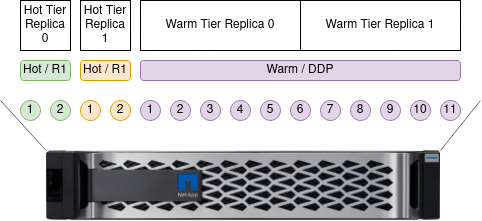
This approach also results in segregated performance on RAID 1/10 groups: on the one hand one RAID 1 group won't get impacted by the other, on the other it can't burst beyond its own performance.
For a comparison, a search query on warm tier - no matter which group - results in all DDP disks being used to serve the request.
Two disk pairs in two RAID 1 groups would give us around 1.3 GB/s each, which would satisfy all Hot Tier tests in this post.
We could get around 5 GB/s from DDP in Warm Tier, assuming a predominantly read workload. That's probably too much, unless one does a lot of reporting.
- Maybe HDDs could be used instead, or - if we suspect we may need more than 2 x 1.3 GB/s on Hot Tier
- Use the third approach with consolidated tiers
Combined RAID 1/10 groups
This approach is similar to the first one in the sense that we have RAID 10 for Hot Tier and DDP for Warm, but we don't attempt to segregate indexer groups in Hot Tier. Why?
- Maybe we use no replicas
- Maybe this is one of two Elasticsearch sites with CCR, so there is a replica, only on a different array located in a different location
- Maybe we have a very busty workload (big force merges or batch reporting) and want to take advantage of pooling all RAID 10 disks into one performance pool
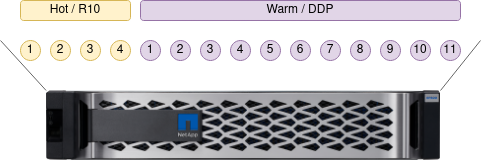
Four disks in one RAID 10 group would give us around 2.6 GB/s. As the number of disks is the same as in the case above, it would satisfy the same workload.
DDP configuration and performance is the same as in the first example. We could use RAID 6, but for 11 disks DDP works better.
Consolidated tiers
This example may be useful when we aren't sure what we need, but we know we don't need extreme performance.
Example: we aren't sure about breakdown between indexing and search/reporting, or how each workload will grow.
It may also come useful when we want to optimize cost. Earlier I mentioned the case where we need more performance but not much capacity, so we need to use smaller disks.
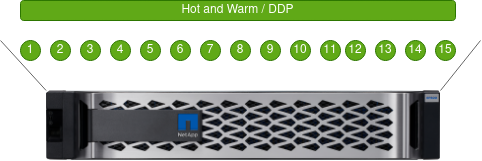
In this scenario with 15 disks in EF600 we get close to 9 GB/s to be shared among all tiers, assuming a 50/50 read-write ratio and 80% sequential workload (a higher write ratio than used for DDP in first other two cases, because write-intensive indexing would move from RAID 1/10 to DDP).
Compared to two earlier approaches where DDP had 11 disks, we get a lot more performance even after increasing write ratio to 50% of DDP workload.
This may work to our advantage - for example indexing can take advantage of several GB/s rather than just 1.3 or 2.6 GB/s.
We also get more usable capacity due to the lower overhead of DDP data protection compared to RAID 1.
Another nice gain in terms of flexibility and cost is that DDPs can be grown in single disk increments, so although there's 15 disks in this configuration, we can keep adding them one by one until controller shelf is full (24). Using the same assumptions for this example, 24 disks would give me over 15 GB/s; of course, the details will vary depending on the exact workload which is mostly impacted by indexing i.e. writes.
What we lose is segregation between replica groups (if we use them) and write performance (compared to RAID 1/10).
If you're interested in DDP, check this post which shows how we can create RAID 1-like volumes in DDP. That's pretty cool and useful for Elasticsearch, because it mitigates some of the downsides of consolidated DDP approach without new downsides.
General sizing ideas
Personally I like the consolidated approach with DDP the most, because it's economical and it's hard to make a mistake.
- if you suspect your write workload needs > 5 GB/s (for EF300) or > 10 GB/s (for EF600) or if you use one replica (RF=2), maybe you should consider RAID 10 for indexers
- mind the fact that going from 0 to 1 replica your write workload increases by 100%
- otherwise consider DDP
- more disks means more performance and RAID 6-style DDP starts at 11, so with DDP it's good to start with 14-18 for performance, or 11 for capacity/cost
- over-provisioning is very important for write-intensive groups/pools (Hot Tier), so don't size based on usable without any over-provisioning reservation
- consolidated DDP spreads write workload across all spindles, so it helps keep over-provisioning relatively lower
- QLC should probably be used only in DDP (not in RAID 10) configurations as they're designed for a low DWPD and need higher over-provisioning than MLC
One way to estimate indexing requirements is to use the above examples to find out MB/s per 10K documents scanned. From the first example at the top 400,000 generic Web application server log lines per second results in 200 MB/s in writes, so each 10,000 docs needs 5 MB/s. Other estimates were created the same way.
| Workload | Replicas | MB/s/10K docs (write) |
|---|---|---|
| Generic | 0 | 5 |
| SIEM | 0 | 45 |
| Time-series | 0 | 75 |
Assuming two indexing workloads, one 20K SIEM docs/s, replicated once (x2), and another 15K time-series docs/s (no replica) and read sizing 50 MB/s for each, we can estimate performance requirements like this:
| Workload | Replicas | MB/s (write) | MB/s (read) | TOTAL (w+r) |
|---|---|---|---|---|
| SIEM 20K | 1 | RF2 x 45 SIEM x 2 | 50 | 180W + 50R |
| TSDB 15K | 0 | RF1 x 75 TSDB x 1.5 | 50 | 112W + 50R |
Capacity sizing is slightly easier because it is calculated the same way for DAS, so general Elasticsearch guidelines apply to external storage (SANs or external DAS).
300 MB/s in writes translates into 25 TB per day. Because 300 MB/s isn't a lot, we can use EF300 and DDP for this.
If three days of logs are kept on Hot Tier, we need 75TB for that. As mentioned earlier, with DDP we'd aim for 11-18 disks and because we don't need much performance here, we'd aim for closer to 11 disks, to keep the cost low. But 15TB disks are too big to use here (11 x 15.3 TB gives much more than 75 TB usable), so 16 7.68 TB disks is our best choice.
What about over-provisioning? You can see the linked blog posts about that, but here we store 3 days of logs on SSDs, which means DPWD is roughly 0.33, which also means we may be able to get away without extra over-provisioning. Or we can use 17 disks to over-size by 10% and leave some extra capacity on that tier and avoid filling Hot Tier filesystems to over 95%.
Assuming Warm tier holds just one copy of data, 30 days of warm data would require (90 (SIEM) + 112 (TSDB)) MB/s * 86400 * 30, or 510 TB. Using the currently largest NL-SAS disks (18TB), we can get the capacity we need from from 44 disks in one DDP.
Obviously we can't put these disks in a single 24-disk shelf for 2.5" disks, so we would do something like:
- One EF300 (lower-cost controller) with 16 x 7.68 TB in controller shelf
- One 60-disk SAS expansion enclosure for 3.5" NL-SAS disks, with 44 x 18 TB disks
For a more detailed and "scientific" sizing please read the Elasticsearch documentation and reach out to Elastic's technical representatives and partners.
Summary
When it comes to Elasticsearch workloads all-flash E-Series arrays do what's required, and don't what isn't.
Containerized Elasticsearch works very well, and there's no particular reason to use VMs for Elasticsearch: a simple approach is to run it in Docker containers on bare metal servers, and a sophisticated approach is something like Elasticsearch on Kubernetes (see that post on DirectPV) - that requires more skills, but some management tasks (including container and storage management) are probably easier once you get used to it.
Official Elasticsearch sizing recommendations are heavily focused on cloud environments and DAS storage. For example, you'll see recommendations for VM sizes and Disk-to-RAM ratio. Those are non-issues for most on-premises users, and when protected SAN arrays are used for data, servers or VMs can be right-sized.
With right-sized Elasticsearch containers (or VMs, or servers), external storage can be sized based on aggregate write performance required for indexing (multiplied by the number of replica copies), and search and other read requirements can be added on top of that. It's not very scientific, but is more usable than the sometimes nebulous official Elasticsearch recommendations meant for hyperscaler VM with DAS disks.