Ubuntu MicroK8s with SANtricity CSI and NetApp E-Series
Introduction
This week I've done some work on my second E-Series CSI project, SANtricity CSI.
In addition to small general fixes and documentation improvements, I've tested it with Ubuntu's MicroK8s which is relatively noteworthy (at least in my personal opinion).
I'd never used MicroK8s with CSI because MicroK8s is so frustrating to use, especially the bastardized "snap" edition. Oh, wait, there's no other!
About "snap":
A snap is a bundle of one or more applications that works without dependencies or modification across many different Linux distributions.
Yeah, except that it's like trying to configure and run containers from the command line, something we all know and love.
What's worse, along the way I somehow lost my way and stumbled into using snap K8s (not MicroK8s), which wasn't what I was after. Fortunately, after only three hours, I couldn't make it work and then I realized I wasn't using what I thought I was using.
Anyway, you need snapd, which is pre-installed on Ubuntu Linux. I had one of those (26.04 LTS connected to E-Series NVMe/RoCE).
MicroK8s with SANtricity CSI
Host-level preparation
Your OS and storage needs to be working.
See the Ubuntu's 26.04 LTS post above. It is NVMe/RoCE-focused, but iSCSI configuration is even simpler and completely generic (/etc/multipath.conf may be left completely empty).
MicroK8s
It was frustrating (as MicroK8s always is), but somewhat uneventful. Long story short:
- MicroK8s comes with built-in Helm and Helm happens to be the default installation method for SANtricity CSI
- MicroK8s uses a weird kubelet path. Helm chart for SANtricity CSI lets you adjust that easily in custom chart values
- As with many of these mini-micro-nano K8s, stuff may be missing or disabled. Such as DNS lookup or network access (who could possibly need those fancy features?)
- MicroK8s has deceptively dumbed-down "examples" of commands that look nice ("Look ma, I've created a Kubernetes cluster with only 19 keyboard strokes!"), but can (mis)lead you into wasting hours, so I'd suggest not follow their "quick" start guides. Use slow start guides
This should get you to the state where you can run sudo-less microk8s or even use kubectl (just install a kubernetes.io version that matches MicroK8s channel version below).
sudo snap install microk8s --classic --channel=1.35
sudo microk8s enable dns
sudo usermod -a -G microk8s $USER
mkdir -p ~/.kube
chmod 0700 ~/.kube
su - $USER
(It's contradictory of me to offer "quick start" steps while advising to avoid them, but at least you've been warned!)
Now is a good time to try deploying a test container to make sure DNS and network work properly, including outgoing network access from MicroK8s containers.
For example, you may want to test outgoing access and DNS resolution like so:
$ microk8s kubectl run -i --tty --rm debug-curl --image=curlimages/curl -- sh
# curl -v -k https://1.1.1.1
# curl -v https://www.netapp.com
SANtricity CSI
Next, SANtricity CSI:
- Helm is "wrapped" inside of that snap monstrosity, so run it with
microk8s(unless you want to install Helm separately) - The SANtricity CSI Helm chart lets you set a custom kubelet directory path. It's all in the SANtricity CSI README
microk8s helm3 install ...
In my case, I cloned the SANtricity CSI repository, entered repository directory and used :
$ sudo microk8s helm install santricity-csi ./charts/santricity-csi \
  -f ../santricity-csi-values.yaml --namespace santricity-csi \
  --create-namespace

NAME: santricity-csi
LAST DEPLOYED: Mon May 11 10:28:06 2026
NAMESPACE: santricity-csi
STATUS: deployed
REVISION: 1
DESCRIPTION: Install complete
TEST SUITE: None
Here's what happens when you screw up and don't specify correct kubelet directory on a Kubernetes cluster that doesn't use the default kubelet directory:
Events:
  Type     Reason       Age                 From               Message
  ----     ------       ----                ----               -------
  Normal   Scheduled    2m11s               default-scheduler  Successfully assigned santricity-csi/santricity-csi-node-j66hh to h1
  Warning  FailedMount  2m12s               kubelet            MountVolume.SetUp failed for volume "kubelet-dir" : hostPath type check failed: /var/snap/microk8s/common/var/lib/kubelet is not a directory
  Warning  FailedMount  4s (x9 over 2m12s)  kubelet            MountVolume.SetUp failed for volume "registration-dir" : hostPath type check failed: /var/snap/microk8s/common/var/lib/kubelet/plugins_registry/ is not a directory
Now you can again fall back to own kubectl (if you have it, otherwise continue with the microk8s overhead) and:
- Create a Storage Class
- Create a test PVC
First, make sure the sucker was installed. If DNS or network don't work, it won't happen. There's some related troubleshooting advice in the SANtricity CSI repository README file, but you really need to fix it on MicroK8s, not in SANtricity CSI.
You'd have to figure this out on your own (sorry - with "community's help").
Assuming that went fine, check for any SANtricity CSI-specific issues.
$ kubectl get pods -n santricity-csi # prefix "microk8s " if you don't have stand-alone kubectl
One of the nice things about SANtricity CSI is it's currently hosted in the SANtricity Go repository where I happen to have a Go CLI. As we create a Storage Class, we need a pool ID (PoolRef) and to get it, we can easily build santricity-cli from the same repo and use it to check.
sean@h1:~/code/santricity-go$ ./santricity-cli \
  --endpoint 10.1.2.3 \
  --username monitor \
  --password "monitor123" \
  --insecure \
  get pools

2026/05/11 10:01:44 Pool: data
2026/05/11 10:01:44   ID: 040000006D039EA000493A26000004FD6996CBC0
2026/05/11 10:01:44   Media: ssd
2026/05/11 10:01:44   PhyType: nvme4k
2026/05/11 10:01:44   RAID: raidDiskPool
2026/05/11 10:01:44   Free: 33724083208192
2026/05/11 10:01:44 Pool: data_r1_vg
2026/05/11 10:01:44   ID: 040000006D039EA000493A9C00000AFD69A67726
2026/05/11 10:01:44   Media: ssd
2026/05/11 10:01:44   PhyType: nvme4k
2026/05/11 10:01:44   RAID: raid1
2026/05/11 10:01:44   Free: 7478037889024
I used the DDP pool (the first one) in my Storage Class which I made the default for this test cluster:
apiVersion: storage.k8s.io/v1
kind: StorageClass
metadata:
  name: santricity-iscsi-raid1
  annotations:
    storageclass.kubernetes.io/is-default-class: "true"
provisioner: santricity.scaleoutsean.github.io
parameters:
  poolID: "040000006D039EA000493A26000004FD6996CBC0"
  raidLevel: "raid1"
You may use the usual - microk8s kubectl apply, for example - to deploy this and then try creating a PVC.
If the PVC gets stuck, check the controller, and then node, logs. You can try posting your questions to the SANtricity Go repository's Discussions.
$ kubectl get pods -n santricity-csi
$ kubectl logs <pod_name> -n santricty-csi
Why and how this matters
MicroK8s is an Ubuntu thing. Consider this:
- SANtricity CSI: it's just one of several CSI drivers for single host filesystems that can work with E-Series, but knowing it works removes uncertainty and makes adoption easier
- MicroCeph (or Rook) on MicroK8s, which I blogged about here is just a step away. As the post explains - and I touched upon that in several Proxmox (who ships own Ceph packages with PVE) posts - if you need more than one storage solution and don't want to deal with JBODs, you can deploy Ceph backed by E-Series and offload Tier 3 workloads to Ceph
- BeeGFS CSI: This is another - fastest-performing - way to access shared SANtricity disks in parallel from within Kubernetes. I have an "all in one" BeeGFS in Docker Compose stack (BeeGFS, Linux NFS, Versity S3 Gateway) that works on Ubuntu, so MicroK8s with BeeGFS CSI could probably be added added as well to round it all up
I'm not advocating deploying two things when one is enough, but rather making sure they're available and understood enough (if not lab-tested). Maybe I don't need two, but there are people who do, and chances are - each may need different two out of five things on the menu (if we add standard Linux NFS VMs and Versity S3 Gateway to that list, for example).
Making that easy makes E-Series an easy and versatile choice.
So, what's next in this area? With MicroK8s sufficiently understood:
- We can have faster time-to-results in Ubuntu-with-SANtricty environments that run Kubernetes
- I've dialed up the priority of Ceph-on-MicroK8s with E-Series (which I did install once, as per that post, but not try to use from clients). This won't use SANtricity CSI, it will be a simple "2 LUNs to each of 3 hosts" deployment with micro-Ceph after that, but just like SANtricity CSI, it will lower the cost of getting a low-cost, shared filesystem solution
- BeeGFS CSI is also highly interesting here for the exact same reason. I've used it with Ubuntu, but not with MicroK8s.
These three solutions taken together make a picture complete.
Consider the ease of setting up three MicroK8s clusters, each connected to one of three E-Series arrays using direct attach (NVMe/RoCE): it literally takes less than 10 minutes.
You end up with three clusters in three racks and 300 GB/s of storage read throughput from 6RU (total) of E-Series and can run any and all kinds of workloads (small batch jobs, inferencing, analytics, deep learning, databases) at industry-leading performance levels. Exactly what I blogged about months ago when Terraform Provider for SANtricity came out.

I've pixelated these for the purpose of not distracting with a different topic (I'll have un-pixelated versions in a future post). Here I have just one MicroK8s cluster (marked with (2)).
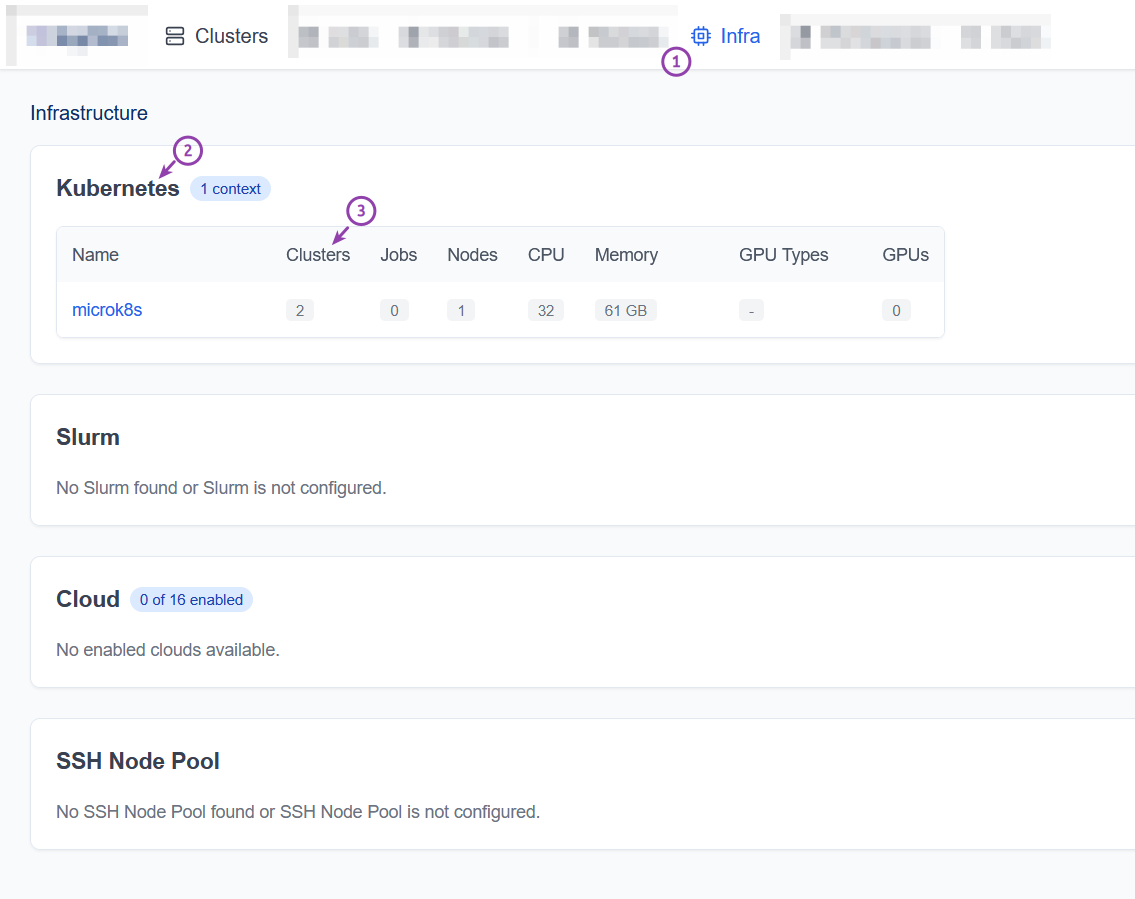
What (3) above shows is two "sub-clusters" on that MicroK8s cluster. That's the AI/HPC part: ephemeral or persistent cluster-on-clusters are used to run these compute jobs.
Below, in the "Clusters" view, we see the two "sub-clusters" that run jobs. The "Infra" column shows they live on the same MicroK8s cluster from the screenshot above.
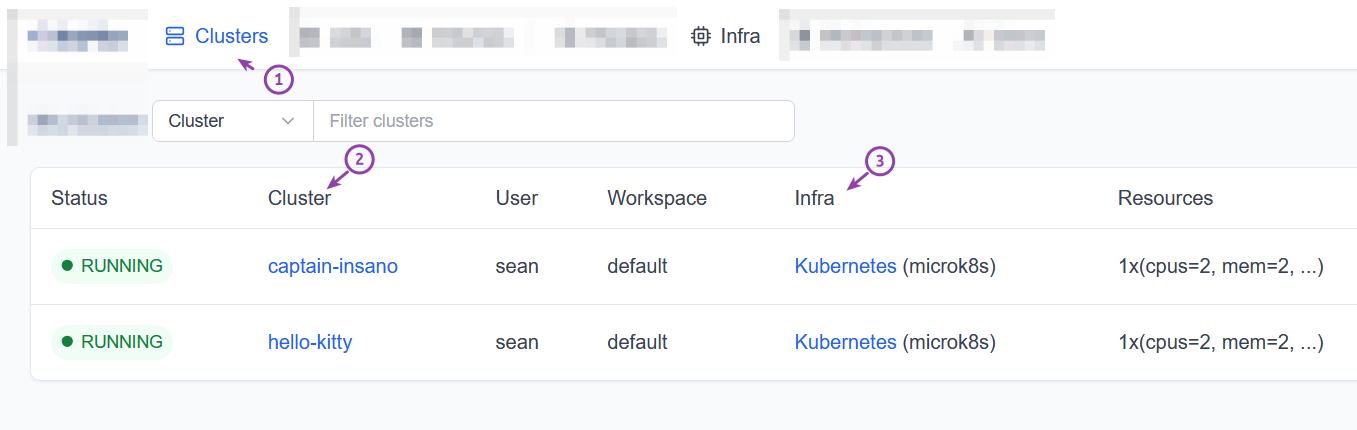
What is not readily obvious from these screenshots - and I'll cover that in a different post - is that one can't just spray compute jobs left and right without access to data. How could sub-clusters hello-kitty and captain-insano running on possibly different Kubernetes clusters access the same data in case a batch job meant to scale-out as is common in deep learning, big data and analytics?
These "infra" clusters don't have to run MicroK8s, of course, but Ubuntu (MicroK8s) makes things easier:
- Ephemeral compute clusters often need multi-host access to the same data (the Hello Kitty problem), but often only for the duration of a job (or batch of jobs). We get this done with BeeGFS CSI and BeeOND and can even run on RAID 0 for the lowest cost and highest performance. This doe
- Databases live longer and mostly use single-host filesystems. This requirement is met by SANtricity CSI, TopoLVM CSI or one of other CSI drivers that work with E-Series. See the amazing Cloud-Native Postgres with E-Series (this was also done on Ubuntu 26.04 LTS) to get the full picture
- Most data is in S3 object stores. We backup databases to S3 and download/upload data/results from/to S3. Smaller object stores will work fine on Versity (tested on Ubuntu, too) or Ceph-on-E-Series. Large S3 environments would be better served by dedicated S3 appliances, of course.

Last December, Kubernetes was a no-go-territory for E-Series. When I drew this diagram in January of 2026, some of it was possible. Today, I know it's all doable with just Ubuntu LTS and open source software for Ubuntu and SANtricity.
Even though I dislike MicroK8s and better "slimmer" Kubernetes distributions exist, I have to admit - the simplicity is undeniable. No new skills, no new OS, just a mildly annoying take on K8s, but that step can be automated and after that's been done it's just ephemeral compute clusters that don't outlive jobs they run, job queues, monitoring and an odd kubectl here and there.
I aim to follow up on this post with a post on Ceph-on-MicroK8s backed by E-Series (to finally complete that last, hands-on step) and another on data sharing for ephemeral Kubernetes clusters (part of the broader "S3 as the single source of truth" topic).