SANtricity CSI adds Block Mode support
SANtricity CSI v1.1.0
As the title says, SANtricity CSI now works with Block Mode PVCs.
It joins IBM Block Driver CSI with SANtricity patches which has enabled this feature (for SANtricity) weeks ago.
SANtricity CSI still can't do snapshots (which IBM Block CSI driver with SANtricity patches can), but Block Mode was easier to do and almost everyone uses application-native replication and protection these days, while for Block Mode there's simply no substitute.
If you have Block Mode, you can do KubeVirt or Ceph on PVCs, and if you don't, you can't.
SANtricity CSI will get snapshots, but who needs them can get them in IBM Block CSI with SANtricity patches today. If I run across a real-life user who needs them on SANtricity CSI and can't use the other one, I may implement snapshots sooner.
Other, minor changes:
- Go client library's Create Volume function is now less opinionated
- Base Go version updated to 1.26.4 as Go had some minor vulnerabilities
RAID 0
One side-story of this release is I used SANtricity CSI with a RAID 0 disk group, which isn't something that's recommended (DDP is the only one recommended), but as the README has always said, classic RAID groups should work if configured since SANtricity CSI just sees a Storage Pool ID and doesn't block you from using any.
It worked as expected so now we know we can use RAID 0 for KV cache volumes:
- 0 overhead (100% usable) for cache
- rapid software-only replacement of failed disks (just create another R0 disk group from remaining disks)
- highest performance
If you can't afford to lose cache data, just pick something else, such as RAID 1.
| Storage Pool type | RAID level for KV cache | Comment |
|---|---|---|
| RAID 1 | RAID 1 only | Requires dedicated group, 100% overhead |
| RAID 0 | RAID 0 only | Requires smaller dedicated group, 0% overhead |
| DDP | RAID 1 | Can share DDP with RAID 6, R1 overhead |
| DDP | RAID 6 | RAID 6 is a terrible choice for fast cache |
This is related to my upcoming solutions and projects related to caching. Outside of Kubernetes you can already use ThinkParQ BeeOND with RAID 0 as well. NetApp has no AI-related caching solution for E-Series yet.
SANtricity CSI v1.1.0 has been uploaded to Github.
Appendix A: Sample files and CLI walk-through with Block Mode
- Kubernetes 1.36
- KubeVirt 1.8.4
- SANtricity 1.1.0
$ ./santricity-cli --endpoint 1.2.3.4 --username monitor --password "blah-blah-blah" get pools --insecure
2026/06/19 15:40:14 Pool: data1
2026/06/19 15:40:14   ID: 040000006D039EA000493A9C00000C2A69BCD05D
2026/06/19 15:40:14   Media: ssd
2026/06/19 15:40:14   PhyType: nvme4k
2026/06/19 15:40:14   RAID: raid1
2026/06/19 15:40:14   Free: 3826797338624
2026/06/19 15:40:14 Pool: kv-cache
2026/06/19 15:40:14   ID: 040000006D039EA000493A9C000010746A216DB5
2026/06/19 15:40:14   Media: ssd
2026/06/19 15:40:14   PhyType: nvme4k
2026/06/19 15:40:14   RAID: raid0
2026/06/19 15:40:14   Free: 7439920054272
I used the kv-cache group in "my-values.yaml".
image:
  repository: docker.io/scaleoutsean/santricity-go
  pullPolicy: Always
  tag: "csi-1.1.0"

controller:
  replicas: 2
  endpoint: "https://1.2.3.4:8443,https://5.6.7.8:8443"      # Management IPs
  dataIPs: "192.168.1.1,192.168.1.2,192.168.2.1,192.168.2.2" # Comma-separated list of iSCSI/NVMe-oF data IPs
  credentials:
    username: "storage"
    password: "blah-blah-blah"
  verifyTLS: false

metrics:
  enabled: false            # I had a conflict with some other app so I just disabled
  port: 8080
  enableNodeMetrics: false  # I had a conflict with some other app so I just disabled
  nodePort: 8081

node:
  enableReaper: false
  kubeletDir: /var/lib/kubelet

storageClasses:
  - name: santricity-nvme-raid0
    isDefault: false
    poolID: "040000006D039EA000493A9C000010746A216DB5" # This was RAID 0 pool, the first time I tested a R0 VG
    reclaimPolicy: Delete
    volumeBindingMode: WaitForFirstConsumer
    allowVolumeExpansion: true
    parameters:
      mediaType: "nvme"
      fsType: "xfs"
      raidLevel: "raid0"  # Not really a choice, since the disk group was RAID 0
      blockSize: "4096"
That resulted in one Storage Class for SANtricity CSI, santricity-nvme-raid0, being immediately available:
$ kubectl get sc
NAME                    PROVISIONER                         RECLAIMPOLICY   VOLUMEBINDINGMODE      ALLOWVOLUMEEXPANSION   AGE
santricity-nvme-raid0   santricity.scaleoutsean.github.io   Delete          WaitForFirstConsumer   true                   40m
The PVC used for the VM (santricity-csi-kubevirt.yaml):
apiVersion: v1
kind: PersistentVolumeClaim
metadata:
  name: demo-santricity-kubevirt
  namespace: vm
spec:
  accessModes:
  - ReadWriteMany
  volumeMode: Block
  resources:
    requests:
      storage: 10Gi
  storageClassName: santricity-nvme-raid0
KubeVirt VM defined in santricity-csi-kubevirt-vm.yaml:
apiVersion: kubevirt.io/v1
kind: VirtualMachine
metadata:
  name: testvm
spec:
  runStrategy: Halted
  template:
    metadata:
      labels:
        kubevirt.io/size: small
        kubevirt.io/domain: testvm
    spec:
      domain:
        devices:
          disks:
            - name: datadisk
              disk:
                bus: virtio
          interfaces:
          interfaces:
          - name: default
            masquerade: {}
        resources:
          requests:
            memory: 64M
      networks:
      - name: default
        pod: {}
      volumes:
        - name: datadisk
          persistentVolumeClaim:
            claimName: demo-santricity-kubevirt
After applying the PVC:
$ kubectl get pvc -n vm
NAME                       STATUS    VOLUME   CAPACITY   ACCESS MODES   STORAGECLASS            VOLUMEATTRIBUTESCLASS   AGE
demo-santricity-kubevirt   Pending                                      santricity-nvme-raid0   <unset>                 26s

$ kubectl describe pvc demo-santricity-kubevirt -n vm
Name:          demo-santricity-kubevirt
Namespace:     vm
StorageClass:  santricity-nvme-raid0
Status:        Pending
Volume:
Labels:        <none>
Annotations:   <none>
Finalizers:    [kubernetes.io/pvc-protection]
Capacity:
Access Modes:
VolumeMode:    Block
Used By:       <none>
Events:
  Type    Reason                Age               From                         Message
  ----    ------                ----              ----                         -------
  Normal  WaitForFirstConsumer  9s (x4 over 44s)  persistentvolume-controller  waiting for first consumer to be created before binding
The PVC isn't doing anything, it needs a consumer. Let's start the VM.
$ kubectl apply -f santricity-csi-kubevirt-vm.yaml -n vm
virtualmachine.kubevirt.io/testvm created

$ kubectl get pvc -n vm
NAME                       STATUS    VOLUME   CAPACITY   ACCESS MODES   STORAGECLASS            VOLUMEATTRIBUTESCLASS   AGE
demo-santricity-kubevirt   Pending                                      santricity-nvme-raid0   <unset>                 76s

$ kubectl get vm -n vm
NAME     AGE   STATUS    READY
testvm   12s   Stopped   False

$ virtctl start testvm -n vm
VM testvm was scheduled to start

$ kubectl get vm -n vm
NAME     AGE   STATUS     READY
testvm   19s   Starting   False

$ kubectl get pvc -n vm
NAME                       STATUS   VOLUME                                     CAPACITY   ACCESS MODES   STORAGECLASS            VOLUMEATTRIBUTESCLASS   AGE
demo-santricity-kubevirt   Bound    pvc-657484c1-395a-43eb-9dd9-fd52e4211215   10Gi       RWX            santricity-nvme-raid0   <unset>                 91s

$ kubectl get vm -n vm
NAME     AGE   STATUS    READY
testvm   33s   Running   True
The VM:
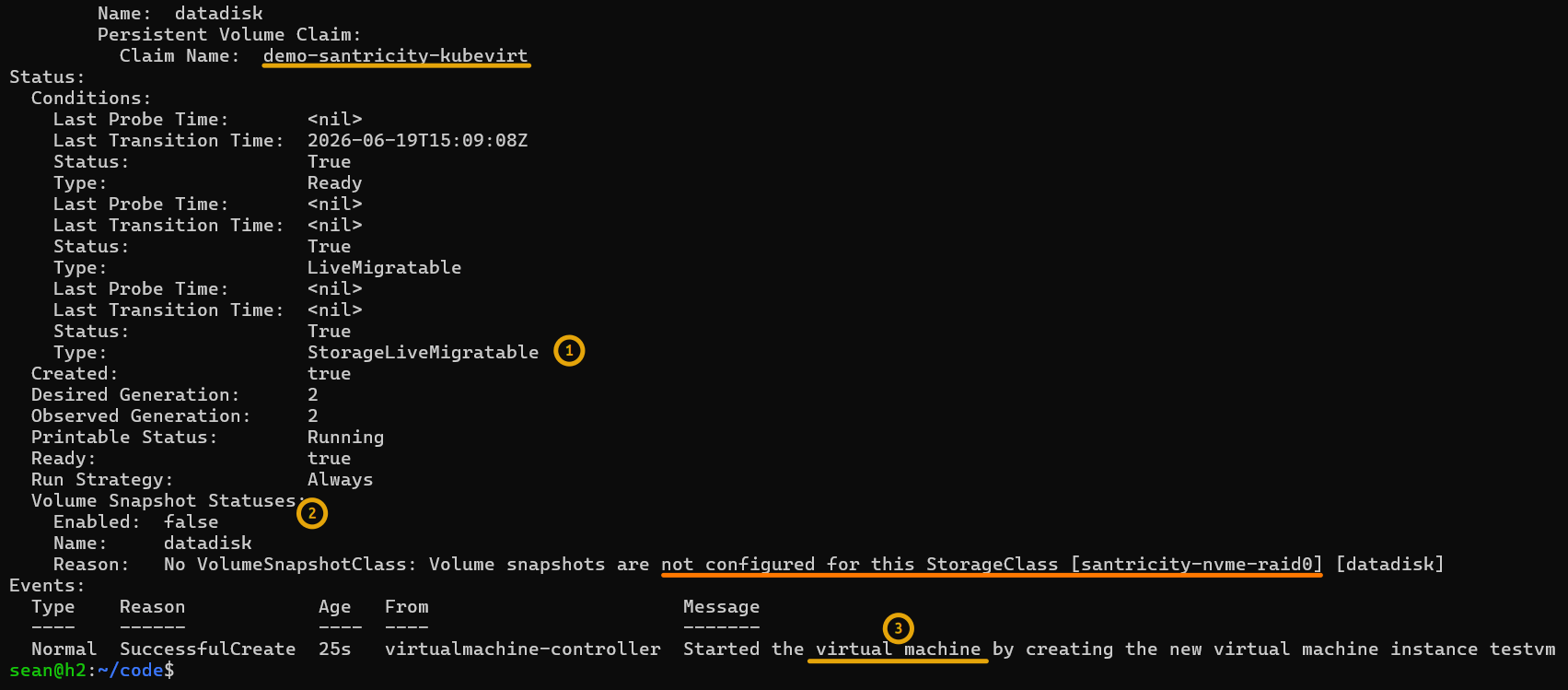
$ kubectl describe vm testvm -n vm
Name:         testvm
Namespace:    vm
Labels:       <none>
Annotations:  kubevirt.io/latest-observed-api-version: v1
              kubevirt.io/storage-observed-api-version: v1
API Version:  kubevirt.io/v1
Kind:         VirtualMachine
Metadata:
  Creation Timestamp:  2026-06-19T15:08:46Z
  Finalizers:
    kubevirt.io/virtualMachineControllerFinalize
  Generation:        2
  Resource Version:  23849373
  UID:               ea73f376-3d54-42c6-8873-2a744ea85f4d
Spec:
  Run Strategy:  Always
  Template:
    Metadata:
      Annotations:
        kubevirt.io/pci-topology-version:  v3
      Labels:
        kubevirt.io/domain:  testvm
        kubevirt.io/size:    small
    Spec:
      Architecture:  amd64
      Domain:
        Devices:
          Disks:
            Disk:
              Bus:  virtio
            Name:   datadisk
          Interfaces:
            Masquerade:
            Name:  default
        Firmware:
          Serial:  c5610c14-02f8-4539-a6fd-0ddceb637002
          Uuid:    99b80559-9a03-4c3d-a91b-4fcae2910b61
        Machine:
          Type:  q35
        Resources:
          Requests:
            Memory:  64M
      Networks:
        Name:  default
        Pod:
      Volumes:
        Name:  datadisk
        Persistent Volume Claim:
          Claim Name:  demo-santricity-kubevirt
Status:
  Conditions:
    Last Probe Time:       <nil>
    Last Transition Time:  2026-06-19T15:09:08Z
    Status:                True
    Type:                  Ready
    Last Probe Time:       <nil>
    Last Transition Time:  <nil>
    Status:                True
    Type:                  LiveMigratable
    Last Probe Time:       <nil>
    Last Transition Time:  <nil>
    Status:                True
    Type:                  StorageLiveMigratable
  Created:                 true
  Desired Generation:      2
  Observed Generation:     2
  Printable Status:        Running
  Ready:                   true
  Run Strategy:            Always
  Volume Snapshot Statuses:
    Enabled:  false
    Name:     datadisk
    Reason:   No VolumeSnapshotClass: Volume snapshots are not configured for this StorageClass [santricity-nvme-raid0] [datadisk]
Events:
  Type    Reason            Age   From                       Message
  ----    ------            ----  ----                       -------
  Normal  SuccessfulCreate  25s   virtualmachine-controller  Started the virtual machine by creating the new virtual machine instance testvm
It says the VM is StorageLiveMigratable.
The reason is ReadWriteMany is enabled. I haven't tested if Live Migration really works. I expect it works.