TopoLVM CSI with NetApp E-Series for modern analytics and AI
Why
NetApp Trident CSI dropped support for E-Series years ago, but demand for Kubernetes with E-Series must have tripled or quadrupled since.
All major applications in the 20s manage own storage on their own and by 2026 everything what's left has become can be managed by orchestrators, especially AI-assisted ones.
Ten years ago, mainstream workloads were traditional DBs and message queues, often in brittle Active-Standby clusters. Applications needed "storage features".
Now, mainstream workloads require just reliable block devices and while even that is debatable, those are certainly preferred. New workloads do not support hardware snapshots, don't require special help in for Active-Standby availability (they're designed for containerized environments), perform own compression, backup/restore, volume expansion, and replication.
What many Kubernetes users still want is:
- CSI support
- Reliable protection (to avoid SLO-impacting replication on every disk failure)
- Good performance
- RAS
So, you get E-Series and in some cases (such as this one) you don't need a NetApp CSI driver. Thanks to Linux and the TopoLVM contributors, we don't need a SANtricity CSI driver.
I've mentioned TopoLVM several times on this blog, but I thought to create one focused post ("Master TopoLVM CSI with E-Series in 2027"?), as was I was reading their Github repository and noticed TopoLVM Helm chart v17.3.1 was refreshed yesterday.
Other CSI options are available. Among the less appreciated ones I like vSphere CSI, but Broadcom made that approach less appealing than it used to be.
How
- Supported Linux distro for the protocol attached to E-Series
- One or more LUNs per each Kubernetes worker
- In SANtricity UI, you won't create "host clusters". You'll create just "hosts". Each host sees own stuff
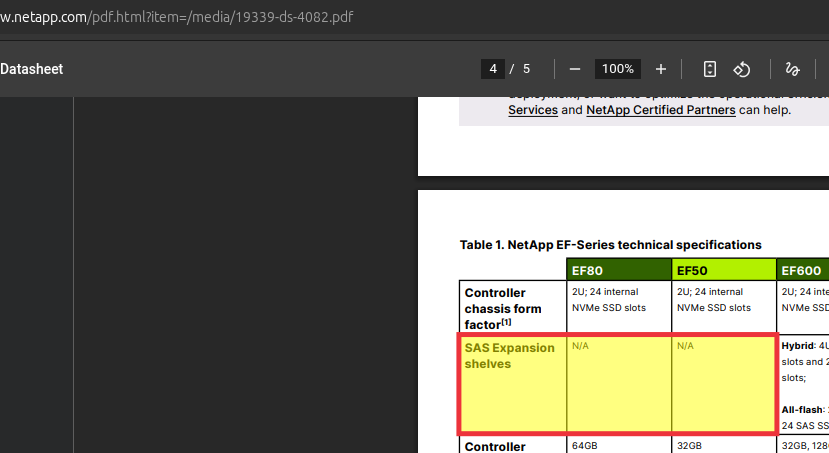
- You can use any protocol supported for your OS/SANtricity - SAS, IB, FC, iSCSI… You need to pick an array with HICs (host interface cards) that support what you want, and you can't mix more than one at the same time. NVMe/ROCE and iSCSI are my personal favorites. The new EF arrays can be hybrid NVMe/HDD (although NetApp hasn't had time to update the datasheet since early September - it's still outdated today as per this screenshot taken minutes ago) and can have five hosts with NVMe/RoCE switchlessly attached to an very fast array which can be a nice storage backend for Kafka, NATS, CNPG, Elasticsearch and more
- Install your distribution's LVM-related packages and Kubernetes
- Prepare at least one VG per CSI-enabled worker
- Head over to the TopoLVM repo
- Deploy TopoLVM with Helm
- Create a storage class and use it
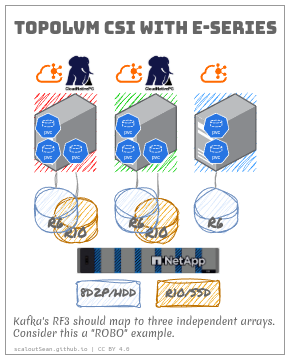
This is mostly very generic, so I'll share my observations related to E-Series.
Assuming you boot from local disk, your first TopoLVM disk will start from /dev/sdb or similar on NVMe. We use vgcreate to "enroll" the volume for TopoLVM. I would keep it simple and if you expect to resize often, perhaps consider DDP-based volumes (but this needs more disks). Otherwise use RAID-based, or see DDP/RAID-related posts on this blog before you decide.
You'll likely have /dev/dm-1 or similar with Device Mapper. NVMe comes with native multipathing. Don't bother with read-only DM on NVMe storage.
My TopoLVM disk is the second one here:
$ sudo vgdisplay
  --- Volume group ---
  VG Name               ubuntu-vg
  System ID
  Format                lvm2
  Metadata Areas        1
  Metadata Sequence No  2
  VG Access             read/write
  VG Status             resizable
  MAX LV                0
  Cur LV                1
  Open LV               1
  Max PV                0
  Cur PV                1
  Act PV                1
  VG Size               <40.00 GiB
  PE Size               4.00 MiB
  Total PE              10239
  Alloc PE / Size       5119 / <20.00 GiB
  Free  PE / Size       5120 / 20.00 GiB
  VG UUID               BGYrJg-tVFK-Gh4z-Thbg-lcSV-HuWq-3rcPEh

  --- Volume group ---
  VG Name               topolvm-vg
  System ID
  Format                lvm2
  Metadata Areas        1
  Metadata Sequence No  1
  VG Access             read/write
  VG Status             resizable
  MAX LV                0
  Cur LV                0
  Open LV               0
  Max PV                0
  Cur PV                1
  Act PV                1
  VG Size               <32.00 GiB
  PE Size               4.00 MiB
  Total PE              8191
  Alloc PE / Size       0 / 0
  Free  PE / Size       8191 / <32.00 GiB
  VG UUID               He7IDX-AMqH-uu43-yaqU-4R0Y-L7wD-Nt9Cq3
Before you can use TopoLVM, you need that VG name. I put mine in topolvm-values.yaml:
controller:
  replicaCount: 1

lvmd:
  deviceClasses:
    - name: ssd
      volume-group: topolvm-vg
      default: true
      spare-gb: 1
You can do this before or after you install, but you can't do anything until that's done.
For example, I create a VG, install TopoLVM with Helm, and wait till it's up to make sure I have no Kubernetes or other issues.
# use MPIO paths on SCSI (DM) and NVMe (ANA)
# sudo vgcreate topolvm-vg /dev/sdb

helm repo add topolvm https://topolvm.github.io/topolvm
helm repo update

helm install --namespace=topolvm-system topolvm topolvm/topolvm
kubectl get pod -n topolvm-system
Now I need to update (or you can provide this when installing) with that topolvm-values.yaml above:
$ helm upgrade topolvm topolvm/topolvm \
  --namespace topolvm-system \
  --version 17.3.1 \
  --values topolvm-values.yaml

$ kubectl get sc
NAME                  PROVISIONER   RECLAIMPOLICY   VOLUMEBINDINGMODE      ALLOWVOLUMEEXPANSION   AGE
topolvm-provisioner   topolvm.io    Delete          WaitForFirstConsumer   true                   2m16s
Take a look at the TopoLVM docs and create a StorageClass with desired options. I created fast-raid10, while the second one came with TopoLVM Helm chart. By "raid10", I mean RAID 10 on E-Series, not on TopoLVM/LVM.
$ cat topolvm-sc.yaml
apiVersion: storage.k8s.io/v1
kind: StorageClass
metadata:
  name: fast-raid10
parameters:
  csi.storage.k8s.io/fstype: xfs
  topolvm.io/device-class: dc01az02h03
provisioner: topolvm.io
reclaimPolicy: Delete
volumeBindingMode: WaitForFirstConsumer

$ kubectl describe sc topolvm-provisioner
Name:                  topolvm-provisioner
IsDefaultClass:        No
Annotations:           meta.helm.sh/release-name=topolvm,meta.helm.sh/release-namespace=topolvm-system
Provisioner:           topolvm.io
Parameters:            csi.storage.k8s.io/fstype=xfs
AllowVolumeExpansion:  True
MountOptions:          <none>
ReclaimPolicy:         Delete
VolumeBindingMode:     WaitForFirstConsumer
Events:                <none>
The TopoLVM docs are good. See this Pod/PVC example to get started with workloads. Just make sure you have the StorageClass named after yours.
Other stuff
I haven't extensively used TopoLVM because LVM is well known, so there isn't much E-Series-specific stuff here.
But, as a storage administrator for Kubernetes, you do need to get into the DAS mindset and not assume you can just move or reassign LUNs around like we can do with Proxmox shared LVM. (If you're a Kubernetes administrator, you're likely already used to dealing with DAS.)
Applications
Because TopoLVM isn't an HA CSI (see the post on other CSI options), it's suitable for situations where CSI-provided HA for PVCs isn't needed. Those are many. Broadly:
- Ephemeral aka trash volumes (including ephemeral volumes in AI/Analytics, e.g. for Ray Framework, Alluxio, etc.)
- Applications with EC or RF larger than 1
- Web server farms or other workloads where HA is solved on front-end and data replicas are cheap (e.g. 4GiB volume for a Web app and its logs)
The second item covers a lot of modern databases. For example, Elasticsearch explicitly calls out TopoLVM.
You usually don't need an HA CSI driver for any of those. You may want it as a way to "save money with deduplication", but almost everyone knows - maybe even your superior, if not application owners - you'd be cutting corners by merging failure domains that application design takes for granted, and relies on for uptime, availability and data consistency.
Velero
Here you can see that, back in 2024, recovery (not backup) situation with Velero was ambiguous and seemed bleak.
Since then, workarounds and features have become available.
volume.kubernetes.io/selected-nodeis stripped on PVC restore, so a restored PVC that uses SC withWaitForFirstConsumercan restore where the pod actually lands. The restore pod decides, so to speakrestorePVC.ignoreDelayBinding: truein the node-agent ConfigMap lets restore proceedloadAffinity(global or perStorageClass) constrains where data-mover pods run. You can schedule them on the host where you're restoring (andStorageClasscan be defined per-host, e.g.gold-{h1,h2,h3})
See Velero issue 9343 where success was reported with loadAffinity and ignoreDelayBinding.
Also see this for Alauda's approach to B&R with Velero & TopoLVM.
So, now backup and restore can both work fine.
- FSB-style backup is always available so Kopia-to-S3 works. By the way, I did this FSB post with IBM Block Driver CSI, which has since received a minor update, and I patched it again but have not published because of lack of meaningful feedback. But with TopoLVM you'd rely on TopoLVM and Thin LVM snapshots - there's nothing E-Series-specific there
- Use
ignoreDelayBinding: trueandloadAffinity - Use
WaitForFirstConsumerstorage classes. Create a parallel immediate-modeStorageClass(or use thebackupPVC/restorePVCstorageClassoverride in the node-agentConfigMap) for Velero's intermediate volumes only (issue 9343). Velero's change-storage-class ConfigMap can also be used if you want the restored workload PVCs to land on a different class - Use application backups - Elasticsearch, Qdrant, Milvus, PostgreSQL (CNPG), Splunk, YugabyteDB and similar multi-node applications all have replication and backup to S3 built-in (or loadable as plugins). Many applications have this as the only supported way (see the Elasticsearch link above), so snapshot-based backup and restore should not be used with them.
Velero v1.19 (I may blog about it when it comes out later this month) "introduces volume data in-place restore, allowing backup data to be restored directly into existing volumes", which can be useful for TopoLVM if the PV is still around. Just make sure your application supports such restores.
Other
Read-ahead below reminds me that there may be some "tuning" options.
$ sudo lvdisplay
  --- Logical volume ---
  LV Path                /dev/ubuntu-vg/ubuntu-lv
  LV Name                ubuntu-lv
  VG Name                ubuntu-vg
  LV UUID                emZb1U-AB3w-40m4-c8R3-lMAa-j1Hp-1gP4G7
  LV Write Access        read/write
  LV Creation host, time ubuntu-server, 2026-11-05 16:46:20 +0000
  LV Status              available
  # open                 1
  LV Size                <20.00 GiB
  Current LE             5119
  Segments               1
  Allocation             inherit
  Read ahead sectors     auto
  - currently set to     256
  Block device           252:0
E-Series LUNs should have read ahead enabled by default, so I'd leave that setting on auto, as I expect them to behave well out of the box.
But you can fiddle with these and other and see what works best for you (that depends not just on workload, but also on SANtricity model, SCSI vs NVMe, disk drive media more). I recommend using defaults unless you know non-defaults are better.
Conclusion
I think TopoLVM is suitable for at least 80% of Kubernetes workloads. Maybe not in your environment, but overall for sure.
I sometimes have "storage experts" telling me how the DAS approach results in "unnecessary" data duplication, but they don't don't know what they don't know. Data duplication (e.g. RF=3) is a feature and the cornerstone of these applications' data integrity and availability (such as CNPG's planned failover in mere seconds demonstrated here).
It's a good and responsibly maintained CSI driver that's been around for years.